
1. Prodotto finitoview
The DALY Smart Active Balance BMS (Battery Management System) is designed to protect and manage Li-ion, LiFePO4, and LTO battery packs. This model supports 4 to 8 series cells (4S-8S) with a voltage range of 12V-24V and a continuous charge/discharge current of 200A. It features an integrated 1A active balancing function and multiple communication interfaces including Bluetooth, RS485, and CAN.

Image 1.1: DALY Smart Active Balance BMS (Model R24TM-200A) and its components.
Caratteristiche principali:
- Cell Compatibility: Supports 4S-8S Li-ion, LiFePO4, and LTO battery packs.
- Valutazione attuale: Corrente di carica e scarica continua da 200 A.
- Bilanciamento attivo: Integrated 1A active balance for cell voltage equalizzazione.
- Monitoraggio intelligente: Built-in Bluetooth for real-time monitoring of cell voltages, temperatures, and other parameters via a mobile application.
- Interfacce di comunicazione: Includes RS485 and CAN for advanced system integration.
- Funzioni di protezione: Overcharge, over-discharge, overcurrent, short circuit, and high-temperature protection.

Image 1.2: Summary of BMS specifications including battery strings, current, balance current, function, battery type, and communication.
2. Configurazione e installazione
Proper installation is critical for the safe and effective operation of the BMS. Ensure all connections are made in the specified order to prevent damage to the BMS or battery pack.
2.1 Elenco di imballaggio
Verificare che tutti i componenti siano presenti prima di iniziare l'installazione:
- Smart Active Balance BMS unit
- P-&-B- cable (Power and Battery Negative cables)
- Screws (2 Pcs)
- Sampling cable (Balance wires)
- B+ cable (Battery Positive cable)
- NTC (Temperature sensor, one standard, two optional)
- Manuale dell'utente (questo documento)
- Scatola di imballaggio
- RS485/CAN port cable (if applicable to your model)

Image 2.1: Illustrated packing list for the DALY BMS.
2.2 Istruzioni per il cablaggio
Follow these steps carefully for correct wiring:
- Connessione di precarica: Connect the pre-charge circuit if your system requires it. This helps to limit inrush current when connecting the main battery.
- Volume di cellatage Sensing Wires: Connect the balance wires (sampling cable) to each cell of the battery pack, starting from the lowest voltage cell (B-) to the highest (B+). Ensure the order is correct.
- Collegamenti di alimentazione principali: Connect the main B- (battery negative) and P- (load/charge negative) cables to the BMS. Then connect the main B+ (battery positive) cable.
- Parallel Battery Pack Configuration: If using multiple battery packs in parallel, ensure each pack has its own BMS and follow the manufacturer's guidelines for parallel connection.

Image 2.2: Pre-charge connection diagram.

Image 2.3: Cell voltage sensing wire connection.

Image 2.4: Main power connection diagram.

Image 2.5: Parallel battery pack connection examplui.
A general wiring diagram is provided below for reference. Always consult the specific diagram included with your product for precise connections.
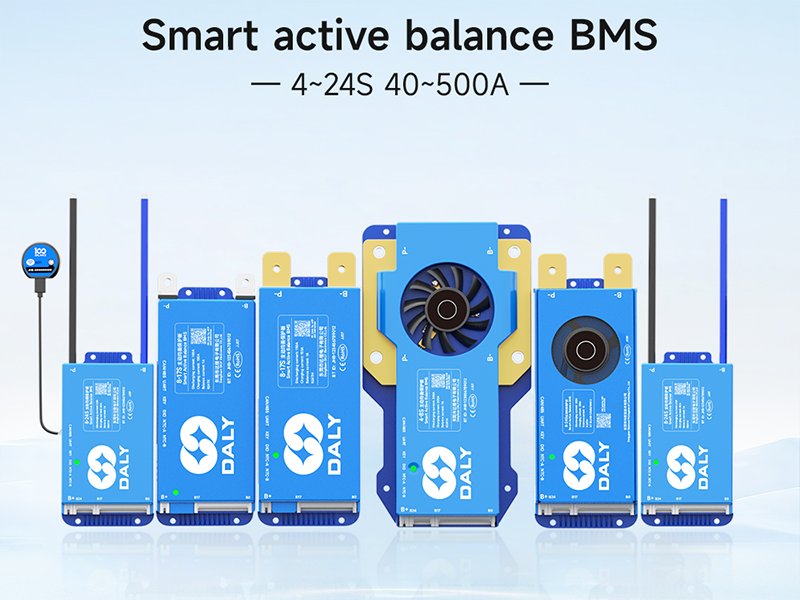
Image 2.6: Comprehensive wiring diagram for the BMS, showing connections for B+, B-, P-, and communication ports.
3. Istruzioni per l'uso
The DALY Smart Active Balance BMS offers intelligent monitoring and control capabilities through its communication interfaces.
3.1 Monitoraggio delle applicazioni mobili
The BMS features built-in Bluetooth for wireless monitoring via a dedicated mobile application. Download the 'BalanceBMS' app from your device's app store (available on iOS and Android).
- Connessione: Once the BMS is powered, open the 'BalanceBMS' app and search for available Bluetooth devices. Select your BMS to connect.
- Monitoraggio: The app displays real-time data including individual cell voltages, volume totale della confezionetage, charge/discharge current, temperature, and State of Charge (SOC).
- Impostazioni: The app allows for adjustment of various BMS parameters, such as over-voltage, sotto-volumetage, and overcurrent thresholds.
3.2 PC Host and Other Communication
For advanced monitoring and configuration, the BMS supports UART, RS485, and CAN communication protocols. These interfaces allow connection to a PC host or other external modules.
- UART: Connect a USB-UART adapter to the BMS UART port for PC communication. Specific software is required for this interface.
- RS485/CAN: These ports enable integration into larger systems, such as industrial controls or vehicle networks. Consult the technical documentation for protocol details.
- Moduli opzionali: The BMS can be extended with optional modules like WiFi for cloud monitoring, GPS, key switches, buzzers, and heating modules.
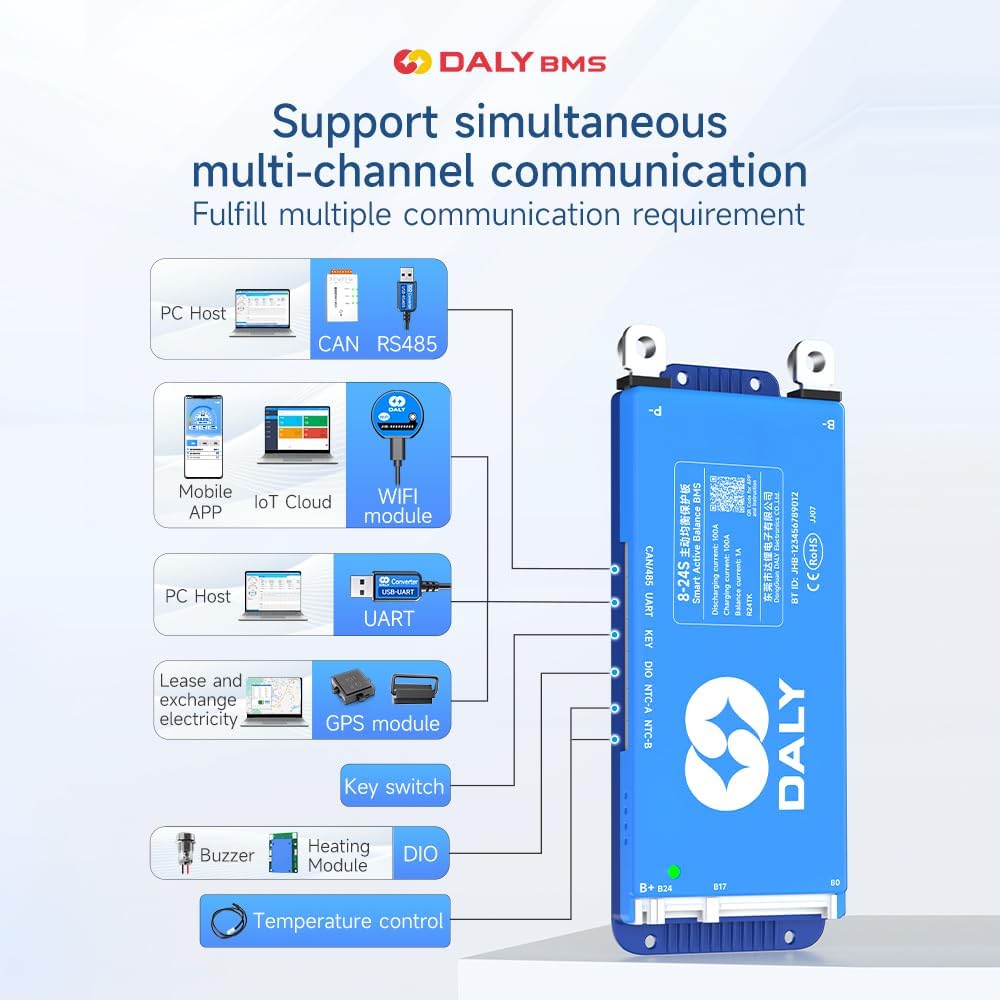
Image 3.1: Multi-channel communication options including PC Host (CAN, RS485, UART), Mobile APP (Bluetooth, WiFi module), GPS module, Key switch, Buzzer, Heating Module, and Temperature control.
4. Manutenzione
The DALY Smart Active Balance BMS is designed for minimal maintenance. Its active balancing feature helps maintain cell health, and its protection functions safeguard the battery.
- Monitoraggio regolare: Periodically check the battery parameters via the mobile app or PC software to ensure all cells are within healthy voltage e intervalli di temperatura.
- Aggiornamenti del firmware: Controllare il produttore websito o app per eventuali aggiornamenti firmware disponibili per garantire prestazioni ottimali e accesso a nuove funzionalità.
- Ispezione fisica: Occasionally inspect the BMS and wiring for any signs of damage, loose connections, or corrosion. Ensure the cooling fan (if present) is free from obstructions.
- Pulizia: Mantenere l'unità BMS pulita e priva di polvere e detriti. Utilizzare un panno asciutto e morbido per la pulizia. Non utilizzare liquidi o detergenti abrasivi.
5. Risoluzione Dei Problemi
Questa sezione affronta i problemi più comuni e le loro possibili soluzioni.
5.1 Problemi generali
- BMS non si accende:
- Verify all main power connections (B-, P-, B+) are secure and correctly wired.
- Controllare il pacco batteria voltage to ensure it is within the operational range (12V-24V for 4S-8S).
- Nessuna connessione Bluetooth:
- Assicurarsi che il BMS sia acceso.
- Verifica che il Bluetooth sia abilitato sul tuo dispositivo mobile.
- Restart the 'BalanceBMS' app and try reconnecting.
- Ensure your device is within close proximity to the BMS.
- Incorrect Readings in App:
- Double-check all cell voltage sensing wires for correct order and secure connections. A multimeter can be used to verify individual cell voltages.
- Ensure the app is configured for the correct number of series cells (S-count).
5.2 Protection Triggers
If the BMS enters a protection state (e.g., no output, no charge), identify the cause:
- Protezione da sovraccarico/scarica eccessiva: The BMS will cut off charging/discharging if cell voltages exceed or fall below set thresholds. Check charger voltage and battery health.
- Protezione da sovracorrente: Occurs if the load draws too much current. Reduce the load or ensure the BMS current rating matches your application.
- Protezione da cortocircuito: The BMS will immediately cut off output in case of a short circuit. Identify and remove the short.
- Protezione dalle alte temperature: If the BMS or battery temperature exceeds safe limits, the BMS will shut down. Ensure adequate ventilation and cooling.
5.3 Compatibility Warning
Avvertimento: Using a BMS with an incompatible battery type or cell count can lead to severe damage to both the battery and the BMS, potentially causing fire or explosion. Always ensure your BMS matches your battery pack's specifications (e.g., Li-ion, LiFePO4, LTO, and S-count).

Image 5.1: Guide for selecting the appropriate BMS based on battery cell type, series count, and ampere requisiti.
6. Specifiche
| Caratteristica | Specificazione |
|---|---|
| Numero di modello | R24TM-200A |
| Tipi di batteria supportati | Li-ion, LiFePO4, LTO |
| Series Cell Count | 4S-8S |
| Ingresso volumetage Gamma | 12V-24V (dependent on S-count) |
| Corrente di carica continua | 200A |
| Corrente di scarica continua | 200A |
| Corrente di equilibrio attivo | 1A |
| Interfacce di comunicazione | Bluetooth, RS485, CAN, UART |
| Dimensioni del prodotto (L x P x A) | 6.97 x 2.6 x 0.83 pollici (177 x 66 x 21 mm) |
| Peso dell'articolo | 9.7 once (275 grammi) |
| Produttore | Dongguan Daly Electronics Co., Ltd |

Immagine 6.1: Passoview of DALY BMS specifications for various current ratings, including the 200A model.
7. Garanzia e supporto
7.1 Informazioni sulla garanzia
This DALY Smart Active Balance BMS comes with an Garanzia di 18 mesi from the date of purchase. The warranty covers defects in materials and workmanship under normal use. It does not cover damage caused by improper installation, misuse, accidents, unauthorized modifications, or natural disasters.
7.2 Assistenza clienti
For technical assistance, troubleshooting, or warranty claims, please contact DALY customer service. Refer to the product packaging or the official DALY websito per le informazioni di contatto più aggiornate.
The 'BalanceBMS' mobile application also provides a channel for support and information regarding your BMS.