
1. Introduzione
The DALY Smart Active Balance BMS is a sophisticated Battery Management System designed to protect and optimize the performance of Li-ion, LiFePO4, and LTO battery packs. This model supports 4 to 8 series cells (4S-8S) with a 400A charge/discharge current and features 1A active balancing. It includes built-in Bluetooth for monitoring and communication interfaces like RS485 and CAN, ensuring comprehensive battery management and data accessibility.
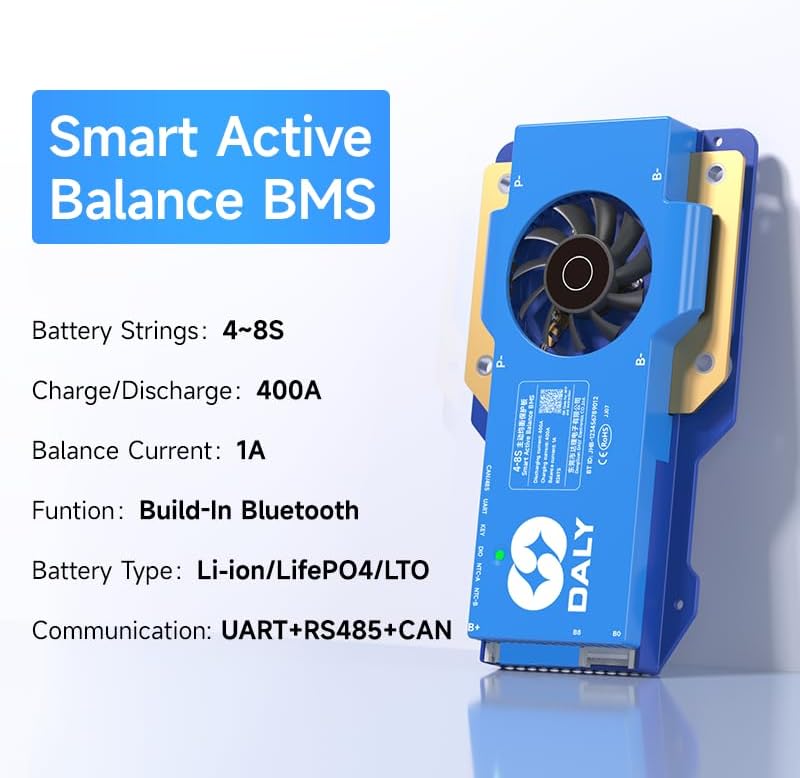
Image 1.1: DALY Smart Active Balance BMS highlighting 4S-8S, 400A, 1A balance, Bluetooth, UART+RS485+CAN.
2. Informazioni sulla sicurezza
Please read and understand all safety instructions before installing or operating the DALY Smart Active Balance BMS. Failure to follow these instructions may result in electric shock, fire, or serious injury.
- Always disconnect power from the battery pack before performing any installation, maintenance, or wiring changes.
- Ensure correct polarity when connecting the BMS to the battery pack. Incorrect wiring can cause severe damage to the BMS and battery.
- Do not short-circuit the battery terminals or the BMS connection points.
- Install the BMS in a well-ventilated area, away from flammable materials and direct sunlight.
- Avoid exposing the BMS to moisture, dust, or extreme temperatures.
- Se non si è sicuri di alcuni passaggi, consultare un professionista qualificato per l'installazione.
- Use appropriate personal protective equipment (PPE) such as insulated gloves and safety glasses during installation.
3. Prodotto finitoview
The DALY Smart Active Balance BMS provides comprehensive protection and management for your battery system. Key features include:
- Cell Compatibility: Supports 4 to 8 series (4S-8S) Li-ion, LiFePO4, and LTO battery types.
- Alta capacità di corrente: Rated for 400A continuous charge and discharge current.
- Bilanciamento attivo: Features 1A active balancing to equalize cell voltages, extending battery life and performance.
- Monitoraggio intelligente: Integrated Bluetooth for real-time monitoring via a mobile application.
- Interfacce di comunicazione: Equipped with UART, RS485, and CAN ports for versatile system integration and data logging.
- Protezioni multiple: Includes overcharge, over-discharge, overcurrent, short circuit, and high-temperature shutdown protections.
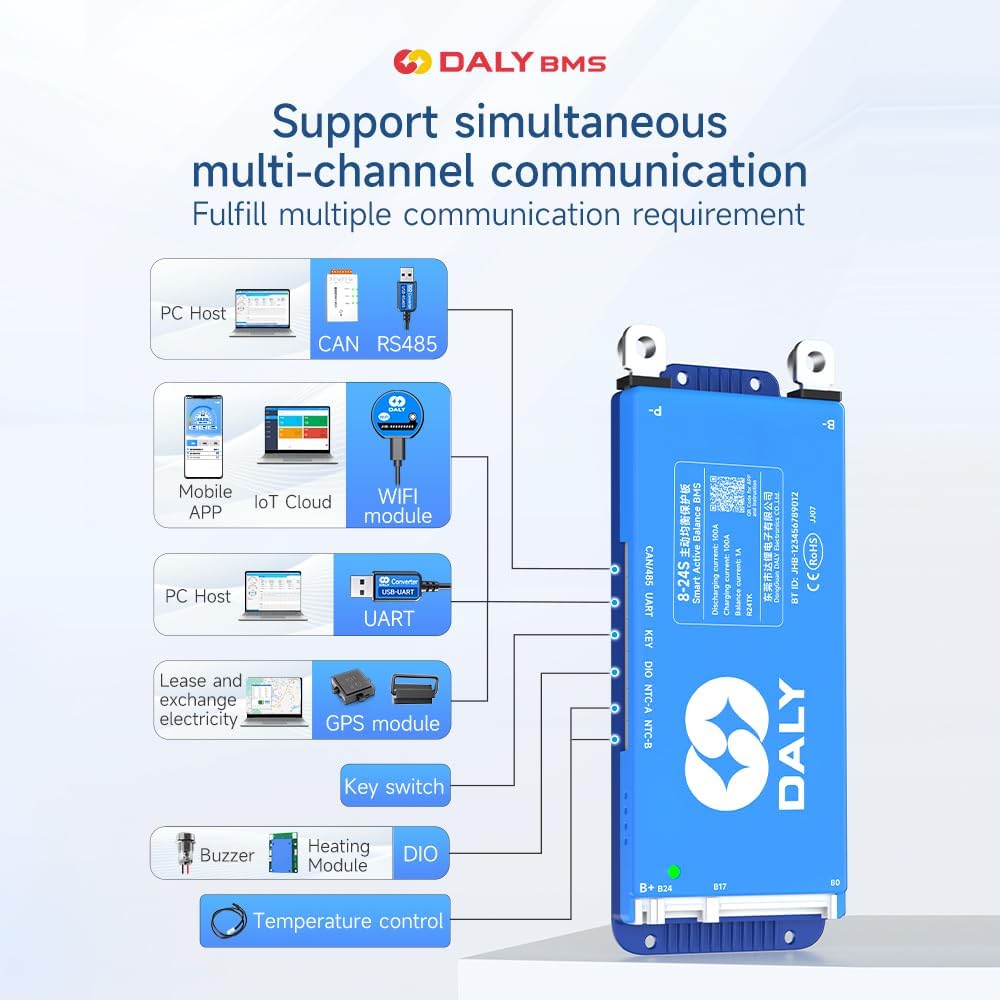
Image 3.1: Diagram illustrating the DALY BMS's support for multi-channel communication including PC Host (CAN, RS485, UART), Mobile APP (Bluetooth, WiFi module), GPS module, Key switch, Buzzer, Heating Module, and DIO for temperature control.
4. Lista di imballaggio
Si prega di verificare che tutti gli articoli elencati di seguito siano inclusi nel pacchetto:
- Smart Active Balance BMS (1 unit)
- P-&B- cable (1 set)
- Screws (2 Pcs)
- Sampling cable (1 set)
- B+ cable (1 unit)
- NTC Temperature Sensor (One standard, two optional)
- Manuale dell'utente (1 copia)
- Packaging box (1 unit)
- RS485/CAN port cable (1 unit)

Image 4.1: Visual representation of the DALY BMS package contents, including the BMS unit, various cables, screws, NTC sensor, and user manual.
5. Configurazione e installazione
Proper installation is crucial for the safe and efficient operation of your BMS. Follow these steps carefully:
5.1 Controlli pre-installazione
- Ensure your battery pack matches the BMS specifications (4S-8S, Li-ion/LiFePO4/LTO).
- Verify all battery cells are balanced and within a healthy voltage range before connecting the BMS.
- Raccogli tutti gli strumenti e i componenti necessari.
5.2 Collegamenti di cablaggio
Importante: Connect the balance wires first, then the main power cables. Disconnect in reverse order.
- Balance Wire Connection: Collegare la sampling cable to each cell's positive terminal, starting from B- (0V) up to B+ (total voltage). Ensure the sequence is correct.
- B- Connection: Connect the main negative terminal of the battery pack to the B- port on the BMS.
- P- Connection: Connect the negative terminal of your load/charger to the P- port on the BMS.
- B+ Connection: Connect the main positive terminal of the battery pack to the B+ port on the BMS.
- Porte di comunicazione: Connect RS485, CAN, or UART cables as required for external communication or monitoring.
- Sensore NTC: Attach the NTC temperature sensor to a central cell or area within the battery pack to monitor temperature.

Image 5.1: Wiring diagram for BMS pre-charge protection, showing connections to the battery pack.

Image 5.2: Illustration of BMS misconnection protection, highlighting correct balance wire connections.

Image 5.3: Diagram showing how to connect multiple BMS units in parallel for increased capacity.

Image 5.4: Comprehensive wiring diagram for all-in protection, including main power and balance connections.
5.3 Installazione dell'app
Download the "BalanceBMS" app from your device's app store (available on iOS and Android) to monitor and configure your BMS via Bluetooth.
6. Istruzioni per l'uso
Once installed, the DALY Smart Active Balance BMS operates automatically to protect your battery. For monitoring and advanced settings, use the mobile application or a PC connection.
6.1 Bluetooth Monitoring (Mobile App)
- Assicurati che il Bluetooth sia abilitato sul tuo smartphone.
- Open the "BalanceBMS" application.
- The app will scan for nearby DALY BMS devices. Select your BMS from the list to connect.
- Una volta connesso, puoi view dati in tempo reale come il volume delle singole celletages, volume totale della batteriatage, charge/discharge current, temperature, and battery state of charge (SOC).
- The app also allows for basic parameter adjustments and viewing of protection status.
6.2 PC Monitoring and Configuration (UART/RS485/CAN)
For detailed configuration and data logging, connect the BMS to a PC using a compatible UART, RS485, or CAN adapter. DALY provides dedicated PC software for these connections, allowing for:
- Advanced parameter settings (e.g., over-voltage, sotto-volumetage thresholds, balancing current).
- Detailed data logging and analysis.
- Aggiornamenti del firmware.
7. Manutenzione
Regular maintenance ensures the longevity and optimal performance of your DALY BMS and battery pack.
- Ispezione visiva: Periodically inspect all wiring and connections for signs of wear, corrosion, or looseness. Ensure all screws are tightened.
- Monitoraggio: Regularly check battery parameters via the "BalanceBMS" app or PC software. Pay attention to cell voltage differences, temperatures, and any active protection alerts.
- Pulizia: Mantenere l'unità BMS pulita e priva di polvere e detriti. Utilizzare un panno asciutto e morbido per la pulizia. Non utilizzare liquidi o detergenti abrasivi.
- Ambiente: Ensure the BMS is operating within its specified temperature range and in a dry environment.
8. Risoluzione Dei Problemi
If you encounter issues with your DALY Smart Active Balance BMS, refer to the following common problems and solutions:
| Problema | Possibile causa | Soluzione |
|---|---|---|
| BMS not powering on / No output | Main power cables incorrectly connected or loose. Battery voltage troppo basso. | Check B- and P- connections. Verify battery voltage is above the under-voltage soglia di protezione. |
| Cells are not balancing | Balance wires incorrectly connected or damaged. Balancing function disabled in settings. | Inspect balance wire connections for correct sequence and integrity. Check BMS settings via app/PC software to ensure active balancing is enabled. |
| Problemi di connessione Bluetooth | Bluetooth disabled on phone. App not installed correctly. BMS too far from device. | Ensure phone Bluetooth is on. Reinstall "BalanceBMS" app. Move closer to the BMS. Restart BMS (if possible) and phone. |
| Overcharge/Over-discharge protection triggered frequently | Volume del caricatoretage too high/low. Load drawing too much current. Battery capacity degradation. | Verify charger voltage and current settings. Reduce load. Check individual cell health. Adjust protection parameters via app/PC software if appropriate for your battery type. |
| BMS gets hot during operation | High current draw. Poor ventilation. Internal fault. | Ensure adequate ventilation around the BMS. Reduce continuous current if possible. If overheating persists at normal loads, contact support. |
If the problem persists after attempting these solutions, please contact DALY customer support for further assistance.
9. Specifiche
Detailed technical specifications for the DALY Smart Active Balance BMS 400A (4S-8S):
| Caratteristica | Specificazione |
|---|---|
| Marca | DALY |
| Numero di modello | R24TS-400A |
| Supporto per serie di batterie | 4S-8S |
| Compatibilità del tipo di batteria | Li-ion, LiFePO4, LTO |
| Corrente di carica/scarica continua | 400A |
| Corrente di equilibrio attivo | 1A |
| Ingresso volumetage Gamma | 12V-24V (Nominal, dependent on cell configuration) |
| Interfacce di comunicazione | Built-in Bluetooth, UART, RS485, CAN |
| Dimensioni articolo (L x P x A) | 7.72 x 4.29 x 1.02 pollici |
| Peso dell'articolo | 660 grammi |
| Produttore | Dongguan Daly Electronics Co., Ltd |

Image 9.1: Table showing various DALY BMS models with their current ratings, sizes, and cable specifications, applicable for 4S-24S configurations.
10. Garanzia e supporto
10.1 Garanzia del produttore
The DALY Smart Active Balance BMS 400A (4S-8S) comes with a Garanzia del produttore di 3 annoLa presente garanzia copre i difetti di materiali e fabbricazione in condizioni di normale utilizzo. Si prega di conservare la prova d'acquisto per eventuali reclami in garanzia.
10.2 Assistenza clienti
For technical assistance, troubleshooting, or warranty inquiries, please refer to the following resources:
- Applicazione mobile: The "BalanceBMS" app often contains helpful guides and FAQs.
- Risorse online: Visit the official DALY websito per la documentazione e il supporto del prodotto.
- Contatta il servizio clienti: For direct support, please reach out to DALY customer service. Contact information can typically be found on the product packaging or the official DALY websito.