
1. Prodotto finitoview
The ETOE Seal Pro A1363 is a 1080P Google TV projector designed for home entertainment. It features a built-in Google TV system, native 1080P resolution with 4K UHD decoding, auto-focus, auto-keystone correction, dual 10W speakers, and dual-band Wi-Fi connectivity. Its fully-sealed optical engine ensures a long, maintenance-free lifespan.
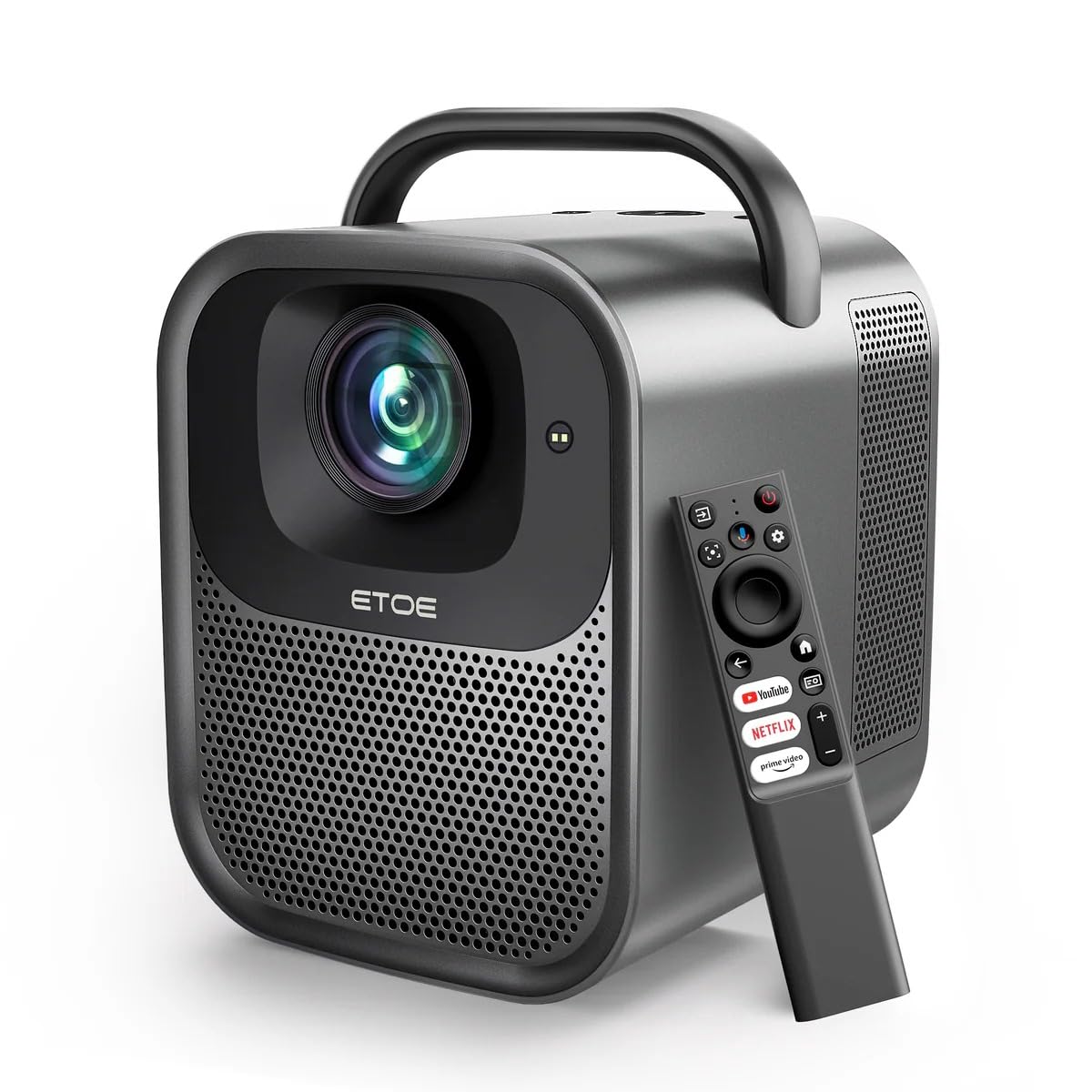
Figura 1.1: ETOE Seal Pro A1363 Projector. This image shows the front and side view of the projector, highlighting its compact design and lens.
Caratteristiche principali:
- Sistema Google TV integrato: Access streaming services like Netflix, YouTube, Prime Video, Disney+, and HBO directly.
- Native 1080P & 4K UHD Decoding: Delivers sharp visuals with 1920x1080 resolution and HDR enhancement.
- Auto-Focus and Keystone Correction: Ensures perfectly square and stable images from various angles.
- Suono coinvolgente: Equipped with powerful 2x10W dual speakers and multiple audio modes.
- Wi-Fi dual-band: Supports 2.4G & 5G for stable wireless projection from Android, iOS, and PC devices.
- Design durevole: Features a dust-proof, fully-sealed optical engine for extended lifespan.
Video del prodotto finitoview:
1.1 video: ETOE Seal Pro Projector Features. This video provides a visual overview of the projector's main features and capabilities, including its Google TV integration, auto-focus, and sound system.
2. Cosa c'è nella scatola
Si prega di controllare il contenuto del pacco una volta disimballato:
- ETOE Seal Pro A1363 Projector
- Adattatore di alimentazione
- Cavo di alimentazione
- Telecomando
- Manuale dell'utente (questo documento)
3. Guida all'installazione
3.1 Posizionamento iniziale
Posizionare il proiettore su una superficie stabile e piana. Assicurarsi che ci sia un'adeguata ventilazione attorno al dispositivo. Per una visione ottimale viewposizionare il proiettore direttamente davanti allo schermo o alla parete.
3.2 Collegamento dell'alimentazione
- Connect the power adaptor to the DC IN port on the projector.
- Plug the power cord into the power adaptor.
- Inserire il cavo di alimentazione in una presa a muro.
3.3 Collegamento di dispositivi esterni
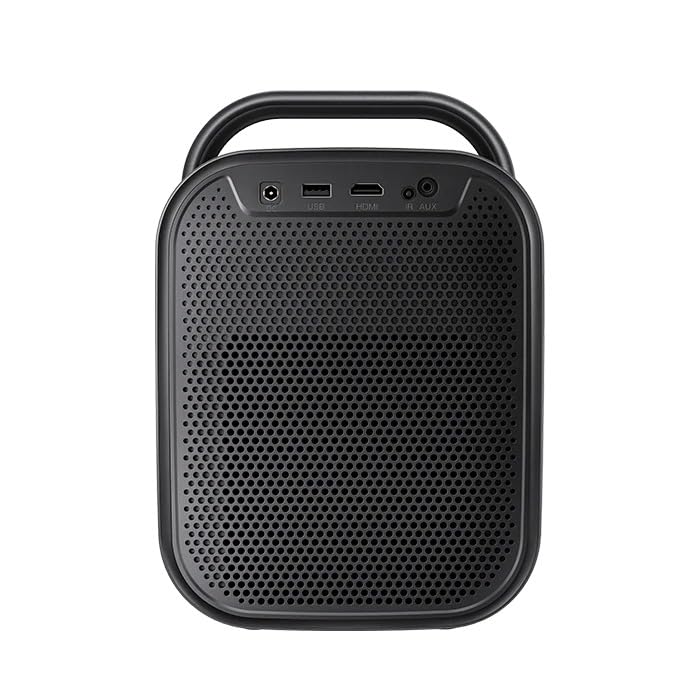
Figura 3.1: Posteriore view of the ETOE Seal Pro A1363 Projector, showing the DC IN, USB, HDMI, and AUX ports.
Il proiettore offre varie opzioni di connettività:
- HDMI: Connect Blu-ray players, gaming consoles, laptops, or other HDMI-enabled devices.
- USB: Collegare unità USB per la riproduzione multimediale.
- AUSILIARI: Collegare dispositivi audio esterni o cuffie.
- Bluetooth: Abbinalo ad altoparlanti o cuffie Bluetooth per un audio wireless.
- Wifi: Connect to your home network for online streaming and wireless projection.
4. Istruzioni per l'uso
4.1 Accensione/spegnimento
- Press the Power button on the projector or the remote control to turn the device on.
- To turn off, press the Power button again and confirm the shutdown prompt on the screen.
4.2 controlli oltreview
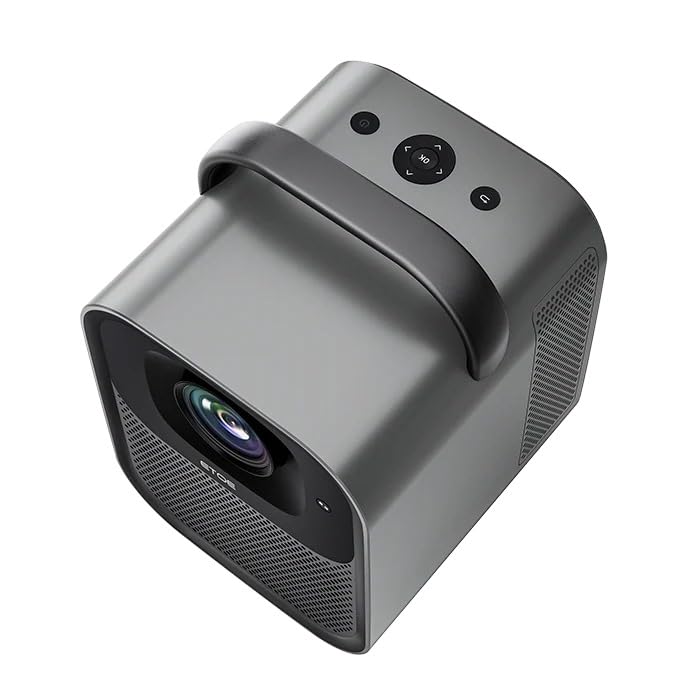
Figura 4.1: Superiore view of the ETOE Seal Pro A1363 Projector, showing the power button, navigation controls, and back button.
The projector can be controlled using the buttons on the top panel or the included remote control.
- Pulsante di accensione: Accende o spegne il proiettore.
- Pulsanti di navigazione (su/giù/sinistra/destra): Utilizzato per navigare nei menu e selezionare le opzioni.
- Pulsante OK: Conferma le selezioni.
- Pulsante Indietro: Ritorna alla schermata o al menu precedente.
4.3 Interfaccia di Google TV
Upon powering on, the projector will display the Google TV home screen. You will need to log in with your Google account to access personalized content and streaming services.
- Segui le istruzioni sullo schermo per connetterti alla tua rete Wi-Fi.
- Accedi con il tuo account Google.
- Install or access your preferred streaming applications (Netflix, YouTube, Prime Video, etc.).
- Use the remote control's navigation buttons and OK button to browse content.
- Utilize Google Assistant for voice commands by pressing the dedicated button on the remote.
4.4 Image Adjustment (Auto-Focus & Keystone)
The ETOE Seal Pro A1363 features automatic focus and keystone correction for a clear and properly shaped image.
- Messa a fuoco automatica: The projector automatically adjusts the image focus when powered on or moved.
- Correzione trapezoidale automatica: The projector automatically corrects distorted images to a rectangular shape, even if placed at an angle.
- Zoom digitale: If further adjustments are needed, navigate to the image settings in the Google TV menu to use the digital zoom feature (50% to 100%) to fine-tune screen size.
5. Manutenzione
Una corretta manutenzione garantisce la longevità e le prestazioni ottimali del proiettore.
5.1 Pulizia del proiettore
- Prima di procedere alla pulizia, assicurarsi che il proiettore sia spento e scollegato.
- Utilizzare un panno morbido e asciutto per pulire la parte esterna del proiettore.
- Per la pulizia delle lenti, utilizzare un panno e una soluzione specifica per la pulizia delle lenti. Evitare materiali abrasivi.
- Non spruzzare liquidi detergenti direttamente sul proiettore.
5.2 Dust-Free Optical Engine
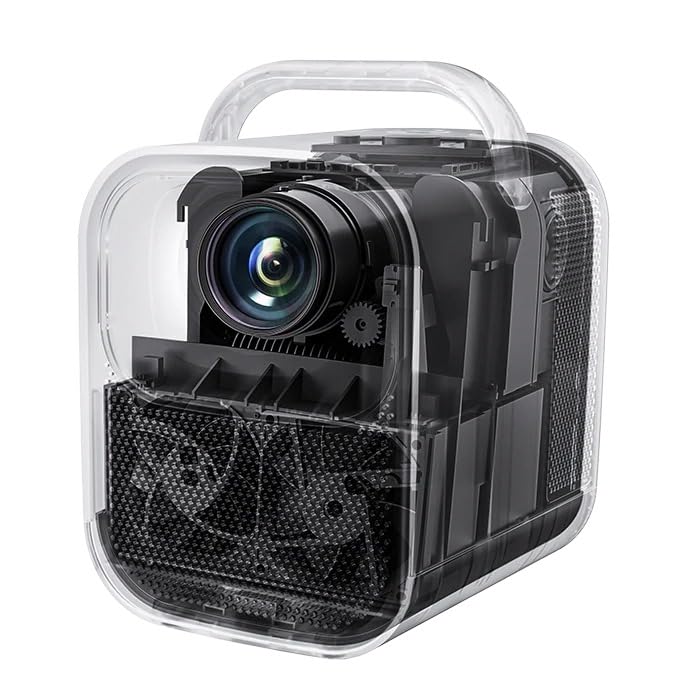
Figura 5.1: Interno view of the ETOE Seal Pro A1363 Projector, highlighting the fully-sealed optical engine designed to prevent dust accumulation.
The ETOE Seal Pro A1363 features a fully-sealed optical engine, which significantly reduces dust accumulation and minimizes the need for internal cleaning. This design contributes to a maintenance-free lifespan of over 30,000 hours.
6. Risoluzione Dei Problemi
Se riscontri problemi con il proiettore, fai riferimento ai seguenti problemi comuni e alle relative soluzioni:
- Nessun potere:
- Ensure the power cord is securely connected to the projector and the wall outlet.
- Verificare che la presa a muro sia funzionante.
- Controlla se l'alimentatore è collegato correttamente.
- Nessuna immagine:
- Check the input source selection. Ensure it matches the connected device (e.g., HDMI).
- Verify the external device is powered on and sending a signal.
- Assicurarsi che il tappo dell'obiettivo sia rimosso.
- Immagine sfocata:
- Il proiettore è dotato di messa a fuoco automatica. Se l'immagine è sfocata, provare a spostare leggermente il proiettore o a riavviarlo per attivare la messa a fuoco automatica.
- Assicurarsi che la superficie di proiezione sia piana e liscia.
- Distorted Image (Not Rectangular):
- Il proiettore è dotato di correzione automatica della distorsione trapezoidale. Se la distorsione persiste, provare a riposizionare il proiettore o a riavviarlo.
- Check for any manual keystone settings in the menu that might override auto-correction.
- Nessun suono:
- Aumentare il volume del proiettore e del dispositivo sorgente collegato.
- Controllare le impostazioni di uscita audio sul dispositivo sorgente.
- Se si utilizzano altoparlanti esterni, assicurarsi che siano correttamente collegati e accesi.
- Problemi di connettività Wi-Fi:
- Assicurati che il proiettore si trovi nel raggio d'azione del router Wi-Fi.
- Verificare che la password Wi-Fi sia stata inserita correttamente.
- Riavvia il router e il proiettore.
7. Specifiche
| Caratteristica | Specificazione |
|---|---|
| Marca | etoe |
| Modello | A1363 |
| Risoluzione nativa | 1920x1080 (1080P) |
| Risoluzione di decodifica | Fino a 4K UHD |
| Luminosità dell'immagine | 1000 ANSI Lumen |
| Rapporto di contrasto dell'immagine | 3000:1 |
| Tecnologia di visualizzazione | LCD |
| Proporzioni | 16:9 |
| Connettività | Dual-Band Wi-Fi (2.4G & 5G), Bluetooth, USB, HDMI, AUX |
| Caratteristiche speciali | Auto Focus, Auto Keystone Correction, Portable, Wireless |
| Altoparlanti | 2 x 10W Dual Speakers |
| Optical Engine Lifespan | 30,000+ ore |
| Dimensioni del prodotto | Dimensioni: 53 x 34 x 59 cm |
| Peso dell'articolo | 3 kg |
| Voltage | 240 Volt |
| Cosatage | 20 Watt |
| Frequenza di aggiornamento | Frequenza 60 Hz |
8. Garanzia e supporto
For warranty information and customer support, please refer to the warranty card included with your product or contact the manufacturer directly.
Produttore: JVDN International
Informazioni sui contatti: JVDN International (OPC) Private Limited, B-1122 Sun Westbank, Ashram Road, Ahmedabad, Gujarat, India, 380009. Contact person: JAYESH KUMAR JAGETIYA. Tel: +91 91361 87951. Email: jayesh@jvdninternational.com
Conservare la prova d'acquisto per eventuali richieste di garanzia.