
ES-KS-TY-012
Qualcomm Car Radio Stereo User Manual
Model: ES-KS-TY-012 | Brand: Generic
Introduzione
This manual provides detailed instructions for the installation, operation, and maintenance of your Qualcomm Car Radio Stereo. Designed specifically for Toyota Corolla models from 2014 to 2016, this advanced head unit features Android 13, a 10.1-inch QLED touch screen, GPS navigation, wireless CarPlay, Android Auto, Bluetooth 5.0, and AM/FM radio. Please read this manual thoroughly before use to ensure optimal performance and safety.
Prodotto finitoview
Caratteristiche principali
- Compatibilità: Specifically designed for Toyota Corolla 2014, 2015, and 2016 models, supporting original car functions like steering wheel controls and sound systems. Features a 360° full viewing angle and adjustable screen brightness for day and night.
- Alte prestazioni: Equipped with Android 13.0, a Qualcomm 3987 Octa-Core CPU, 4GB RAM, and 64GB ROM for powerful performance and fast response times.
- Superior Display: 10.1-inch 1280x720 high-definition QLED display for clear visuals.
- Audio migliorato: Built-in Digital Signal Processor (DSP) for rich, clear sound and customizable audio settings.
- Connettività intelligente: Supports wireless Apple CarPlay, Android Auto, and Mirror Link with Bluetooth 5.0 for seamless smartphone integration, including GPS navigation, hands-free calling, and access to apps via voice control (Siri/Google Assistant).
- Accesso ad Internet: Supports 4G network and Wi-Fi connections for online navigation, video streaming (YouTube, Netflix), and app downloads.
Rappresentazione visiva

Image: The main product unit, showcasing the 10.1-inch QLED display with navigation, radio, and app icons. Also includes a rearview camera and a smartphone demonstrating wireless CarPlay/Android Auto functionality.

Image: A visual summary of the head unit's core features: CarPlay/Android Auto/Mirror Link, Built-in DSP Surround sound, Wifi/4G Online/Offline capabilities, and Bluetooth/GPS/APP support.
Contenuto della confezione
Dopo aver aperto la confezione, verificare che siano presenti tutti i componenti:
- In-dash Head Unit (Qualcomm Car Radio Stereo)
- Cavi del cablaggio
- Decoder CANBUS
- Pannello telaio
- Libretto di istruzioni
- Additional Cables (as required for specific connections)
Installazione
The installation of this head unit requires careful attention to wiring and fitting. It is recommended to consult the included instruction book for detailed, step-by-step guidance or seek professional installation if you are not familiar with car audio system wiring.
Processo di installazione terminatoview
- Assicurarsi che l'alimentazione del veicolo sia spenta e che la batteria sia scollegata.
- Rimuovere con cautela l'autoradio originale e il pannello di rivestimento.
- Connect the provided wiring harness cables and CANBUS decoder to the vehicle's existing wiring and the new head unit.
- Mount the new head unit into the dashboard using the provided frame panel.
- Reconnect the battery and test the unit's functionality.
For specific wiring diagrams and fitting instructions, refer to the "Instruction Book" included in your package.

Image: Demonstrates the visual transformation of the car's dashboard, showing the original setup ("Before Installation") and the integrated Qualcomm Car Radio Stereo ("After Installation").

Image: The head unit seamlessly integrated into the dashboard of a Toyota Corolla (2014-2016 model), displaying the Android 13 interface with various app icons.
Operazione
The Qualcomm Car Radio Stereo operates on an intuitive Android 13 touch screen interface. Navigate through menus, launch applications, and control settings with simple taps and swipes.
Personalizzazione dell'interfaccia utente
The system offers 21 different user interface (UI) sets that can be switched freely to personalize your experience.
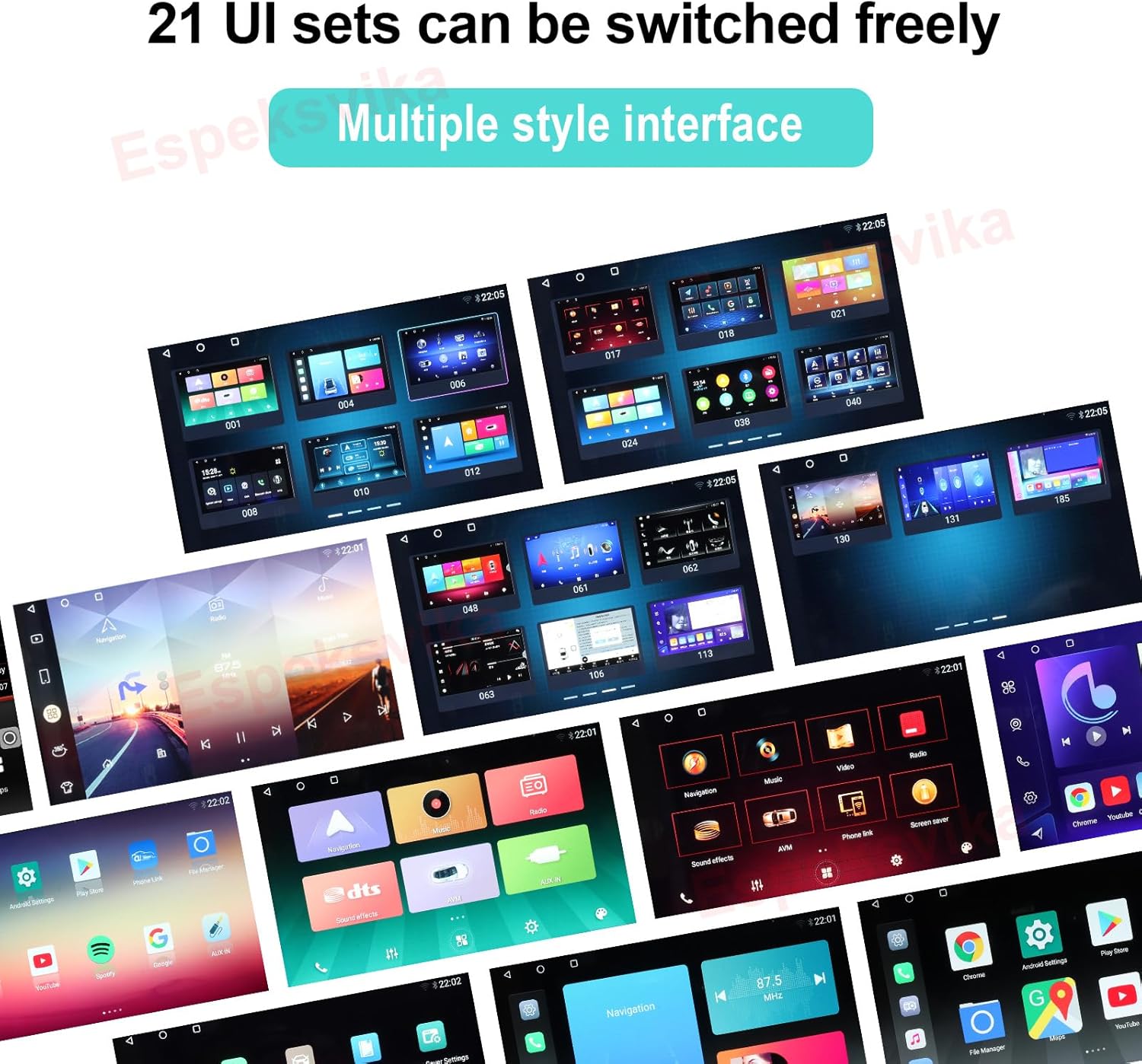
Image: A collage of various user interface designs, demonstrating the 21 customizable UI sets available on the head unit.
Connettività
Wireless CarPlay e Android Auto
Connect your smartphone wirelessly via Bluetooth 5.0 to access Apple CarPlay or Android Auto. This allows for seamless integration of your phone's features, including GPS navigation, hands-free calling, messaging, and music streaming, all controllable via the touch screen or voice commands (Siri/Google Assistant).
Collegamento specchio
Utilize Mirror Link to display your smartphone's screen directly on the head unit, providing access to a wider range of applications.
Rete Wi-Fi e 4G
Connect to Wi-Fi hotspots or insert a 4G SIM card (if supported by your model) to access the internet directly from the head unit. This enables online navigation, streaming services like YouTube and Netflix, and downloading apps from the app store.
Navigazione GPS
The built-in GPS module provides accurate navigation. You can use pre-installed maps or download your preferred navigation applications for both online and offline use.
Caratteristiche audio
Processore di segnale digitale (DSP)
The integrated DSP significantly enhances audio quality, delivering rich and clear sound. Customize your listening experience with various sound settings, including a 16-band equalizer, loudness, delay, and balance controls.

Image: The DTS HiFi audio interface, showing detailed equalizer settings with multiple frequency bands for precise sound customization.
Radio FM
The built-in FM/AM tuner allows you to search for and listen to your favorite radio stations. Enjoy real-time radio broadcasts and save preferred channels for quick access.

Image: The FM Radio interface displayed on the head unit, showing frequency tuning, favorite stations, and a visual representation of audio levels.
Risoluzione dei problemi
If you encounter any issues with your Qualcomm Car Radio Stereo, please refer to the following common troubleshooting tips. For more complex problems, consult the detailed instruction book or contact customer support.
- Nessun potere: Controllare tutti i collegamenti elettrici e i fusibili. Assicurarsi che la batteria del veicolo sia correttamente collegata e carica.
- Nessun suono: Verificare i collegamenti degli altoparlanti. Controllare le impostazioni audio (volume, disattivazione audio, impostazioni DSP). Assicurarsi che sia selezionata la sorgente audio corretta.
- Problemi con il segnale GPS: Assicurarsi che l'antenna GPS sia installata correttamente e abbia una visuale libera view del cielo. Prova a spostare il veicolo in un'area aperta.
- Problemi di connessione Bluetooth: Assicurati che il Bluetooth sia abilitato sia sull'unità principale che sullo smartphone. Elimina le associazioni precedenti e prova a riconnetterti.
- CarPlay/Android Auto non si connette: Verify your phone's operating system is up to date. Ensure the correct USB cable (if wired) or strong wireless connection is established.
- Touchscreen che non risponde: Try restarting the unit. If the issue persists, a factory reset might be necessary (refer to the instruction book for steps).
Specifiche
| Caratteristica | Dettaglio |
|---|---|
| Peso dell'articolo | 4.52 libbre |
| Dimensioni del pacco | 12.99 x 7.9 x 7.6 pollici |
| Numero modello articolo | ES-KS-TY-012 |
| Dimensioni dello schermo | 10.1 pollici |
| Sistema operativo | Androide 13.0 |
| Processore | Qualcomm 3987 Octa-Core CPU |
| Memoria RAM | 4 GB |
| ROM | 64 GB |
| Risoluzione dello schermo | 1280x720 QLED |
| Versione Bluetooth | 5.0 |
| Tecnologia di connettività | Bluetooth, Wi-Fi, USB, 4G Network |
| Caratteristiche speciali | Touchscreen, Bluetooth, Wireless CarPlay, Android Auto, Mirror Link, DSP, GPS Navigation |
| Tipo di servizio del veicolo | Auto (Toyota Corolla 2014-2016) |
Garanzia e supporto
Your Qualcomm Car Radio Stereo comes with a Garanzia di 2 anno dalla data di acquisto, coprendo difetti di fabbricazione e malfunzionamenti in condizioni di normale utilizzo.
For any questions regarding installation, wiring, assembly, operation, or connection errors, please do not hesitate to contact our customer support. Ensure you have your product model number (ES-KS-TY-012) and purchase details ready when contacting support.
Please note: The warranty does not cover damage caused by improper installation, misuse, accidents, or unauthorized modifications.
Ask a question about this manual
Ask about setup, troubleshooting, compatibility, parts, safety, or missing instructions. Manuals+ will review the question and use this page’s manual context to help answer it.