
Introduzione
Thank you for choosing the Care Bears Wireless LED Headphones. These Bluetooth-enabled headphones are designed for a fun and interactive audio experience, featuring light-up ears and earcups, an adjustable headband, and convenient on-ear controls. This manual will guide you through the setup, operation, and maintenance of your new headphones.
Contenuto della confezione
- Care Bears Wireless LED Headphones
- Cavo di ricarica USB
- Manuale d'uso
Prodotto finitoview
Familiarize yourself with the various components of your headphones:

Figura 1: Davanti view of the Care Bears Wireless LED Headphones, showcasing the adjustable headband, soft ear pads, and light-up ear features.
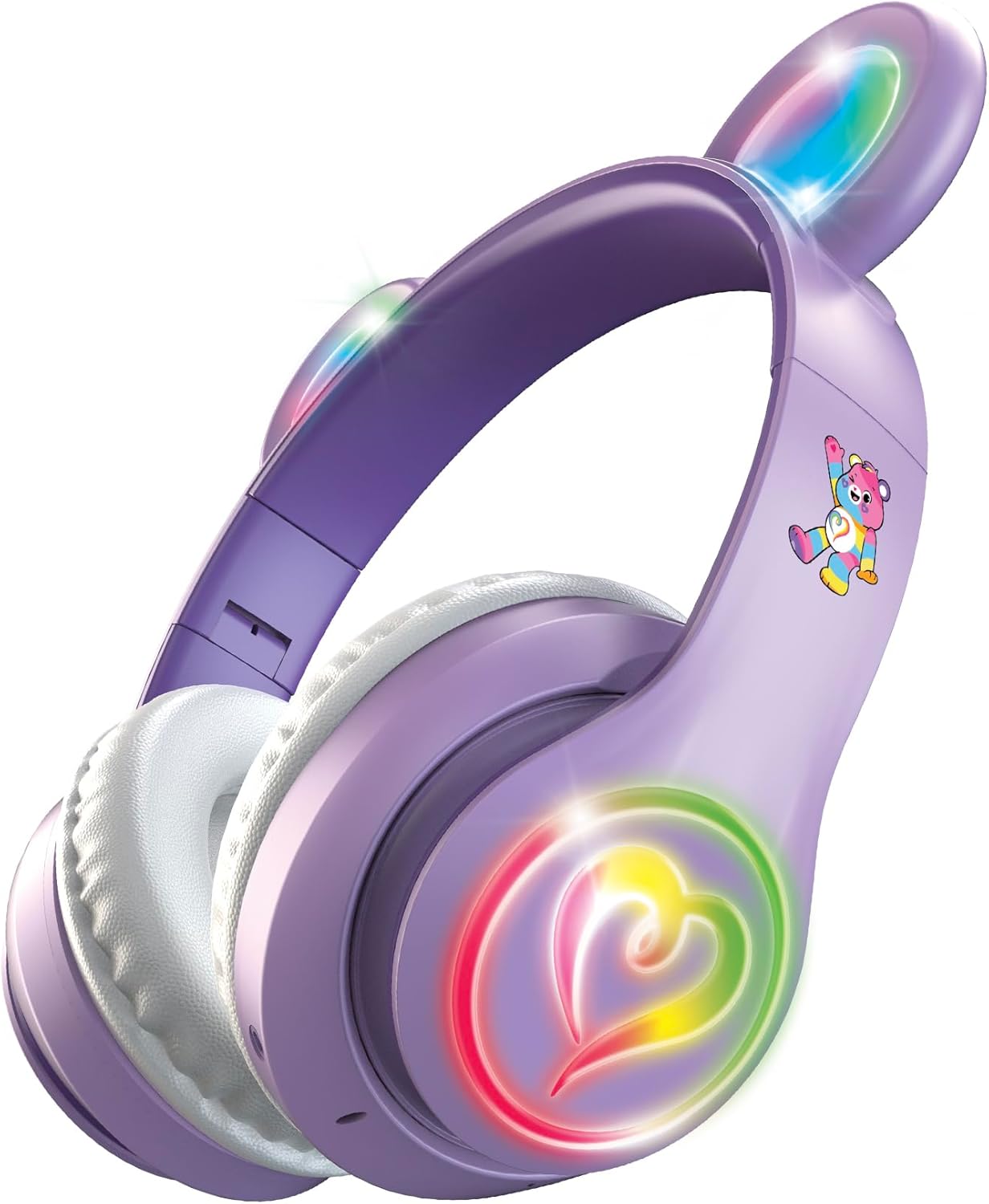
Figura 2: Angolato view of the headphones with the multicolor LED lights activated on both the ears and the heart-shaped design on the earcups.
Caratteristiche principali:
- Fascia regolabile: Per una vestibilità comoda e sicura.
- Cuscinetti auricolari morbidi: Designed for extended listening comfort.
- Light-Up Ears and Earcups: Multicolor LED lights for a vibrant visual effect.
- On-Ear Control Panel: Buttons for power, play/pause, track navigation, and volume.
- Microfono: Integrato per chiamate in vivavoce.
- Porta di ricarica: Micro USB port for recharging the internal battery.
Impostare
1. Carica delle cuffie
- Locate the Micro USB charging port on one of the earcups.
- Connect the provided USB charging cable to the headphones and a compatible USB power source (e.g., computer USB port, USB wall adapter).
- The LED indicator light will illuminate during charging and change color or turn off when fully charged.
- Una carica completa garantisce circa 8 ore di utilizzo continuo.
2. Accoppiamento Bluetooth
- Assicurarsi che le cuffie siano completamente cariche.
- Press and hold the Power button on the earcup until the LED indicator light flashes, indicating pairing mode.
- Sul tuo dispositivo (smartphone, tablet, computer), attiva il Bluetooth e cerca i dispositivi disponibili.
- Select "Care Bears Headphones" (or similar name) from the list of found devices.
- Once paired, the LED indicator light will stop flashing and remain solid, or turn off, depending on the model.
- Una volta accese, le cuffie tenteranno automaticamente di riconnettersi all'ultimo dispositivo associato.
Istruzioni per l'uso
Accensione/spegnimento
- Per accendere: Premere e tenere premuto il pulsante di accensione finché l'indicatore LED non si accende.
- Per spegnere: Tenere premuto il pulsante di accensione finché l'indicatore LED non si spegne.
Riproduzione musicale
- Riproduci/Pausa: Premi una volta il pulsante Riproduci/Pausa.
- Traccia successiva: Press the 'Next Track' button (often marked with a forward arrow or '+').
- Traccia precedente: Press the 'Previous Track' button (often marked with a backward arrow or '-').
- Aumenta volume: Press and hold the 'Volume Up' button (often marked with '+').
- Volume basso: Press and hold the 'Volume Down' button (often marked with '-').
Chiamata a mani libere
- Rispondi/Termina chiamata: Press the Play/Pause button once during an incoming call to answer, and once again to end the call.
- Rifiuta chiamata: Durante una chiamata in arrivo, tenere premuto il pulsante Riproduci/Pausa per circa 2 secondi.
- Ricomponi l'ultimo numero: Double-press the Play/Pause button when not on a call.
Controllo della luce a LED
The headphones feature multicolor LED lights on the ears and earcups. Refer to the specific button on your headphones, often labeled 'Light' or a light bulb icon, to cycle through light modes or turn them off.
Manutenzione
- Pulizia: Per pulire le cuffie, utilizzare un panno morbido e asciutto. Non utilizzare detergenti abrasivi o solventi.
- Magazzinaggio: Conservare le cuffie in un luogo fresco e asciutto, lontano dalla luce solare diretta e da temperature estreme.
- Evitare l'acqua: Queste cuffie non sono impermeabili. Evitare l'esposizione all'acqua o a umidità eccessiva.
Risoluzione dei problemi
- Nessun potere: Assicurarsi che le cuffie siano completamente cariche.
- Impossibile associare: Make sure Bluetooth is enabled on your device and the headphones are in pairing mode. Move closer to your device.
- Nessun suono: Controlla il livello del volume sia delle cuffie che del dispositivo connesso. Assicurati che le cuffie siano correttamente associate.
- Luci non funzionanti: Ensure the headphones are powered on and check if there is a dedicated button to activate the LED lights.
Specifiche
- Numero modello: CBHPLEDGV101-MFN
- Connettività: Bluetooth 4.2
- Posizionamento dell'orecchio: Sopra l'orecchio
- Durata della batteria: Fino a 8 ore (media)
- Gamma di frequenza: 20Hz - 20,000Hz
- Metodo di controllo: Premere il pulsante
- Materiale: Plastic, Fabric, Silicone
- Peso dell'articolo: 0.3 libbre
- Caratteristiche aggiuntive: Light-Up Ears and Earcups with Multicolor LED Lights
Informazioni sulla garanzia
These headphones come with a Garanzia limitata di 30 giorni from the manufacturer. Please retain your proof of purchase for any warranty claims. The warranty covers manufacturing defects but typically does not cover damage caused by misuse, accidents, or unauthorized modifications.
Supporto
For further assistance, troubleshooting, or warranty inquiries, please refer to the contact information provided on the product packaging or visit the official Care Bears product support websito.