
DATOUBOSS DT4811B
Manuale utente dell'inverter solare ibrido DATOUBOSS 11KW
Modello: DT4811B | Marca: DATOUBOSS
1. Introduzione
This manual provides detailed instructions for the installation, operation, and maintenance of the DATOUBOSS 11KW Hybrid Solar Inverter. This advanced inverter is designed to convert 48V DC power from solar panels or batteries into 220/230V AC power for various applications. It features a built-in 150A MPPT solar charge controller and supports both on-grid and off-grid operations, including battery-less mode and parallel connection for increased capacity.
Per garantire un utilizzo sicuro ed efficiente dell'inverter, leggere attentamente il presente manuale prima dell'installazione e dell'uso.
2. Istruzioni di sicurezza
Always adhere to the following safety precautions to prevent injury and damage to the inverter or connected equipment:
- L'installazione deve essere eseguita da personale qualificato in conformità con le normative elettriche locali.
- Prima di effettuare qualsiasi cablaggio o manutenzione, assicurarsi che tutte le fonti di alimentazione siano scollegate.
- Non tentare di smontare o riparare l'inverter da soli. Contattare personale di assistenza qualificato.
- Tenere l'inverter lontano da acqua, umidità e materiali infiammabili.
- Garantire un'adeguata ventilazione intorno all'inverter per evitare il surriscaldamento.
- This inverter is equipped with multiple protection functions including short-circuit, overcurrent, overvoltage, sottovoltage, overtemperature, and overload protection. However, proper system design and installation are crucial.

Immagine: Oltreview of the inverter's comprehensive 360-degree protection features, including short circuit, overcurrent, overvoltage, sottovoltage, overload, over-temperature, and backfill protection.
3. Prodotto finitoview
The DATOUBOSS 11KW Hybrid Solar Inverter is a versatile power solution combining the functions of an inverter, solar charger, and battery charger. It provides uninterruptible power supply and features a pure sine wave output to protect sensitive electronics.
Caratteristiche principali:
- 11KW Pure Sine Wave Hybrid Inverter (48V DC to 230V AC).
- Built-in 2 MPPT, bidirectional MPPT module with a maximum PV open circuit voltage di 500VDC.
- Supporta il funzionamento in parallelo di un massimo di 9 unità per una maggiore capacità di potenza.
- LCD display for real-time system data and operating status.
- Ingresso configurabile voltage range and AC/solar charger priority via LCD settings.
- Supports power statistics and analysis, even without Wi-Fi connection.
- Three priority modes: Grid priority, Solar priority, and Battery priority.
- Multi-function protection: Short-circuit, overcurrent, overvoltage, sottovoltage, sovratemperatura, sovraccarico.
- Integrated parallel lines and current balancing lines for dynamic monitoring.
- Funzione di attivazione della batteria al litio.
- Fuse reverse connection protection.
- Two output ports: one common output and one backup output.
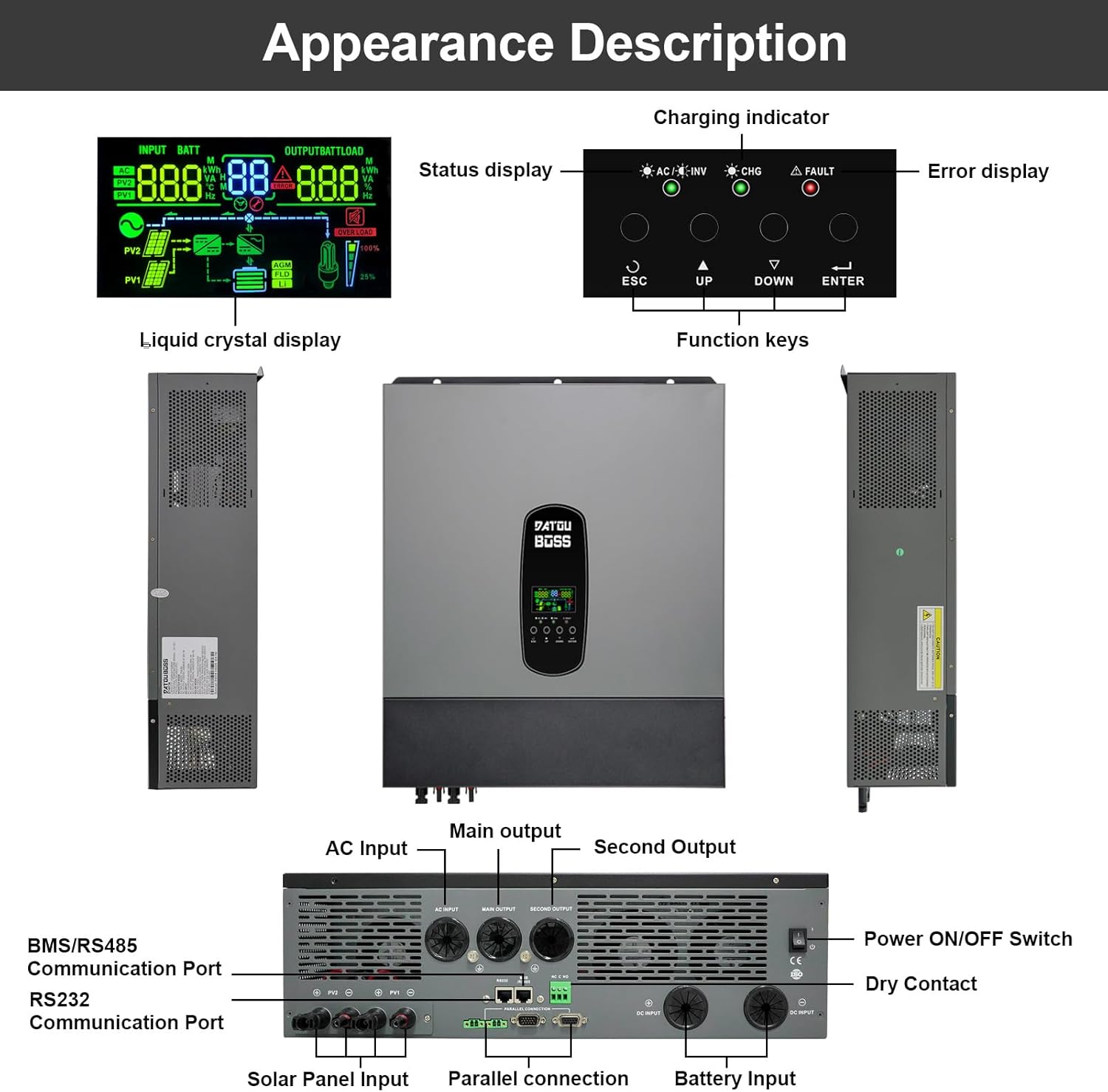
Immagine: anteriore, laterale e posteriore views of the DATOUBOSS 11KW Hybrid Solar Inverter, highlighting the LCD display, function keys, charging indicator, error display, and various connection ports including AC input/output, solar panel input, battery input, parallel connection, BMS/RS485, RS232 communication ports, and power switch.

Image: Detailed labeled diagram of the inverter's ports and controls. Key components include: 1. LCD display, 2. Status display, 3. Charging indicator, 4. Error display, 5. Function keys, 6. AC Input, 7. Main Output, 8. Second Output, 9. BMS/RS485 Communication Port, 10. RS232 Communication Port, 11. Solar Panel Input, 12. Parallel connection, 13. Dry Contact, 14. Battery Input, 15. Power ON/OFF Switch.
4. Impostazione
4.1 Ambiente di installazione
Install the inverter in a clean, dry, and well-ventilated area. Avoid direct sunlight, high temperatures, and excessive humidity. Ensure sufficient clearance around the unit for proper airflow.
4.2 Collegamenti di cablaggio
Refer to the port diagram in Section 3 for connection points. Ensure all connections are secure and correctly polarized. Use appropriate cable gauges for all connections to prevent overheating and power loss.
- Collegamento della batteria: Connect the 48V battery bank to the Battery Input terminals. Observe correct polarity (+ to + and - to -).
- Ingresso pannello solare: Connect your solar array to the Solar Panel Input terminals. Ensure the total open circuit voltage of the PV array does not exceed 500VDC.
- Ingresso/uscita CA: Connect the grid AC power to the AC Input and your loads to the Main Output and Second Output terminals.
- Connessione parallela: For parallel operation (up to 9 units), connect the parallel communication cables and power balancing lines between the inverters.

Image: Diagrams illustrating parallel operation configurations for two and three DATOUBOSS 48V 11KW Hybrid Inverters, showing connections for solar panels, batteries, grid, and load, along with communication connections between units.
4.3 Interfaccia di comunicazione
The inverter features RS232 and BMS/RS485 communication ports.
- Porta RS232: Can be connected to a Wi-Fi module for wireless communication and monitoring of inverter data. Note: The Wi-Fi module provides remote viewing but does not support remote modification of parameters or remote control.
- BMS/RS485 Port: Used for communication with compatible batteries. Ensure correct pin mapping (1 to 485B, 2 to 485A) when connecting to the battery's communication pins.

Immagine: dettagliata view of the RS232 and BMS/RS485 communication ports, with instructions for connecting to a Wi-Fi module and battery BMS, including RJ45 pinout for RS485 communication.
4.4 Battery-less Operation
This inverter supports battery-less operation, allowing it to directly power loads from photovoltaic (PV) modules. In this mode, the inverter converts DC power from PV directly to AC power for homes or other loads. If PV generation is insufficient, the system can draw energy from the grid to ensure continuous power supply.

Image: Explanation of battery-free operation, detailing how the inverter can supply power without connecting batteries, directly converting DC power from PV modules to AC power for loads, and integrating with the grid when PV power is insufficient.

Image: Table outlining the advantages (reduced initial costs, improved system flexibility, reduced battery loss, flexible upgrade) and limitations (no power supply at night, impact of PV generation fluctuations) of battery-less operation, along with applicable scenarios.
5. Operativo
5.1 Display LCD e tasti funzione
The LCD display provides real-time system data, including input/output voltage, battery status, power statistics, and operating mode. Use the function keys (ESC, UP, DOWN, ENTER) to navigate menus and configure settings.

Image: Close-up of the inverter's LCD display, showing various real-time data points such as input voltage (AC, PV1, PV2), battery status, output load, and indicators for AC/Inverter, Charging, and Fault. The display also shows the system's energy flow.
5.2 modalità di ricarica
L'inverter supporta quattro modalità di ricarica:
- Priorità dell'alimentazione di rete: If no mains power is available, the battery is charged using solar energy.
- Priorità solare: La ricarica con energia solare ha la priorità. Se non è disponibile energia solare, la batteria viene caricata tramite la rete elettrica.
- Caricamento misto: L'energia solare e quella di rete possono caricare la batteria contemporaneamente.
- Solo solare: La batteria può essere ricaricata solo tramite energia solare.
5.3 Modalità di funzionamento dell'uscita di carica
The inverter offers three charge output working modes:
- Netz (Utility Priority - Default): The mains current has priority over the load.
- Solare: Solar power has priority, then battery, then grid for power consumption.
- SBU (Solar-Battery-Utility): Solar power has priority, then battery, then utility (grid) in order of priority.

Image: Visual representation of the four charging modes (Priority of Mains Power Supply, Solar Priority, Mixed Loading, Solar Only) and three charge output working modes (Netz/Utility, Solar, SBU), illustrating the power flow and priority settings for each mode.
6. Manutenzione
Una manutenzione regolare garantisce la longevità e le prestazioni ottimali del tuo inverter solare ibrido DATOUBOSS.
- Pulizia: Pulire periodicamente l'esterno dell'inverter con un panno asciutto. Assicurarsi che le aperture di ventilazione siano libere da polvere e detriti.
- Connessioni: Controllare annualmente tutti i collegamenti elettrici per verificarne la tenuta e l'assenza di segni di corrosione. Collegamenti allentati possono causare surriscaldamento e scarse prestazioni.
- Ambiente: Assicurarsi che l'ambiente di installazione rimanga entro gli intervalli di temperatura e umidità specificati.
- Aggiornamenti del firmware: Controllare il produttore websito per eventuali aggiornamenti firmware disponibili per migliorare le prestazioni o risolvere problemi.
- Stato della batteria: If using batteries, monitor their health and charge/discharge cycles regularly to extend their lifespan. The inverter can be configured for regular charging and discharging to prolong battery life.
7. Risoluzione Dei Problemi
In caso di problemi con l'inverter, consultare i seguenti passaggi comuni per la risoluzione dei problemi. Per problemi persistenti, contattare l'assistenza clienti.
| Problema | Possibile causa | Soluzione |
|---|---|---|
| L'inverter non si accende | No DC input from battery/solar; Power switch off; Blown fuse. | Controllare i collegamenti della batteria e il voltage; Ensure solar input is present; Turn on power switch; Check and replace fuses if necessary. |
| Nessuna uscita CA | Overload; Short circuit; Over-temperature; Input voltage fuori portata. | Reduce load; Check for short circuits in wiring; Allow inverter to cool down; Verify input voltage rientra nelle specifiche. |
| Codice di errore sul display LCD | Guasto specifico del sistema. | Refer to the inverter's detailed error code list (not provided in this manual, consult full product manual or manufacturer). |
| Poor charging performance | Insufficient solar input; Battery issues; Incorrect charging settings. | Check solar panel output; Inspect battery health; Adjust charging current/priority settings via LCD. |
8. Specifiche
The following table outlines the key technical specifications for the DATOUBOSS 11KW Hybrid Solar Inverter (Model DT4811B).
| Parametro | Valore |
|---|---|
| Numero di modello | Modello DT4811B |
| Capacità | 11000VA/11000W |
| Intervallo di temperatura di esercizio | -10 a 50 ℃ |
| Grado di protezione | Grado di protezione IP21 |
| Ingresso CC (modalità inverter) | 48 V CC |
| Uscita CA (modalità inverter) | 230 V CA, 50/60 Hz, 47.8 A, 1 Φ |
| Caricatore AC | 54VDC, 150A |
| AC Input (AC Mode) | 230 V CA, 50/60 Hz, 60 A, 1 Φ |
| AC Output (AC Mode) | 230 V CA, 50/60 Hz, 47.8 A, 1 Φ |
| Potenza del pannello solare | 2 x 5500W |
| Corrente di carica massima | 150A |
| Vol. solaretage Intervallo (Vmp) | 300-400 V CC |
| Miglior volumetage Intervallo (Vmp) | 300-400 V CC |
| Vol. solare massimotage | 500 V CC |
| Dimensioni del prodotto | Dimensioni: 70.8 x 57 x 24.1 cm |
| Peso del prodotto | 19.19 chilogrammi |
| Numero di serie | 20241020 0476 |

Image: A close-up of the product label on the DATOUBOSS 11KW Hybrid Solar Inverter, displaying detailed technical specifications such as capacity, operating temperature, protection degree, inverter mode parameters, AC charger details, solar mode parameters, and the serial number.
9. Garanzia e supporto
DATOUBOSS si impegna a garantire la qualità dei prodotti e la soddisfazione del cliente.
- Garanzia: Questo prodotto viene fornito con una garanzia di 5 anni.
- Assistenza clienti: Professional 24-hour customer service is available to assist with any product-related questions or issues.
- Contatto: For support, please refer to the contact information provided with your purchase or visit the official DATOUBOSS websito.

Image: Icons representing key aspects of DATOUBOSS customer support: 10 Years Lifespan (product design target), 5 Years Guarantee (warranty period), 24 Hrs Response (customer service availability), and Local Warehouses (for distribution and service).
Ask a question about this manual
Ask about setup, troubleshooting, compatibility, parts, safety, or missing instructions. Manuals+ will review the question and use this page’s manual context to help answer it.