
Introduzione
This manual provides detailed instructions for the setup, operation, maintenance, and troubleshooting of your IROK ND63PRO Rapid Trigger Magnetic Switch 60% TKL Mechanical Keyboard. Please read this manual thoroughly to ensure proper use and to maximize your keyboard's performance.
Prodotto finitoview
Caratteristiche principali
- Layout compatto a 63 tasti: 60% layout design saves desktop space while retaining essential keys.
- Gaming Grade Magnetic Switches: Equipped with OKT Azure magnetic switches for high trigger accuracy and stable feel.
- Full Customization 200-Segment Keys: Rapid Trigger (RT) function adjustable up to 200 segments, with a trigger track range between 0.02mm-4.0mm and precision as low as 0.02mm.
- Bassa latenza 0.3 ms: Utilizes Lengendspeed technology for ultra-low latency, ideal for gaming.
- Customizable RGB Keyboard: Features full-color RGB lighting with 21 different light effects.
- Interruttori sostituibili a caldo: Allows for easy replacement of magnetic switches without soldering.
- Solid Gasket Construction: Incorporates an aluminum alloy positioning plate for a solid typing feel and crisp sound.
- Web Driver and One-stop HUB Driver: Supports easy parameter adjustment and management without complex installation.
Cosa c'è nella scatola
- IROK ND63PRO Mechanical Keyboard
- Estrattore per tasti
- Cavo USB
- Manuale dell'utente (questo documento)
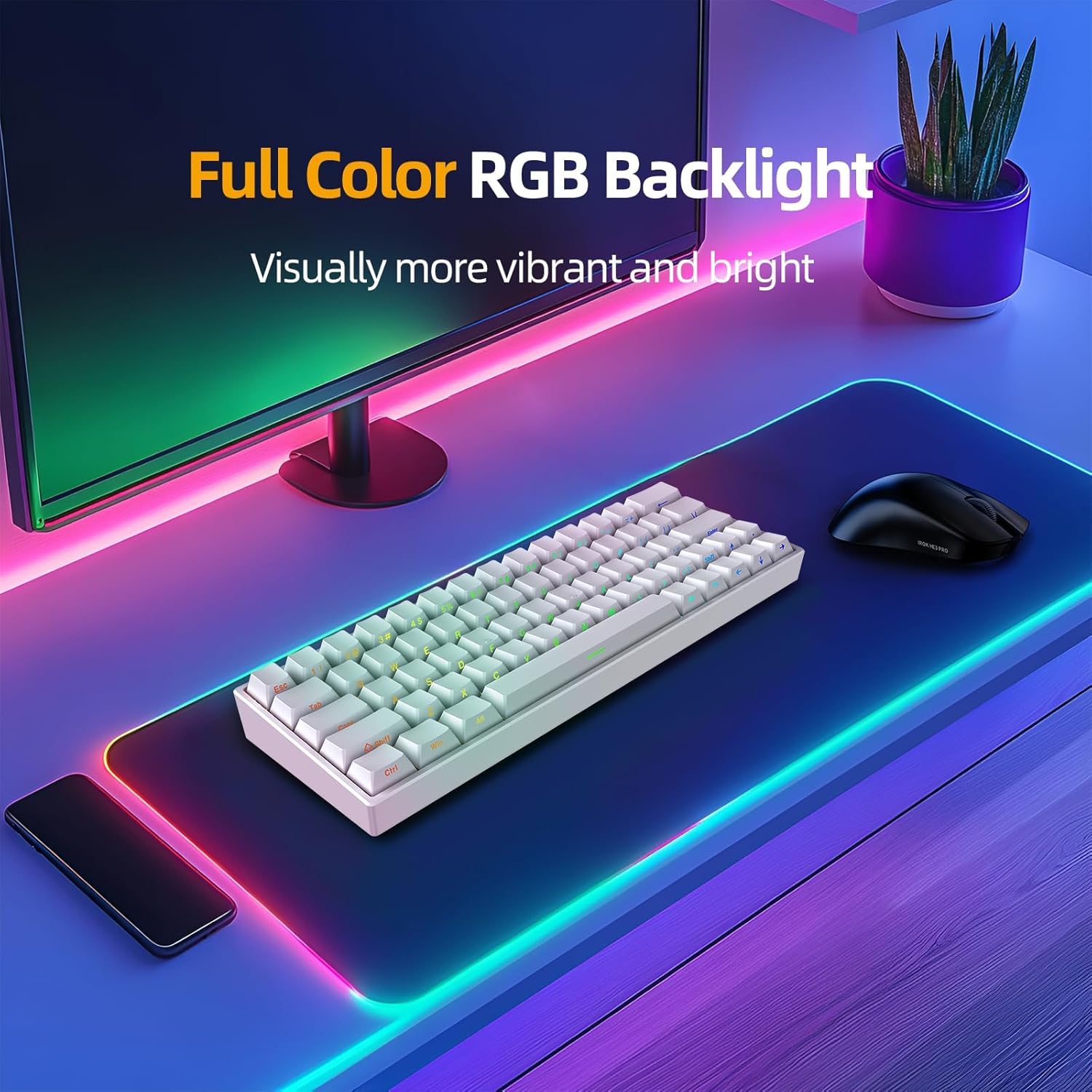
Image: The IROK ND63PRO keyboard displayed on a desk, showcasing its full-color RGB backlight and compact 60% layout.
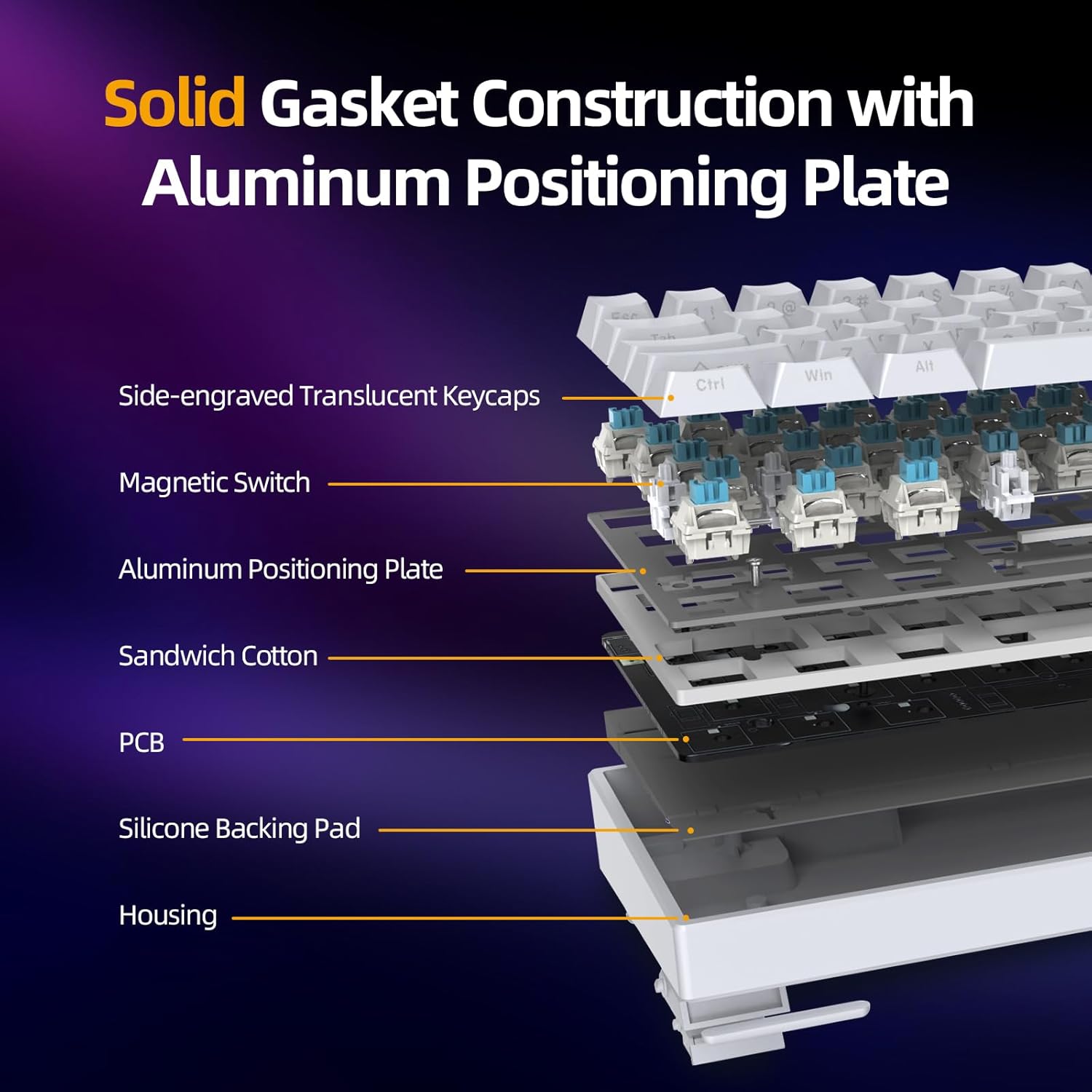
Image: An exploded diagram illustrating the internal components of the keyboard, including side-engraved translucent keycaps, magnetic switches, aluminum positioning plate, sandwich cotton, PCB, silicone backing pad, and housing, highlighting the solid gasket construction.
Istruzioni di installazione
- Disimballare la tastiera: Estrarre con cautela la tastiera e tutti gli accessori dalla confezione.
- Collegare il cavo USB: Connect the provided USB-C cable to the keyboard's USB-C port and the other end to an available USB port on your computer (PC or Mac).
- Accensione iniziale: La tastiera si accenderà automaticamente e l'illuminazione RGB si accenderà.
- Installazione del driver (facoltativa ma consigliata): For full customization and advanced features, download and install the IROK web driver or one-stop HUB driver from the official IROK website. This allows for easier parameter adjustment.
- Posizionamento: Posizionare la tastiera su una superficie piana e stabile.
Istruzioni per l'uso
Rapid Trigger (RT) Function and Actuation
The ND63PRO features magnetic switches with a Rapid Trigger (RT) function, allowing for highly customizable actuation and reset points.
- Adjustable Trigger Range: The trigger track range can be set between 0.02mm and 4.0mm.
- Precisione: Adjustments can be made with a precision as low as 0.02mm, offering 200 segments of customization.
- 0 Deadband Adjustment: The dead zone of the bottom lift can be adjusted from 0, and different dead zones can be set according to different magnetic switch types.

Image: A visual representation of the customizable 200-segment key travel, illustrating the RT adjustment range of 0.02mm-4.0mm and 0 deadband adjustment.

Image: A table detailing recommended settings for deadband, trigger stroke, reset stroke, and sensitivity for both standard magnetic switches and Azure magnetic switches, demonstrating the 0 deadband adjustment capability.
KME Function
The KME function allows for advanced key mapping, similar to SOCD (Simultaneous Opposite Cardinal Directions) and ST (Super Tap) functions found in other gaming devices. This enables precise control and rapid input for competitive gaming.

Image: A graphic demonstrating the KME function, showing how the keyboard registers input from two keys simultaneously, similar to SOCD and ST functionalities.
Low Latency and Polling Rate
The IROK ND63PRO utilizes Lengendspeed technology to achieve a latency of less than 0.3ms. Combined with an 8000Hz polling rate, this ensures extremely fast response times, crucial for gaming.

Image: A visual comparison highlighting the 8000Hz polling rate of the ND63PRO keyboard, indicating it is 8 times faster than regular keyboards with a 1000Hz polling rate, resulting in gaming-grade latency of less than 0.3ms.
Personalizzazione dell'illuminazione RGB
The keyboard features full-color RGB backlighting with 21 different lighting effects. These effects can be switched and customized using the dedicated software.

Image: The IROK ND63PRO keyboard showcasing its full-color RGB backlight, appearing visually vibrant and bright on a desk setup.
Interruttori sostituibili a caldo
The ND63PRO supports hot-swappable magnetic switches. This allows users to easily replace switches without the need for soldering, enabling customization of typing feel and sound.

Image: A detailed diagram of the OKT Azure Magnetic Switch, showing its internal components and specifications such as total stroke, initial pressure, bottom pressure, initial magnetic flux, and bottoming magnetic flux.
Customization Driver
The IROK ND63PRO supports both a web driver and a one-stop HUB driver for comprehensive customization. These drivers provide an intuitive interface for adjusting key functions, lighting effects, actuation points, and other parameters.
Access the driver via the official IROK website for easy operation and management.

Image: A screenshot of the IROK customization driver interface, showing options for magnetic switch settings, lighting, actions, and profiles, with detailed controls for trigger stroke, quick reset sensitivity, and dead zone.
Manutenzione
Una manutenzione regolare aiuta a prolungare la durata e le prestazioni della tastiera.
- Pulizia dei tasti: Utilizzare l'estrattore per tasti in dotazione per rimuovere i tasti. Pulirli con un panno morbido.ampcon acqua e sapone neutro. Assicurarsi che siano completamente asciutti prima di riattaccarli.
- Pulizia del corpo della tastiera: Use a soft, dry, lint-free cloth to wipe down the keyboard body. For stubborn dirt, a slightly damp è possibile utilizzare un panno, ma evitare un'eccessiva umidità.
- Rimozione della polvere: Utilizzare aria compressa per rimuovere polvere e detriti tra i tasti e gli interruttori.
- Evitare i liquidi: Do not spill liquids on the keyboard. If a spill occurs, immediately disconnect the keyboard, dry it thoroughly, and allow it to air dry completely before reconnecting.
Risoluzione dei problemi
- La tastiera non risponde:
- Assicurarsi che il cavo USB sia collegato saldamente sia alla tastiera che al computer.
- Prova a collegare la tastiera a una porta USB diversa del computer.
- Prova la tastiera su un altro computer per determinare se il problema riguarda la tastiera stessa o la porta/i driver del computer.
- Riavvia il computer.
- Illuminazione RGB non funzionante/errata:
- Check the keyboard's software/driver settings to ensure RGB lighting is enabled and configured correctly.
- Prova a reimpostare l'illuminazione della tastierafile alle impostazioni predefinite.
- Assicurarsi che il firmware della tastiera sia aggiornato.
- Tasti non registrati o digitati due volte:
- Assicurarsi che gli interruttori siano correttamente inseriti nelle rispettive prese.
- If using the customization driver, check the actuation point settings for the affected keys. Adjusting the trigger stroke or deadband might resolve the issue.
- Pulire la zona circostante l'interruttore interessato per rimuovere eventuali detriti.
- If a specific switch is faulty, it can be replaced due to the hot-swappable design.
- Customization Driver Issues:
- Ensure you have downloaded the correct and latest version of the driver from the official IROK websito.
- Temporarily disable any antivirus or firewall software that might be interfering with the driver installation or operation.
- Run the driver software as an administrator.
Specifiche
| Caratteristica | Dettaglio |
|---|---|
| Numero di modello | ND63PRO |
| Disposizione | 60% (63 tasti) |
| Tipo di interruttore | Magnetic (OKT Azure Switches) |
| Connettività | Cablato (USB-C) |
| Gamma di attuazione | 0.02mm - 4.0mm (200 segments adjustable) |
| Latenza | Meno di 0.3 ms |
| Tasso di sondaggio | 8000 Hz |
| Retroilluminazione | Full Color RGB (21 effects) |
| Hot-Swap | SÌ |
| Costruzione | Gasket Mount with Aluminum Positioning Plate |
| Dimensioni del prodotto | 11.65"L x 4.21"W x 0.78"H (29.59 x 10.69 x 1.98 cm) |
| Peso dell'articolo | 1.21 libbre (0.55 kg) |
| Dispositivi compatibili | PC |
Garanzia e supporto
For warranty information, please refer to the documentation included with your purchase or visit the official IROK websito.
If you encounter any issues or require technical assistance, please contact IROK customer support through their official channels.
Politica di ritorno: The product typically comes with a 30-day return policy for refunds or replacements. Please check your purchase details for specific terms.