
1. Importanti istruzioni di sicurezza
Si prega di leggere attentamente tutte le istruzioni di sicurezza prima di utilizzare questo prodotto. Conservare queste istruzioni per riferimento futuro.
- Fonte di energia: Utilizzare solo l'adattatore di alimentazione o le batterie specificati. Assicurarsi che il volumetage corrisponde ai requisiti dell'unità.
- Acqua e umidità: Do not expose the unit to rain, moisture, or dripping water. Do not place objects filled with liquids on the unit.
- Ventilazione: Assicurare una ventilazione adeguata. Non ostruire le aperture di ventilazione.
- Calore: Tenere l'unità lontana da fonti di calore quali termosifoni, bocchette di ventilazione, stufe o altri apparecchi che producono calore.
- Pulizia: Pulire solo con un panno asciutto. Non usare detergenti liquidi o spray.
- Manutenzione: Non tentare di riparare questo prodotto da soli. Affidare tutte le operazioni di manutenzione a personale di assistenza qualificato.
- Sicurezza laser: This unit contains a laser component. Do not open the CD compartment while a disc is playing. Avoid direct exposure to the laser beam.
2. Contenuto della confezione
Verificare che tutti gli articoli siano presenti nel pacco:
- G Keni Portable CD and Cassette Player Boombox Combo
- Cavo di alimentazione CA
- Telecomando
- Manuale dell'utente (questo documento)
3. Prodotto finitoview
The G Keni BT-9224MU is a versatile audio system combining a CD player, cassette player/recorder, AM/FM radio, Bluetooth speaker, and USB playback. It features dual 3W speakers for stereo sound and can be powered by AC or batteries for portability.
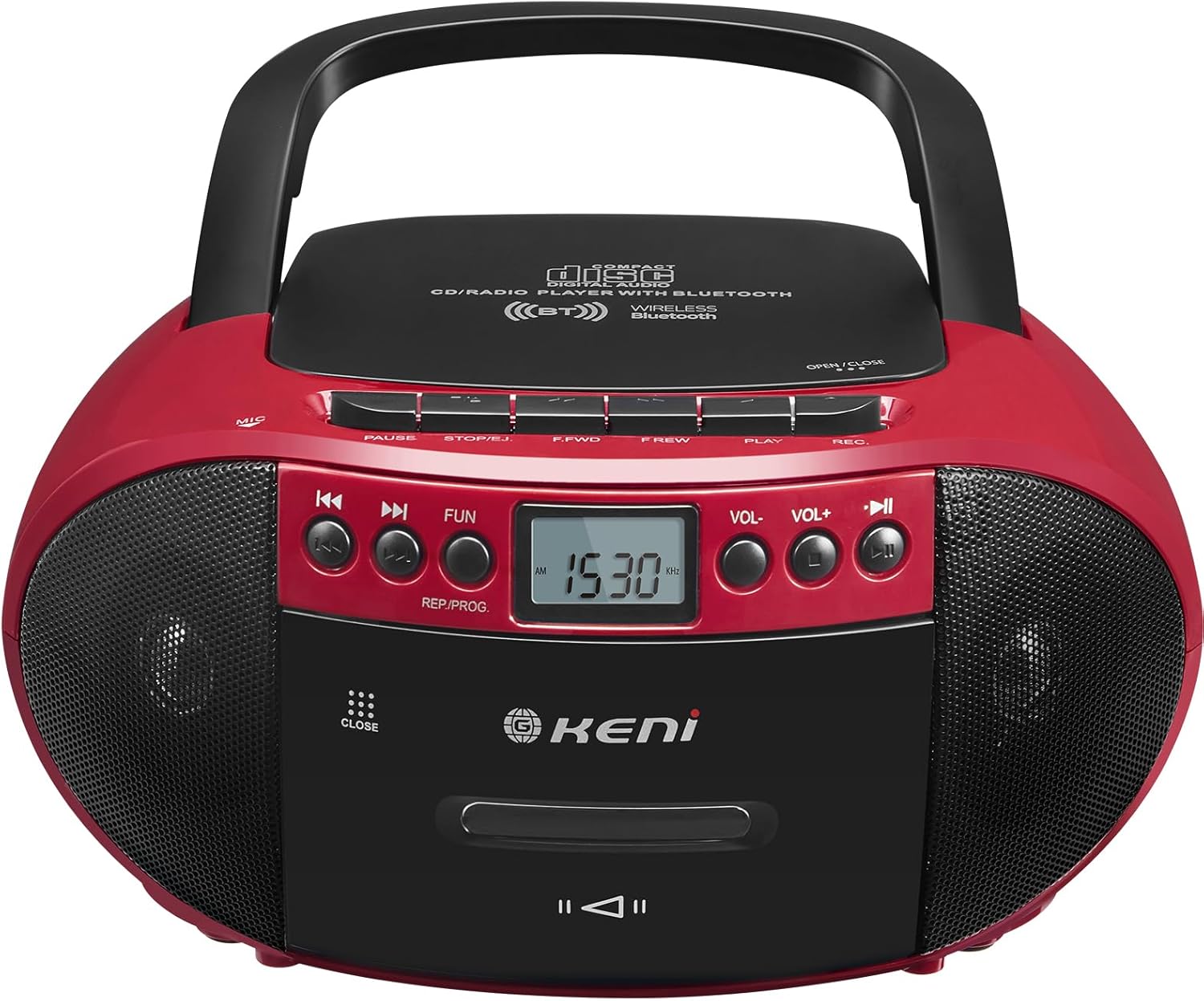
Figura 3.1: Fronte view of the G Keni BT-9224MU Boombox.

Figure 3.2: The boombox highlighting its five playback modes: CD Player, Cassette Player, FM/AM Radio, USB Input, and Bluetooth.
4. Impostazione
4.1 Alimentazione dell'unità
Il boombox può essere alimentato sia tramite corrente alternata che tramite batterie.
4.1.1 Collegamento all'alimentazione CA
- Locate the AC power input jack on the back of the unit.
- Connect the supplied AC power cord to the jack.
- Plug the other end of the AC power cord into a standard wall outlet (100-240V, 50/60Hz).
4.1.2 Installazione della batteria
Per l'uso portatile, l'unità richiede 6 batterie di tipo 'C' (non incluse).
- Aprire il coperchio del vano batterie situato nella parte inferiore dell'unità.
- Inserire 6 batterie di tipo 'C', assicurandosi che la polarità (+/-) sia corretta, come indicato all'interno del vano.
- Chiudere saldamente il coperchio del vano batterie.

Figure 4.1: Illustrations of AC power connection and battery installation.
4.2 Regolazione dell'antenna
For optimal FM radio reception, extend the telescopic antenna. For AM reception, the unit has a built-in ferrite bar antenna, so repositioning the unit may improve reception.
5. Istruzioni per l'uso
5.1 Controlli generali
- Pulsante di accensione: Accende o spegne l'unità.
- Pulsante FUNZIONE/MODALITÀ: Switches between CD/USB/Bluetooth, Cassette, and AM/FM Radio modes.
- Pulsanti VOLUME +/-: Regola il livello di uscita audio.
- Pulsante RIPRODUCI/PAUSA: Starts or pauses playback in CD, USB, or Bluetooth modes.
- Pulsante STOP/EJECT: Stops playback and opens the CD lid or cassette door.
- Pulsanti SALTA/CERCA (◀◀ / ▶▶): Salta le tracce/files o avanza/riavvolge velocemente.
5.2 Funzionamento del lettore CD
The unit supports CD, CD-R, CD-RW, and MP3 discs.
- Importante: Before first use, remove the laser lens protector paper plate from the CD compartment.
- Premere il tasto FUNZIONE/MODALITÀ per selezionare la modalità CD.
- Premere il tasto STOP/ESPULSIONE pulsante per aprire il coperchio del vano CD.
- Posizionare un CD sul perno con l'etichetta rivolta verso l'alto.
- Close the CD compartment lid. The unit will read the disc.
- Premere il tasto RIPRODUCI/PAUSA pulsante per avviare la riproduzione.
- Utilizzo SALTA/CERCA pulsanti per navigare tra le tracce.

Figure 5.1: Inserting a CD into the boombox, with the remote control visible.
5.3 Cassette Player & Recorder Operation
The unit allows playback and recording of standard audio cassettes.
5.3.1 Riproduzione di cassette
- Premere il tasto FUNZIONE/MODALITÀ button to select Cassette mode.
- Premere il tasto STOP/ESPULSIONE pulsante per aprire lo sportello della cassetta.
- Inserire una cassetta con il bordo aperto rivolto verso l'alto.
- Chiudere lo sportello della cassetta.
- Premere il tasto GIOCARE button (usually indicated by a triangle) to start playback.
- Utilizzo FAST FORWARD (F.FWD) E REWIND (F.REW) pulsanti per navigare nel nastro.
- Premere il tasto STOP/ESPULSIONE button to stop playback and open the door.

Figure 5.2: A cassette tape being inserted into the boombox.
5.3.2 Registrazione su cassetta
The unit can record from the radio, CD, or via its built-in microphone.
- Inserire una cassetta vuota nell'apposito vano.
- Select the desired source for recording (CD, Radio, or ensure no other source is playing for voice recording).
- Premere il tasto REGISTRAZIONE (REGISTRAZIONE) button (usually red) to begin recording. The PLAY button will also engage automatically.
- Per interrompere la registrazione, premere il pulsante STOP/ESPULSIONE pulsante.
Funzionamento radio AM/FM 5.4
Enjoy local radio broadcasts with the built-in tuner.
- Premere il tasto FUNZIONE/MODALITÀ pulsante per selezionare la modalità radio AM o FM.
- Extend the telescopic antenna for FM reception. Adjust its position for best signal.
- Utilizzare il ACCORDATURA knob or buttons (if available) to scan for stations. The LCD screen will display the frequency.
- Regolare il VOLUME al livello desiderato.

Figure 5.3: The boombox being used to listen to AM/FM radio outdoors.
5.5 Funzionamento Bluetooth
Connect your Bluetooth-enabled devices to stream audio wirelessly.
- Premere il tasto FUNZIONE/MODALITÀ button to select Bluetooth mode. The unit will enter pairing mode, indicated by a flashing Bluetooth icon or audible prompt.
- Sul tuo dispositivo mobile, attiva il Bluetooth e cerca i dispositivi disponibili.
- Select "G Keni BT-9224MU" (or similar name) from the list to pair.
- Una volta effettuato l'abbinamento, puoi riprodurre l'audio dal tuo dispositivo tramite lo stereo portatile.

Figure 5.4: A smartphone streaming music to the boombox via Bluetooth 5.1.
5.6 Riproduzione USB
Riproduci audio MP3/WMA fileÈ direttamente da un'unità flash USB.
- Inserire un'unità flash USB nella porta USB dell'unità.
- Premere il tasto FUNZIONE/MODALITÀ button to select USB mode. The unit will automatically detect and begin playing compatible audio files.
- Utilizzo RIPRODUCI/PAUSA E SALTA/CERCA pulsanti per controllare la riproduzione.
5.7 Utilizzo del telecomando
The included remote control provides convenient operation for certain functions.
- The remote control can operate functions for CD, Bluetooth, and USB playback.
- It cannot control cassette and radio playback.
- Ensure the remote control has working batteries and is pointed towards the front of the boombox.
5.8 Utilizzo delle cuffie
Connect headphones to the 3.5mm headphone jack for private listening. When headphones are connected, the main speakers will be muted.
6. Manutenzione
6.1 Pulizia dell'unità
- Pulire la parte esterna dell'unità con un panno morbido e asciutto.
- Non utilizzare detergenti abrasivi, cere o solventi poiché potrebbero danneggiare la finitura.
6.2 Cura delle lenti CD
- A dirty CD lens can cause skipping or playback errors. Use a specialized CD lens cleaning kit if necessary.
- Evitare di toccare direttamente la lente.
6.3 Pulizia della testina della cassetta
- Over time, cassette heads can accumulate dust and oxide, affecting sound quality. Use a cassette head cleaning tape or a cotton swab with isopropyl alcohol to gently clean the heads and pinch rollers.
7. Risoluzione Dei Problemi
If you encounter issues with your G Keni BT-9224MU, refer to the following common problems and solutions:
| Problema | Possibile causa | Soluzione |
|---|---|---|
| Nessun potere | Cavo CA non collegato; batterie scariche o inserite in modo errato. | Controllare il collegamento del cavo CA; sostituire le batterie o verificare la corretta polarità. |
| Il CD non viene riprodotto / salta | Disc is dirty or scratched; Laser lens is dirty; Disc inserted incorrectly. | Clean the disc; Clean the laser lens; Re-insert disc with label side up. Ensure laser lens protector was removed. |
| Cassette not playing / Poor sound | Tape is tangled or damaged; Cassette heads are dirty. | Check tape condition; Clean cassette heads and pinch rollers. |
| Scarsa ricezione radio | Antenna non estesa/regolata; segnale debole. | Extend and adjust FM antenna; Reposition the unit for AM reception. |
| Il Bluetooth non si connette | Unit not in Bluetooth mode; Device not in pairing mode; Too far from unit. | Ensure unit is in Bluetooth mode; Put device in pairing mode; Move device closer to the unit. |
| Il telecomando non funziona | Batterie scariche; ostruzione tra il telecomando e l'unità. | Replace remote batteries; Remove any obstructions. Note: Remote does not control cassette or radio. |
8. Specifiche
| Caratteristica | Specificazione |
|---|---|
| Numero di modello | BT-9224MU |
| Fonte di alimentazione | AC 100-240V ~ 50/60Hz / 6 x 'C' size batteries (DC 9V) |
| Potenza di uscita dell'altoparlante | 3 Watt (per altoparlante, totale 6 W) |
| Connettività | Bluetooth 5.1, USB, Auxiliary, AM/FM Radio |
| Tipi di dischi compatibili | CD, CD-R, CD-RW, MP3 |
| Modalità di uscita audio | Stereo |
| Dimensioni del prodotto | 10 x 8.8 x 5 pollici (25.4 x 22.35 x 12.7 cm) |
| Peso dell'articolo | 2.64 libbre (1.2 kg) |
| Materiale | Plastica |
| Componenti inclusi | AC Cord, Remote Control |
9. Garanzia e supporto
9.1 Informazioni sulla garanzia
This G Keni product is covered by a Servizio di garanzia di 12 mesi dalla data di acquisto. La presente garanzia copre i difetti di fabbricazione e di lavorazione in condizioni di normale utilizzo.
9.2 Assistenza clienti
For any questions, technical assistance, or warranty claims, please contact G Keni customer service. We are committed to providing support and ensuring customer satisfaction.
Please refer to the detailed user manual included in your package or visit the official G Keni websito per le informazioni di supporto più aggiornate.