
KEENSTAR ST-265TC
KEENSTAR ST-265TC Touch Screen 2-Slice Toaster
Model: ST-265TC
1. Importanti misure di sicurezza
Quando si utilizzano apparecchi elettrici, è necessario seguire sempre le precauzioni di sicurezza di base, tra cui le seguenti:
- Leggere tutte le istruzioni prima di utilizzare il tostapane.
- Non toccare le superfici calde. Utilizzare maniglie o manopole.
- Per proteggersi dal rischio di scosse elettriche, non immergere il cavo, la spina o il tostapane in acqua o altri liquidi.
- È necessaria un'attenta supervisione quando un elettrodomestico viene utilizzato da bambini o nelle loro vicinanze.
- Scollegare dalla presa quando non in uso e prima di pulire. Lasciare raffreddare prima di mettere o togliere parti.
- Non utilizzare alcun apparecchio con un cavo o una spina danneggiati oppure dopo che l'apparecchio stesso non funziona correttamente o è stato danneggiato in qualsiasi modo.
- Non lasciare che il cavo penda dal bordo del tavolo o del bancone o che tocchi superfici calde.
- Non posizionare sopra o vicino a un fornello a gas o elettrico caldo, oppure in un forno caldo.
- Non utilizzare il tostapane per un uso diverso da quello previsto.
- Non inserire nel tostapane alimenti di grandi dimensioni, confezioni di carta stagnola o utensili, poiché potrebbero comportare il rischio di incendio o scosse elettriche.
- Potrebbe verificarsi un incendio se i tostapane vengono coperti o toccano materiali infiammabili, tra cui tende, drappeggi, pareti e simili, durante il funzionamento.
- Non tentare di staccare il cibo quando il tostapane è collegato alla presa di corrente.
- Questo apparecchio è destinato esclusivamente all'uso domestico.
2. Prodotto finitoview
The KEENSTAR ST-265TC is a modern 2-slice toaster featuring a touch screen interface for precise control over your toasting preferences. It includes wide slots to accommodate various bread types and a removable crumb tray for easy cleaning.
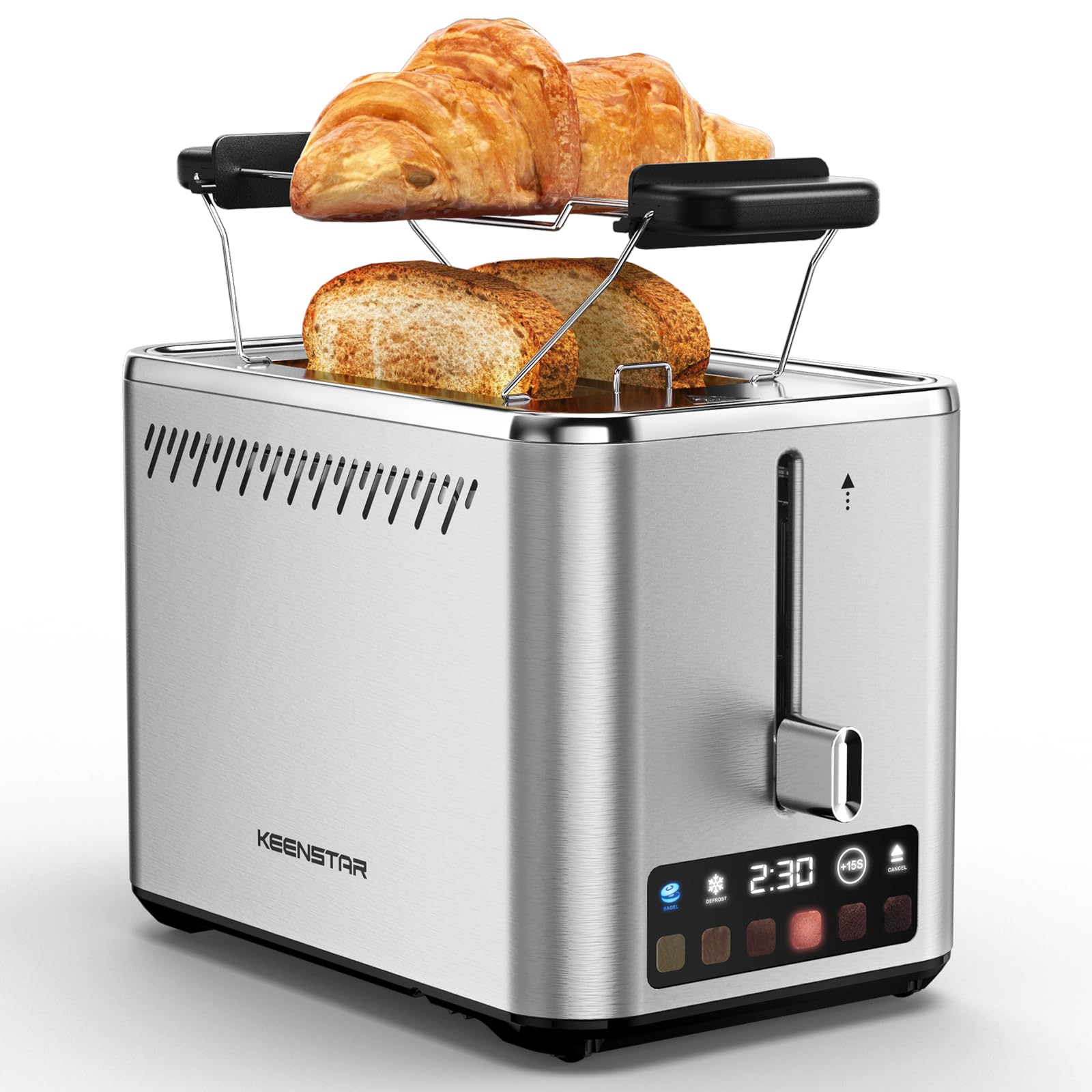
Image: KEENSTAR ST-265TC 2-Slice Toaster in silver stainless steel.
3. Impostazione
Disimballaggio
Carefully remove the toaster and all packaging materials from the box. Ensure all accessories, including the warming rack, are present.
Posizionamento
Posizionare il tostapane su una superficie stabile, piana e resistente al calore, lontano da materiali infiammabili come tende o pareti. Garantire un'adeguata ventilazione attorno all'apparecchio.
Primo utilizzo
Before toasting food for the first time, operate the toaster without bread on the highest browning setting (level 6) to burn off any manufacturing residues. A slight odor or smoke may be present; this is normal and will dissipate.
4. Istruzioni per l'uso
Pannello di controllo Fineview

Image: The toaster's smart touch control display showing 6 browning levels and extra functions like Bagel, Defrost, +15S, and Cancel.
Tostatura di base
- Insert up to two slices of bread into the wide 1.5-inch slots.
- Select your desired browning level (1-6) by touching the corresponding icon on the display. Level 1 is the lightest, and Level 6 is the darkest.
- Press the lever down until it locks into place. The digital display will show a countdown timer.
- The toast will automatically pop up when the cycle is complete.

Image: Visual guide showing the steps for easy toaster operation: 1. Put bread in slots, 2. Select browning level and function, 3. Press the lever down, 4. Enjoy delicious bread.
Funzione Bagel
This function is designed to toast the cut side of bagels while gently warming the outer side.
- Insert bagel halves into the slots with the cut side facing outwards.
- Selezionare il livello di doratura desiderato.
- Tocca il CIAMBELLINE button on the display. It will illuminate.
- Press the lever down until it locks.

Image: The toaster's display showing the illuminated BAGEL mode. BAGEL mode toasts one side only; place the cut side facing outward.
Funzione di scongelamento
Use this function to toast frozen bread without pre-thawing.
- Inserire il pane congelato nelle fessure.
- Selezionare il livello di doratura desiderato.
- Tocca il SCONGELARE button on the display. It will illuminate.
- Press the lever down until it locks.

Image: The toaster's display showing the illuminated DEFROST mode. This mode allows you to cook frozen breads easily without guesswork.
+15S Function
If your toast is not quite browned enough after a cycle, you can add an additional 15 seconds of toasting time.
- After a toasting cycle, if more browning is desired, touch the +15S pulsante.
- The toaster will initiate a 15-second toasting cycle.
Annulla funzione
To stop the toasting cycle at any time, simply touch the CANCELLARE button. The lever will automatically raise, and the heating elements will turn off.

Image: The toaster's display highlighting the +15S button to increase baking time by 15 seconds, and the Cancel button to stop heating.
Rack scaldavivande
The included warming rack can be used to warm pastries, croissants, or other items that cannot be placed directly into the toaster slots.
- Place the warming rack securely on top of the toaster, aligning it over the slots.
- Place the item to be warmed on the rack.
- Start a toasting cycle (without bread in the slots) to generate heat. The heat rising from the toaster will warm the item on the rack.
- Monitor the item closely to prevent over-warming or burning.

Image: The removable warming rack attached to the toaster, with a croissant placed on it for warming.
Video del prodotto
Video: Demonstrates the touchscreen and warming tray features of the KEENSTAR toaster.
Video: Un resoconto dettagliatoview of the KEENSTAR Smart 2-Slice Toaster, highlighting its touch screen and various functions.
Video: Explores the key features and functionalities of the KEENSTAR toaster.
5. Manutenzione e pulizia
Pulizia generale
Always unplug the toaster from the power outlet and allow it to cool completely before cleaning. Wipe the exterior with a soft, damp panno. Non utilizzare detergenti abrasivi o pagliette metalliche, poiché potrebbero graffiare la finitura in acciaio inossidabile.
Vassoio briciole
The removable crumb tray collects crumbs during toasting and should be emptied regularly to prevent fire hazards.
- Assicurarsi che il tostapane sia scollegato e completamente freddo.
- Pull out the crumb tray located at the bottom rear of the toaster.
- Eliminare le briciole e pulire il vassoio con un panno.amp stoffa.
- Slide the crumb tray back into place until it clicks securely.

Image: The toaster's convenient design showing the removable crumb tray being pulled out and the cord storage area on the bottom.
Conservazione del cavo
For neat storage, the power cord can be wrapped around the designated area on the underside of the toaster.
6. Risoluzione Dei Problemi
- Il tostapane non si accende: Ensure the power cord is securely plugged into a working electrical outlet. Make sure the toast lever is fully pressed down.
- Tostatura non uniforme: Ensure bread slices are centered in the slots. Try adjusting the browning level. Different types of bread may require different settings.
- Bread stuck in slots: Unplug the toaster immediately and allow it to cool. Gently remove the bread using non-metallic tongs. Never use metal utensils.
- Fumo proveniente dal tostapane: Unplug the toaster immediately. Remove any food particles or crumbs that may be lodged inside the slots or on the heating elements. Ensure the crumb tray is clean.
7. Specifiche
| Marca | KEENSTAR |
| Modello | ST-265TC |
| Energia | 900 watt |
| Voltage | 120 Volt (CA) |
| Numero di fette | 2 |
| Materiale | Acciaio inossidabile |
| Dimensioni del prodotto (P x L x A) | 10.39" x 7.1" x 6.1" |
| Larghezza della fessura | 1.5 pollici |
| Caratteristiche speciali | Cancel Function, LED Indicator, Removable Crumb Tray, Touchscreen, Warming Rack |

Image: Diagram showing the dimensions of the KEENSTAR ST-265TC toaster: 9.4 inches (24cm) length, 6.1 inches (15.6cm) width, 7 inches (18cm) height, and 1.5 inch (3.8cm) wide slots.
8. Garanzia e supporto
Garanzia
This KEENSTAR toaster comes with a 2-year warranty. Please refer to the warranty card included in the product packaging for detailed terms and conditions.
Assistenza clienti
For any questions, technical assistance, or warranty claims, please contact KEENSTAR customer support. Contact information can typically be found on the warranty card or the official KEENSTAR websito.
Ask a question about this manual
Ask about setup, troubleshooting, compatibility, parts, safety, or missing instructions. Manuals+ will review the question and use this page’s manual context to help answer it.