
Introduzione
Welcome to the user manual for your new Generic M59 Pro Max Smartwatch. This guide provides essential information on setting up, operating, maintaining, and troubleshooting your device. The M59 Pro Max Smartwatch is designed to enhance your daily life with features like advanced activity tracking, call support, smart notifications, and various sport modes.
Contenuto della confezione
Si prega di verificare che tutti i seguenti articoli siano inclusi nel pacchetto:
- M59 Pro Max Smartwatch
- 7 Random Straps (Silicone, Rubber, Nylon)
- Cavo di ricarica wireless
- Manuale d'uso

Image: The M59 Pro Max Smartwatch and its accessories, including a variety of interchangeable straps, neatly arranged in its packaging.
Impostare
1. Ricarica dello smartwatch
Before first use, fully charge your smartwatch. Place the smartwatch on the wireless charging cable. The screen will indicate charging status. A full charge typically takes 2-3 hours.
2. Accensione/spegnimento
- Per accendere: Tieni premuto il pulsante laterale finché lo schermo non si illumina.
- Per spegnere: Tieni premuto il pulsante laterale, quindi seleziona "Spegni" sullo schermo.
3. Installazione e associazione dell'app
To unlock the full potential of your smartwatch, download the companion fitness tracker application on your smartphone or tablet. Refer to the Quick Start Guide for the specific app name or QR code.
- Download and install the app from your device's app store.
- Abilita il Bluetooth sul tuo smartphone.
- Open the app and follow the on-screen instructions to pair your M59 Pro Max Smartwatch. Ensure the smartwatch is powered on and near your phone during pairing.
Istruzioni per l'uso
Navigazione di base
The M59 Pro Max features a 2-inch HD touchscreen display for intuitive interaction. Swipe left, right, up, or down to navigate through menus and access different functions. Tap to select items.
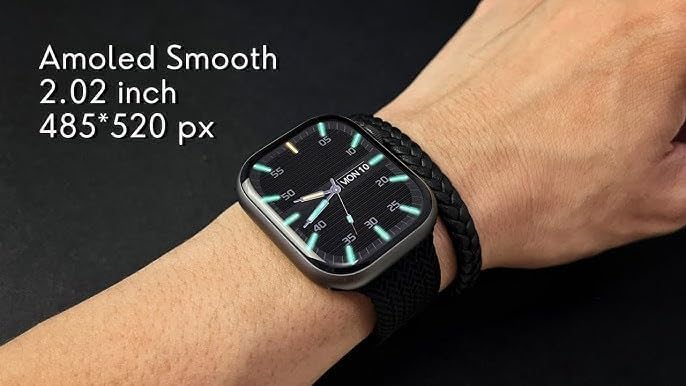
Image: The M59 Pro Max Smartwatch worn on a wrist, showcasing its vibrant 2.02-inch AMOLED display with a resolution of 485x520 pixels.
Chiamate e notifiche
Once paired via Bluetooth, you can manage calls and receive notifications directly on your smartwatch.
- Effettuare le chiamate: Use the dialer on the watch or access your phone's contacts through the watch interface.
- Ricevere chiamate: Rispondi o rifiuta le chiamate in arrivo direttamente dal tuo polso.
- Notifiche: View messages, app alerts, and other notifications.
Fitness Tracking and Sport Modes
The smartwatch offers comprehensive fitness tracking and multiple sport modes.
- Monitoraggio delle attività: Monitora i passi, la distanza e le calorie bruciate.
- Cardiofrequenzimetro: Fornisce dati sulla frequenza cardiaca in tempo reale.
- Monitoraggio del sonno: Analyzes sleep patterns and duration.
- Modalità sportive: Select from various activities like running, cycling, and more to track specific workout data.
NFC and GPT Features
The M59 Pro Max supports NFC for convenient transactions and GPT for enhanced interaction. Refer to the companion app for specific setup and usage instructions for these advanced features.
Manutenzione
Pulizia
Wipe the smartwatch and straps regularly with a soft, dry cloth. For stubborn dirt, a slightly damp è possibile utilizzare un panno. Evitare prodotti chimici aggressivi o materiali abrasivi.
Resistenza all'acqua
The M59 Pro Max is water repellent. This means it can withstand splashes, sweat, and light rain. It is not suitable for swimming, showering, or diving. Avoid prolonged exposure to water.
Cura del cinturino
The included straps are made of silicone, rubber, and nylon. Clean them according to their material type. Ensure straps are dry before reattaching to the watch.
Risoluzione dei problemi
Se riscontri problemi con il tuo smartwatch, prova le seguenti soluzioni:
- Smartwatch not powering on: Assicurarsi che il dispositivo sia completamente carico.
- Impossibile associare lo smartphone: Make sure Bluetooth is enabled on your phone and the smartwatch is within range. Try restarting both devices.
- Dati di fitness imprecisi: Ensure the watch is worn snugly on your wrist. Calibrate the app if available.
- Notifiche non visualizzate: Check app permissions on your smartphone and ensure notifications are enabled for the companion app.
- Schermo non reattivo: Prova a riavviare lo smartwatch.
For further assistance, please refer to the support section of the companion application or contact your retailer.
Specifiche
| Nome del modello | M59 ProMax |
| Nome del marchio | Generico |
| Sistema operativo | Sistema operativo proprietario |
| Dimensioni dello schermo | 2 pollici |
| Tipo di visualizzazione | OLED |
| Risoluzione | 240x280 |
| Tecnologia di connettività | Bluetooth, Cellular (LTE) |
| Standard di comunicazione wireless | Bluetooth |
| Funzionalità di connettività | NFC, Bluetooth, Cellular |
| Caratteristiche speciali | Advanced Activity Tracking, Call and Chat Support |
| Composizione delle celle della batteria | Ioni di litio |
| GPS | Nessun GPS |
| Forma dell'oggetto | Girare |
| Tipo di materiale del cinturino | Silicone, Rubber, Nylon |
| Livello di resistenza all'acqua | Idrorepellente |
| Tipo di sport | Sport multipli |
| Input dell'interfaccia umana | Schermo tattile |
| Applicazione supportata | Dispositivo di monitoraggio del fitness |
| Tipo di controllore | Controllo vocale |
| Tipo di misuratore | Heart Rate Monitor, Sleep Duration, Step Count |
| Tipo di chiusura | Fibbia |
| Colore | Nero |
| Colore della fascia | Nero |
| Dispositivi compatibili | Smartphone, Tablet |
| Modelli di telefono compatibili | Tutti i modelli di smartphone attuali |
Garanzia e supporto
Informazioni sulla garanzia
This product is provided without an explicit warranty. Please check with your retailer regarding their return and exchange policies.
Assistenza clienti
For any questions or issues not covered in this manual, please contact the retailer where you purchased the product or refer to the support section within the companion application.