
1. Prodotto finitoview
The MiBOXER Y3 RGB+CCT Vertical Remote provides comprehensive control over compatible RGB+CCT LED lighting systems. This remote allows for precise adjustments of RGB colors, color temperature (CCT), and brightness. Utilizing 2.4GHz wireless technology, it ensures reliable communication with your lighting devices. Its ergonomic vertical design and intuitive interface are designed for ease of use, enabling users to effortlessly customize lighting for various environments.
Caratteristiche principali:
- RGB, CCT, and Brightness Control: Adjust colors, color temperature, and brightness with ease.
- Tecnologia wireless a 2.4 GHz: Garantisce una connettività affidabile e a lungo raggio.
- Design verticale: Ergonomic and easy-to-use layout for quick adjustments.
- Multi-Color and Dimmable: Create customized lighting scenes with vibrant colors and dimming options.
- Compatibilità versatile: Works with MiBOXER RGB+CCT lighting products.
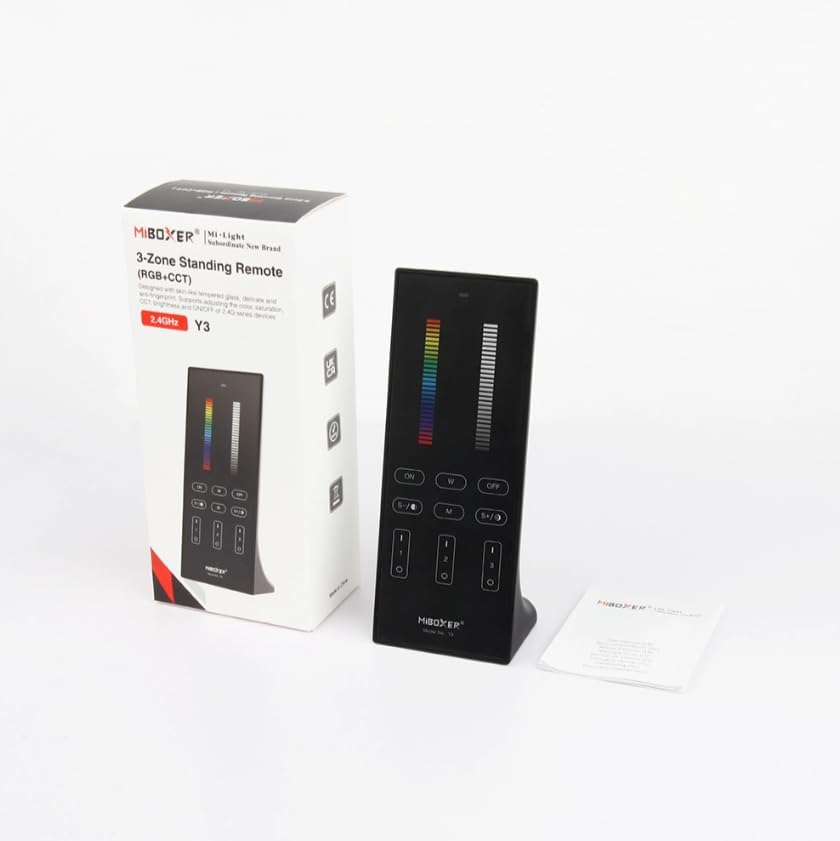
Figure 1: MiBOXER Y3 RGB+CCT Vertical Remote with its retail packaging.
2. Istruzioni per l'installazione
2.1 Installazione della batteria
The MiBOXER Y3 remote requires two AAA batteries (not included). To install:
- Individuare il coperchio del vano batterie sul retro del telecomando.
- Per aprire, far scorrere il coperchio verso il basso.
- Inserire due batterie AAA, assicurandosi della corretta polarità (+ e -).
- Far scorrere il coperchio in posizione finché non scatta in modo sicuro.
2.2 Linking the Remote to Lighting Devices
To control your MiBOXER RGB+CCT lighting devices, the remote must be linked to them. This process typically involves a specific sequence of actions on both the remote and the lighting device. Refer to your specific MiBOXER lighting product's manual for detailed linking instructions, as the procedure may vary slightly between different light models. A common linking procedure is as follows:
- Ensure the lighting device is powered off.
- Power on the lighting device.
- Within 3 seconds of powering on the light, press the "Zone ON" button (labeled "I" or "1") on the remote for the desired zone.
- La spia dovrebbe lampeggiare più volte, indicando il corretto collegamento.
- If linking fails, repeat the process.
To unlink a device from a zone, power on the light and within 3 seconds, press the "Zone ON" button (labeled "I" or "1") five times rapidly for the corresponding zone. The light should flash multiple times to confirm unlinking.
3. Istruzioni per l'uso
The MiBOXER Y3 remote features an intuitive layout for controlling various lighting parameters. Familiarize yourself with the buttons and sliders as shown in Figure 2.

Figure 2: MiBOXER Y3 Remote Control button layout and functions.
3.1 Funzioni dei pulsanti:
| Pulsante/Controllo | Funzione |
|---|---|
| Spia luminosa | Flashes to confirm button presses. |
| Cursore RGB | Slide to select desired RGB color. |
| Cursore luminosità | Slide to adjust light brightness (0-100%). |
| Master ON (I/ON) | Accende tutte le luci collegate. |
| Master OFF (O/OFF) | Spegne tutte le luci collegate. |
| White Light (W) | Attiva la modalità luce bianca pura. |
| Speed-/CCT-/Saturation- | Decreases speed in dynamic mode, decreases color temperature (warmer white), or decreases color saturation. |
| Speed+/CCT+/Saturation+ | Increases speed in dynamic mode, increases color temperature (cooler white), or increases color saturation. |
| Dynamic Mode (M) | Cycles through various dynamic lighting effects. Press repeatedly to change effects. |
| Zone ON (1, 2, 3 - "I") | Turns ON lights linked to the specific zone. Used for linking/unlinking. |
| Zone OFF (1, 2, 3 - "O") | Turns OFF lights linked to the specific zone. |
3.2 Funzionamento generale:
- Accensione/spegnimento delle luci: Use the "Master ON" or "Master OFF" buttons for all lights, or "Zone ON" / "Zone OFF" for specific zones.
- Regolazione del colore: Slide your finger along the "RGB Slider" to select your desired color.
- Regolazione della luminosità: Slide your finger along the "Brightness Slider" to increase or decrease the light intensity.
- Regolazione della temperatura del colore (CCT): In white light mode, use the "CCT-" and "CCT+" buttons to make the white light warmer or cooler.
- Modalità dinamiche: Press the "M" button to activate dynamic lighting modes. Use "Speed-" and "Speed+" to adjust the speed of the current dynamic effect.
- Regolazione della saturazione: In RGB mode, use "Saturation-" and "Saturation+" to adjust the intensity of the color.
4. Manutenzione
Proper maintenance ensures the longevity and optimal performance of your MiBOXER Y3 remote.
- Pulizia: Wipe the remote with a soft, dry cloth. Do not use abrasive cleaners, solvents, or wet cloths, as these can damage the surface or internal components.
- Sostituzione della batteria: Replace batteries when the indicator light becomes dim or the remote's response becomes inconsistent. Always use new AAA batteries and dispose of old batteries responsibly.
- Magazzinaggio: Conservare il telecomando in un luogo fresco e asciutto, lontano dalla luce solare diretta e da temperature estreme. Se si conserva per periodi prolungati, rimuovere le batterie per evitare perdite.
- Evitare l'umidità: This remote is not waterproof. Keep it away from water and high humidity environments.
5. Risoluzione Dei Problemi
If you encounter issues with your MiBOXER Y3 remote, refer to the following troubleshooting steps:
| Problema | Possibile causa | Soluzione |
|---|---|---|
| Il telecomando non risponde alla pressione dei pulsanti. | Batterie scariche o scariche. Il telecomando non è collegato alle luci. Fuori dal limite. | Sostituire le batterie. Re-link the remote to the lighting devices (refer to Section 2.2). Move closer to the lighting devices. |
| Le luci non cambiano colore/luminosità. | È stata selezionata la modalità errata. Remote not linked to the specific zone. | Ensure you are in the correct mode (e.g., RGB for color, CCT for white temperature). Verify the remote is linked to the correct zone. |
| Indicator light not flashing. | Batterie scariche. Guasto interno. | Sostituire le batterie. Se il problema persiste dopo la sostituzione della batteria, contattare l'assistenza clienti. |
| Interference with other 2.4GHz devices. | Vicinanza ad altri dispositivi wireless. | Move the remote or other 2.4GHz devices further apart. |
6. Specifiche
Technical specifications for the MiBOXER Y3 RGB+CCT Vertical Remote.
| Caratteristica | Dettaglio |
|---|---|
| Numero di modello | Y3 |
| Marca | MiBOXER |
| Tipo di controllo | RGB+CCT Vertical Remote |
| Tecnologia senza fili | 2.4GHz |
| Alimentazione elettrica | 2 batterie AAA (non incluse) |
| Caratteristica speciale | RGB/CCT/brightness dimmable |
| Peso dell'articolo | 4.8 once (circa 136 grammi) |
| Dimensioni del pacco | 6.5 x 3 x 2 pollici (circa 16.5 x 7.6 x 5.1 cm) |


Figure 3: Dimensions of the MiBOXER Y3 Remote Control and its packaging.
7. Garanzia e supporto
For warranty information, please refer to the documentation provided with your specific MiBOXER lighting product or contact the retailer where the product was purchased. MiBOXER products typically come with a manufacturer's warranty covering defects in materials and workmanship.
Per supporto tecnico o ulteriore assistenza, visita il sito ufficiale MiBOXER websul sito o contattare il servizio clienti. I recapiti sono solitamente disponibili sulla confezione del prodotto o sul sito web ufficiale del marchio.