
1. Introduzione
This manual provides detailed instructions for the FREEWOLF M68 60% Wireless Gaming Keyboard. Please read this manual carefully before using the product to ensure proper operation and longevity.

Figure 1: FREEWOLF M68 Wireless Gaming Keyboard (Shimmer color variant)
2. Prodotto finitoview
Caratteristiche principali:
- Connettività Tri-Mode: Supports wired (USB-C), 2.4GHz wireless, and Bluetooth 5.0 connections.
- Compatibilità multi-dispositivo: Connects to Windows, Mac, Linux, PC, Laptop, iPad, iOS, and Android devices.
- Layout compatto al 60%: Features 67 keys, optimizing desktop space.
- Tasti PBT: Durable Polybutylene Terephthalate keycaps with clear legends.
- Retroilluminazione LED arcobaleno: Offers constant and breathing modes with adjustable brightness and speed.
- Batteria a lunga durata: Built-in 2000mAH battery provides extended usage.
- Design ergonomico: Double leg braces allow for three adjustable typing angles.
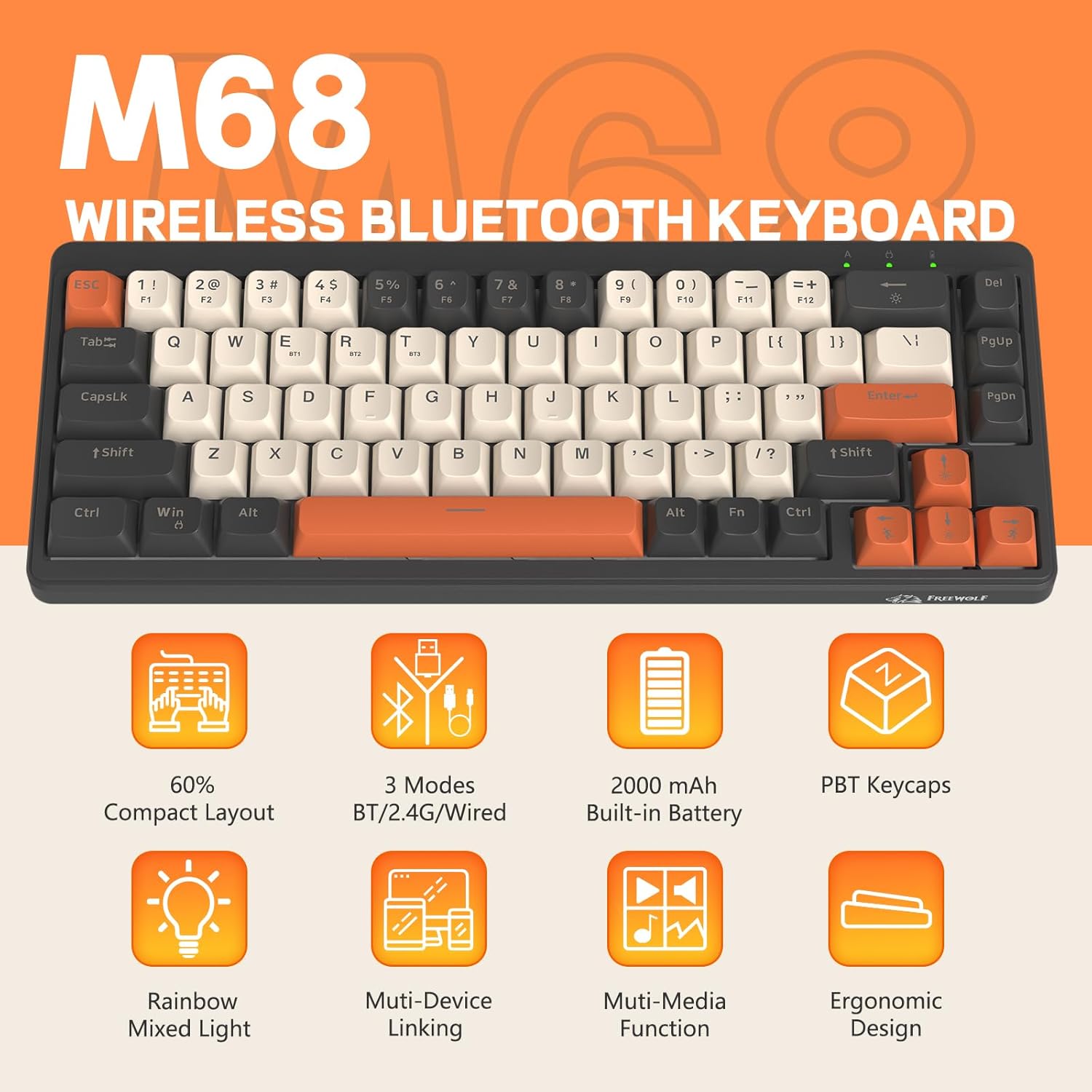
Figura 2: Oltreview of FREEWOLF M68 key features.
3. Configurazione e connessione
3.1. Connessione Tri-Mode suview
The M68 keyboard supports three connection methods: wired via USB-C, 2.4GHz wireless via a USB receiver, and Bluetooth 5.0. You can switch between these modes using the dedicated switch on the keyboard.

Figura 3: dettagliata view of the 3-mode connection options.
3.2. Connessione cablata
- Individuare la porta USB-C sulla tastiera.
- Collegare il cavo USB-C in dotazione alla tastiera e l'altra estremità alla porta USB del computer.
- Ensure the mode switch on the keyboard is set to the wired (USB) position.
- La tastiera verrà riconosciuta automaticamente dal sistema.
3.3. Connessione wireless a 2.4 GHz
- Locate the 2.4GHz USB receiver (often stored in a compartment on the keyboard).
- Collega il ricevitore USB a una porta USB disponibile sul tuo computer.
- Set the mode switch on the keyboard to the 2.4GHz wireless position.
- La tastiera dovrebbe connettersi automaticamente. In caso contrario, premere FN+R per avviare l'accoppiamento.
3.4. Connessione Bluetooth
The M68 can connect to up to three Bluetooth devices simultaneously.
- Impostare l'interruttore della modalità sulla tastiera sulla posizione Bluetooth.
- To enter pairing mode for a specific channel (BT1, BT2, or BT3), press and hold FN+Q (per BT1), FN+W (per BT2), oppure FA + MI (for BT3) until the corresponding indicator light flashes rapidly.
- On your device (PC, laptop, tablet, phone), open Bluetooth settings and search for "FREEWOLF M68".
- Seleziona la tastiera da associare. La spia luminosa diventerà fissa una volta effettuata la connessione.
- Per passare da un dispositivo Bluetooth associato all'altro, premere FN + Q/W/E brevemente.
4. Funzionamento
4.1. Controllo della retroilluminazione
The M68 features customizable rainbow LED backlighting.
- FN + Backspace: Toggle backlight on/off or switch between constant and breathing modes.
- FN + Freccia sinistra: Ridurre la velocità della retroilluminazione.
- FN + Freccia destra: Aumentare la velocità della retroilluminazione.
- FN + Freccia su: Aumentare la luminosità della retroilluminazione.
- FN + Freccia giù: Ridurre la luminosità della retroilluminazione.

Figure 4: Backlight adjustment key combinations.
4.2. Regolazione ergonomica
The keyboard includes double leg braces on the back to adjust the typing angle for comfort.
- Flip the keyboard over to access the leg braces.
- Regola i due-stage leg braces to achieve your preferred typing angle (flat, one stage, or two stages).

Figure 5: Ergonomic angle adjustments.
4.3. Gestione della batteria
The keyboard has a built-in 2000mAH rechargeable battery.
- Ricarica: Connect the keyboard via the USB-C cable to a power source (computer USB port or wall adapter). The charging indicator will show status.
- Durata della batteria: Up to 60 hours with backlight on, and up to 200 hours with backlight off.
- Risparmio energetico: La tastiera entrerà in modalità sospensione dopo un periodo di inattività per risparmiare la batteria. Premere un tasto qualsiasi per riattivarla.

Figure 6: Battery capacity information.
5. Manutenzione
- Pulizia: Use a soft, dry cloth to clean the keyboard surface. For keycaps, you may use a slightly damp panno. Evitare l'eccessiva umidità.
- Rimozione dei tasti: If necessary, use a keycap puller to carefully remove PBT keycaps for deeper cleaning or replacement.
- Magazzinaggio: Conservare la tastiera in un luogo fresco e asciutto, lontano dalla luce solare diretta e da temperature estreme.
- Evitare i liquidi: Do not expose the keyboard to liquids to prevent damage to internal components.
6. Risoluzione Dei Problemi
| Problema | Possibile causa | Soluzione |
|---|---|---|
| La tastiera non risponde (cablata) | Collegamento del cavo allentato, modalità errata. | Ensure USB-C cable is securely connected. Check if the mode switch is set to wired. Try a different USB port. |
| La tastiera non risponde (2.4 GHz) | USB receiver not connected, incorrect mode, pairing issue. | Ensure USB receiver is plugged in. Set mode switch to 2.4GHz. Re-pair by pressing FN+R. Try a different USB port for the receiver. |
| La tastiera non risponde (Bluetooth) | Not paired, incorrect mode, device Bluetooth off. | Ensure device Bluetooth is on. Set mode switch to Bluetooth. Enter pairing mode (FN + Q/W/E) and re-pair. Forget the device on your system and re-pair. |
| La retroilluminazione non funziona o è bloccata | Backlight off, low battery, software glitch. | Premere FN + Backspace to toggle. Charge the keyboard. Try resetting the keyboard (refer to advanced functions if available, or disconnect/reconnect). |
| Tasti non registrati o digitati due volte | Polvere/detriti sotto il tasto, problema con l'interruttore. | Carefully remove keycap and clean. If issue persists, contact support. |
7. Specifiche
| Modello | Numero di modello: M68 |
| Marca | FREEWOLF |
| Connettività | Cablato (USB-C), wireless a 2.4 GHz, Bluetooth 5.0 |
| Disposizione dei tasti | 60% (67 tasti) |
| Materiale del copritastiera | PBT (polibutilentereftalato) |
| Retroilluminazione | LED arcobaleno (RGB) |
| Capacità della batteria | 2000mAH |
| Dispositivi compatibili | Laptop, PC, Tablet (Windows, Mac, Linux, iOS, Android) |
| Dimensioni del prodotto | Dimensioni: 32.51 x 12.5 x 3.99 cm |
| Peso | 600 grammi |
| Caratteristiche speciali | Ergonomic (adjustable angles), Backlit |
8. Garanzia e supporto
For warranty information, technical support, or customer service inquiries, please refer to the contact information provided with your purchase or visit the official FREEWOLF websito.
Si prega di conservare la prova d'acquisto per eventuali reclami in garanzia.