
Introduzione
This manual provides detailed instructions for the setup, operation, and maintenance of your FREEWOLF M68 65% Wireless Gaming Keyboard. The M68 features tri-mode connectivity (Wired, 2.4GHz, Bluetooth 5.0), PBT keycaps, rainbow LED backlighting, and an ergonomic design. Please read this manual thoroughly before using the product to ensure optimal performance and longevity.

Image: The FREEWOLF M68 65% Wireless Gaming Keyboard, showcasingrazie al suo layout compatto e al design dei tasti.

Immagine: Un overview of the FREEWOLF M68 keyboard's key features, including its compact layout, tri-mode connectivity, 2000mAh battery, PBT keycaps, rainbow lighting, multi-device linking, multimedia functions, and ergonomic design.
Contenuto della confezione
- FREEWOLF M68 65% Wireless Gaming Keyboard
- Cavo USB-C
- Ricevitore wireless a 2.4 GHz
- Manuale dell'utente (questo documento)
Impostare
1. Ricarica della tastiera
Before initial use, fully charge the keyboard using the provided USB-C cable. Connect the USB-C end to the keyboard and the USB-A end to a power source (e.g., computer USB port, USB wall adapter). The keyboard has a built-in 2000mAh rechargeable battery.

Image: The FREEWOLF M68 keyboard highlighting its 2000mAh built-in battery for extended use.
2. Modalità di connettività
The M68 keyboard supports three connection modes: Wired, 2.4GHz Wireless, and Bluetooth 5.0. A switch on the keyboard allows you to select your preferred mode.

Image: Close-up of the FREEWOLF M68 keyboard's side, illustrating the 3-mode connection switch for 2.4G, Bluetooth, and Wired modes, along with the USB-C port and 2.4G receiver storage.
Modalità cablata
- Collega il cavo USB-C alla tastiera e l'estremità USB-A al computer.
- Set the mode switch on the keyboard to the "Wired" position.
- La tastiera verrà riconosciuta automaticamente dal sistema operativo.
Modalità wireless a 2.4 GHz
- Individuare il ricevitore USB da 2.4 GHz, solitamente conservato in uno scomparto sulla tastiera.
- Collega il ricevitore a una porta USB disponibile sul tuo computer.
- Set the mode switch on the keyboard to the "2.4G" position.
- La tastiera dovrebbe connettersi automaticamente.
Modalità Bluetooth
The keyboard supports connecting to up to three Bluetooth devices simultaneously.
- Set the mode switch on the keyboard to the "BT" position.
- Per associare un dispositivo, tenere premuto FN+Q, FN+W, O FA + MI per 3-5 secondi finché la spia luminosa non lampeggia rapidamente, indicando la modalità di associazione.
- On your device (computer, tablet, smartphone), go to Bluetooth settings and search for "FREEWOLF M68" or a similar name.
- Selezionare la tastiera per completare il processo di associazione. La spia luminosa smetterà di lampeggiare una volta effettuata la connessione.
- Per passare da un dispositivo Bluetooth associato all'altro, premere FN+Q, FN+W, O FA + MI brevemente.
Istruzioni per l'uso
1. Function Key Combinations (FN)
The M68 keyboard utilizes the FN key for accessing various secondary functions and multimedia controls.
- FN + F1-F12: Access standard F-keys (F1-F12).
- FN + Q/W/E: Switch between Bluetooth devices 1, 2, and 3.
- FN + Backspace: Toggle backlight on/off or breathing mode.
- FN + Left Arrow / Right Arrow: Adjust backlight speed.
- FN + Up Arrow / Down Arrow: Regola la luminosità della retroilluminazione.
- FN+ESC: Ripristina le impostazioni di fabbrica.
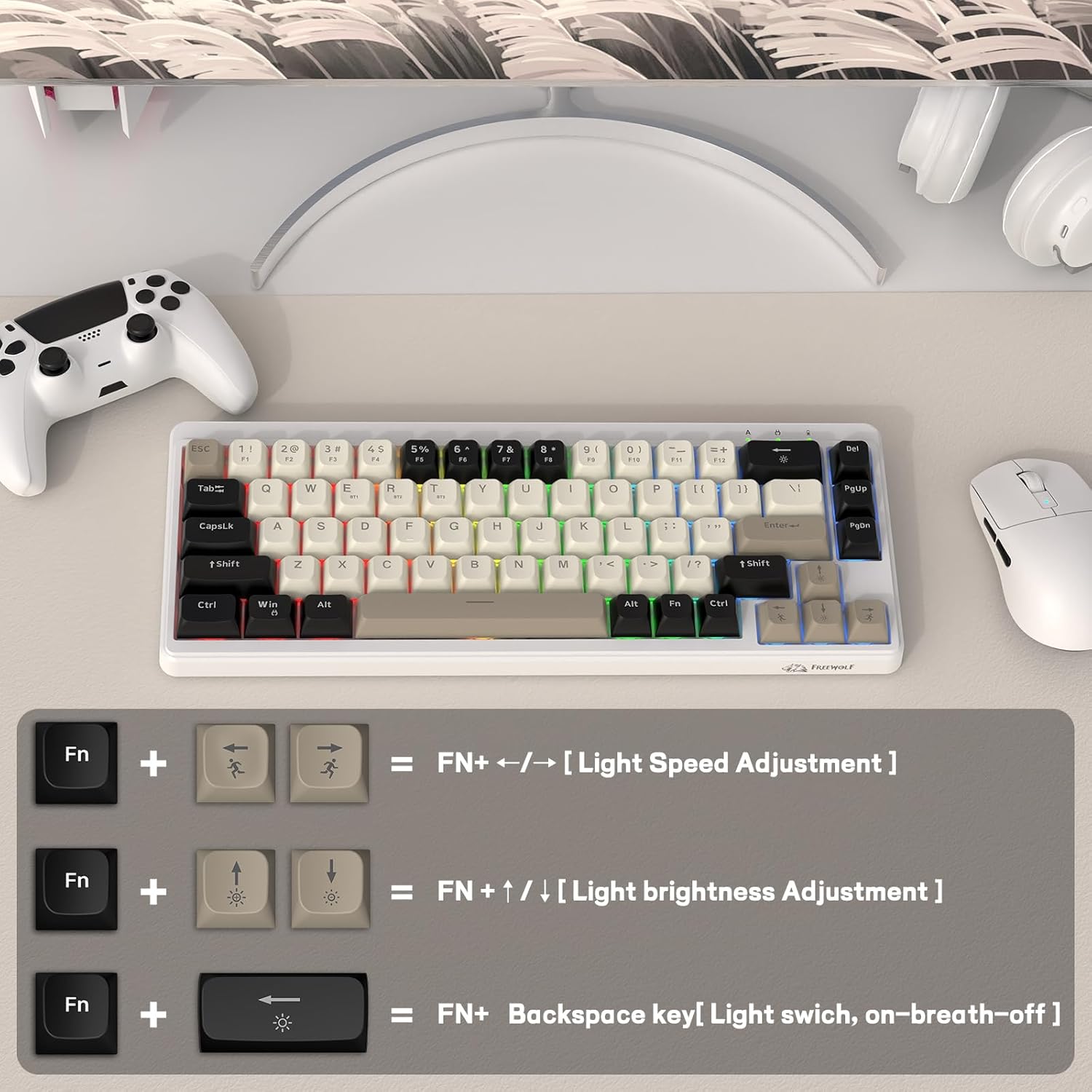
Image: Diagram illustrating FN key combinations for adjusting backlight speed and brightness, and toggling the backlight on/off or breathing mode.
2. Regolazione ergonomica
The keyboard features double leg braces on the back, allowing for three comfortable typing angles.
- Posizione piatta: Leg braces not open.
- Medium Angle: Open one leg brace.
- Steep Angle: Open both leg braces.
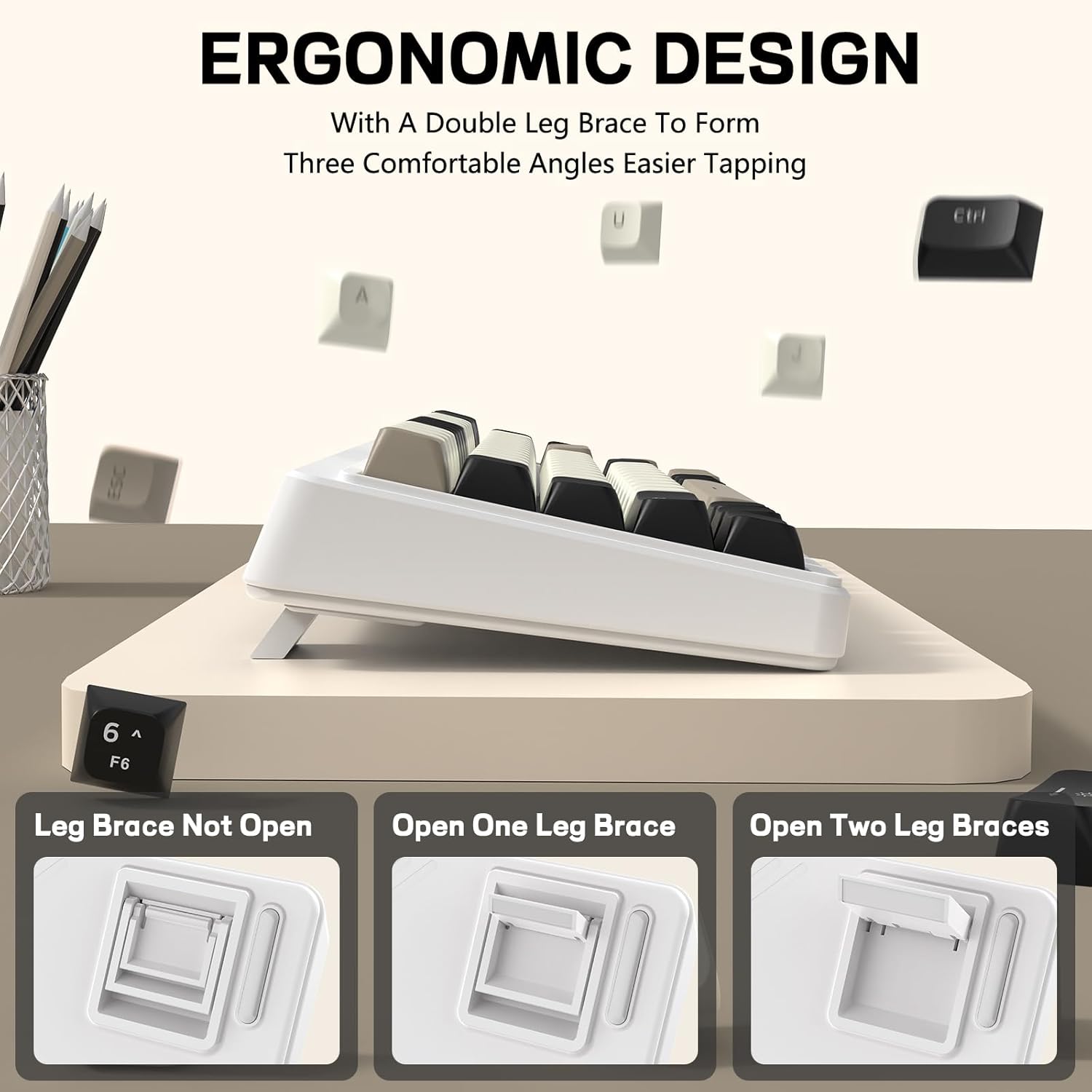
Image: Visual representation of the FREEWOLF M68 keyboard's adjustable leg braces, showing three different ergonomic typing angles.
Manutenzione
- Pulizia: Utilizzare un panno morbido e asciutto per pulire la superficie della tastiera. Per una pulizia più profonda, utilizzare un panno leggermenteamp un panno con un sapone delicato, assicurandosi che nessun liquido entri nella tastiera.
- Rimozione dei tasti: The PBT keycaps can be removed for cleaning. Use a keycap puller (not included) to gently lift keycaps. Reinstall by pressing them firmly onto the switches.
- Magazzinaggio: Conservare la tastiera in un luogo fresco e asciutto, lontano dalla luce solare diretta e da temperature estreme.

Image: Close-up of the FREEWOLF M68 keyboard showcasing its PBT keycaps, highlighting their clear legends and comfortable feel.
Risoluzione dei problemi
- La tastiera non risponde:
- Assicurarsi che la tastiera sia carica.
- Verificare che l'interruttore della modalità di connessione (cablata, 2.4G, BT) corrisponda alla connessione desiderata.
- For 2.4GHz, ensure the receiver is securely plugged in.
- For Bluetooth, ensure the keyboard is paired correctly (FN+Q/W/E) and your device's Bluetooth is enabled.
- Prova a connetterti tramite cavo USB-C per escludere problemi di connettività wireless.
- Retroilluminazione non funzionante:
- Assicurarsi che la tastiera sia carica.
- Premere FN + Backspace per attivare/disattivare la retroilluminazione.
- Regola la luminosità utilizzando FN + Up Arrow / Down Arrow.
- Connessione intermittente:
- Avvicinare la tastiera al ricevitore/dispositivo per ridurre le interferenze.
- Assicurarsi che nessun altro dispositivo wireless stia causando interferenze.
- Se necessario, riassociare i dispositivi Bluetooth.
Specifiche
| Modello | Numero di modello: M68 |
| Connettività | Cablato (USB-C), wireless a 2.4 GHz, Bluetooth 5.0 |
| Disposizione dei tasti | 65% (67 tasti) |
| keycaps | PBT |
| Retroilluminazione | LED arcobaleno (supporto RGB) |
| Capacità della batteria | 2000mAh |
| Dimensioni (L x P x A) | 12.8" x 4.92" x 1.57" (325 mm x 125 mm x 40 mm) |
| Peso | 1.36 libbre (0.62 kg) |
| Dispositivi compatibili | Laptop, PC, Tablet (Windows, Mac, Linux, iOS, Android) |

Image: The FREEWOLF M68 keyboard illustrating its 65% compact layout and physical dimensions (325mm/12.8inch length, 125mm/4.92inch width).
Garanzia e supporto
For warranty information and technical support, please refer to the contact details provided with your purchase or visit the official FREEWOLF websito. Conservare la prova d'acquisto per eventuali reclami in garanzia.