
1. Prodotto finitoview
The COUGAR FV150 RGB is a mid-tower gaming case designed for high-performance PC builds. It features a dual-chamber design, separating the main components from cables, storage drives, and the power supply unit (PSU) for a clean aesthetic and improved airflow. The case supports various motherboard form factors and offers extensive cooling options, including pre-installed ARGB fans.
Caratteristiche principali:
- Design a doppia camera: Fornisce un chiaro view of your build through glass panels while concealing cables and other components.
- Supporto GPU: Accommodates graphics cards up to 400mm in length, with options for vertical GPU orientation.
- Compatibilità della scheda madre: Supports Mini-ITX, Micro-ATX, and ATX motherboards.
- Staffa inferiore per ventola progettata: Simplifies fan installation by allowing attachment prior to setup.
- Extensive Fan & Water Cooling Support: Multiple fan mounting points and radiator support up to 360mm.
- Sincronizzazione RGB senza interruzioni: Integrated universal fan hub for easy ARGB lighting control.
- Pannello I/O moderno: Includes 2 x USB Type-A and 1 x USB 3.2 Type-C ports.
- Archiviazione flessibile: Supports combinations of 3.5" HDDs and 2.5" SSDs.
- Filtri antipolvere magnetici: Located on the top and right side for easy maintenance.

Immagine 1.1: Angolata view of the COUGAR FV150 RGB case, highlighting its dual-chamber design and pre-installed ARGB fans.
2. Configurazione e installazione
Follow these steps for proper installation of your PC components into the COUGAR FV150 RGB case.
2.1 Disimballaggio e ispezione iniziale
- Estrarre con cautela la custodia dalla confezione.
- Ispezionare la custodia per verificare che non vi siano segni di danni durante il trasporto.
- Remove the tempered glass side panel by unscrewing the thumb screws, if present, or by releasing il meccanismo di chiusura.
2.2 Installazione della scheda madre
- Ensure the correct standoffs are installed for your motherboard form factor (Mini-ITX, Micro-ATX, or ATX).
- Posizionare la schermatura I/O nell'apertura posteriore del case.
- Allineare con attenzione la scheda madre con i distanziatori e la schermatura I/O, quindi fissarla con le viti.
2.3 Installazione dell'unità di alimentazione (PSU).
- The FV150 RGB supports bottom-mount PSUs.
- Slide the PSU into its designated compartment in the secondary chamber from the rear of the case.
- Secure the PSU with screws from the exterior rear of the case.
2.4 Installazione dell'unità di archiviazione
- Locate the drive bays in the secondary chamber.
- For 3.5" HDDs, slide the drive into the appropriate tray and secure it.
- For 2.5" SSDs, mount them to the designated brackets or trays.
2.5 Installazione della scheda grafica (GPU)
- Rimuovere le coperture degli slot di espansione necessari nella parte posteriore del case.
- Insert your GPU into the PCIe slot on the motherboard and secure it with screws.
- The case supports GPUs up to 400mm. For vertical GPU mounting, a separate riser cable and bracket (not included) are required.
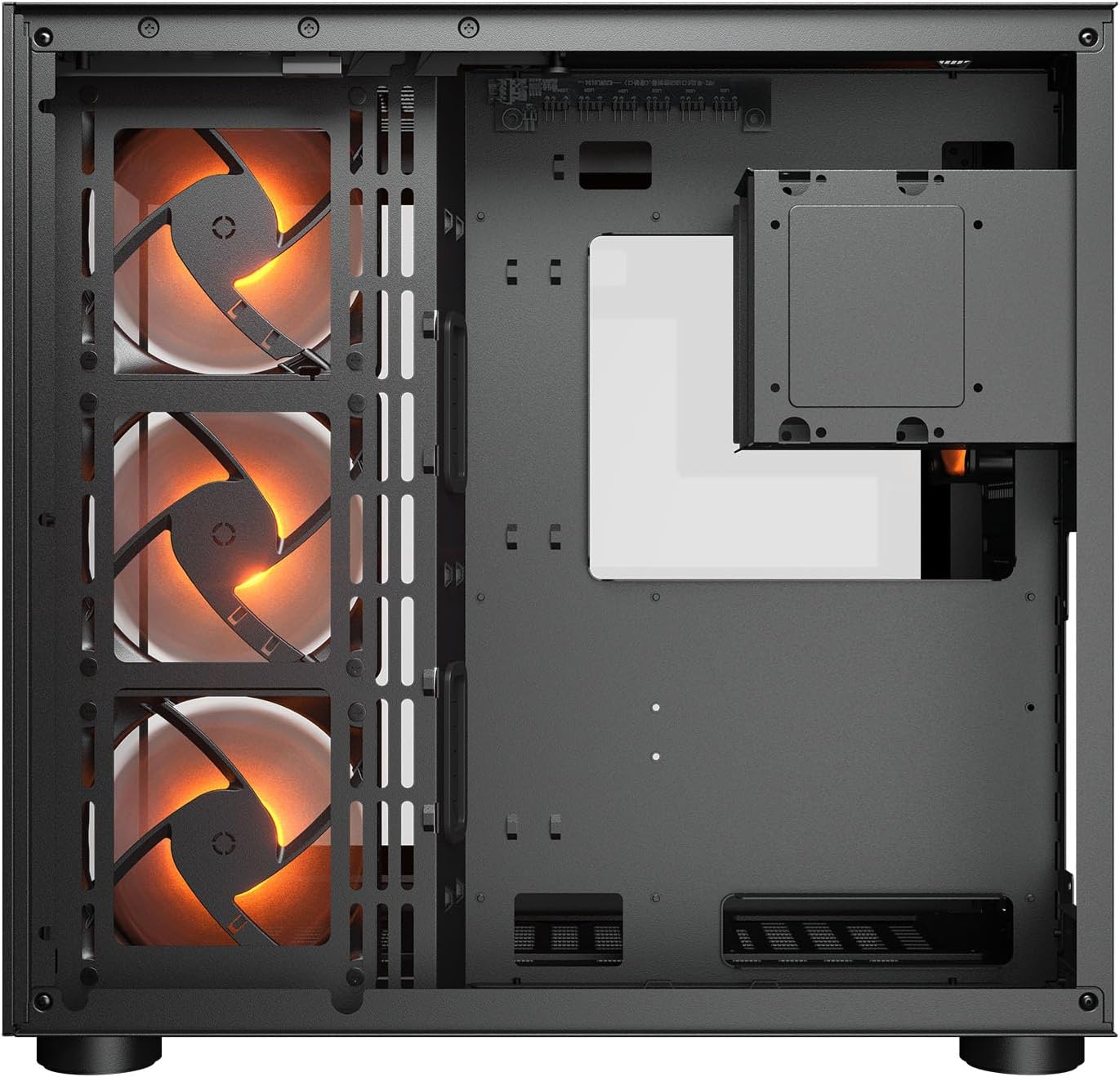
Immagine 2.1: Interno view illustrating the main chamber for motherboard and GPU installation, with pre-installed side fans.
2.6 Installazione di ventole e radiatori
- The case comes with 3 x 120mm ARGB side fans and 1 x 120mm ARGB rear fan pre-installed.
- Additional fans can be installed at the top (3 x 120mm or 2 x 140mm) and bottom (3 x 120mm or 2 x 140mm).
- Utilize the engineered bottom fan bracket for easier installation of bottom fans.
- For water cooling, radiators up to 360mm can be mounted on the top and 240mm on the side.

Image 2.2: Top internal view, showing potential mounting locations for additional cooling fans or radiators.
2.7 Gestione dei cavi
- Route all power and data cables through the cutouts to the secondary chamber.
- Utilizzare il ample space and tie-down points in the secondary chamber to organize cables for optimal airflow and a clean appearance.
2.8 Connecting Front I/O Panel
- Connect the front panel cables (USB 3.2 Type-C, USB Type-A, audio, power, reset, LED) to the corresponding headers on your motherboard.
3. Istruzioni per l'uso
Una volta installati e collegati tutti i componenti, è possibile accendere il sistema.
3.1 Accensione
- Assicurarsi che l'interruttore dell'alimentatore sia in posizione "ON".
- Premere il pulsante di accensione sul pannello I/O anteriore del case.
3.2 Controllo dell'illuminazione RGB
- The integrated universal fan hub allows for easy synchronization of ARGB lighting.
- Connect the hub to your motherboard's ARGB header (5V 3-pin) to control lighting effects via motherboard software.
- Alternatively, use the dedicated RGB button on the front I/O panel to cycle through pre-set lighting modes if not connected to a motherboard header.
4. Manutenzione
Una manutenzione regolare aiuta a garantire prestazioni ottimali e longevità dei componenti del PC.
4.1 Pulizia del filtro antipolvere
- The COUGAR FV150 RGB features magnetic dust filters on the top and right side, along with a ventilated bottom cover.
- Gently remove the magnetic dust filters.
- Clean them using compressed air or by rinsing with water (ensure they are completely dry before reattaching).
- Periodically clean the ventilated bottom cover.
4.2 Pulizia generale
- Utilizzare un panno morbido e asciutto per pulire le superfici esterne della custodia.
- For tempered glass panels, use a glass cleaner and a microfiber cloth to avoid streaks.
- Evitare l'uso di prodotti chimici aggressivi o materiali abrasivi che potrebbero danneggiare la finitura.
5. Risoluzione Dei Problemi
Questa sezione fornisce soluzioni ai problemi più comuni che potresti riscontrare.
5.1 Il sistema non si accende
- Check PSU: Ensure the power supply unit is properly connected to the wall outlet and the PSU switch is in the 'ON' position.
- Collegamenti del pannello frontale: Verificare che il cavo del pulsante di accensione proveniente dal case sia collegato correttamente al connettore del pannello frontale della scheda madre.
- Internal Power Cables: Confirm all necessary power cables (24-pin ATX, 8-pin CPU, PCIe for GPU) are securely connected to the motherboard and components.
5.2 Fans Not Spinning or RGB Not Working
- Collegamenti della ventola: Ensure all fan power cables are securely connected to the fan hub or motherboard headers.
- Connessioni RGB: Verify the ARGB cables are correctly connected to the fan hub and the hub is connected to a 5V 3-pin ARGB header on the motherboard.
- Software/Button: If connected to the motherboard, check your motherboard's RGB control software. If not, try pressing the RGB button on the case's I/O panel to cycle modes.
5.3 Porte USB non funzionanti
- Intestazioni USB interne: Confirm that the USB 3.0 and USB Type-C cables from the front I/O panel are correctly plugged into the corresponding headers on your motherboard.
- Driver della scheda madre: Ensure you have installed the latest chipset and USB drivers for your motherboard.
6. Specifiche
Detailed technical specifications for the COUGAR FV150 RGB Gaming Case.

Image 6.1: Case dimensions for planning your setup.
| Caratteristica | Specificazione |
|---|---|
| Nome del prodotto | FV150 RGB |
| Fattore di forma del caso | Mid Tower |
| Compatibilità della scheda madre | Mini ITX, Micro ATX, ATX |
| Dimensioni (L x A x P) | 300 x 400 x 415 mm (11.8" x 15.7" x 16.3") |
| Pannello I/O | USB 3.2 Gen 2 Type-C x 1, USB-A 3.0 x 2, 4 Pole Headset Audio Jack, RGB Button |
| 3.5" Drive Bay | 2 |
| 2.5" Drive Bay | 1+1 (converted from 3.5" drive bays) |
| Slot di espansione | 7+3 |
| Supporto GPU verticale | SÌ |
| Cooling Fan Support (Top) | 3 x 120 mm o 2 x 140 mm |
| Cooling Fan Support (Bottom) | 3 x 120 mm o 2 x 140 mm |
| Cooling Fan Support (Side) | 3 x 120 mm |
| Cooling Fan Support (Rear) | 1 x 120 mm |
| Pre-installed Fans (Side) | 3 x 120mm ARGB (Reversed) |
| Pre-installed Fans (Rear) | 1 x 120mm ARGB |
| Pre-installed Fan Speed | 1000 (±10%) giri/min |
| Pre-installed Fan Connector | 5V 3 Pin (ARGB) / 3 Pin (Fan) |
| Numero massimo di fan | 10 |
| Supporto per raffreddamento ad acqua (in alto) | 360mm / 280mm / 240mm |
| Water Cooling Support (Side) | 240 mm / 120 mm |
| Supporto per raffreddamento ad acqua (posteriore) | 120mm |
| RGB Hub Sync with M/B | SÌ |
| massimo Lunghezza scheda grafica | 400 mm (15.7 pollici) |
| massimo Altezza del dispositivo di raffreddamento della CPU | 180 mm (7.1 pollici) |
| massimo Lunghezza alimentatore | 210 mm (8.3 pollici) |
| Materiale | Metallo |
| Peso dell'articolo | 6.83 chilogrammi |
7. Informazioni sulla garanzia
COUGAR products are manufactured to the highest quality standards. This product is covered by a manufacturer's warranty against defects in materials and workmanship. The specific duration and terms of the warranty may vary by region and retailer. Please retain your proof of purchase for warranty claims.
For detailed warranty information, please refer to the official COUGAR websito o contattare il rivenditore locale.
8. Supporto
If you encounter any issues or have questions regarding your COUGAR FV150 RGB Gaming Case that are not covered in this manual, please contact COUGAR customer support.
- Visita il sito ufficiale COUGAR websito per domande frequenti, download di driver e informazioni di contatto per l'assistenza.
- Contact your retailer for assistance with product returns or exchanges.