
Introduzione
Thank you for choosing the 5Rcom Floor TV Stand with Hidden Wheels. This manual provides essential information for the safe and correct assembly, operation, and maintenance of your new TV stand. Please read these instructions carefully before beginning assembly and retain them for future reference.

Image: The 5Rcom Floor TV Stand positioned in a modern bedroom, showcasing its sleek design and how it integrates with home decor.
Prodotto finitoview
The 5Rcom Floor TV Stand is designed for versatility and stability, offering a mobile and adjustable solution for your television. Key features include:
- Concealed Caster Wheels: Four ultra-low, nearly invisible wheels allow for smooth movement across various rooms.
- Compatibilità TV universale: Supports most TVs from 24 to 55 inches, weighing up to 30 kg.
- Conformità VESA: Compatible with VESA patterns ranging from 100x100 mm (min) to 400x400 mm (max).
- Funzionalità girevole: Screen can be rotated 30 degrees left or right for optimal viewangoli di inclinazione.
- Regolazione dell'altezza: Easily adjust the TV height for a comfortable viewesperienza di acquisizione.
- Costruzione robusta: Features a reinforced alloy steel pole and a stable wood-textured base.
- Gestione cavi integrata: Helps keep cables organized and out of sight.

Image: A close-up showing the integrated cable management clips, the safety lock mechanism for the TV bracket, and the durable alloy steel pole.
Specifiche
| Caratteristica | Dettaglio |
|---|---|
| Tipo di montaggio | Supporto da pavimento |
| Tipo di movimento | Girevole (±30°) |
| Dimensioni TV compatibili | 24 - 55 pollici |
| Capacità di carico massima | 30 kg (66 libbre) |
| Compatibilità VESA | da 100x100mm a 400x400mm |
| Materiale | Acciaio legato, legno |
| Colore | White (pole), Wood texture (base) |
| Dimensioni complessive (L x P x A) | 550 x 380 x 1010-1310 mm (adjustable height) |
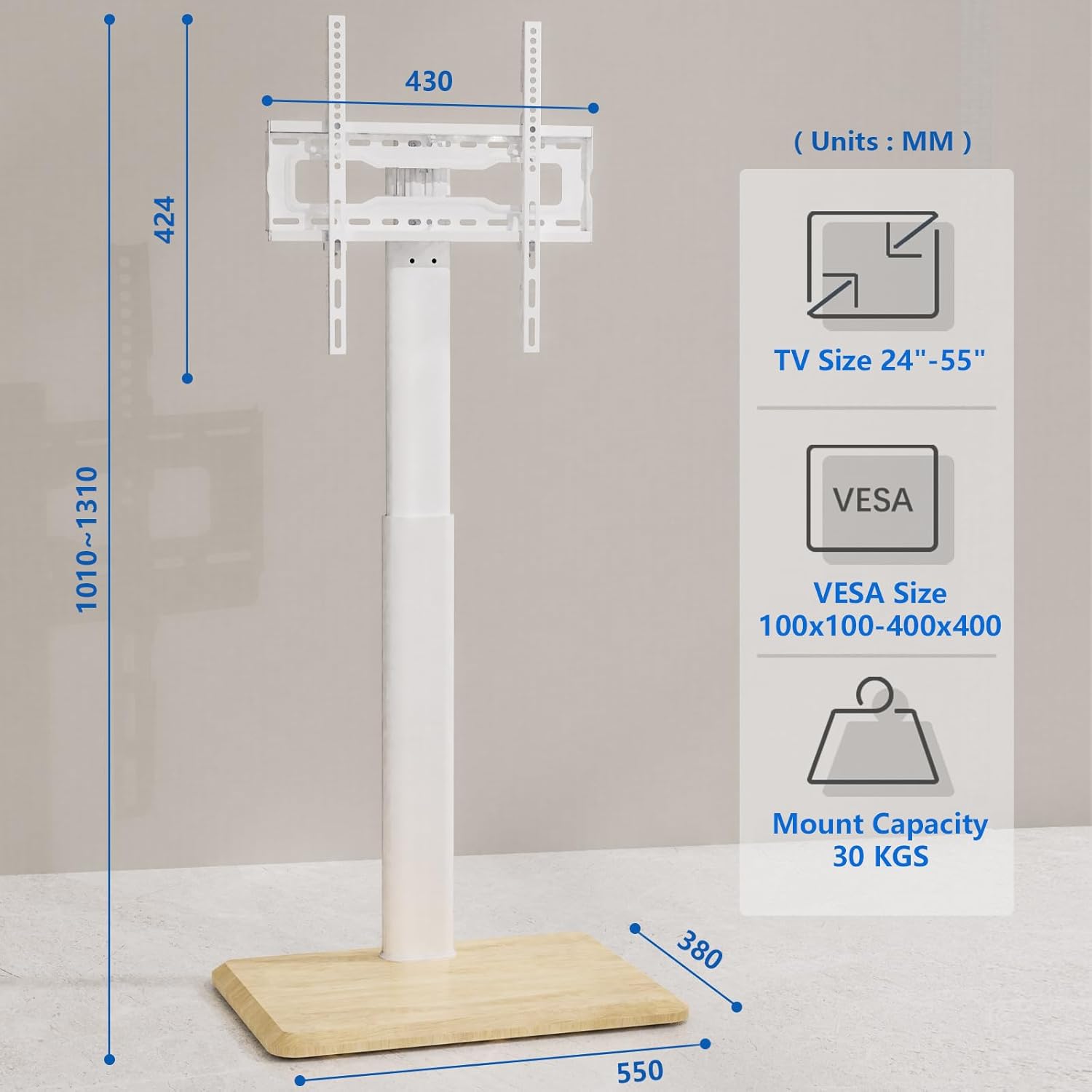
Image: A detailed diagram illustrating the stand's dimensions, supported TV sizes, VESA mounting patterns, and maximum weight capacity.

Image: A chart explaining how to check VESA compatibility, TV size, and TV weight to ensure proper fit with the stand.
Informazioni sulla sicurezza
Per garantire un funzionamento sicuro ed evitare danni, osservare le seguenti linee guida di sicurezza:
- Non superare la capacità di peso massima di 30 kg (66 libbre).
- Ensure your TV's VESA pattern falls within the supported range (100x100mm to 400x400mm).
- Montare sempre il supporto su una superficie morbida e pulita per evitare graffi.
- Verify all screws and connections are securely tightened before mounting the TV.
- Tenere bambini e animali domestici lontani dal supporto durante il montaggio e il funzionamento.
- Non appendere o arrampicarsi sul supporto TV.
- Distribute the TV's weight evenly on the mounting brackets.
- Use the provided safety lock to secure the TV to the stand.
Istruzioni per l'installazione e il montaggio
The 5Rcom Floor TV Stand is designed for easy assembly. Follow these steps carefully:
- Disimballare i componenti: Carefully remove all parts from the packaging and lay them out on a soft, flat surface. Verify all parts are present according to the included parts list.
- Assemblare la base: Attach the main support pole to the wooden base using the designated screws. Ensure a firm connection.
- Installare le ruote girevoli: Insert the concealed caster wheels into the pre-drilled holes on the underside of the base.
- Fissare le staffe TV: Secure the vertical TV brackets to the back of your television using the appropriate VESA screws and spacers. Refer to your TV's manual for specific VESA hole locations.
- Montare la TV sul supporto: Carefully lift the TV with the attached brackets and hook them onto the main support pole's mounting plate. Ensure the brackets are properly seated.
- Secure TV with Safety Lock: Engage the safety lock mechanism to prevent the TV from accidentally dislodging from the stand.
- Gestione dei cavi: Route all TV cables through the integrated cable management clips on the back of the support pole for a tidy appearance.
Video: Official product video demonstrating the assembly process, key features like swivel and height adjustment, and the concealed caster wheels of the 5Rcom Floor TV Stand.
Istruzioni per l'uso
- Ruotare la TV: Gently grasp the sides of your TV and rotate it left or right. The stand allows for a ±30 degree swivel to achieve your desired viewing angle. Avoid forcing the TV beyond its rotational limits.
- Regolazione dell'altezza della TV: The TV plate offers 2 levels of height adjustment, and the brackets offer 3 levels. To adjust, carefully remove the TV from the stand (if necessary), reposition the brackets or plate to the desired height, and re-secure. Always ensure the TV is stable after adjustment.
- Spostamento del supporto: The concealed caster wheels allow for easy repositioning. Gently push the stand from the base to move it. Ensure the path is clear of obstacles and the floor surface is suitable for smooth movement.

Image: An illustration demonstrating the TV stand's ability to swivel the television screen 30 degrees to either side.

Image: A diagram showing the different height adjustment options for both the TV plate and the mounting brackets.

Immagine: un primo piano view of the discreetly integrated caster wheels located on the underside of the stand's wooden base.
Manutenzione
Regular maintenance helps prolong the life and appearance of your TV stand:
- Pulizia: Pulisci il supporto con un panno morbido e asciutto. Per macchie ostinate, usa un panno leggermenteamp panno con sapone neutro, quindi asciugare accuratamente. Evitare prodotti chimici aggressivi o detergenti abrasivi.
- Controllare le connessioni: Controllare periodicamente tutte le viti e i bulloni per assicurarsi che siano ben serrati e sicuri. Serrarli nuovamente se necessario.
- Ispezionare le ruote: Ensure the caster wheels are free of debris and roll smoothly. Clean if needed.
Risoluzione dei problemi
Se riscontri problemi con il tuo supporto TV, fai riferimento ai seguenti problemi comuni e alle relative soluzioni:
- Il supporto è instabile:
- Assicurarsi che tutte le viti di montaggio siano ben serrate.
- Verify the TV's weight and VESA pattern are within the stand's specifications.
- Make sure the stand is placed on a flat, level surface.
- Difficoltà nello spostamento del supporto:
- Check if the caster wheels are obstructed by debris or carpet fibers.
- Ensure the floor surface is suitable for rolling wheels.
- TV Does Not Fit Brackets:
- Confirm your TV's VESA pattern matches the stand's supported range (100x100mm to 400x400mm).
- Assicurati di utilizzare le viti e i distanziali corretti per il tuo modello di TV.
Garanzia e supporto
This 5Rcom Floor TV Stand comes with a Garanzia del produttore di 2 anni dalla data di acquisto. Questa garanzia copre difetti di materiali e lavorazione in condizioni di normale utilizzo.
For warranty claims, technical assistance, or any questions not covered in this manual, please contact 5Rcom customer support through the retailer where you purchased the product or visit the official 5Rcom websito per le informazioni di contatto.