
1. Introduzione
Thank you for choosing the Intenso O400HA Over-Ear Headphones. These headphones are designed to provide a superior audio experience with advanced features such as Hybrid Active Noise Cancelling (ANC), Transparency Mode, and Bluetooth 5.3 connectivity. This manual will guide you through the setup, operation, and maintenance of your new headphones.
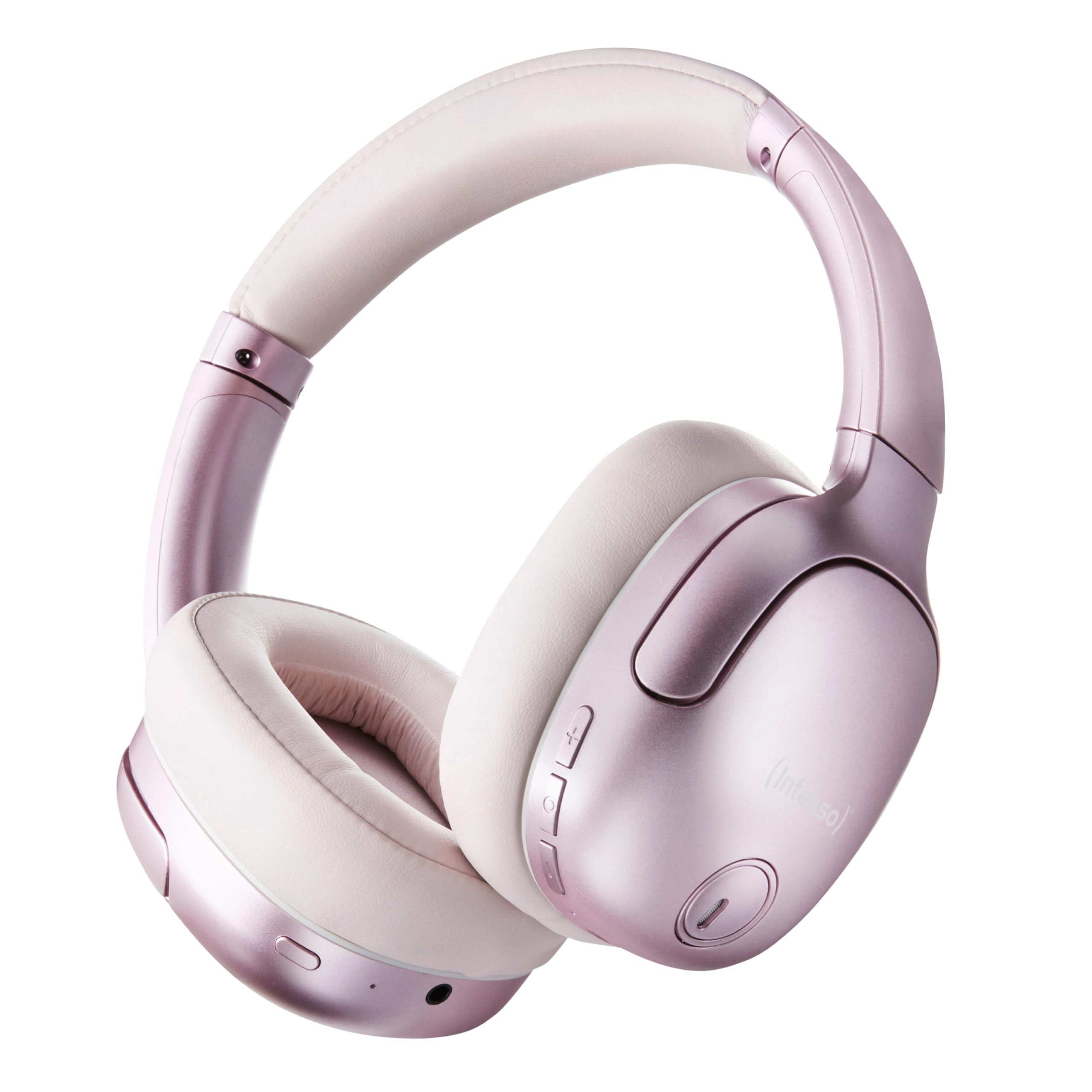
Image 1.1: Intenso O400HA Over-Ear Headphones (Pink)
The Intenso O400HA headphones feature a comfortable over-ear design with soft ear pads, an adjustable headband, and intuitive controls on the earcups.
2. Contenuto della confezione
Si prega di controllare la confezione per verificare la presenza dei seguenti elementi:
- Intenso O400HA Over-Ear Headphones
- Cavo di ricarica da USB-C a USB-C
- 1.5m Audio Cable (3.5mm jack)
- Manuale d'uso
3. Prodotto finitoview
Familiarize yourself with the various parts and controls of your Intenso O400HA headphones.

Immagine 3.1: Lato view of Intenso O400HA headphones with controls
This image displays the right earcup with its control buttons and ports. These typically include power, volume, multi-function buttons, and a charging port.
Controlli e porte:
- Pulsante di accensione: Utilizzato per accendere/spegnere le cuffie e avviare l'associazione Bluetooth.
- Pulsante Volume su/Traccia successiva: Aumenta il volume con una pressione breve, passa alla traccia successiva con una pressione prolungata.
- Pulsante Volume giù/Traccia precedente: Con una pressione breve si riduce il volume, con una pressione prolungata si passa alla traccia precedente.
- Pulsante multifunzione (MFB): Controls playback (play/pause), answers/ends calls, activates voice assistant.
- Pulsante ANC/Modalità Trasparenza: Toggles between Hybrid Active Noise Cancelling, Transparency Mode, and normal mode.
- Porta di ricarica USB-C: Per caricare le cuffie.
- Jack audio da 3.5 mm: Per connessione cablata.
- Microfoni: Internal and external microphones for ANC and calls.
4. Impostazione
4.1. Carica delle cuffie
Prima del primo utilizzo, caricare completamente le cuffie.
- Collegare il cavo di ricarica USB-C in dotazione alla porta USB-C delle cuffie.
- Collegare l'altra estremità del cavo a un adattatore di alimentazione USB (non incluso) o alla porta USB di un computer.
- The LED indicator will show the charging status. It typically turns off or changes color when fully charged.
A full charge takes approximately 2 hours. A quick charge of 15 minutes provides up to 6 hours of playtime.
4.2. Accoppiamento Bluetooth
Per collegare le cuffie a un dispositivo abilitato Bluetooth:
- Assicurati che le cuffie siano spente.
- Tenere premuto il pulsante di accensione per circa 5-7 secondi finché l'indicatore LED non lampeggia in blu e rosso, indicando la modalità di associazione.
- Sul tuo dispositivo (smartphone, tablet, laptop), vai alle impostazioni Bluetooth e abilita il Bluetooth.
- Cercare available devices and select "Intenso O400HA" from the list.
- Una volta connesso, l'indicatore LED solitamente lampeggerà lentamente in blu o rimarrà fisso in blu.
Una volta accese, le cuffie tenteranno automaticamente di riconnettersi all'ultimo dispositivo associato.
5. Utilizzo delle cuffie
5.1. Accensione/spegnimento
- Accensione: Tenere premuto il pulsante di accensione per 2-3 secondi.
- Spegni: Tenere premuto il pulsante di accensione per 3-4 secondi.
5.2. Audio Modes: ANC, Transparency, Music
The Intenso O400HA headphones offer three distinct audio modes to suit your environment.

Immagine 5.1: Passoview of Noise Control Modes
This image illustrates the key noise control technologies: Hybrid Active Noise Cancellation (ANC) for reducing ambient noise, Environmental Noise Cancellation (ENC) for clear calls, and Transparency Mode for hearing your surroundings.

Image 5.2: Hybrid Active Noise Cancelling Explained
This diagram shows how Hybrid ANC works using both external and internal microphones to filter out up to 95% of ambient noise, such as engine sounds.
- Cancellazione attiva del rumore ibrida (ANC): Press the ANC/Transparency Mode button to activate. This mode significantly reduces ambient noise, ideal for travel or noisy environments.
- Modalità trasparenza: Press the ANC/Transparency Mode button again to switch to Transparency Mode. This allows external sounds to pass through, enabling you to hear your surroundings without removing the headphones.
- Normal Mode (Music Mode): Press the ANC/Transparency Mode button a third time to return to normal mode, where ANC and Transparency are off. This mode provides balanced sound for a comprehensive listening experience.
5.3. Riproduzione musicale e chiamate
- Riproduci/Pausa: Premere brevemente il pulsante multifunzione (MFB).
- Traccia successiva: Premere a lungo il pulsante Volume su.
- Traccia precedente: Premere a lungo il pulsante Volume giù.
- Aumenta volume: Premere brevemente il pulsante Volume su.
- Volume basso: Premere brevemente il pulsante Volume giù.
- Rispondi/Termina chiamata: Premere brevemente l'MFB.
- Rifiuta chiamata: Premere a lungo il tasto MFB.
- Attiva l'assistente vocale: Premere due volte l'MFB.
5.4. Connessione cablata (modalità passiva)
You can use the headphones in passive mode even if the battery is depleted or if you prefer a wired connection.
- Collegare un'estremità del cavo audio da 3.5 mm al jack audio delle cuffie.
- Collegare l'altra estremità all'uscita audio da 3.5 mm del dispositivo.
Note: ANC and Transparency modes may not function or may have reduced performance when using the wired connection without power.
6. Manutenzione
To ensure the longevity and optimal performance of your Intenso O400HA headphones, follow these maintenance guidelines:
- Pulizia: Per pulire le cuffie, utilizzare un panno morbido e asciutto. Non utilizzare detergenti abrasivi, solventi o prodotti chimici aggressivi.
- Magazzinaggio: Store the headphones in a cool, dry place away from direct sunlight and extreme temperatures. When not in use, it is recommended to store them in a protective case (if provided or purchased separately).
- Esposizione all'acqua: Queste cuffie non sono impermeabili. Evitare l'esposizione ad acqua, umidità o pioggia.
- Cura della batteria: For optimal battery life, avoid fully discharging the battery frequently. Charge the headphones regularly, even if not used for extended periods.
- Cura del cavo: Handle the charging and audio cables gently. Avoid bending or twisting them excessively.
7. Risoluzione Dei Problemi
Se riscontri problemi con le cuffie, fai riferimento ai seguenti problemi comuni e alle relative soluzioni:
| Problema | Possibile causa | Soluzione |
|---|---|---|
| Le cuffie non si accendono | Batteria scarica | Caricare completamente le cuffie. |
| Impossibile effettuare l'associazione tramite Bluetooth | Cuffie non in modalità di associazione; Bluetooth del dispositivo disattivato; Interferenza | Ensure headphones are in pairing mode (flashing blue/red). Turn Bluetooth on your device. Move closer to the device. Forget previous pairings and try again. |
| Nessun suono o volume basso | Volume too low; Incorrect audio source; Loose cable (wired mode) | Aumenta il volume delle cuffie e del dispositivo. Verifica che sia selezionata l'uscita audio corretta sul dispositivo. Assicurati che il cavo da 3.5 mm sia collegato saldamente. |
| L'ANC non è efficace | ANC not activated; Improper fit | Premere il pulsante ANC per attivare. Regolare le cuffie in modo che aderiscano perfettamente alle orecchie. |
| Distorsione del suono | Distance from device; Interference; Low battery | Move closer to your device. Avoid strong electromagnetic fields. Charge the headphones. |
8. Specifiche
| Caratteristica | Dettaglio |
|---|---|
| Nome del modello | Over-Ear O400HA |
| Tecnologia di connettività | Wireless (Bluetooth 5.3) / Wired (3.5mm jack) |
| Controllo del rumore | Cancellazione ibrida del rumore |
| Durata della batteria | Fino a 75 ore |
| Tempo di ricarica | Approximately 2 Hours (15 min for 6 hours playtime) |
| wireless Range | Fino a 15 metri |
| Risposta in frequenza | Da 20 Hz a 20 KHz |
| Impedenza | 32 Ohm |
| Metodo di controllo | Touch/Buttons |
| Peso | 0.25 chilogrammi |
| Materiale | Elastomero termoplastico (TPE) |
| Dispositivi compatibili | Mobile phones, Laptops, Tablets, Gaming Consoles, Car Audio Systems |
9. Garanzia e supporto
Intenso products are designed for reliability and performance. For warranty information and customer support, please refer to the warranty card included with your purchase or visit the official Intenso websito. Conservare la prova d'acquisto per eventuali reclami in garanzia.
For further assistance, you may contact Intenso customer service through their official channels.