
1. Prodotto finitoview
The ANJIELO SMART 94218B is a 4-wire video intercom system designed for enhanced home security and convenience. It features a 7-inch touchscreen indoor monitor and an HD 1080P outdoor doorbell camera. The system supports WiFi connectivity for remote access via a mobile application, allowing you to monitor and interact with visitors from anywhere. Key features include a 148° wide-angle lens, integrated infrared sensor for night vision, and robust IP65 waterproof and dustproof construction for the outdoor unit. It is compatible with 12V electronic locks for integrated access control.
2. Contenuto della confezione
Disimballare con cura la scatola e assicurarsi che tutti gli articoli elencati di seguito siano presenti e in buone condizioni. Se alcuni articoli risultano mancanti o danneggiati, contattare l'assistenza clienti.

Immagine: Oltreview of the ANJIELO SMART 94218B package contents, including the doorbell, IC cards, wiring, user manual, screwdriver, screws, and connection lines.
- Unità campanello esterno
- Indoor Monitor (7-inch Touchscreen)
- IC Cards (Multiple for access control)
- 4-Core Wiring Cable
- External Power Supply (1.2m)
- Manuale d'uso
- Cacciavite
- Viti di montaggio e tasselli
- Connection Lines for electronic locks
3. Informazioni sulla sicurezza
Please read and understand all safety instructions before installation and operation. Failure to follow these instructions may result in electric shock, fire, or damage to the product.
- Sicurezza elettrica: Assicurarsi che l'alimentazione sia scollegata prima di effettuare qualsiasi cablaggio o installazione. In caso di dubbi, tutti i lavori elettrici devono essere eseguiti da un elettricista qualificato.
- Esposizione all'acqua: While the outdoor unit is waterproof (IP65), avoid submerging it in water. Ensure all connections are sealed properly during installation.
- Temperatura: Do not expose the device to extreme temperatures or direct sunlight for prolonged periods, which could affect performance and lifespan.
- Pulizia: Per la pulizia, utilizzare un panno morbido e asciutto. Evitare detergenti abrasivi o solventi.
- Bambini: Keep packaging materials and small components away from children to prevent choking hazards.
4. Componenti e dimensioni del prodotto
Familiarize yourself with the different parts of your outdoor doorbell unit and its physical dimensions.

Immagine: dettagliata view of the outdoor doorbell unit with labels for the rain cover, IR-LED, camera, speaker, keypad, card reader, microphone, call button, and fingerprint sensor.
- Copertura antipioggia: Provides additional protection against weather elements.
- IR-LED: LED a infrarossi per l'illuminazione della visione notturna.
- Telecamera: 1080P HD camera for video capture.
- Oratore: Per la comunicazione audio bidirezionale.
- tastiera: Numeric keypad for password-based unlocking.
- Lettore di schede: For IC card access control.
- Microfono: Per la comunicazione audio bidirezionale.
- Pulsante di chiamata: To alert the indoor monitor and mobile app.
- Sensore di impronte digitali: For fingerprint-based unlocking.
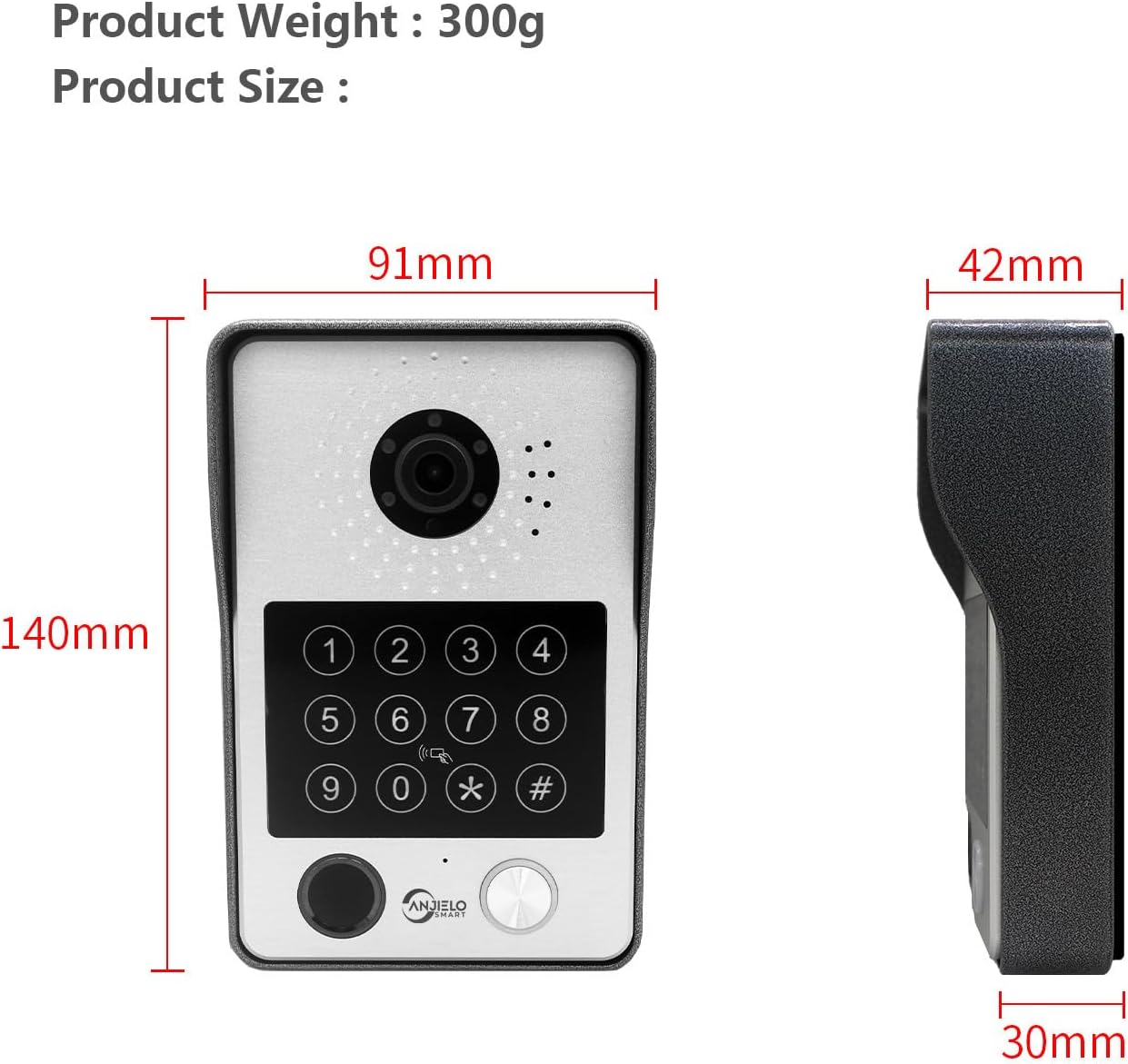
Image: Dimensions of the outdoor doorbell unit: 140mm (height) x 91mm (width) x 42mm (depth, including rain cover) / 30mm (unit depth).
5. Configurazione e installazione
5.1 Istruzioni per il cablaggio
The ANJIELO SMART 94218B system uses a 4-wire connection between the outdoor doorbell unit and the indoor monitor. Ensure all power is disconnected before beginning wiring.
- Preparare il cablaggio: Use the provided 4-core cable to connect the outdoor unit to the indoor monitor. For extended distances, a high-quality 4-core wire is recommended.
- Connetti alimentazione: Connect the external 1.2m power supply to the indoor monitor.
- Collegamento serratura elettronica: If connecting to a 12V electronic lock, use the provided connection lines. Refer to the lock's manual for specific wiring requirements.
- Connessioni sicure: Assicurarsi che tutti i collegamenti dei cavi siano sicuri e adeguatamente isolati per evitare cortocircuiti.
5.2 Montaggio dell'unità esterna
The outdoor unit is designed for wall mounting and features IP65 waterproofing.

Image: The outdoor unit is IP65 waterproof, dustproof, and anti-vandal, featuring an aluminum alloy shell with a rain cover.
- Scegli la posizione: Select a suitable location near your door, ensuring the camera has a clear view of visitors and is at an appropriate height.
- Fori di perforazione: Use the mounting bracket (if provided, or mark holes directly) to mark and drill holes for the mounting screws.
- Unità sicura: Attach the outdoor unit securely to the wall using the provided screws and wall plugs. Ensure the rain cover is correctly positioned.
5.3 Initial Configuration (Wi-Fi and App)
The main indoor monitor can connect to your home Wi-Fi network for remote access via the mobile application.
- Accensione: Once all wiring is complete, connect the power supply to an electrical outlet.
- Configurazione del monitor: Follow the on-screen prompts on the 7-inch touchscreen monitor to complete the initial setup.
- Connessione Wi-Fi: Navigate to the network settings on the monitor and connect to your home Wi-Fi network.
- Download dell'app: Download the dedicated mobile application (e.g., Tuya APP) from your smartphone's app store.
- Accoppia dispositivo: Follow the instructions within the app to pair your video intercom system. This typically involves scanning a QR code displayed on the monitor or entering a device ID.
6. Istruzioni per l'uso
6.1 Metodi di sblocco 5 in 1
The ANJIELO SMART 94218B offers multiple convenient ways to unlock your door.

Image: Visual representation of the five unlocking methods: Fingerprint, Password, IC Card, unlocking via the Indoor Monitor, and unlocking via the Tuya mobile application.
- Impronta digitale: Place your registered fingerprint on the sensor on the outdoor unit.
- Password: Enter your pre-set password on the keypad of the outdoor unit.
- Scheda IC: Tap a registered IC card on the card reader area of the outdoor unit.
- Monitorare: Use the unlock function on the indoor touchscreen monitor.
- Applicazione mobile: Use the unlock function within the paired mobile application.
6.2 Two-Way Audio and Monitoring
Communicate with visitors and monitor your entrance from various devices.

Image: The system enables two-way audio communication with visitors through the indoor monitor or a connected mobile phone, showing live views on both devices.
- Chiamata dei visitatori: When a visitor presses the call button on the outdoor unit, all connected indoor monitors and paired mobile phones will ring.
- Rispondi alla chiamata: You can answer the call from any indoor monitor or your mobile phone to see, hear, and speak with the visitor.
- Funzione interfono: Indoor monitors support call forwarding and internal audio-only conversations between multiple monitors within the home.
6.3 Rilevamento del movimento e registrazione
The system provides security by detecting motion and recording events.

Image: The system's smart PIR motion detection sends alerts to your mobile phone and monitor when movement is detected, automatically recording video or snapshots.
- Registrazione automatica: When motion is detected or the doorbell is pressed, the camera automatically records video or captures snapshots.
- Magazzinaggio: Recordings are saved to an additional Micro SD card (not included, or included as a component) for later review.
- ViewRegistrazioni: Puoi view recorded events directly on the indoor monitor or through the mobile application.
6.4 Visione notturna
The outdoor unit provides clear visibility even in low-light conditions.

Image: Comparison of day and night vision capabilities, highlighting the 1080P resolution and 148-degree wide-angle view provided by the outdoor unit's integrated IR-LEDs.
The integrated infrared sensor and IR-LEDs enable clear night vision, ensuring you can identify visitors and monitor your entrance effectively, even in complete darkness.
7. Manutenzione
7.1 Cura e pulizia
- Unità esterna: Periodically wipe the camera lens and keypad with a soft, damp panno per rimuovere polvere e sporco. Evitare l'uso di prodotti chimici aggressivi.
- Monitor interno: Pulisci il touchscreen con un panno in microfibra. Non spruzzare soluzioni detergenti direttamente sullo schermo.
- Connessioni: Regularly check wiring connections for any signs of wear or corrosion, especially for outdoor components.
8. Risoluzione Dei Problemi
If you encounter issues with your ANJIELO SMART video intercom system, refer to the following common problems and solutions.
| Problema | Possibile causa | Soluzione |
|---|---|---|
| No power to monitor/doorbell | Power adapter unplugged; wiring issue; power outage. | Check power connections; verify power outlet; inspect wiring for damage. |
| Nessun video/audio dall'unità esterna | Loose wiring connection; camera/microphone fault. | Ensure 4-core wiring is securely connected; restart the system. |
| Impossibile sbloccare la porta | Incorrect password/fingerprint/IC card; electronic lock issue; wiring problem. | Verify credentials; check electronic lock power and wiring; ensure correct unlock method is selected. |
| L'app mobile non si connette | Monitor not connected to Wi-Fi; incorrect app pairing; internet issue. | Check monitor's Wi-Fi status; re-pair device in app; verify home internet connection. |
| scarsa visione notturna | IR-LEDs obstructed or faulty; dirty camera lens. | Clean camera lens; ensure no obstructions; contact support if IR-LEDs are not functioning. |
Se il problema persiste dopo aver provato queste soluzioni, contattare l'assistenza clienti ANJIELO SMART per ulteriore assistenza.
9. Specifiche tecniche
Detailed technical specifications for the ANJIELO SMART 94218B video intercom system.
| Caratteristica | Specificazione |
|---|---|
| Marca | ANJIELO INTELLIGENTE |
| Numero di modello | 94218B |
| Tecnologia di connettività | Cablato, Wireless (Wi-Fi) |
| Risoluzione di acquisizione video | Formato: 1080p |
| Caratteristiche speciali | Night Vision, Motion Detection, 5-in-1 Unlock (Fingerprint, Password, IC Card, App, Monitor) |
| Uso interno/esterno | Interno (monitor), esterno (campanello) |
| Dispositivi compatibili | Smartphone |
| Tipo di montaggio | Montaggio a parete |
| Colore | Nero |
| Tipo di allarme | Solo movimento |
| Metodo di controllo | Applicazione |
| Protocollo di connettività | Wifi |
| Voltage | 12 Volt |
| Cosatage | 2 watt |
| Numero di canali | 2 |
| Formato di acquisizione video | AVI |
| Dimensioni dell'articolo | Dimensioni: 27 x 2 x 18 cm |
| Unit Volume/Weight | 1.0 Conteggio |
| Paese di origine | Cina |
| Produttore | ANJIELO INTELLIGENTE |
10. Garanzia e supporto
10.1 Informazioni sulla garanzia
For specific warranty details regarding your ANJIELO SMART 94218B video intercom system, please refer to the warranty card included in your package or contact the seller directly. Warranty terms typically cover manufacturing defects for a specified period from the date of purchase.
10.2 Assistenza clienti
If you require technical assistance, have questions about installation, or need to report a product issue, please contact ANJIELO SMART customer support. You can usually find contact information on the product packaging, the seller's websito o all'interno dell'applicazione mobile.