
Morelax MA303-1
Morelax Bluetooth Sleep Mask MA303-1 User Manual
1. Introduzione
The Morelax Bluetooth Sleep Mask MA303-1 is designed to provide a comfortable and immersive sleep experience. This 3D contoured eye mask integrates wireless Bluetooth headphones, allowing users to enjoy audio while blocking out light for undisturbed rest. It is suitable for various situations including sleep, travel, meditation, and relaxation, offering a blend of comfort and functionality.
2. Informazioni sulla sicurezza
- Avvertimento: Only one Bluetooth connection is allowed. If connecting to another device, ensure the previous device is disconnected.
- Non adatto a bambini di età inferiore a 3 anni.
- Do not use if you have difficulty breathing or cannot remove the mask by yourself.
- Spegnimento automatico: If there is no activity after starting or disconnecting Bluetooth, the device will automatically shut down after 5 minutes to conserve battery.
3. Contenuto della confezione
Si prega di controllare la confezione per verificare la presenza dei seguenti elementi:
- 1 x Morelax Bluetooth Sleep Mask MA303-1
- 1 cavo di ricarica USB
- 1 x Manuale utente
4. Prodotto finitoview
The Morelax Bluetooth Sleep Mask MA303-1 features an ergonomic design for maximum comfort and functionality.
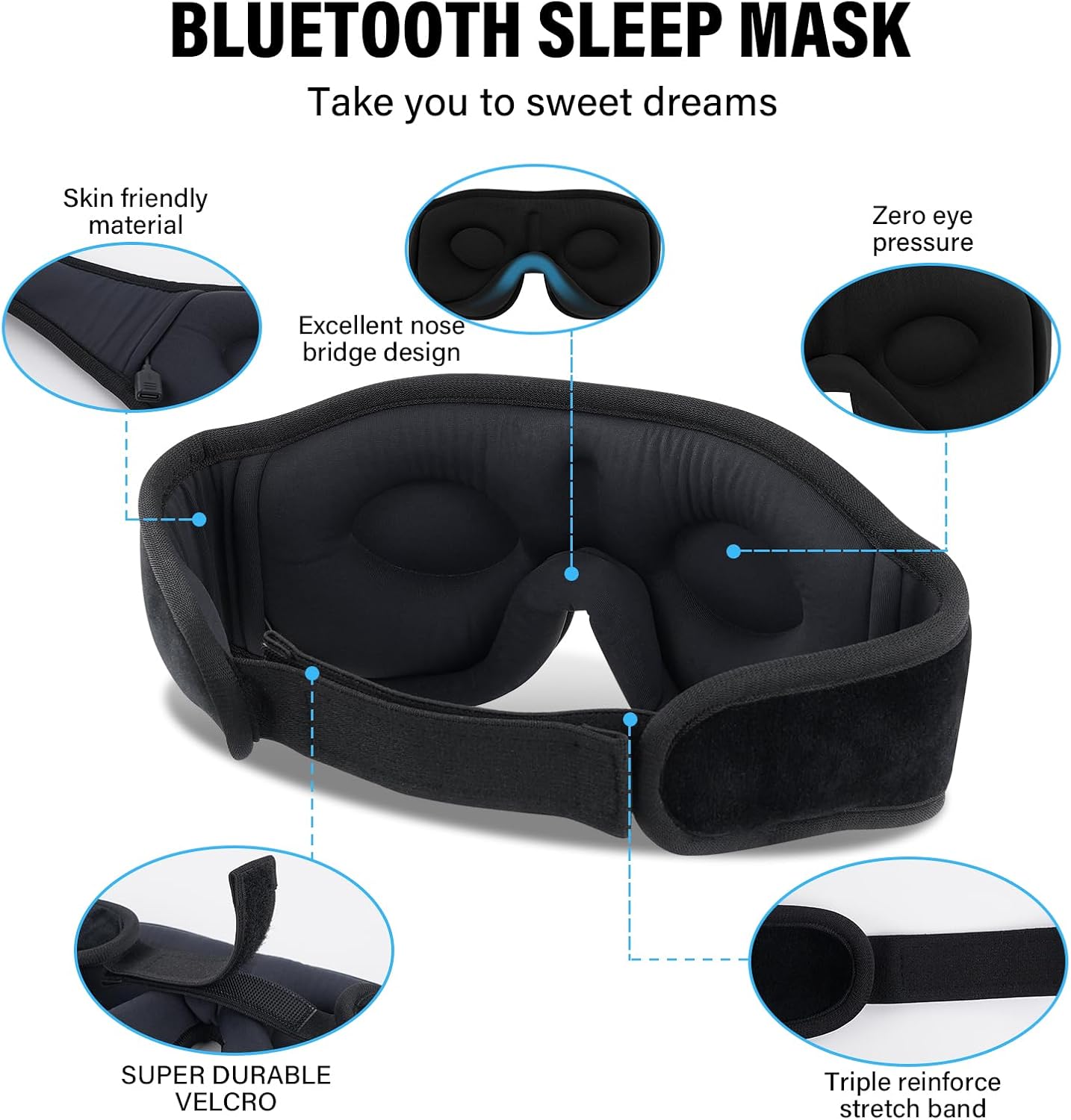
Figure 1: Morelax Bluetooth Sleep Mask MA303-1, highlighting skin-friendly material, excellent nose bridge design, zero eye pressure, super durable Velcro, and a triple reinforced stretch band.
- 3D Contoured Design: The mask features a 3D contoured cup design with a 15-degree tilt, providing ample space for eye movement and preventing pressure on the eyes, ideal for side sleepers.
- Premium Light Blocking: Deep eye pockets (0.4 inches) and an excellent nose bridge design effectively block out 100% of light from all angles, ensuring complete darkness.
- Materiali confortevoli: Crafted from skin-friendly memory foam and super-soft, breathable fabric, the mask is lightweight, hypoallergenic, and gentle on the face.
- Integrated Bluetooth Headphones: Equipped with Bluetooth 5.2 technology and 11MM drivers, the mask delivers high-fidelity stereo sound for an immersive audio experience.
- Cinturino regolabile: A super durable Velcro strap allows for easy adjustment to fit various head sizes comfortably without catching hair.

Figure 2: A user demonstrating the 3D contoured cup design of the sleep mask, ensuring a comfortable and pressure-free fit.

Figura 3: dettagliata view of the mask's deep eye pockets, designed to prevent light leakage and allow free eye movement.

Figure 4: The sleep mask showcasing its HiFi stereo sound capabilities with Bluetooth 5.2 and 11MM drivers.
5. Impostazione
5.1 Charging the Mask
Before first use, fully charge the sleep mask.
- Locate the charging port on the mask (usually near the control panel).
- Connect the provided USB charging cable to the mask and a suitable USB power source (e.g., computer USB port, wall adapter).
- The indicator light will show charging status (e.g., red for charging, off when fully charged).
- A full charge takes approximately 1 hour and provides up to 12 hours of playtime.

Figure 5: The sleep mask offers extended battery life, allowing for prolonged use on a single charge.
5.2 Associazione Bluetooth
To connect your sleep mask to a Bluetooth-enabled device:
- Assicurarsi che la maschera per dormire sia carica e spenta.
- Press and hold the power button on the mask for a few seconds until the indicator light flashes rapidly (e.g., blue/red alternating), indicating pairing mode.
- Sul tuo dispositivo (smartphone, tablet, ecc.), attiva il Bluetooth e cerca i dispositivi disponibili.
- Select 'Morelax' or 'BT-FAAH' from the list of found devices to pair.
- Una volta effettuata la connessione, la spia luminosa smetterà di lampeggiare e rimarrà fissa in blu.
- Nota: The mask supports only one Bluetooth connection at a time. Disconnect from the current device before attempting to pair with a new one.
5.3 Wearing the Mask
For optimal comfort and light blocking:
- Place the mask over your eyes, ensuring the 3D contoured cups align with your eye sockets for zero pressure.
- Adjust the Velcro strap at the back of your head for a snug yet comfortable fit. Avoid overtightening.
- Gently slide the integrated speakers within the mask to align them directly with your ears for optimal sound quality.
6. Istruzioni per l'uso
6.1 Accensione/spegnimento
- Per accendere: Premere e tenere premuto il pulsante di accensione finché la spia non si accende.
- Per spegnere: Premere e tenere premuto il pulsante di accensione finché la spia non si spegne.
6.2 Riproduzione di musica
- Riproduci/Pausa: Press the Play/Pause button once to start or pause music playback.
- Aumenta volume: Premere il pulsante '+' per aumentare il volume.
- Volume basso: Premere il pulsante '-' per diminuire il volume.
- Traccia successiva: Tieni premuto il pulsante '+' per passare alla traccia successiva.
- Traccia precedente: Press and hold the '-' button to skip to the previous track.
6.3 Gestione delle chiamate
- Rispondi alla chiamata: Quando arriva una chiamata, premere una volta il pulsante Riproduci/Pausa per rispondere.
- Termina chiamata: Durante una chiamata, premere una volta il pulsante Riproduci/Pausa per terminare la chiamata.
- Rifiuta chiamata: When a call comes in, press and hold the Play/Pause button to reject the call.
7. Manutenzione
Proper care ensures the longevity and hygiene of your sleep mask.
- Rimuovere l'elettronica: The Bluetooth module and speakers are not washable. Before cleaning, carefully remove the Bluetooth module and speakers from their pockets within the mask.
- Lavare solo a mano: Hand wash the fabric portion of the sleep mask with water below 40°C (104°F). Do not use harsh detergents or bleach.
- Asciugatura all'aria: Gently squeeze out excess water and allow the mask to air dry completely in a well-ventilated area. Do not tumble dry or iron.
- Rimontare: Once completely dry, carefully reinsert the Bluetooth module and speakers into their designated pockets.
8. Risoluzione Dei Problemi
If you encounter any issues with your Morelax Bluetooth Sleep Mask MA303-1, refer to the following common solutions:
| Problema | Soluzione |
|---|---|
| Il dispositivo non si accende | Ensure the mask is fully charged. Connect it to a power source using the USB cable. |
| Impossibile accoppiare il Bluetooth | Make sure the mask is in pairing mode (indicator light flashing). Ensure Bluetooth is enabled on your device. Disconnect the mask from any previously paired devices before attempting to pair with a new one. |
| Scarsa qualità del suono o nessun suono | Adjust the position of the speakers to align directly with your ears. Ensure the mask is properly charged and connected. |
| Light leakage around the edges | Adjust the mask's position on your face and tighten the strap for a snug fit. Ensure the nose bridge area is properly seated. |
| Automatic shutdown occurs too quickly | The mask has an automatic shutdown feature after 5 minutes of inactivity (no Bluetooth connection or audio playback). This is normal operation. |
9. Specifiche
| Caratteristica | Dettaglio |
|---|---|
| Marca | Più rilassato |
| Numero di modello | MA303-1 |
| Versione Bluetooth | 5.2 |
| Tempo di ricarica | Circa 1 ora |
| Tempo di gioco | Fino a 12 ore |
| Materiali | Memory Foam, Super-soft breathable fabric |
| Caratteristiche speciali | 3D Contoured Design, Zero Eye Pressure, Adjustable Strap, Built-in Microphone, Hypoallergenic |
| Dimensioni del prodotto | 20.32 x 9.65 x 2.84 cm (8 x 3.8 x 1.1 pollici) |
| Peso dell'articolo | 127.01 grammi (4.48 once) |
| Istruzioni per la cura | Hand Wash Only (after removing electronics) |
| Tipo di chiusura | Cinturino in velcro |
| Fascia di età | Adulto |
10. Garanzia e supporto
For warranty information, technical support, or any inquiries regarding your Morelax Bluetooth Sleep Mask MA303-1, please contact Morelax customer service through your purchase platform or the official Morelax websito. Conservare la prova d'acquisto per eventuali reclami in garanzia.
Ask a question about this manual
Ask about setup, troubleshooting, compatibility, parts, safety, or missing instructions. Manuals+ will review the question and use this page’s manual context to help answer it.