
iKF iKF Solo
Manuale utente delle cuffie wireless over-ear iKF Solo
Modello: iKF Solo
Marca: iKF
Introduzione
Thank you for choosing the iKF Solo Wireless Over-Ear Headphones. These headphones are designed to provide a superior audio experience with advanced features such as Active Noise Cancellation (ANC), HiFi stereo sound, and extended playback time. This manual will guide you through the setup, operation, and maintenance of your new headphones to ensure optimal performance and longevity.

Image: iKF Solo Wireless Over-Ear Headphones, showcasinil design elegante e il fattore di forma over-ear.
Contenuto della confezione
Si prega di selezionare la casella per i seguenti elementi:
- iKF Solo Wireless Over-Ear Headphones
- Cavo di ricarica (tipo C)
- Manuale d'uso
- Microfono esterno staccabile
- Borsa portaoggetti
Prodotto finitoview
Comandi e indicatori

Immagine: Lato view of the iKF Solo headphones, highlighting the location of the control buttons for volume, power, and mode selection.
Familiarize yourself with the buttons and indicators on your iKF Solo headphones:
- Pulsante di accensione: Tenere premuto per accendere/spegnere. Premere brevemente per riprodurre/mettere in pausa.
- Volume su (+): Aumentare il volume.
- Volume basso (-): Diminuire il volume.
- Pulsante ANC/Modalità Trasparenza: Alterna tra Cancellazione attiva del rumore, Modalità trasparenza e Modalità normale.
- Indicatore LED: Visualizza lo stato di alimentazione, lo stato di associazione e lo stato di carica.
- Porta di tipo C: Per la ricarica e la connessione audio cablata.
- Jack per microfono: For connecting the detachable external microphone.
Impostare
Caricare le cuffie
Before first use, fully charge your iKF Solo headphones. A full charge takes approximately 2 hours.
- Collegare il cavo di ricarica Type-C in dotazione alla porta di ricarica delle cuffie.
- Collegare l'altra estremità del cavo a una fonte di alimentazione USB (ad esempio, una porta USB del computer, un adattatore da parete).
- L'indicatore LED diventerà rosso durante la ricarica e si spegnerà quando la carica sarà completa.
Nota: Avoid using chargers with power exceeding 24 watts or fast chargers unless verified compatible, as this may damage the headphones.

Image: Graphic illustrating the impressive battery life of the iKF Solo headphones, up to 130 hours in normal mode and 95 hours with ANC enabled.
Accoppiamento Bluetooth
Pair your iKF Solo headphones with your Bluetooth-enabled device (smartphone, tablet, laptop).
- Assicurati che le cuffie siano spente.
- Tenere premuto il pulsante di accensione per circa 3-5 secondi finché l'indicatore LED non lampeggia in blu e rosso, indicando la modalità di associazione.
- Sul tuo dispositivo, vai alle impostazioni Bluetooth e abilita il Bluetooth.
- Select "iKF Solo" from the list of available devices.
- Una volta effettuata la connessione, l'indicatore LED diventerà blu fisso o lampeggerà lentamente.
Le cuffie si riconnetteranno automaticamente all'ultimo dispositivo associato quando vengono accese, se il Bluetooth del dispositivo è attivo e nel raggio d'azione.
Istruzioni per l'uso
Cancellazione attiva del rumore (ANC) e modalità Trasparenza
The iKF Solo headphones feature hybrid ANC technology to reduce ambient noise and a Transparency Mode to hear your surroundings.
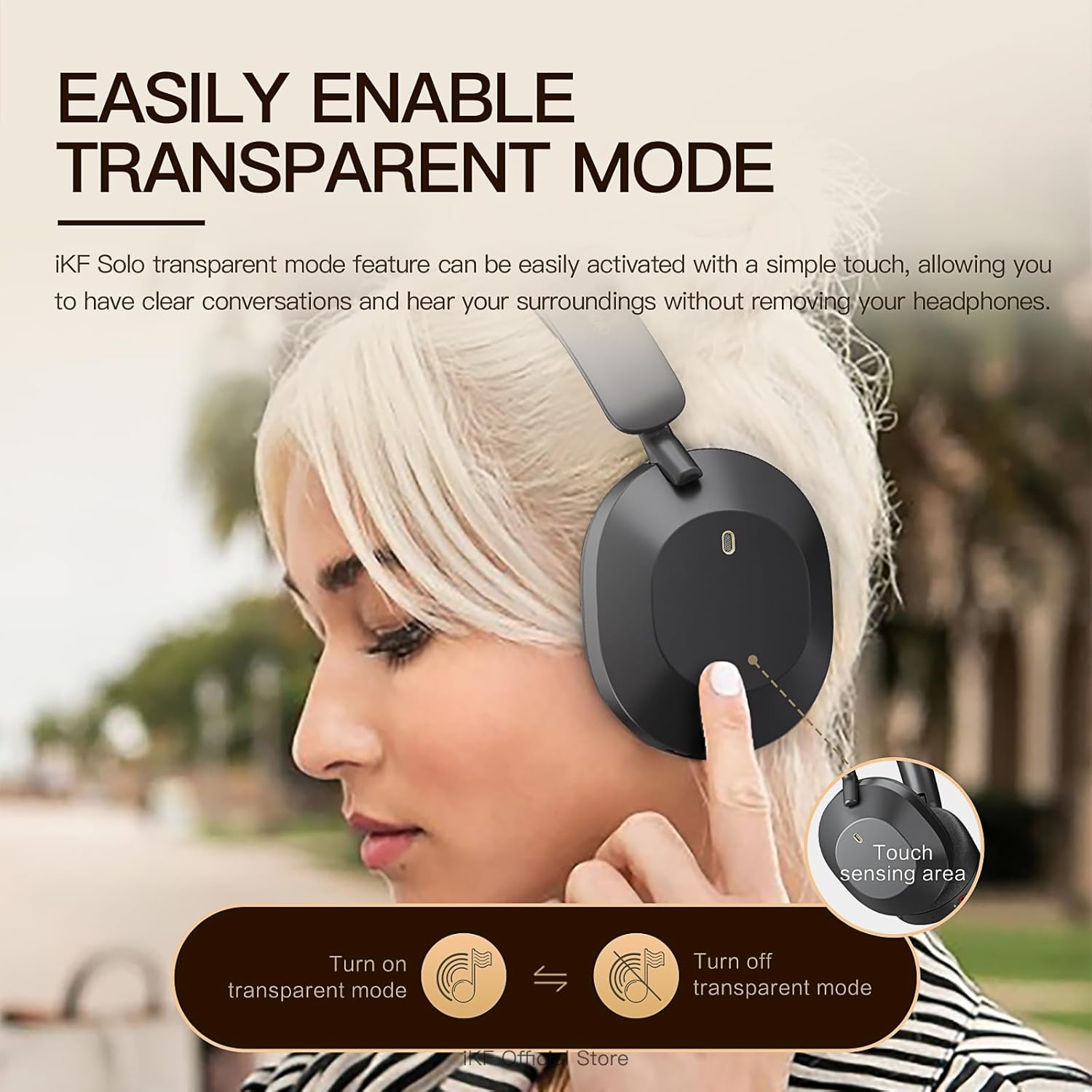
Image: A user demonstrating the activation of the transparent mode by touching the sensing area on the headphone.
- Premere il tasto Pulsante ANC/Modalità Trasparenza per scorrere:
- Cancellazione attiva del rumore (ANC) attivata: Reduces external noise by up to 52dB. Ideal for travel or noisy environments.
- Modalità trasparenza: Allows you to hear your surroundings clearly without removing the headphones. Useful for conversations or announcements.
- Modalità normale (ANC disattivato): Riproduzione audio standard senza cancellazione del rumore o trasparenza.
Audio Modes (Movie and Game)
The headphones offer specialized audio modes for an enhanced experience.

Image: Depiction of users enjoying the iKF Solo headphones in various scenarios, illustrating the multi-mode functionality including noise reduction, transparent, and movie modes.
- Modalità film: Provides immersive 3D surround sound, enhancing the cinematic experience.
- Modalità di gioco: Offers ultra-low latency (35ms) for competitive gaming, ensuring synchronized audio and visuals.
- Refer to the iKF App for specific controls to switch between these modes.
Riproduzione musicale e chiamate
- Riproduci/Pausa: Premere brevemente il pulsante di accensione.
- Controllo del volume: Utilizzare i pulsanti Volume su (+) e Volume giù (-).
- Traccia successiva: Double-press the Volume Up (+) button.
- Traccia precedente: Double-press the Volume Down (-) button.
- Rispondi/Termina chiamata: Premere brevemente il pulsante di accensione.
- Rifiuta chiamata: Tenere premuto il pulsante di accensione per 2 secondi.
- Attiva l'assistente vocale: Premere tre volte il pulsante di accensione.
The detachable microphone ensures clear voice pickup during calls and gaming.
iKF App Customization
Enhance your experience by downloading the iKF app. The app allows you to:
- Adjust ANC strength.
- Switch between listening modes (e.g., Movie, Game).
- Control Equalizer (EQ) settings.
- Enable dual device pairing for seamless switching between devices.
Manutenzione
Proper care will extend the life of your iKF Solo headphones.
- Pulizia: Per pulire le cuffie, utilizzare un panno morbido e asciutto. Non utilizzare prodotti chimici aggressivi o materiali abrasivi.
- Magazzinaggio: When not in use, store the headphones in the provided storage bag to protect them from dust and scratches. The foldable design makes them compact for storage.
- Cura della batteria: Avoid exposing the headphones to extreme temperatures. For long-term storage, charge the battery to about 50% every few months to prevent deep discharge.
- Esposizione all'acqua: Queste cuffie non sono impermeabili. Evitare l'esposizione all'acqua o a umidità eccessiva.

Image: The iKF Solo headphones in their folded position, demonstrating their portable and travel-friendly design.
Risoluzione dei problemi
If you encounter issues with your headphones, refer to the following table for common solutions.
| Problema | Possibile causa | Soluzione |
|---|---|---|
| Le cuffie non si accendono. | Batteria scarica. | Caricare completamente le cuffie. |
| Impossibile effettuare l'associazione tramite Bluetooth. | Cuffie non in modalità di associazione; Bluetooth del dispositivo disattivato; Troppo lontano dal dispositivo. | Ensure headphones are in pairing mode (flashing blue/red LED). Turn on device Bluetooth. Move headphones closer to device. Forget "iKF Solo" on device and re-pair. |
| No sound or choppy sound. | Not connected; Volume too low; Interference. | Ensure headphones are connected. Increase volume on headphones and device. Move away from other wireless devices. Try restarting both headphones and device. |
| L'ANC non funziona in modo efficace. | ANC not activated; Improper fit. | Premere il pulsante ANC per attivare. Regolare le cuffie in modo che aderiscano perfettamente alle orecchie. |
| Il microfono non funziona. | Microphone not properly connected; Device settings. | Ensure the detachable microphone is securely plugged in. Check microphone input settings on your device. |
Specifiche
Detailed technical specifications for the iKF Solo Wireless Over-Ear Headphones:
| Caratteristica | Descrizione |
|---|---|
| Nome del modello | iKF Solo |
| Controllo del rumore | Cancellazione attiva del rumore, isolamento acustico |
| Tecnologia di connettività | Bluetooth, cablato (tipo C) |
| Comunicazione senza fili | Bluetooth |
| Dimensioni del driver audio | 40 millimetri |
| Impedenza | 32 Ohm |
| Tempo di ricarica | Circa 2 ore |
| Playback Time (Normal) | Fino a 130 ore |
| Tempo di riproduzione (ANC attivato) | Fino a 95 ore |
| Fattore di forma | Sopra l'orecchio |
| Materiale | Plastica |
| Tipo di controllo | Controllo dei pulsanti |
| Dispositivi compatibili | Tablets, Cellphones/iPhone, Smart Watch, Laptops/iPad/Macbook |

Immagine: Un esploso view diagramma mostracasing the 40mm speaker drivers and internal components responsible for the HiFi audio quality.
Garanzia e supporto
iKF provides a standard warranty for its products. For detailed warranty information, please refer to the warranty card included in your package or visit the official iKF websito.
If you require further assistance, technical support, or have questions not covered in this manual, please contact iKF customer service through their official channels. Contact information can typically be found on the product packaging or the brand's official websito.
Ask a question about this manual
Ask about setup, troubleshooting, compatibility, parts, safety, or missing instructions. Manuals+ will review the question and use this page’s manual context to help answer it.