
Introduzione
Thank you for choosing the FLEXISPOT EC5 Plus Electric Sit-Stand Desk Frame. This manual provides essential information for the safe and efficient assembly, operation, and maintenance of your new desk frame. Designed with ergonomics in mind, this dual-motor frame offers smooth and quiet height adjustment, allowing you to effortlessly switch between sitting and standing positions for a healthier work environment.
Importanti istruzioni di sicurezza
Si prega di leggere attentamente tutte le istruzioni prima del montaggio e dell'uso. Il mancato rispetto di queste istruzioni può causare lesioni o danni al prodotto.
- Assicurarsi che tutti i componenti siano presenti e integri prima del montaggio. Non utilizzare se qualche componente risulta mancante o danneggiato.
- Tenere bambini e animali domestici lontani dalla scrivania durante il funzionamento per evitare lesioni causate dalle parti in movimento.
- Do not place hands or other body parts near the lifting columns or crossbar during height adjustment to avoid pinching.
- Assicurarsi che la scrivania sia posizionata su una superficie piana per evitare che si ribalti.
- Non sovraccaricare la scrivania. La capacità di carico massima è di 120 kg (265 libbre).
- Utilizzare solo l'adattatore di alimentazione e i cavi forniti.
- Scollegare l'alimentazione prima della pulizia o della manutenzione.
- The anti-collision system is designed to prevent damage, but always exercise caution during operation.
Contenuto della confezione
Verifica che tutti i seguenti componenti siano inclusi nel pacchetto:
- Gambe per scrivania (2)
- Traversa (1)
- Staffe Laterali (2)
- Scatola di controllo (1)
- Pannello di controllo/telefono (1)
- Adattatore di alimentazione (1)
- Cavo di alimentazione (1)
- Vassoio di gestione dei cavi (1)
- Hardware Kit (screws, tools, etc.)
- Manuale dell'utente (questo documento)

Guida all'installazione
Istruzioni di montaggio
Assembly typically requires two people. Follow the steps below for a successful setup. Refer to the detailed diagrams in the included printed manual for visual guidance.
- Disimballare i componenti: Estrarre con cautela tutti i componenti dall'imballaggio e disporli su una superficie pulita e morbida per evitare graffi.
- Attach Side Brackets to Legs: Secure the side brackets to the top of each lifting column (leg) using the provided screws.
- Assemblare la traversa: Connect the two halves of the crossbar, ensuring the motor cables are properly routed.
- Collegare le gambe alla traversa: Attach the assembled legs to the crossbar. Ensure all connections are secure.
- Installare la scatola di controllo: Mount the control box to the designated area on the crossbar using the provided screws.
- Connect Motors and Handset: Plug the motor cables from each leg into the control box. Connect the handset/control panel cable to the control box.
- Collegare l'adattatore di alimentazione: Connect the power adapter to the control box and then to the power cable.
- Montaggio su tavolo: Carefully place your chosen tabletop (not included) onto the assembled frame. Ensure it is centered and aligned. Secure the tabletop to the frame using appropriate screws (ensure screw length is suitable for your tabletop thickness to avoid piercing through). The frame is compatible with tabletops from 120 to 180 cm in length and 60 to 80 cm in width.
- Gestione dei cavi: Use the included cable management tray and ties to organize all cables neatly.
- Accensione iniziale: Plug the power cable into a wall outlet. The desk should be ready for initial calibration or operation.

Istruzioni per l'uso
Pannello di controllo Fineview
The EC5 Plus features an intuitive control panel with an LED display and memory functions.
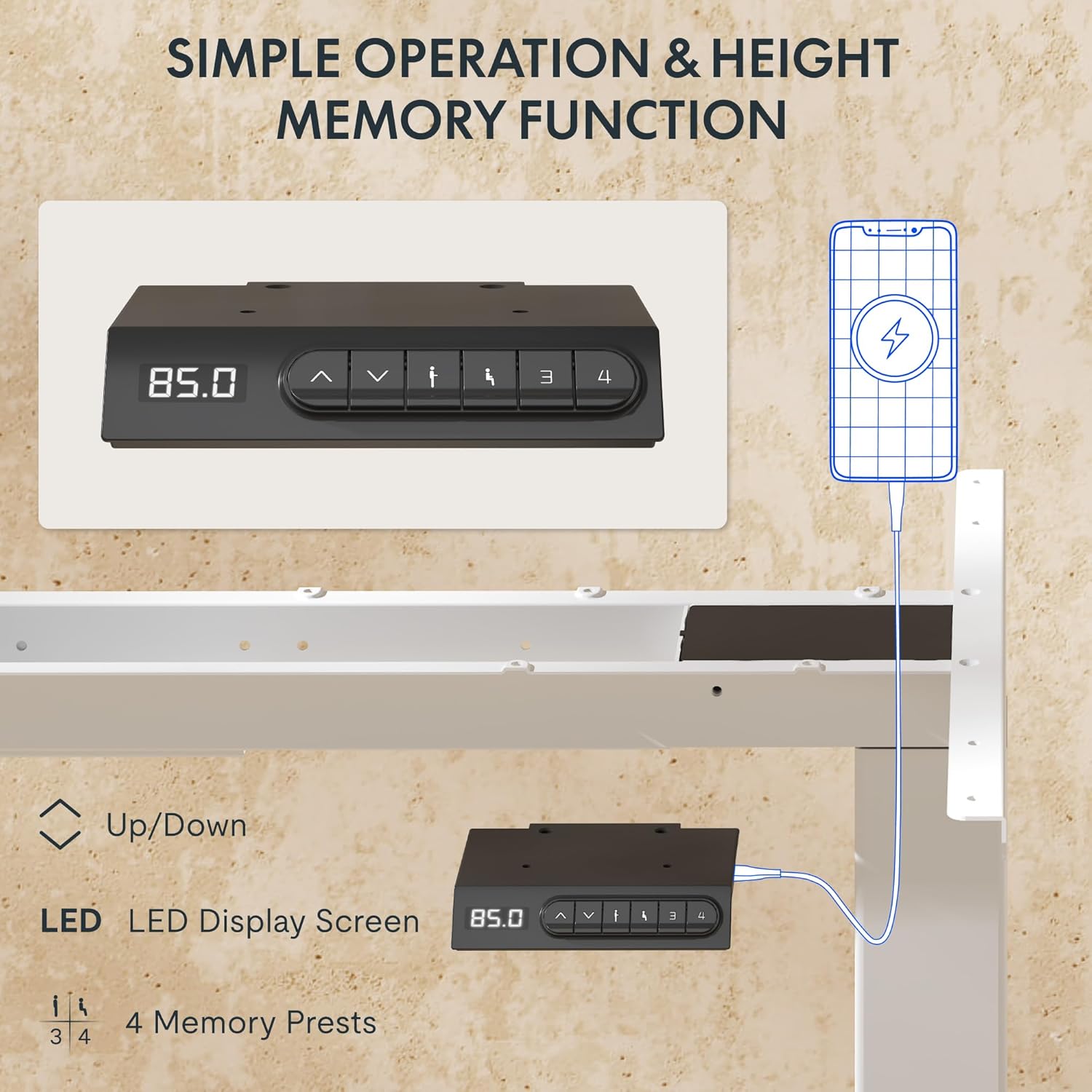
- Display a LED: Mostra l'altezza attuale della scrivania in centimetri.
- Frecce su/giù (▲ / ▼): Tenere premuto per regolare manualmente l'altezza della scrivania.
- Preimpostazioni di memoria (1, 2, 3, 4): Memorizza e richiama le impostazioni di altezza preferite.
- Porte USB-A e USB-C: Integrated charging ports for your devices.
Regolazione dell'altezza
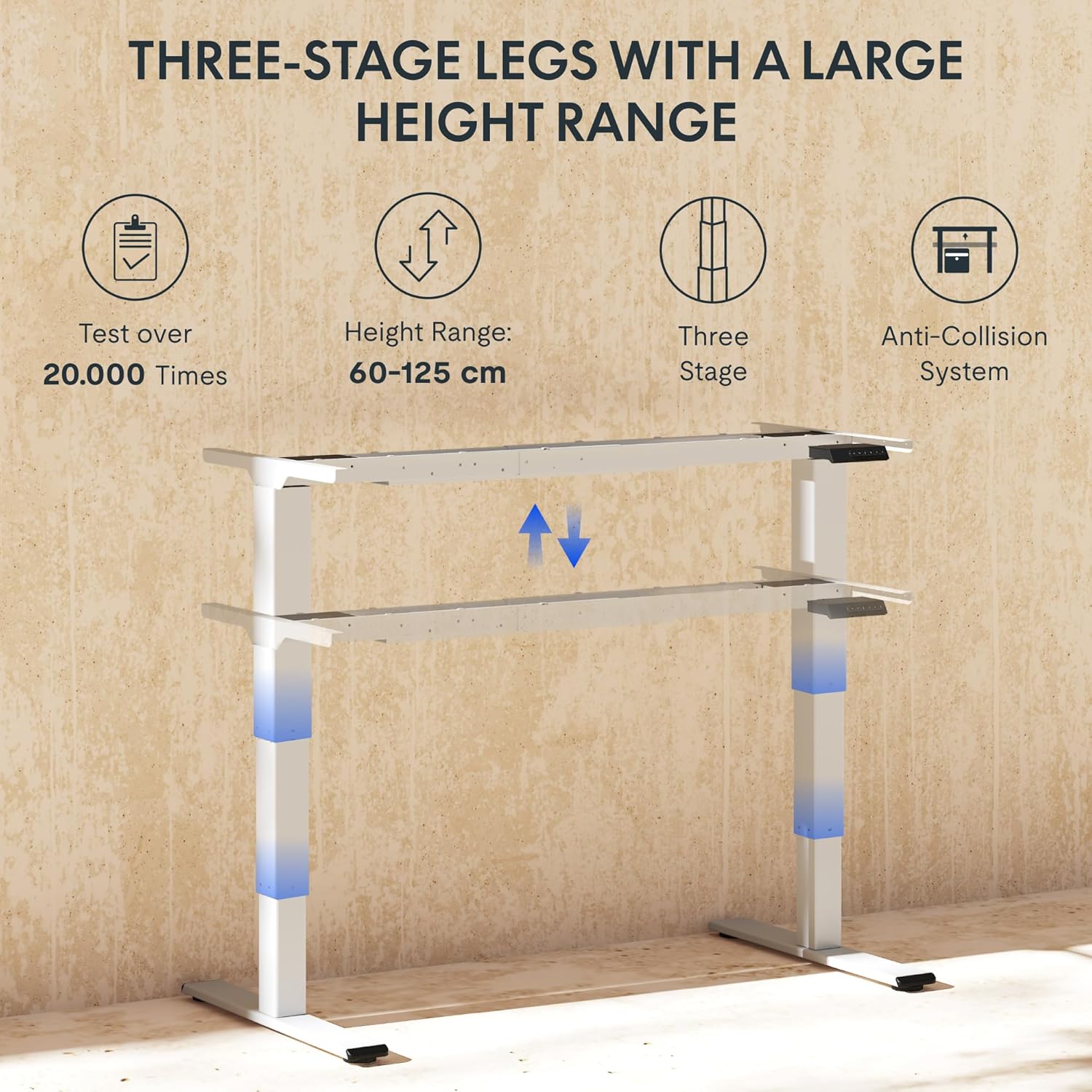
Per regolare l'altezza della scrivania, tenere premuto il tasto ▲ (Su) o ▼ (Down) arrow button until the desk reaches your desired height. The LED display will show the current height in real-time. The desk frame supports a height range of 60 cm to 125 cm.
Preset di memoria
The desk allows you to save up to four preferred height settings for quick recall:
- Regolare la scrivania all'altezza desiderata utilizzando le frecce Su/Giù.
- Press the "M" or "SET" button (if available, otherwise proceed to step 3).
- Press one of the numbered memory preset buttons (1, 2, 3, or 4) within 3 seconds. The LED display will show "S-" followed by the number, indicating the height has been saved.
- To recall a saved height, simply press the corresponding numbered memory preset button. The desk will automatically move to the saved position.
Sistema anticollisione
The EC5 Plus is equipped with an intelligent anti-collision system. If the desk encounters an obstacle during height adjustment, it will automatically stop and reverse slightly to prevent damage or injury. This system has adjustable sensitivity levels. Refer to the detailed manual for instructions on adjusting sensitivity.
Porte di ricarica USB
The control panel includes integrated USB-A and USB-C charging ports. Simply connect your smartphone, tablet, or other compatible devices to these ports for convenient charging directly from your desk.
Manutenzione
Regular maintenance ensures the longevity and optimal performance of your FLEXISPOT EC5 Plus desk frame.
- Pulizia: Pulisci la struttura della scrivania con un panno morbido eamp cloth. Avoid using abrasive cleaners or solvents that may damage the finish. Ensure the desk is unplugged before cleaning.
- Ispezione: Controllare periodicamente tutte le viti e i collegamenti per assicurarsi che siano ben serrati. Serrare nuovamente se necessario.
- Gestione dei cavi: Assicurarsi che i cavi non siano schiacciati o aggrovigliati, poiché ciò potrebbe compromettere il funzionamento della scrivania o causare danni.
- Lubrificazione: The lifting columns are designed to be maintenance-free and do not require lubrication.
Risoluzione dei problemi
If you encounter any issues with your desk frame, refer to the table below for common problems and solutions.
| Problema | Possibile causa | Soluzione |
|---|---|---|
| La scrivania non si muove. | Power cable disconnected; control box not connected; motor cables loose. | Check all power and motor connections. Ensure the power outlet is functional. |
| La scrivania si muove in modo irregolare o produce rumori insoliti. | Sovraccarico; collegamenti allentati; ostruzione. | Reduce weight on the desk. Check all screws and connections. Ensure no obstructions are present. Perform a reset (refer to manual for specific reset procedure). |
| Anti-collision system triggers too often or not at all. | Sensitivity setting incorrect. | Adjust the anti-collision sensitivity via the control panel (refer to manual for specific steps). |
| Il display LED mostra un codice di errore. | Malfunzionamento specifico. | Consultare il manuale utente completo per un elenco dei codici di errore e delle relative soluzioni. Se il problema persiste, contattare l'assistenza clienti. |
Specifiche
Detailed technical specifications for the FLEXISPOT EC5 Plus Desk Frame:
| Caratteristica | Dettaglio |
|---|---|
| Marca | FLESSIBILE |
| Numero di modello | EC5W-PL-IE |
| Colore | Bianco |
| Dimensioni del prodotto (L x P x A) | 80 x 180 x 125 cm (frame dimensions, adaptable to tabletop) |
| Peso dell'articolo | 22.6 chilogrammi |
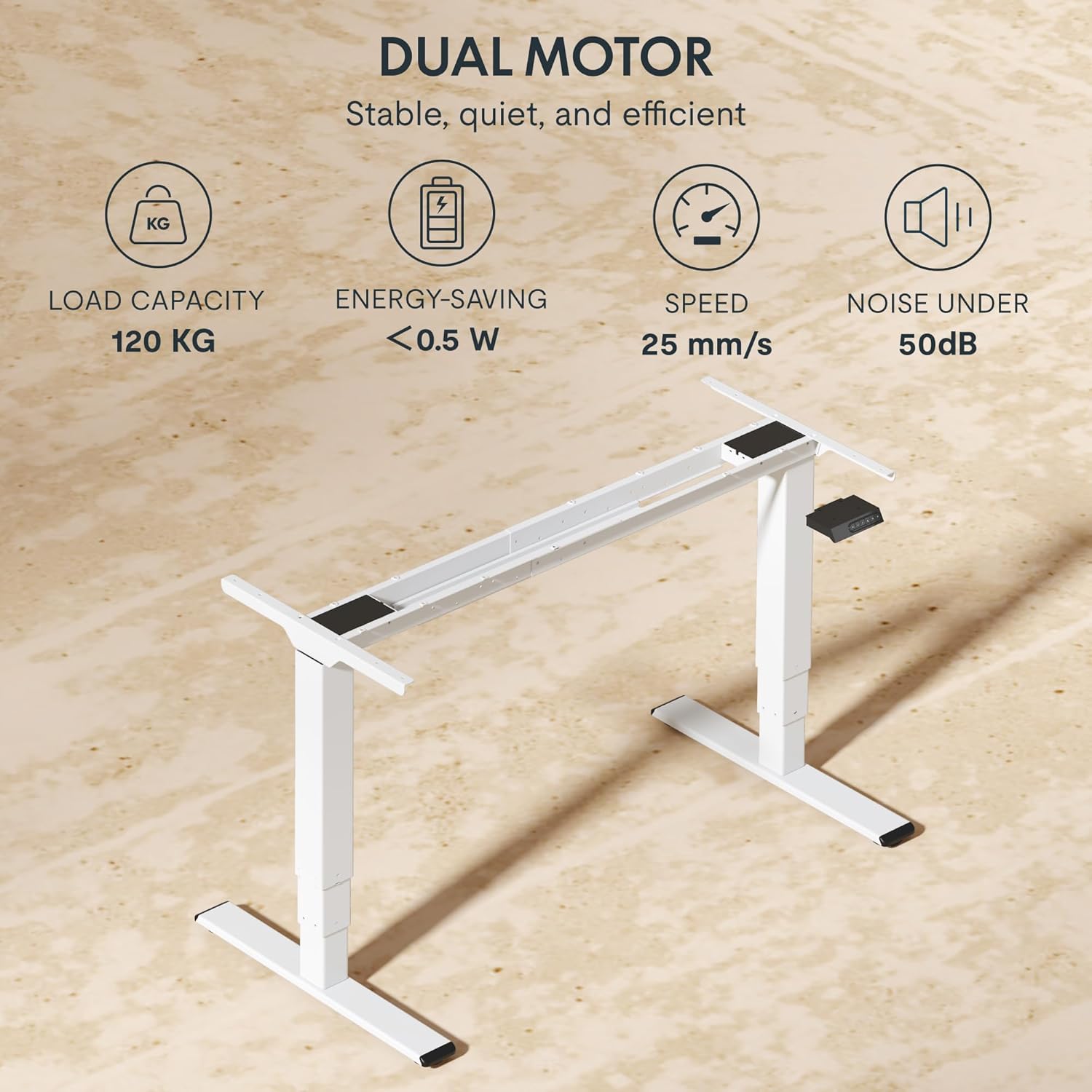
| Capacità di carico | 120 kg (265 libbre) |
| Tipo di motore | Sistema a doppio motore |
| Gamma di regolazione dell'altezza | 60 cm - 125 cm (23.6 pollici - 49.2 pollici) |
| Velocità di sollevamento | 25 millimetri/secondo |
| Livello di rumore | Sotto i 50 dB |
| Gambetages | Tre-stage telescopic legs |
| Pannello di controllo | LED display, 4 memory presets, Up/Down buttons |
| Porte di ricarica | Integrated USB-A and USB-C ports |
| Caratteristiche speciali | Ergonomic design, Anti-Collision System, Energy-saving (<0.5W standby) |
| Compatible Tabletop Sizes | Length: 120-180 cm; Width: 60-80 cm |
| Materiale di base | Metallo |
Garanzia e supporto
FLEXISPOT stands behind the quality of its products. Your EC5 Plus Desk Frame comes with the following warranty:
- Garanzia sul telaio: 5 anni
- Garanzia del motore: 3 anni
This warranty covers defects in materials and workmanship under normal use. For warranty claims or technical assistance, please contact FLEXISPOT customer support. Lifetime free technical support is provided.
For the most up-to-date contact information, please visit the official FLEXISPOT websito o fare riferimento alla documentazione relativa all'acquisto.
Websito: www.flexispot.com