
1. Introduzione e oltreview
Thank you for choosing the Hagibis 380W USB C Charger 8-Port GaN PD 3.1 Charging Station. This device is designed to provide efficient and fast charging for multiple electronic devices simultaneously. Featuring advanced GaN (Gallium Nitride) technology and PD 3.1 support, it offers high power output in a compact form factor. This manual provides essential information for safe and optimal use of your charging station.
2. Caratteristiche del prodotto
- 8-Port Charging Station: Supports charging up to 8 devices concurrently, including 6 USB-C ports and 2 USB-A ports.
- Uscita ad alta potenza: Delivers a total of 380W. Single USB-C ports (C1/C2) can provide up to 140W, suitable for high-power laptops.
- Tecnologia GaN: Utilizes 3rd generation Gallium Nitride materials for efficient power delivery, reduced heat, and a compact design.
- Sistema di raffreddamento avanzato: Features a built-in AI chip for intelligent temperature control and a cooling fan, along with bottom and side cooling holes, to ensure safe operation.
- Molteplici protocolli di ricarica rapida: Compatible with PD3.1, PPS, QC4+, QC3.0, FCP, SCP, AFC, and more, ensuring broad compatibility with various devices.
- Protezione completa: Equipped with temperature protection, over-current protection, over-voltage protection, overcharge protection, overload protection, overheat protection, and short circuit protection.
- Ampia compatibilità: Supports a vast range of devices including MacBook Pro/Air, iPad Pro, iPhone 15/16 series, Dell XPS, Samsung Galaxy devices, and other USB-C and USB-A powered electronics.
3. Contenuto della confezione
Si prega di verificare che tutti gli articoli siano presenti nel pacco:

Image: Contents of the Hagibis 380W GaN Charger package, showing the charger, power cable, and manual.
- Hagibis 380W GaN Charger Unit
- Manuale di istruzioni
- Power Cable (Type A - 2 pin, North American)
- Scatola al dettaglio
4. Istruzioni per l'installazione
- Disimballare il caricabatterie: Carefully remove the Hagibis 380W USB C Charger and all accessories from the packaging.
- Collegare il cavo di alimentazione: Insert the included power cable into the AC input port on the back of the charging station. Ensure it is firmly seated.
- Collegare alla presa di corrente: Plug the other end of the power cable into a standard 110V AC wall outlet. The charging station is now ready for use.
- Posizionare il caricabatterie: Place the charging station on a stable, flat surface with adequate ventilation to allow for proper heat dissipation.
5. Istruzioni per l'uso
The Hagibis 380W charging station is designed for ease of use. Follow these steps to charge your devices:
- Identificare le porte: The charging station features 6 USB-C ports (C1-C6) and 2 USB-A ports (A1-A2). Refer to the port labels on the device.
- Collega i tuoi dispositivi: Use appropriate charging cables (not included) to connect your devices to the desired ports on the charging station. For optimal fast charging, use high-quality USB-C to USB-C cables for USB-C devices and USB-A to device-specific cables for USB-A devices.
- Automatic Power Distribution: The charging station intelligently detects the connected devices and automatically adjusts the power output to provide the fastest and safest charge.
- Ricarica del monitor: The LED indicators on the charger will illuminate to show active charging.

Image: The Hagibis 380W charger simultaneously charging a laptop, smartphone, and wireless earbuds.

Image: The Hagibis 380W charger providing simultaneous fast charging to four laptops.
6. Power Output Configurations
The Hagibis 380W charging station dynamically allocates power based on the number and type of connected devices. Below are common output configurations:
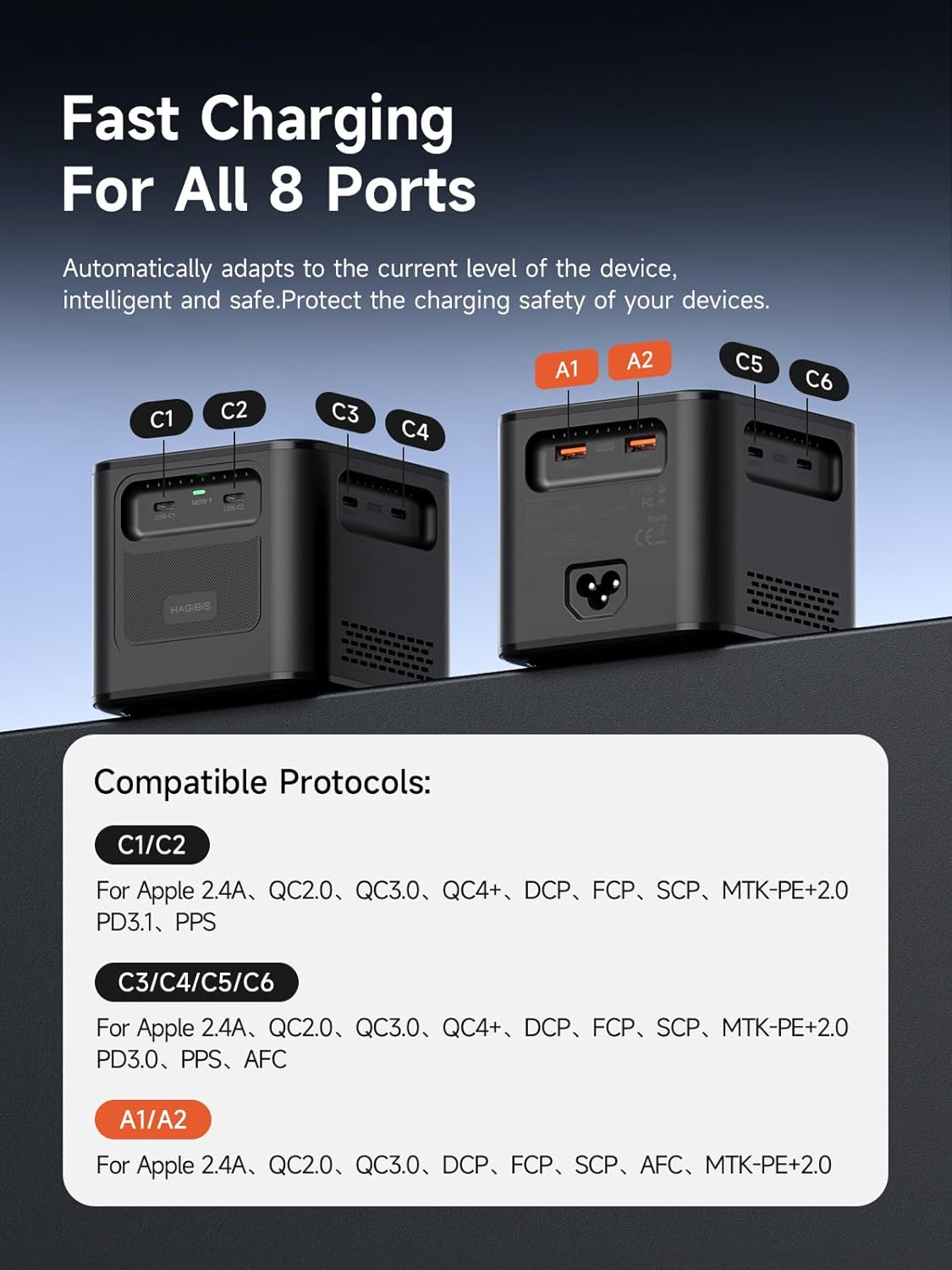
Image: Port identification and compatible charging protocols for C1/C2, C3/C4/C5/C6, and A1/A2 ports.
Protocolli compatibili:
- C1/C2 Ports: Apple 2.4A, QC2.0, QC3.0, QC4+, DCP, FCP, SCP, MTK+PE+2.0, PD3.1, PPS
- C3/C4/C5/C6 Ports: Apple 2.4A, QC2.0, QC3.0, QC4+, DCP, FCP, SCP, MTK+PE+2.0, PD3.1, PPS, PD3.0, AFC
- A1/A2 Ports: Apple 2.4A, QC2.0, QC3.0, DCP, FCP, SCP, AFC, MTK+PE+2.0
Combinazioni di uscite:
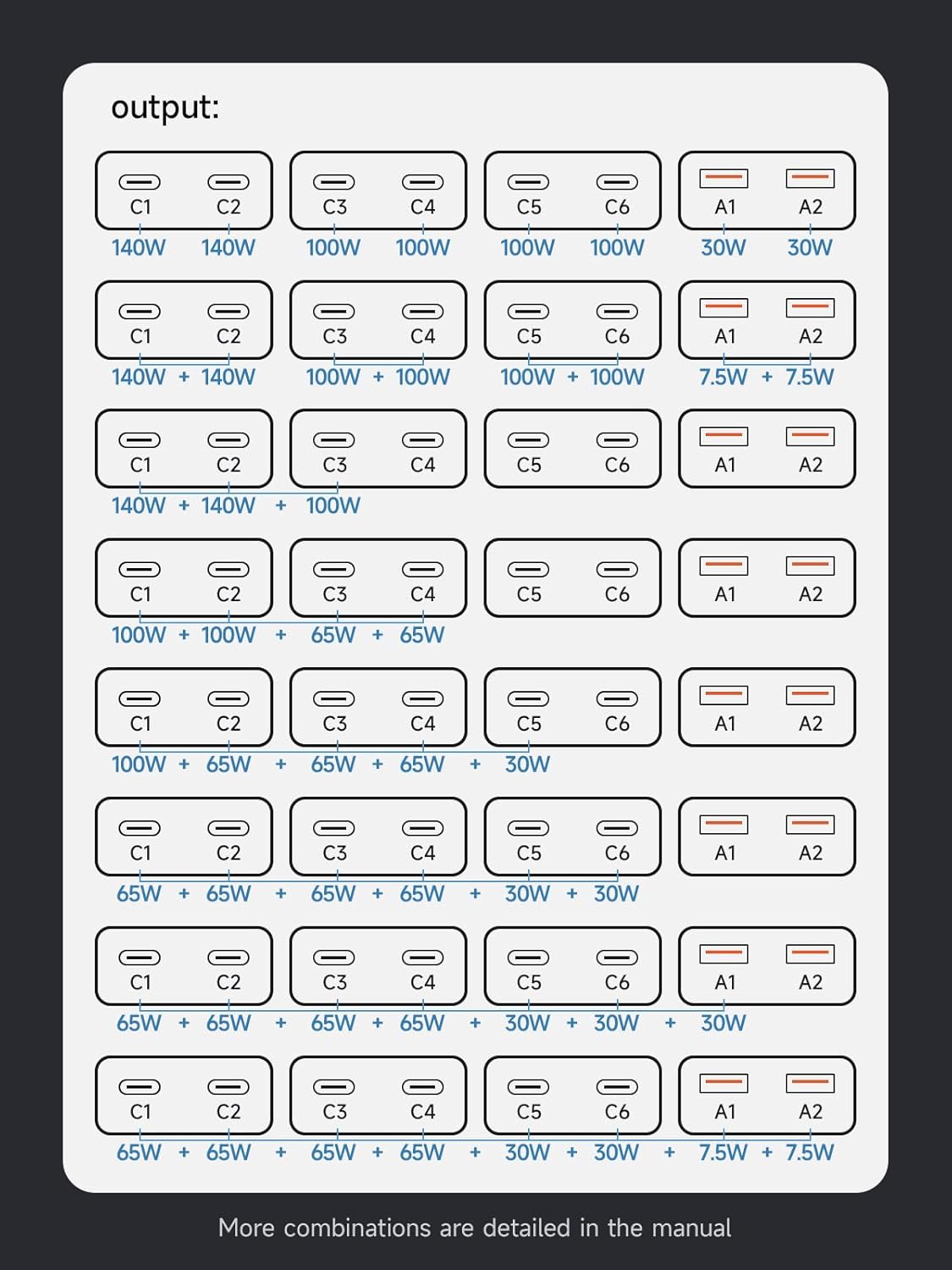
Image: Visual representation of power distribution across multiple ports.
- Single Port Max Output: C1/C2 up to 140W (28V/5A); C3/C4/C5/C6 up to 100W (20V/5A); A1/A2 up to 7.5W.
- Uscita doppia porta:
- C1+C2 = 140W+140W
- C3+C4 = 100W+100W
- C5+C6 = 100W+100W
- A1+A2 = 7.5W+7.5W
- Multiple Port Output Examples:
- C1+C2+C3 = 140W+140W+100W
- C1+C2+C3+C4 = 100W+100W+65W+65W
- C1+C2+C3+C4+C5 = 100W+65W+65W+65W+30W
- C1+C2+C3+C4+C5+C6 = 65W+65W+65W+65W+30W+30W
- C1+C2+C3+C4+C5+C6+A1 = 65W+65W+65W+65W+30W+30W+30W
- C1+C2+C3+C4+C5+C6+A1+A2 = 65W+65W+65W+65W+30W+30W+7.5W+7.5W
7. Manutenzione
Una corretta manutenzione garantisce la longevità e le prestazioni ottimali della stazione di ricarica.
- Pulizia: Scollegare il caricabatterie dalla presa di corrente prima di pulirlo. Utilizzare un panno morbido e asciutto per pulire l'esterno. Non utilizzare detergenti liquidi o spray.
- Magazzinaggio: Quando non viene utilizzato per lunghi periodi, conservare il caricabatterie in un luogo fresco e asciutto, lontano dalla luce solare diretta e da temperature estreme.
- Ventilazione: Ensure the cooling vents are not obstructed during operation to prevent overheating.
- Cura del cavo: Avoid bending or crimping charging cables excessively, as this can damage them and affect charging performance.
8. Risoluzione Dei Problemi
If you encounter issues with your Hagibis charging station, please refer to the following common problems and solutions:
| Problema | Possibile causa | Soluzione |
|---|---|---|
| Dispositivo non in carica | Loose connection, faulty cable, power outlet issue, device compatibility. | Ensure power cable is securely plugged in. Try a different charging cable. Test the power outlet with another device. Verify device compatibility with the charger's output specifications. |
| Ricarica lenta | Cable not supporting fast charging, too many devices connected, device not supporting fast charging protocol. | Use a high-quality cable that supports fast charging. Refer to the 'Power Output Configurations' section to ensure sufficient wattage for your device. Check if your device supports the charger's fast charging protocols. |
| Il caricabatterie è caldo | Heavy load, obstructed ventilation. | This is normal under heavy load due to high power output. Ensure the charger is placed in a well-ventilated area and vents are not blocked. The built-in cooling system will manage temperature. If it becomes excessively hot or shuts down, disconnect devices and power, then allow it to cool. |
| Il caricabatterie non si accende | No power from outlet, faulty power cable. | Check if the power outlet is functional. Ensure the power cable is fully inserted into both the charger and the wall outlet. |
9. Specifiche
Detailed technical specifications for the Hagibis 380W USB C Charger:

Image: Product dimensions and key technical parameters.
| Marca | Hagibis |
| Numero di modello | PD380 |
| Porte USB totali | 8 (6x USB-C, 2x USB-A) |
| Watt totaletage | 380W |
| Ingresso volumetage | 110-120V~50/60Hz 5.0A Max (US) |
| Output (C1/C2) | 3.3V~21V=5A, 5V=3A, 9V=3A, 12V=3A, 15V=3A, 20V=5A (100W Max), 28V=5A (140W Max), PPS: 3.3-21V=5A (105W Max) |
| Output (C3/C4/C5/C6) | 3.3V~21V=5A, 5V=3A, 9V=3A, 12V=3A, 15V=3A, 20V=5A (100W Max), PPS: 3.3-21V=5A (105W Max) |
| Output (A1/A2) | 4.5V=5A, 5V=4.5A, 9V=3A, 12V=2.5A, 20V=1.5A (30W Max) |
| Tipo di connettore | USB tipo A, USB tipo C |
| Materiale | Policarbonato |
| Colore | Nero |
| Peso dell'articolo | 23 once (circa 650 g) |
| Dimensioni | Circa. 95mm x 88mm x 95mm |
| Fonte di alimentazione | Elettrico con cavo |
| Certificazione di sicurezza | Conforme UL |
10. Informazioni sulla sicurezza
Per garantire un funzionamento sicuro ed evitare danni al dispositivo o lesioni, osservare le seguenti linee guida di sicurezza:
- Non esporre il caricabatterie ad acqua, umidità o temperature estreme.
- Evitare di far cadere o di sottoporre il caricabatterie a urti violenti.
- Do not disassemble, modify, or attempt to repair the charger. This will void the warranty and may cause hazards.
- Tenere il caricabatterie lontano da materiali infiammabili.
- Ensure proper ventilation around the charger during use. Do not cover it with cloths or other materials.
- Use only the provided power cable or a certified replacement.
- Scollegare il caricabatterie dalla presa di corrente quando non è in uso o durante i temporali.
- This device is equipped with multiple protection functions including temperature, over-current, over-voltage, overcharge, overload, overheat, and short circuit protection to ensure safe charging.
11. Garanzia e supporto
The Hagibis 380W USB C Charger (Model PD380) comes with a Garanzia di 1 anno dalla data di acquisto, coprendo i difetti di fabbricazione.
For technical support, warranty claims, or any questions regarding your product, please contact the retailer where you purchased the item or visit the official Hagibis websito per informazioni sul servizio clienti.
Produttore: Shanghai Xinxie Industrial Co., Ltd.