
Introduzione
The SpaceX Starlink Mini Satellite Dish (4th Gen) provides reliable, high-speed internet connectivity in remote areas. Designed for portability, it is ideal for RVs, camping, remote work, and off-grid living. This manual will guide you through the setup, operation, and maintenance of your Starlink Mini.
- Advanced Satellite Technology: Features the latest Gen 4 technology for reliable, high-speed internet.
- Connettività versatile: Functions as a wireless router, modem router combo, or gaming router.
- Trasmissione ad alta velocità: Ensures smooth, buffer-free streaming even from remote locations.
- Compatto e portatile: Designed for travel and hassle-free internet access on the go.
Avviso importante: Outside region fees may apply. A one-time activation fee of $300 may be charged for use of your Mini outside a specific area. A one-time congestion fee of $100 may also apply in some areas, which Starlink plans to remove when network capacity improves.
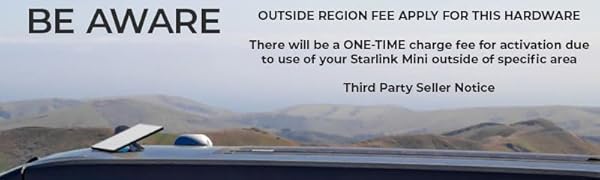
Image: Important notice regarding potential fees for using Starlink Mini outside designated regions or during congestion.
Contenuto della confezione
Before you begin, ensure all components are present in your Starlink Mini package:
- Starlink Mini Satellite Dish with Integrated WiFi
- Cavalletto
- Adattatore per mini tubi e montaggio piatto
- DC Power Cable (15m / 49.2ft)
- Alimentazione elettrica
- Spina Starlink
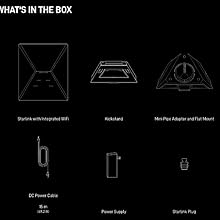
Image: Visual representation of the Starlink Mini, kickstand, adapter, DC power cable, power supply, and plug.
Impostare
Follow these steps to set up your Starlink Mini for optimal performance:
- Disimballare i componenti: Estrarre con cautela tutti gli articoli dall'imballaggio.
- Fissare il cavalletto: Locate the kickstand on the back of the Starlink Mini dish. Fold it out until it clicks into place, ensuring the dish is angled correctly for sky visibility.
- Collegare il cavo di alimentazione: Plug the DC power cable into the port on the Starlink Mini dish. Ensure a secure connection.
- Collegare l'alimentazione: Connect the other end of the DC power cable to the power supply unit. Then, plug the power supply into a suitable power source (wall outlet or compatible 12V source).
- Posizionare il piatto: Place the Starlink Mini dish in an open area with a clear, unobstructed view of the sky. Avoid trees, buildings, or other obstacles that could block the signal.
- Scarica l'app Starlink: Download the official Starlink app on your smartphone or tablet. The app will guide you through the final configuration steps, including connecting to the Wi-Fi network and checking for software updates.

Image: The Starlink Mini dish with its integrated kickstand extended, showing its compact and portable design.

Immagine: Frontale view of the Starlink Mini Satellite Dish.

Immagine: Lato view of the Starlink Mini Satellite Dish, highlighting its slim profile.
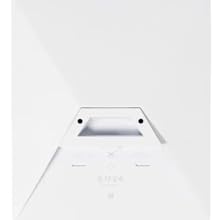
Immagine: Indietro view of the Starlink Mini Satellite Dish, showing the kickstand and connection ports.
Istruzioni per l'uso
Once set up, the Starlink Mini operates largely automatically. Here are key operational aspects:
- Allineamento automatico: The dish will automatically orient itself to connect with the Starlink satellite constellation. This process may take a few minutes.
- Monitoring with App: Use the Starlink app to monitor your connection status, speed, and any potential obstructions. The app provides real-time statistics on ping success, latency, and power draw.
- Configurazione Wi-Fi: Configure your Wi-Fi network name and password through the Starlink app.
- Portabilità: The compact design allows for easy transport. Simply fold the kickstand, disconnect the power, and pack it for your next destination.
The Starlink Mini is designed for seamless internet access in various environments:
- Residenziale: Connect at home.
- Vagare: Connect on the go, perfect for RVs and camping.
- Barche: Connect on the water.

Image: Starlink Mini dish providing internet in a remote, grassy outdoor setting with a laptop, demonstrating its use for remote work.
Manutenzione
To ensure the longevity and optimal performance of your Starlink Mini, follow these maintenance guidelines:
- Mantieni la calma: Ensure the dish surface is free from dirt, snow, ice, or other obstructions. The dish has a self-heating capability to melt snow, but heavy accumulation may require manual clearing.
- Cura del cavo: Handle the power cable with care to prevent damage. Avoid sharp bends or kinks.
- Aggiornamenti software: Regularly check the Starlink app for software updates. Updates often include performance improvements and new features.
- Magazzinaggio: When not in use, store the Starlink Mini in a dry, protected environment.
Risoluzione dei problemi
If you encounter issues with your Starlink Mini, try the following troubleshooting steps:
- Nessuna connessione internet:
- Check for obstructions using the Starlink app's 'Obstructions' tool.
- Ensure the power cable is securely connected to both the dish and the power supply.
- Verify the power supply is plugged into a working outlet.
- Riavviare Starlink Mini scollegandolo dall'alimentazione per 30 secondi e ricollegandolo.
- Velocità basse:
- Confirm there are no obstructions blocking the dish's view del cielo.
- Check the Starlink app for any network congestion alerts in your area.
- Ensure your device is connected to the Starlink Wi-Fi network and not another network.
- Wi-Fi Not Appearing:
- Ensure the Starlink Mini is powered on and has completed its initial boot-up sequence.
- Try restarting the Starlink Mini.
- Check your device's Wi-Fi settings to ensure it's scanning for networks.
Specifiche
| Tipo di antenna | Satellitare |
| Marca | Generico |
| Colore | Bianco |
| Numero di canali | 10 |
| Portata massima | 3200 piedi |
| Dimensioni del prodotto (L x P x A) | 7 cm L x 4 cm P x 9 cm A |
| Peso dell'articolo | 5 libbre |
| Conteggio unità | 1.0 Conteggio |
Garanzia
This product comes with a standard manufacturer's warranty. For specific details regarding warranty coverage, duration, and claims process, please refer to the warranty card included in your product packaging or visit the official Starlink support websito.
Supporto
For further assistance, technical support, or to access additional resources, please visit the official Starlink support website or contact their customer service. The Starlink app also provides a comprehensive help section and diagnostic tools.