
1. Introduzione
This manual provides essential instructions for the proper setup, operation, and maintenance of your Irfora Remote Control. This remote control is designed for wireless navigation and control of compatible GPS fishing bait boats, specifically models D18B, D16B, D18E, and D16E.
The remote control features a strong signal for extended range and an LCD screen to display critical information about your bait boat's status and location.

Image: The Irfora Remote Control shown alongside a compatible GPS fishing bait boat, demonstrating its intended use for wireless operation.
2. Prodotto finitoview
Familiarize yourself with the components and controls of your Irfora Remote Control.
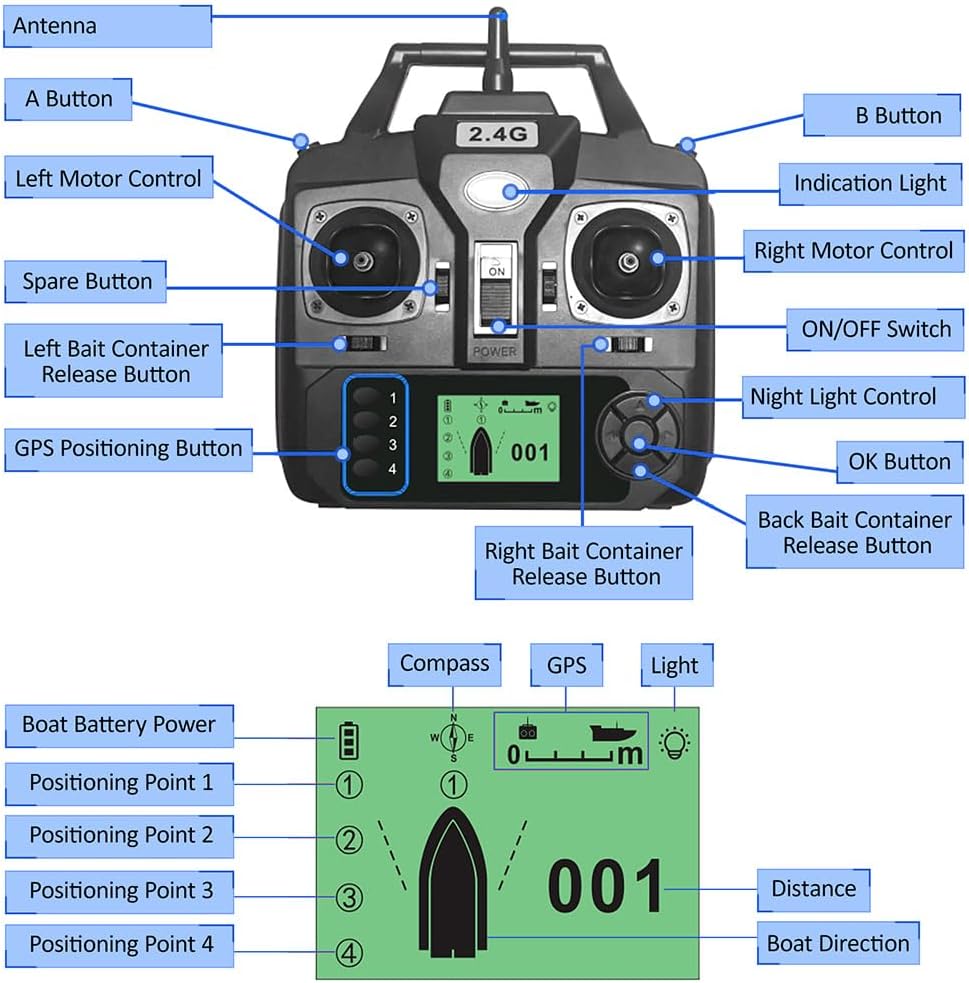
Image: A detailed diagram labeling each part of the remote control, including the antenna, joysticks, ON/OFF switch, bait release buttons, GPS positioning buttons, and LCD screen.
Componenti chiave:
- Antenna: Per la trasmissione del segnale wireless.
- Left Motor Control: Joystick for controlling the left motor of the bait boat.
- Right Motor Control: Joystick for controlling the right motor of the bait boat.
- Interruttore ON/OFF: Accende o spegne il telecomando.
- Indicatore luminoso: Fornisce feedback sullo stato.
- A Button / B Button: Auxiliary control buttons.
- Left Bait Container Release Button: Activates the release mechanism for the left bait container.
- Right Bait Container Release Button: Activates the release mechanism for the right bait container.
- Back Bait Container Release Button: Activates the release mechanism for the rear bait container (if applicable to boat model).
- GPS Positioning Button (1-4): Used to set and recall GPS positioning points.
- Controllo della luce notturna: Activates or deactivates the boat's night lights.
- Pulsante OK: Confirms selections on the LCD screen.
- Schermo LCD: Displays boat distance, direction, positioning points, battery life, and light status.

Immagine: Frontale view of the remote control, illustrating its physical dimensions for reference.
3. Impostazione
3.1 Installazione della batteria
- Individuare il vano batterie sul retro del telecomando.
- Aprire il coperchio del vano batterie.
- Inserire 4 batterie AA (non incluse) nel vano, assicurandosi della corretta polarità (+/-).
- Chiudere saldamente il coperchio del vano batterie.

Immagine: Posteriore view of the remote control, highlighting the battery compartment for battery installation.
3.2 Accensione/Spegnimento
- To power on, slide the ON/OFF switch to the "ON" position. The LCD screen will illuminate.
- To power off, slide the ON/OFF switch to the "OFF" position. The LCD screen will turn off.
3.3 Pairing with Bait Boat
The remote control is typically pre-paired with compatible Irfora GPS fishing bait boats. If pairing is required or connection is lost:
- Ensure both the remote control and the bait boat are powered off.
- Power on the bait boat first.
- Within 5 seconds, power on the remote control.
- The remote control should automatically connect to the bait boat. The LCD screen will display connection status. Refer to your bait boat's specific manual for detailed pairing instructions if issues persist.
4. Istruzioni per l'uso
This section details the functions of the remote control for navigating and operating your GPS fishing bait boat.

Image: The remote control in use, demonstrating its function in guiding a bait boat across the water.
4.1 Boat Navigation
- Utilizzare il Left Motor Control joystick to adjust the speed and direction of the left motor.
- Utilizzare il Right Motor Control joystick to adjust the speed and direction of the right motor.
- Combine both joysticks for forward, backward, turning, and precise maneuvering.
4.2 Rilascio dell'esca
- Premere il tasto Left Bait Container Release Button to open the left bait compartment and release bait.
- Premere il tasto Right Bait Container Release Button to open the right bait compartment and release bait.
- Premere il tasto Back Bait Container Release Button to open the rear bait compartment (if available on your boat model).
4.3 Posizionamento GPS
The remote control allows you to set and recall up to 4 GPS positioning points.
- Setting a Point: Navigate the boat to the desired location. Press and hold one of the GPS Positioning Buttons (1-4) until the remote confirms the point is saved.
- Recalling a Point: Premere il desiderato GPS Positioning Button (1-4) briefly. The boat will automatically navigate to the saved location.
4.4 Informazioni sullo schermo LCD
The LCD screen provides real-time data:
- Boat Battery Power: Indicates the remaining battery life of the bait boat.
- Bussola: Shows the boat's current heading.
- Stato GPS: Indicates GPS signal strength and lock.
- Stato della luce: Shows if the boat's lights are on or off.
- Distanza: Displays the distance of the boat from the remote control or a set point.
- Boat Direction: Visual representation of the boat's orientation.
- Positioning Points (1-4): Indicates which GPS points are set or active.
4.5 Controllo della luce notturna
- Premere il tasto Controllo della luce notturna button to toggle the bait boat's night lights on or off for visibility in low-light conditions.
5. Manutenzione
- Pulizia: Pulisci il telecomando con un panno morbido e asciutto. Non utilizzare prodotti chimici aggressivi o detergenti abrasivi.
- Magazzinaggio: Store the remote control in a cool, dry place away from direct sunlight and extreme temperatures. Remove batteries if storing for extended periods to prevent leakage.
- Esposizione all'acqua: The remote control is not waterproof. Avoid exposing it to water or high humidity.
6. Risoluzione Dei Problemi
| Problema | Possibile causa | Soluzione |
|---|---|---|
| Il telecomando non si accende. | Le batterie sono scariche o installate in modo errato. | Sostituirle con batterie AA nuove, assicurandosi della corretta polarità. |
| No connection to bait boat. | Boat is not powered on; remote is out of range; pairing issue. | Ensure boat is on. Move closer to the boat. Re-attempt pairing procedure (Section 3.3). |
| La barca non risponde ai comandi. | Weak signal; boat battery low; remote battery low. | Check remote and boat battery levels. Move closer to the boat. |
| Lo schermo LCD è scuro o vuoto. | Batteria del telecomando scarica. | Sostituire le batterie del telecomando. |
7. Specifiche
- Marca: Ifora
- Materiale: Plastica
- Colore: Nero
- Dimensioni del prodotto: Approximately 15.5 cm (W) x 16.5 cm (H) / 6.1 in (W) x 6.5 in (H)
- Dimensioni della confezione: Approximately 17 cm x 17 cm x 7 cm / 6.7 in x 6.7 in x 2.8 in
- Peso del pacco: Circa 250 g / 8.8 once
- Fonte di energia: 4 batterie AA (non incluse)
- Frequenza wireless: 2.4G
- Gamma remota: 400-500 metri
- Compatibilità: Irfora GPS Fishing Bait Boats D18B, D16B, D18E, D16E