
Guide Sensmart TK421
User Manual: TK Series Thermal Vision Monocular
Model: TK421 | Brand: Guide Sensmart
Introduzione
The Guide Sensmart TK421 Thermal Vision Monocular is a high-performance device designed for enhanced visibility in various outdoor conditions, particularly low light or darkness. Featuring a 400x300 resolution sensor and a 50Hz refresh rate, it provides clear thermal imaging for applications such as hunting, wildlife observation, and surveillance. Its compact and durable design ensures reliable operation in challenging environments.
Informazioni importanti sulla sicurezza
- Non esporre il dispositivo a temperature estreme o alla luce solare diretta per periodi prolungati.
- Avoid direct eye exposure to the laser beam. Do not direct the laser beam toward people or animals.
- Keep the device away from water unless specifically stated as waterproof. This model is IP66 rated, but general caution is always recommended.
- Per la ricarica utilizzare solo l'adattatore di alimentazione e i cavi specificati.
- Non tentare di smontare o riparare il dispositivo da soli. Contattare il personale di assistenza autorizzato.
- Conservare il dispositivo in un luogo fresco e asciutto quando non viene utilizzato.
Contenuto della confezione
Dopo aver aperto la confezione, verificare che siano presenti tutti i seguenti elementi:
- Thermal Monocular (TK421)
- Adattatore di alimentazione
- Cavo USB (Tipo C)
- Cavo micro HDMI
- Copriobiettivo
- Cinturino da polso
- Borsa interna
- Tracolla
- Guida rapida
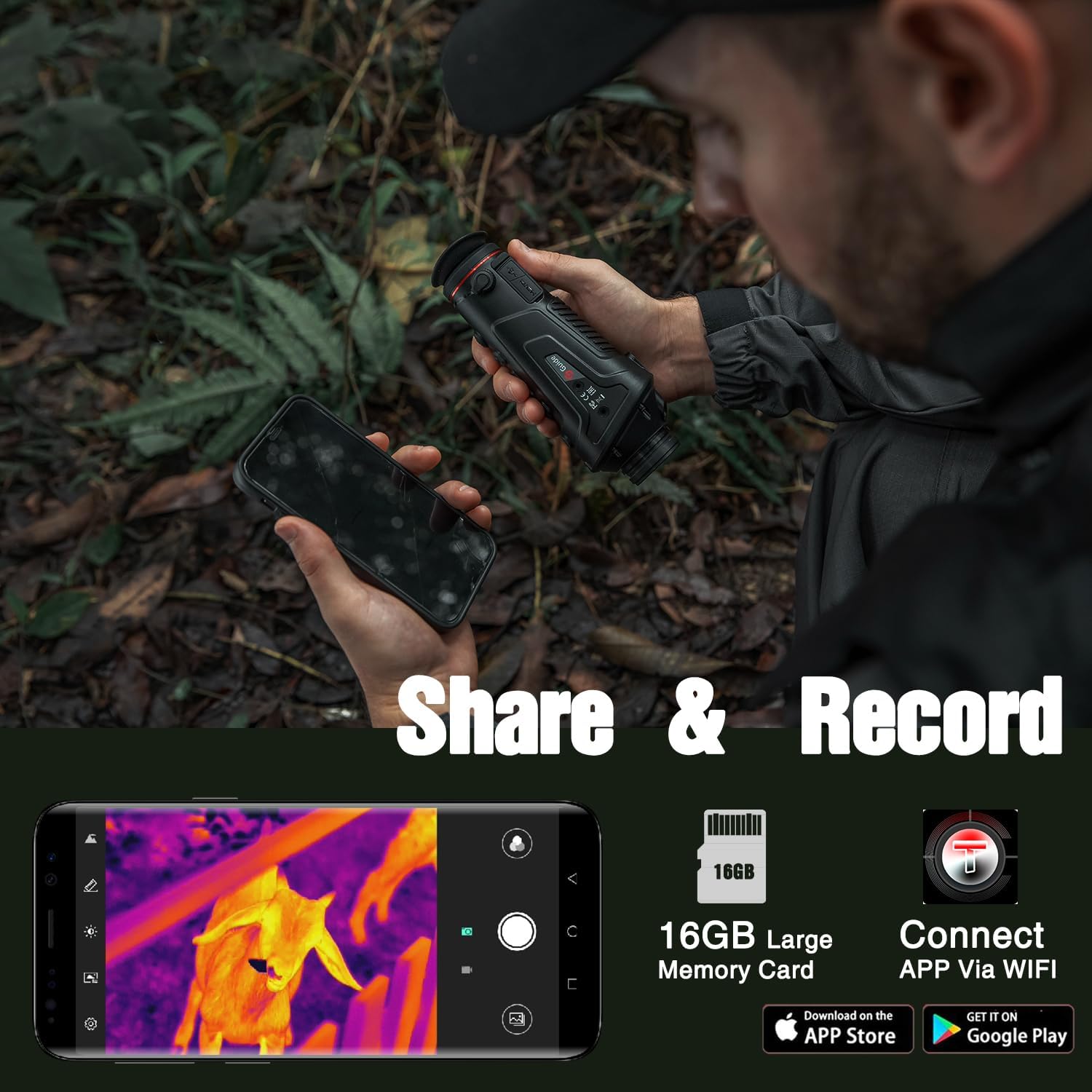
Image: All items included in the TK421 thermal monocular package.
Prodotto finitoview
The TK421 thermal monocular is designed for ease of use and durability. Familiarize yourself with its main components:

Image: The TK421 thermal monocular, highlighting its ergonomic shape and button layout.
- Lente obiettivo: Lente frontale per l'acquisizione di immagini termiche.
- Oculare: Regolabile per un comfort ottimale viewing.
- Pulsanti di controllo: Located on the top for power, mode selection, zoom, and recording.
- Porta USB-C: Per la ricarica e il trasferimento dei dati.
- Porta Micro HDMI: Per l'uscita video.
- Strap Loops: For attaching wrist or shoulder straps.
Guida all'installazione
1. Carica del dispositivo
Before first use, fully charge the TK421 monocular. The device is equipped with a durable rechargeable battery that provides up to 5 hours of continuous use.
- Connect the provided USB Type-C cable to the monocular's charging port.
- Collega l'altra estremità del cavo USB all'alimentatore.
- Collega l'alimentatore a una presa elettrica standard.
- La spia di carica indicherà lo stato di carica. Solitamente si spegnerà o cambierà colore quando la carica sarà completa.
2. Accensione iniziale
- Tenere premuto il pulsante di accensione (solitamente contrassegnato dal simbolo di accensione) per alcuni secondi, finché il display non si attiva.
- Adjust the eyepiece focus ring until the display image is clear.
Istruzioni per l'uso
Funzionamento di base
- Accensione/spegnimento: Premere e tenere premuto il pulsante di accensione.
- Ingrandisci: Use the dedicated zoom buttons (e.g., '+' and '-' or up/down arrows) to adjust magnification (1.7x-6.8x).
- Selezione della modalità: Press the Mode button to cycle through different viewing modes (e.g., Natural, White Hot, Iron Hot, etc.).
- Cattura foto/video: Press the Capture button to take a photo or start/stop video recording. The device has 16GB of internal storage.
Funzionalità avanzate
- Palette di colori multipli: The TK421 offers 6 color palettes and 3 scene modes to optimize viewing for different environments and preferences. Experiment with these settings to find the best contrast for your target.
- Rangefinder and Picture-in-Picture (PIP) Mode: Utilize the built-in rangefinder for distance estimation. The Picture-in-Picture mode allows for a magnified view of a specific area while maintaining a wider field of view.
- Indicatore a infrarossi: A built-in Infrared indicator assists in easy target location, with a range of up to 200 meters.
- Wi-Fi Connectivity and TargetIR App: Connect the monocular to your smartphone via Wi-Fi using the TargetIR app for remote control, real-time image/video transmission, and sharing.

Immagine: Examples of different color palettes available on the TK421 for varied thermal visualization.

Image: Demonstrating the multi-functional capabilities including PIP mode, ranging, and hot spot tracking.

Image: The TK421 connected to a smartphone via Wi-Fi for remote viewing e registrazione.
Viewing Thermal Imagery

Image: A visual comparison illustrating the enhanced clarity provided by the TK421's thermal imaging capabilities.
Video ufficiale del prodotto
Video: A demonstration of the TK421 thermal monocular in use, showing real-time field observation of wildlife. This video illustrates the device's ability to provide clear thermal imagery for identifying subjects in various environments.
Manutenzione
- Pulizia della lente: Use a soft, lint-free cloth specifically designed for optics to clean the objective lens and eyepiece. Do not use abrasive materials or harsh chemicals.
- Pulizia del corpo: Pulisci il corpo del dispositivo con un panno morbido eamp panno. Evitare l'eccessiva umidità.
- Magazzinaggio: When not in use for extended periods, store the monocular in its protective bag in a dry, cool environment. Ensure the battery is partially charged (around 50%) before long-term storage.
- Durata: The TK421 features an IP66 waterproof rating and is designed to withstand drops of up to 1 meter, making it suitable for harsh weather conditions.
Image: Highlighting the durable and waterproof features of the TK421 monocular.
Risoluzione dei problemi
| Problema | Possibile causa | Soluzione |
|---|---|---|
| Il dispositivo non si accende. | La batteria è scarica. | Charge the device using the provided power adapter and USB-C cable. |
| L'immagine è sfocata o poco chiara. | Eyepiece not focused; lens is dirty. | Adjust the eyepiece focus ring. Clean the objective lens and eyepiece with a soft, lint-free cloth. |
| Cannot connect to TargetIR app. | Wi-Fi is off; incorrect app settings. | Ensure Wi-Fi is enabled on the monocular and your smartphone. Check app permissions and network settings. Restart both devices. |
| Durata breve della batteria. | Utilizzo frequente di funzioni ad alto consumo energetico; batteria vecchia. | Reduce screen brightness or turn off Wi-Fi when not needed. Ensure the device is fully charged before use. If battery life significantly degrades, contact support. |
Specifiche tecniche
| Caratteristica | Dettaglio |
|---|---|
| Nome del modello | Guide Sensmart-TK 421 |
| Risoluzione sensore | 400x300 pixel |
| Passo pixel | 17 micron |
| Frequenza di aggiornamento | 50 Hz |
| Zoom Campo | 1.7x-6.8x |
| Tipo di visualizzazione | 0.4-inch FLOCS screen |
| Risoluzione dello schermo | 1280x960 |
| Memoria interna | 16 GB |
| Durata della batteria | Fino a 5 ore |
| Grado di impermeabilità | Grado di protezione IP66 |
| Resistenza alla caduta | Fino a 1 metri |
| Connettività | Wi-Fi, USB Type-C, Micro HDMI |
| Materiale | Metallo, Plastica |
| Peso dell'articolo | 1 libbra |
| Dimensioni (LxWxH) | 14.17 x 4.72 x 7.09 pollici (Prodotto) |
Garanzia e supporto
The Guide Sensmart TK421 Thermal Vision Monocular comes with a garanzia di tre anni, providing peace of mind and protection for your investment.
For technical support, warranty claims, or any inquiries regarding your device, please contact Guide Sensmart customer service. Refer to the quick start guide included in your package for specific contact details or visit the official Guide Sensmart websito.
Risorse online:
- Visitare il Guide Sensmart Store on Amazon per informazioni e aggiornamenti sui prodotti.
Ask a question about this manual
Ask about setup, troubleshooting, compatibility, parts, safety, or missing instructions. Manuals+ will review the question and use this page’s manual context to help answer it.