
1. Introduzione
Thank you for choosing the briidea HRVTC-03A RV Thermostat, Model MK-177. This thermostat is designed to provide reliable and efficient temperature control for your recreational vehicle. It offers a user-friendly interface and is engineered for durability in RV environments. Please read this manual thoroughly before installation and operation to ensure proper use and to maximize the lifespan of your device.
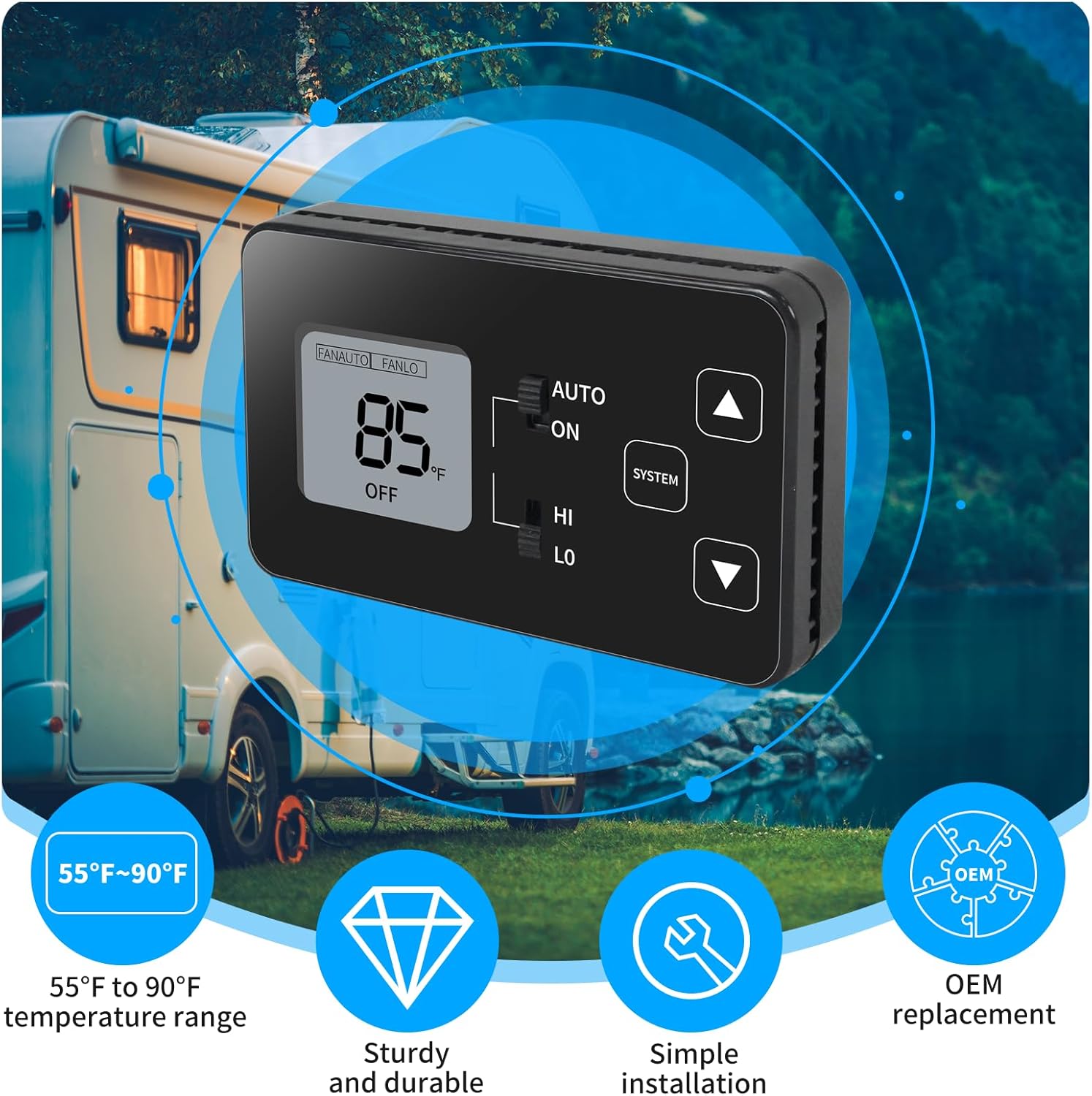
Image 1.1: The briidea HRVTC-03A RV Thermostat, highlighting its 55°F to 90°F temperature range, sturdy design, simple installation, and OEM replacement capability.
2. Informazioni sulla sicurezza
- Sicurezza elettrica: Always disconnect power to the RV's HVAC system before installing or servicing the thermostat to prevent electrical shock.
- Personale qualificato: Installation should be performed by a qualified technician or individuals with experience in RV electrical systems.
- Cablaggio: Ensure all wiring connections are secure and comply with local electrical codes and RV manufacturer specifications. Incorrect wiring can damage the thermostat or the RV's electrical system.
- Ambiente operativo: Do not expose the thermostat to extreme moisture or temperatures outside its specified operating range.
3. Contenuto della confezione
Prima di iniziare l'installazione, verificare che tutti gli elementi siano presenti nel pacchetto:
- briidea HRVTC-03A RV Thermostat (Model MK-177)
- Viti di montaggio (in genere 4)
- Wall Anchors (typically 3)
- Wire Nuts (typically 5)
- Piccolo cacciavite

Image 3.1: All accessories included with the briidea HRVTC-03A RV Thermostat, such as mounting hardware and a screwdriver.
4. Configurazione e installazione
4.1 Preinstallazione
- Scollegare l'alimentazione: Turn off all power to your RV's HVAC system at the circuit breaker or fuse panel.
- Rimuovere il vecchio termostato: Carefully remove the cover of your existing thermostat. Note the wiring connections before disconnecting them. It is recommended to take a photo of the existing wiring for reference.
- Verifica della compatibilità: This thermostat is an ideal replacement for Coleman models 7330335 series, 7330385 series, and 7330336 series. Ensure your existing system is compatible.

Image 4.1: The briidea RV Thermostat is designed as an OEM replacement for specific Coleman models, ensuring broad compatibility.
4.2 Istruzioni per il cablaggio
The briidea HRVTC-03A features user-friendly, color-coded wiring for straightforward installation. Refer to the wiring diagram below and match the wires from your RV to the corresponding terminals on the new thermostat.

Image 4.2: Easy wiring diagram illustrating connections for the upper A/C unit and optional furnace wiring, with color-coded wires for simple installation.
- T-STAT Connections: Connect the wires from your RV's existing thermostat cable to the corresponding terminals on the HRVTC-03A.
- Fili codificati a colori: Match colors (e.g., Yellow to Y, Green to GH, Gray to GL, Blue to B(-)).
- Furnace Wiring (Optional): If your RV has a furnace, connect the White wire to W(+), Red to (+), and Blue to (-).
- Alimentazione elettrica: Ensure the 12 VDC power supply is correctly connected. A 1A fuse is suggested to protect the wiring leading to the thermostat.
- Connessioni sicure: Use the provided wire nuts to secure all connections.
4.3 Montaggio del termostato
- Position the thermostat on the wall where the old unit was located.
- Use the provided mounting screws to secure the thermostat to the wall. Ensure it is level and firmly attached.
- Once mounted, carefully attach the front cover of the thermostat.
4.4 Accensione iniziale
After installation, restore power to your RV's HVAC system. The thermostat display should illuminate, indicating it is ready for operation.
5. Istruzioni per l'uso
The briidea HRVTC-03A RV Thermostat features a clear display and intuitive buttons for easy temperature management.

Image 5.1: The briidea RV Thermostat in an RV interior, showcasing its flexible temperature control, sturdy design, and user-friendly wiring.
5.1 Controlli di base
- Interruttore ON/OFF: Located on the side or front panel, this switch controls the main power to the thermostat.
- SYSTEM Button: Press this button to cycle through system modes: COOL, HEAT, and OFF.
- FAN AUTO/LO/HI Switch: This switch controls the fan speed. Select AUTO for automatic fan operation, LO for low speed, or HI for high speed.
- Temperature Up (▲) / Down (▼) Buttons: Use these buttons to adjust the desired temperature setting. The temperature range is 55°F to 90°F (13°C to 32°C).

Image 5.2: The briidea RV Thermostat installed and in use within an RV, demonstrating its ease of operation.
5.2 Cambio unità di temperatura (Fahrenheit/Celsius)
To switch between Fahrenheit (°F) and Celsius (°C) temperature display, locate the small switch or button, often found inside the battery compartment or on the back of the unit, and toggle it to your preferred unit. Refer to the detailed instructions provided on the product packaging or a separate quick-start guide if available.
6. Manutenzione
- Pulizia: Pulisci l'esterno del termostato con un panno morbido eamp panno. Non usare detergenti abrasivi o solventi.
- Flusso d'aria: Ensure that the vents on the thermostat are not obstructed by dust or debris, as this can affect temperature readings.
- Sostituzione della batteria: If your model uses batteries (not explicitly stated for this model, but common for thermostats), replace them annually or when the low battery indicator appears.
7. Risoluzione Dei Problemi
- Nessuna alimentazione/Display vuoto:
- Check the RV's circuit breaker or fuse for the HVAC system.
- Assicurarsi che tutti i collegamenti elettrici siano sicuri.
- Verify the 12V DC power supply is active.
- Lettura errata della temperatura:
- Assicurarsi che il termostato non sia esposto alla luce solare diretta o a correnti d'aria.
- Pulire eventuali residui di polvere o detriti dalle prese d'aria del termostato.
- Il sistema HVAC non risponde:
- Check the SYSTEM mode setting (COOL, HEAT, OFF).
- Verify the fan setting (AUTO, LO, HI).
- Ensure the set temperature is appropriately above or below the ambient temperature to trigger the system.
- Ricontrollare tutti i collegamenti elettrici.
- Nessuna retroilluminazione:
- Some models may not feature a backlight. Refer to product specifications.
8. Specifiche
| Marca | briidea |
| Nome del modello | Codice articolo: MK-177 |
| Numero di modello del prodotto | HRVTC-03A |
| Intervallo di temperatura | da 55°F a 90°F (da 13°C a 32°C) |
| Fonte di alimentazione | 12 VCC |
| Dimensioni (circa) | 4 pollici (L) x 2.6 pollici (A) x 0.9 pollici (P) |
| Peso (circa) | 209 grammi |
| ASIN | B0DNJMYQJR |
9. Garanzia e supporto
briidea products are manufactured to high-quality standards. This product comes with a limited warranty against defects in materials and workmanship. For specific warranty details, please refer to the warranty card included with your purchase or visit the official briidea websito.
If you encounter any issues or have questions regarding the installation or operation of your briidea HRVTC-03A RV Thermostat, please contact briidea customer support. Our team is available to assist you with technical support and troubleshooting.
Informazioni sui contatti:
- Websito: www.briidea.com (Nota bene: questo è un segnaposto URL. Refer to your product documentation for the actual support websito.)
- E-mail: support@briidea.com (Please note: This is a placeholder email. Refer to your product documentation for the actual support email.)