
1. Prodotto finitoview
The WANBO T-Type Ceiling Mount is a robust and adjustable mounting solution designed specifically for the Wanbo X5 Pro home projector. Constructed from high-quality aluminum alloy, this mount provides a secure and stable platform for ceiling installation. Its adjustable design allows for precise positioning of your projector, ensuring optimal viewing angles. The minimalist aesthetic integrates seamlessly into various room decors.
2. Contenuto della confezione
Verificare che tutti i componenti siano presenti nella confezione prima di procedere con l'installazione.
- Braccio di montaggio
- Hardware di montaggio (viti, tasselli)
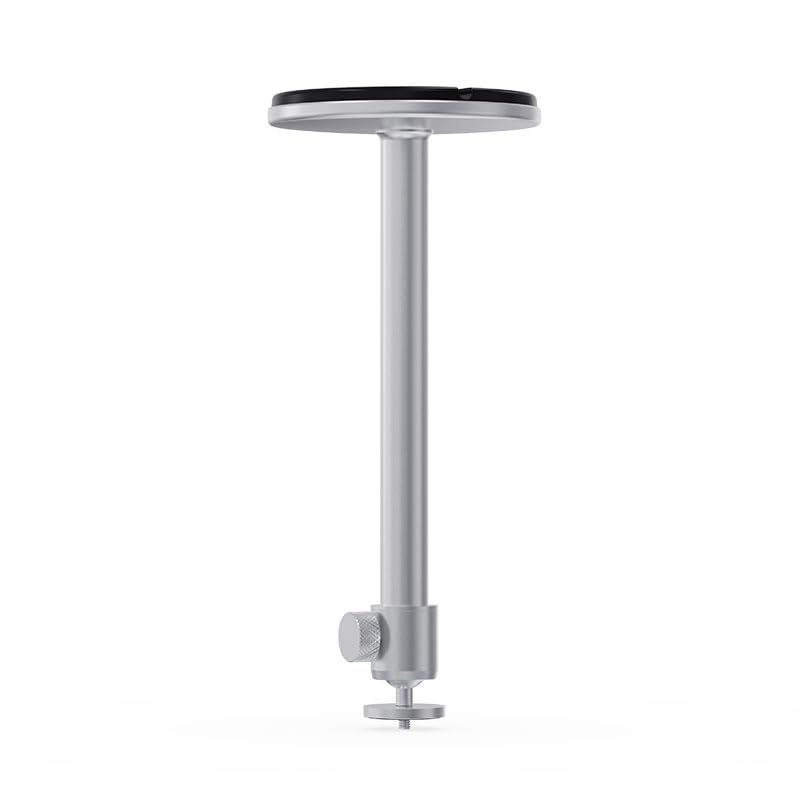
Image 2.1: Components of the WANBO T-Type Ceiling Mount, including the main arm and the ceiling base.
3. Informazioni sulla sicurezza
- Leggere attentamente tutte le istruzioni prima dell'installazione.
- Ensure the mounting surface (ceiling) can safely support the combined weight of the mount and the projector (maximum 10 pounds).
- Durante l'installazione utilizzare strumenti e dispositivi di sicurezza adeguati.
- If unsure about installation, consult a qualified professional.
- Non stringere eccessivamente le viti, poiché ciò potrebbe danneggiare il supporto o il proiettore.
- Tenere bambini e animali domestici lontani dall'area di installazione.
4. Configurazione e installazione
Follow these steps to securely install your WANBO T-Type Ceiling Mount.
4.1 Identify Mounting Location
- Choose a suitable location on the ceiling that provides a clear projection path and is structurally sound.
- Ensure there are no electrical wires or plumbing in the drilling path.
4.2 Montare il supporto
- Attach the mounting arm to the circular ceiling base by screwing them together. Ensure it is hand-tightened securely.

Image 4.1: The WANBO T-Type Ceiling Mount fully assembled before ceiling installation.
4.3 Mount to Ceiling
- Hold the assembled mount against the chosen ceiling location and mark the drilling points through the holes in the circular base.
- Drill pilot holes into the ceiling at the marked points. Use appropriate drill bits for your ceiling material.
- Insert the provided wall anchors (if necessary for your ceiling type) into the pilot holes.
- Align the mount's base with the drilled holes and secure it to the ceiling using the provided screws. Ensure the mount is firmly attached and does not wobble.
4.4 Attach Projector
- Locate the mounting screw hole on the bottom of your Wanbo X5 Pro projector.
- Align the projector's mounting hole with the threaded screw at the end of the mount's arm.
- Carefully screw the projector onto the mount until it is secure. Do not overtighten.
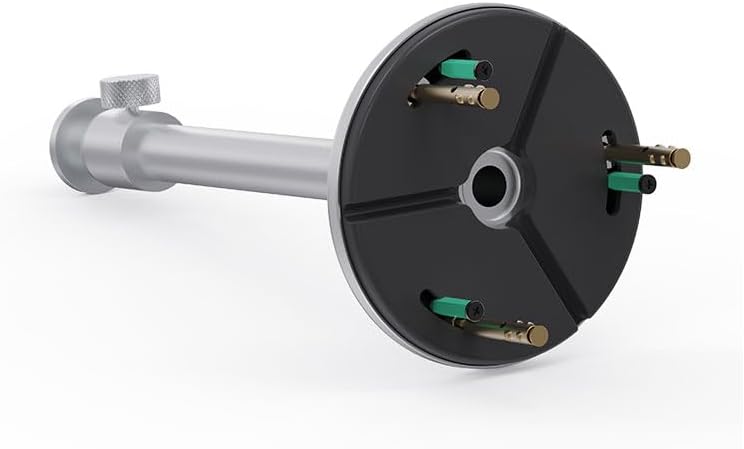
Image 4.2: Detail of the projector attachment mechanism on the mount.
5. Istruzioni per l'uso
The WANBO T-Type Ceiling Mount offers adjustable features for optimal projector positioning.
5.1 Regolazione dell'altezza
The mount features a telescoping design. To adjust the height, loosen the knob on the side of the mounting arm, extend or retract the arm to the desired length (up to 13.0 inches), and then tighten the knob firmly to secure the position.
5.2 Rotating the Projector
The mount allows for rotation. Gently rotate the projector to achieve the desired horizontal angle. Ensure the projector is stable after adjustment.
6. Manutenzione
- Pulizia: Pulire il supporto con un panno morbido e asciutto. Non utilizzare detergenti abrasivi o solventi.
- Controlli periodici: Controllare periodicamente tutte le viti e i collegamenti per assicurarsi che siano sempre ben serrati e sicuri.
- Limite di peso: Non superare la capacità di peso massima di 10 libbre.
7. Risoluzione Dei Problemi
- Il monte sembra instabile: Ensure all mounting screws are securely tightened to the ceiling and the projector is firmly attached to the mount. Verify the ceiling structure is adequate.
- Difficulty adjusting height/rotation: Loosen the adjustment knob sufficiently before attempting to move the arm or rotate the projector. Do not force adjustments.
- Projector not level: Re-adjust the rotation and ensure the ceiling mount itself is installed level.
8. Specifiche
| Marca | WANBO |
| Nome del modello | T-Type Ceiling Mount |
| Numero di modello | WBUS-T-X5 Pro (WBCA01) |
| Dispositivi compatibili | Proiettore Wanbo X5 Pro |
| Tipo di montaggio | Montaggio a soffitto |
| Materiale | Lega di alluminio |
| Colore | Argento |
| Capacità massima di peso | 10 libbre (4.5 kg) |
| Peso dell'articolo | 0.7 libbre (0.32 kg) |
| Lunghezza del braccio | 13.0 pollici (33 cm) |
| Caratteristiche aggiuntive | Adjustable, Rotatable |
9. Garanzia e supporto
9.1 Informazioni sulla garanzia
This WANBO T-Type Ceiling Mount comes with a Garanzia del produttore di 1 anni dalla data di acquisto. La presente garanzia copre i difetti di materiali e di fabbricazione in condizioni di normale utilizzo. Non copre i danni causati da installazione impropria, uso improprio, incidenti o modifiche non autorizzate.
9.2 Assistenza clienti
For technical assistance, warranty claims, or any questions regarding your WANBO T-Type Ceiling Mount, please contact WANBO customer support through the official WANBO website or your retailer's support channels. Please have your model number (WBUS-T-X5 Pro) and proof of purchase ready when contacting support.