
1. Introduzione
This manual provides detailed instructions for the proper use, setup, and maintenance of your Caliber Scientific Calculator, Model 297208. Designed for students, engineers, and professionals, this calculator offers 240 functions for a wide range of mathematical and scientific calculations.
Please read this manual thoroughly before using the calculator to ensure optimal performance and longevity.
2. Informazioni sulla sicurezza
- Keep the calculator away from extreme temperatures, direct sunlight, and high humidity.
- Evitare di far cadere la calcolatrice o di sottoporla a forti urti.
- Do not attempt to disassemble or modify the calculator. This will void the warranty.
- Use only the specified battery type. Incorrect battery usage may cause leakage or explosion.
- Avviso sulla batteria: Tenere le batterie lontano dalla portata dei bambini e degli animali domestici. Le batterie possono essere dannose se ingerite. Se un bambino o un animale domestico ingerisce una batteria, consultare immediatamente un medico.
3. Contenuto della confezione
Upon opening your Caliber Scientific Calculator package, please verify that all items are present and in good condition:
- Caliber Scientific Calculator (Model 297208)
- Protective Hard Sliding Cover
- One AG10 Button Cell Battery (pre-installed or included separately)
- Manuale dell'utente (questo documento)

Image 1: Caliber Scientific Calculator in retail packaging, showing key features.
4. Impostazione
4.1. Fonte di alimentazione
The Caliber Scientific Calculator operates on dual power sources: solar power and battery power. The solar panel provides power in well-lit environments, while the battery ensures operation in low-light conditions.
4.2. Installazione/sostituzione della batteria
Your calculator includes one AG10 button cell battery. If battery replacement is needed:
- Assicurarsi che la calcolatrice sia spenta.
- Individuare il vano batterie sul retro della calcolatrice.
- Utilizzando un piccolo cacciavite, aprire con cautela il coperchio del vano batteria.
- Remove the old battery and insert a new AG10 button cell battery, ensuring the correct polarity (+/-).
- Riposizionare il coperchio del vano batteria e fissarlo con la vite.
Note: Some models may require a AAA battery. Refer to the specific markings on your calculator's battery compartment if different from AG10.
5. Funzioni chiave oltreview
The calculator features a 10-digit LCD display and 240 functions. Familiarize yourself with the key layout:
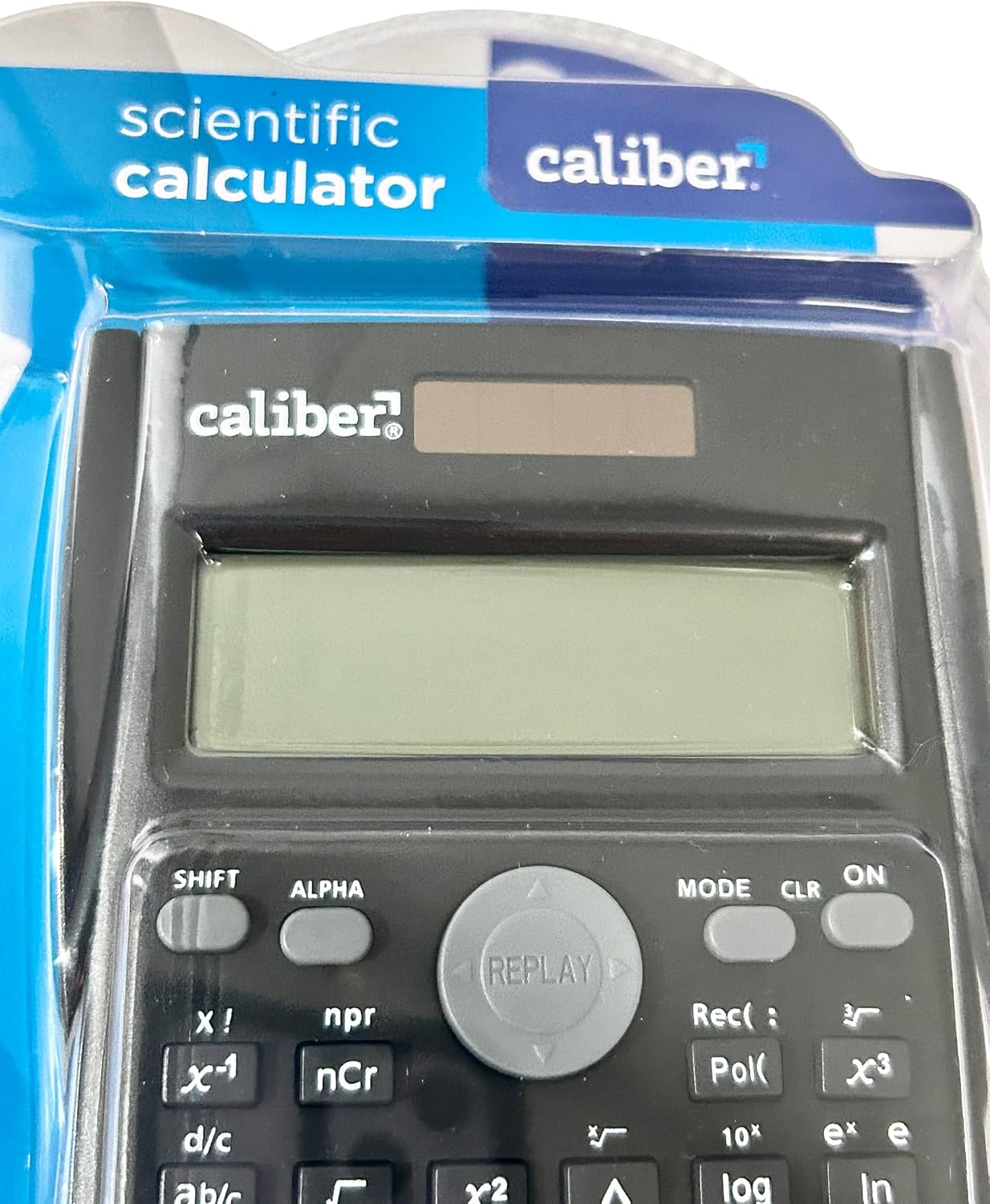
Image 2: Close-up of the calculator's display and key layout.
- Display: 10-digit LCD for clear viewing of inputs and results.
- ACCESO/SPENTO: Power on/off the calculator.
- SPOSTARE: Accesses secondary functions printed above the keys (typically in yellow or orange).
- ALFA: Accesses alpha characters and variables (typically in red or green).
- DIREZIONI: Changes calculation modes (e.g., COMP, STAT, EQN).
- CLR: Clears memory or settings.
- IL: Elimina l'ultima cifra immessa.
- Corrente alternata: Clears all entries and resets the calculation.
- Tasti freccia: Navigate through entries and results.
- = (Uguale a): Executes the calculation.
6. Istruzioni per l'uso
6.1. Calcoli di base
Per eseguire operazioni aritmetiche di base:
- Premere il tasto ON tasto per accendere la calcolatrice.
- Inserisci il primo numero.
- Premere il tasto operativo desiderato (+, -, ×, ÷).
- Inserisci il secondo numero.
- Premere il tasto = tasto per visualizzare il risultato.
6.2. Funzioni avanzate
The calculator supports 240 functions, including trigonometric, logarithmic, statistical, and more. To access secondary functions (printed above keys), press the SPOSTARE key before the desired function key.
- Funzioni trigonometriche: peccato, così, abbronzatura e le loro funzioni inverse (SPOSTARE + sin⁻¹, ecc.).
- Funzioni logaritmiche: tronco d'albero (base 10), ln (logaritmo naturale).
- Funzioni potenza e radice: x², √, X.
- Funzioni di memoria: Utilizzo STO (Negozio) e RCL (Recall) to save and retrieve values.
- Calcoli statistici: Entrare MODALITÀ and select STAT mode for statistical computations.
For detailed instructions on specific functions, refer to the comprehensive instructions enclosed with your product (if applicable) or consult online resources for scientific calculator usage.
7. Manutenzione
7.1. Pulizia
To clean your calculator:
- Pulisci l'esterno con un panno morbido e asciutto.
- Per sporco ostinato, leggermente dampInumidire il panno con acqua e sapone neutro, quindi asciugarlo immediatamente.
- Non utilizzare detergenti abrasivi, solventi o alcol, poiché potrebbero danneggiare il casing o display.
7.2. Conservazione
When not in use, store the calculator in a cool, dry place, away from direct sunlight and extreme temperatures. Always use the protective hard sliding cover to prevent damage to the keys and display.

Image 3: Packaging detail showing features including the hard sliding cover and dual power.
8. Risoluzione Dei Problemi
| Problema | Possibile causa | Soluzione |
|---|---|---|
| La calcolatrice non si accende. | Insufficient light for solar power, or dead battery. | Move to a brighter area or replace the AG10 button cell battery. |
| Display shows "ERROR". | Mathematical error (e.g., division by zero, invalid input). | Premere AC to clear the error and re-enter the calculation correctly. |
| Risultati di calcolo errati. | Incorrect mode selected, or input error. | Controllare la modalità corrente (MODALITÀ key) and ensure correct data entry. Clear all memory (SPOSTARE + CLR) se necessario. |
9. Specifiche
| Numero di modello | 297208 |
| Marca | Calibro |
| Tipo di visualizzazione | LCD a 10 cifre |
| Numero di funzioni | 240 |
| Tipo di calcolatrice | Ingegneria/Scientifico |
| Fonte di alimentazione | Dual Power (Solar & Battery) |
| Tipo di batteria | 1 x AG10 Button Cell (included) or 1 x AAA (may vary by model) |
| Dimensioni dello schermo | 3 pollici |
| Dimensioni (L x L) | 6" x 3" |
| Materiale di recinzione | Plastica |
| Codice UPC | 050428205495 |
10. Garanzia e supporto
10.1. Informazioni sulla garanzia
This product is subject to a return policy. For details regarding returns, exchanges, or warranty claims, please refer to the retailer's return policy where the product was purchased.
10.2. Assistenza clienti
For further assistance, technical support, or inquiries not covered in this manual, please contact Caliber customer service through their official websito o il rivenditore da cui hai acquistato il prodotto.
