
1. Introduzione
This manual provides essential information for the safe and efficient operation of your ZLPOWER 3000W 12V DC Pure Sine Wave Inverter Charger. Please read all instructions carefully before installation and use to ensure optimal performance and safety.
2. Istruzioni di sicurezza
- Always ensure the inverter is turned off before connecting or disconnecting batteries.
- Be careful not to reverse the polarity when connecting battery cables; doing so may damage the inverter.
- Turn off the mains power before connecting AC wiring.
- If using a generator, ensure it's compatible with the inverter's input voltage e frequenza.
- Use appropriate size and length of wires with NEC color code.
- The maximum output power of each AC socket is 1200W. If it exceeds 1200W, please use the dedicated output port for wiring.
- When wiring, quickly tap the terminal with the terminal lug, or connect the mains first, which can effectively avoid sparks.
3. Contenuto della confezione
Your ZLPOWER Inverter Charger package includes the following items:
- ZLPOWER 3000W 12V Pure Sine Wave Inverter Charger Unit
- Cavi della batteria (rosso per positivo, nero per negativo)
- Remote Control Panel with Cable
- AC Input/Output Wiring Accessories (Terminal Block Cover, Screws)
- Manuale di istruzioni
- Copriterminali della batteria (rosso e nero)
- Installation Tools (e.g., wrench)
- Resistor for Pre-Charge Circuit (for safe battery connection)
4. Prodotto finitoview
The ZLPOWER LW-3000W 12V Inverter Charger is designed for robust performance and ease of use. Below is an overview dei suoi componenti e caratteristiche principali.

Figure 1: ZLPOWER 3000W 12V Pure Sine Wave Inverter Charger. This image shows the overall design of the inverter with its front panel featuring the LCD display and output ports.

Figure 2: Product details and dimensions of the ZLPOWER 3000W 12V Inverter. This image highlights the physical dimensions and various connection points on the unit.
Caratteristiche del pannello frontale:
- Schermo LCD: Shows real-time data for voltage, load, power, and battery status.
- Interruttore di alimentazione: ON/OFF button for the inverter.
- Prese di uscita CA: For connecting various AC appliances.
- Porte USB: Per caricare dispositivi alimentati tramite USB.
Caratteristiche del pannello posteriore:
- Terminali di ingresso CC: Terminali positivo (rosso) e negativo (nero) per il collegamento della batteria.
- AC Input/Output Terminals: Terminal block for hardwiring AC input from grid/generator and AC output to loads.
- Porta del telecomando: For connecting the external remote control panel.
- Ventole di raffreddamento: Ventole integrate per la gestione termica.
5. Installazione
5.1 DC Connection (Battery)
Proper battery connection is crucial for safety and performance. Always ensure the inverter is turned off before proceeding.
Video 1: Low frequency inverter wiring video. This video demonstrates the step-by-step process of connecting battery cables to the inverter, including safety precautions for polarity.
- Preparare l'inverter: Ensure the inverter's power switch is in the OFF position. Remove the protective covers and nuts from the DC input terminals (positive red, negative black) on the inverter.
- Collegare il cavo positivo: Connect one end of the positive (red) battery cable to the inverter's positive terminal. Secure it tightly with the nut. Connect the other end of the positive cable to the positive terminal of your battery.
- Collegare il cavo negativo: Connect one end of the negative (black) battery cable to the inverter's negative terminal. Secure it tightly with the nut. Connect the other end of the negative cable to the negative terminal of your battery.
- Verificare la polarità: Double-check that positive terminals are connected to positive and negative to negative. Reversing polarity will damage the inverter.
- Pre-Charge Circuit (Recommended): For safe connection, especially with LiFePO4 batteries, use a pre-charge resistor to prevent sparks. Refer to your full manual for detailed instructions on installing a permanent pre-charge circuit.
- Connessioni sicure: Ensure all connections are tight and secure. Replace the protective terminal covers.
5.2 AC Connection (Input/Output)
The inverter can be connected to an AC input source (grid or generator) and provides AC output for your loads.
Video 2: Low frequency inverter wiring video. This video also demonstrates the AC input and output wiring process, showing how to connect live, neutral, and ground wires.
- La sicurezza prima di tutto: Turn off the mains power or generator before making any AC connections.
- Morsettiera di accesso: Remove the protective cover from the AC wiring terminal block on the inverter.
- Cablaggio ingresso CA: Use a 3-core AC cable (Live (L), Neutral (N), Ground (G)). Connect the Live (L) wire to the terminal labeled 'AC Input L', Neutral (N) to 'AC Input N', and Ground (G) to the grounding screw. This connection enables battery charging from the grid/generator and AC pass-through.
- AC Output Wiring: Use another 3-core AC cable for your loads. Connect the Live (L) wire to 'AC Output L', Neutral (N) to 'AC Output N', and Ground (G) to the grounding point. This is where your home appliances or other loads will receive power.
- Secure and Cover: Ensure all wires are securely fastened within their respective terminals. Replace the protective cover over the terminal block.
6. Funzionamento
Once installed, operating your ZLPOWER inverter is straightforward. The LCD display provides all necessary information.
Video 3: How to Use Your Low Frequency Solar Hybrid Inverter. This video demonstrates the basic operation and display functions of the inverter.
- Accensione: Press the ON/OFF button on the inverter unit or the connected remote control panel to power on the unit.
- Schermo LCD: The LCD display will illuminate and show real-time operational data, including input/output voltage, percentuale di caricotage, battery status, and frequency.
- Collegamento dei carichi: Plug your AC appliances into the AC output sockets on the inverter's front panel or connect them to the hardwired AC output terminals.
- Telecomando: Use the remote control panel for convenient monitoring and control from a distance.
7. Impostazioni di sistema
The inverter offers customizable settings to optimize its performance for your specific setup.
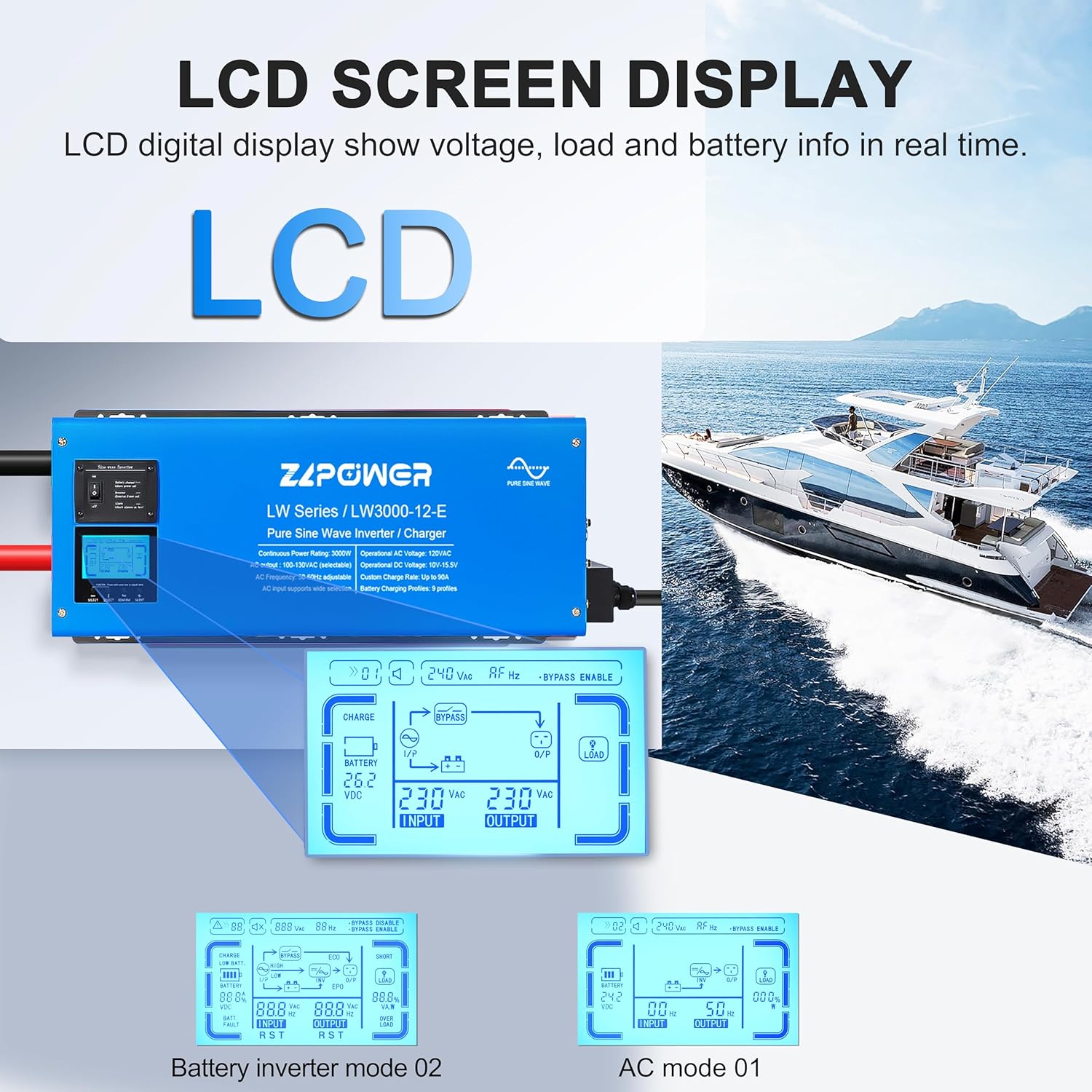
Figura 3: dettagliata view of the LCD screen display on the ZLPOWER Inverter. This image illustrates the various data points and menu options available for configuration.
- Impostazioni di accesso: Press and hold the setting button (usually labeled 'Confirm' or 'Enter') for 3 seconds to enter the main settings interface on the LCD display.
- Navigare nei menu: Use the UP/DOWN arrow buttons to navigate through the different setting options.
- Regola i parametri: Select a parameter and use the arrow buttons to adjust its value. Confirm your selection to save changes.
- Corrente di carica regolabile: The charging current can be adjusted from 0-100% to suit your battery's requirements.
- AC/Battery Priority Selector: Choose whether the inverter prioritizes AC input (grid/generator) or battery power.
- Automatic Generator Start (AGS): Configure the inverter to automatically start a connected generator when battery levels are low.
- Commutazione di frequenza: The inverter supports both 50Hz and 60Hz output frequencies, which can be selected via the settings.
8. Compatibilità della batteria
The ZLPOWER inverter is designed to be compatible with a wide range of battery types, offering flexibility for various power systems.

Figure 4: Illustration of the various battery types compatible with the ZLPOWER Inverter. This image shows icons for LiFePO4, Lithium-ion, Flooded, AGM, Sealed Lead Acid, and Gel batteries.
- Tipi supportati: The inverter supports 7 battery types, including LiFePO4, Lithium-ion, Flooded, AGM, Sealed Lead Acid, and Gel batteries.
- 5-Step Progressive Charging: Features an advanced 5-step progressive charging algorithm to optimize battery health and lifespan.
- Depleted Battery Startup: The inverter allows for startup and continuous power even with depleted batteries.
- Sensore di temperatura della batteria: An included battery temperature sensor provides crucial data to prevent overheating during charging and discharging.
9. Protections and Features
The ZLPOWER inverter is equipped with multiple safety features and advanced functionalities to ensure reliable and secure operation.

Figura 5: Oltreview of the LCD display and key protection features of the ZLPOWER Inverter. This image highlights the various safeguards and operational indicators.
- Uscita onda sinusoidale pura: Delivers clean, stable power suitable for sensitive electronics and appliances, preventing interference.
- Protezione da sovraccarico: Automatically shuts down if connected loads exceed its capacity.
- Protezione da sovratemperatura: Prevents damage from excessive heat buildup.
- Protezione da sovraccarico: Safeguards batteries from being overcharged.
- Low Battery Safeguards: Protegge le batterie dalla scarica profonda.
- Volume di uscitatage Regolamento: Automatically adjusts output voltage to maintain stability under varying load conditions.
- Alta efficienza: Achieves up to 97% efficiency in line mode and 88% in battery mode.
- High Power Factor: Operates with a power factor of 0.9-1.0, indicating efficient power usage.
- Low Frequency Type: Utilizes a transformer for robust and reliable power conversion.
10. Risoluzione Dei Problemi
If your ZLPOWER inverter is not functioning as expected, please follow these general troubleshooting steps:
- Controllare le connessioni: Verify all DC and AC cable connections for tightness and correct polarity. Loose connections can cause poor performance or faults.
- Stato della batteria: Ensure your battery bank has sufficient voltage and charge. A low battery can prevent the inverter from operating.
- Capacità di carico: Confermare che il peso totaletage of connected appliances does not exceed the inverter's 3000W continuous rating or the 1200W maximum per AC socket.
- Schermo LCD: Observe the LCD display for any fault codes or warning messages, which can indicate specific issues.
- Ripristina inverter: Try turning the inverter off, waiting a few minutes, and then turning it back on.
- Consulta il manuale: For detailed troubleshooting charts and specific fault code explanations, refer to the comprehensive instruction manual.
- Contatta l'assistenza: If the issue persists after following these steps, contact ZLPOWER customer support for further assistance.
11. Specifiche
| Caratteristica | Specificazione |
|---|---|
| Numero di modello | LW-3000W 12V |
| Potenza continua | 3000W |
| Potenza di picco | 9000W (for 20 seconds) |
| Ingresso CC Voltage | 12V CC |
| Volume di uscita CAtage | 120 V CA monofase |
| Forma d'onda di uscita | Onda sinusoidale pura |
| Efficienza in modalità linea | Fino al 97% |
| Battery Mode Efficiency | Fino al 88% |
| Corrente del caricabatteria | 90A (Adjustable 0-100%) |
| Interruttore di trasferimento | 30A |
| Frequenza di uscita | 50Hz/60Hz (commutabile) |
| Dimensioni del prodotto | 18.1 x 7.48 x 8.7 pollici |
| Peso dell'articolo | 59.5 libbre |
| Produttore | ZLP POWER |
12. Garanzia e supporto
ZLPOWER is a professional inverter manufacturer with over fifteen years of experience in the industry. We are committed to providing reliable products and excellent customer service.
- Garanzia: Your ZLPOWER Inverter Charger comes with a 24-month warranty from the date of purchase.
- Supporto tecnico: We offer lifetime technical support to assist you with any questions or issues you may encounter.
- Contattaci: For warranty claims, technical assistance, or any other inquiries, please contact ZLPOWER customer service through the provided channels in your purchase documentation.