
Introduzione
This manual provides detailed instructions for the safe and efficient operation of your Phomemo M836-B Portable Thermal Printer. The M836-B is an inkless, wireless thermal printer designed for portability and convenience, supporting various paper sizes including US Letter and A4. Please read this manual thoroughly before using the printer to ensure optimal performance and longevity.
Prodotto finitoview
Caratteristiche principali
- Stampa termica senza inchiostro: Utilizes thermal technology, eliminating the need for ink cartridges or ribbons.
- Connettività wireless: Supports Bluetooth for seamless connection with iOS and Android devices.
- Connettività USB: Compatible with Windows, macOS, ChromeOS, and Linux via USB Type-C.
- Alta risoluzione: Offers a print resolution of 300 DPI for clear text and graphics.
- Design portatile: Compact and lightweight, ideal for travel and on-the-go printing.
- Supporto carta multiformato: Accommodates various thermal paper sizes, including US Letter (8.5'' x 11'') and A4.
- Uscita monocromatica: Prints in black and white.

Image: The Phomemo M836-B printer demonstrating its inkless thermal printing capability, highlighting no mess from ink.

Immagine: Un overview of the Phomemo M836-B's key features, including wireless connectivity, inkless operation, 2600mAh battery capacity, and 300 DPI resolution.
Contenuto della confezione
Verificare che tutti gli articoli siano presenti nel pacco:
- Phomemo M836-B Portable Thermal Printer
- Thermal Paper (as specified in the box)
- Cavo USB di tipo C.
- Manuale dell'utente (questo documento)
Guida all'installazione
1. Caricamento della stampante
- Collegare il cavo USB Type-C in dotazione alla porta di ricarica della stampante.
- Collegare l'altra estremità del cavo USB a un adattatore di alimentazione USB compatibile (non incluso) o alla porta USB di un computer.
- The indicator light will show charging status. Charge the printer fully before first use.
2. Caricamento della carta
The Phomemo M836-B supports both thermal paper rolls and sheet-fed thermal paper.
- Aprire il coperchio del vano carta.
- For roll paper: Insert the thermal paper roll into the designated slot, ensuring the printing side faces upwards. Gently pull a small length of paper out.
- For sheet-fed paper: Insert the thermal paper sheet into the input slot, ensuring it is straight and aligned.
- Chiudere bene il coperchio del vano carta.

Image: Illustration of how to load different types of thermal paper (roll and sheet) into the Phomemo M836-B printer, showing the paper selection mechanism.
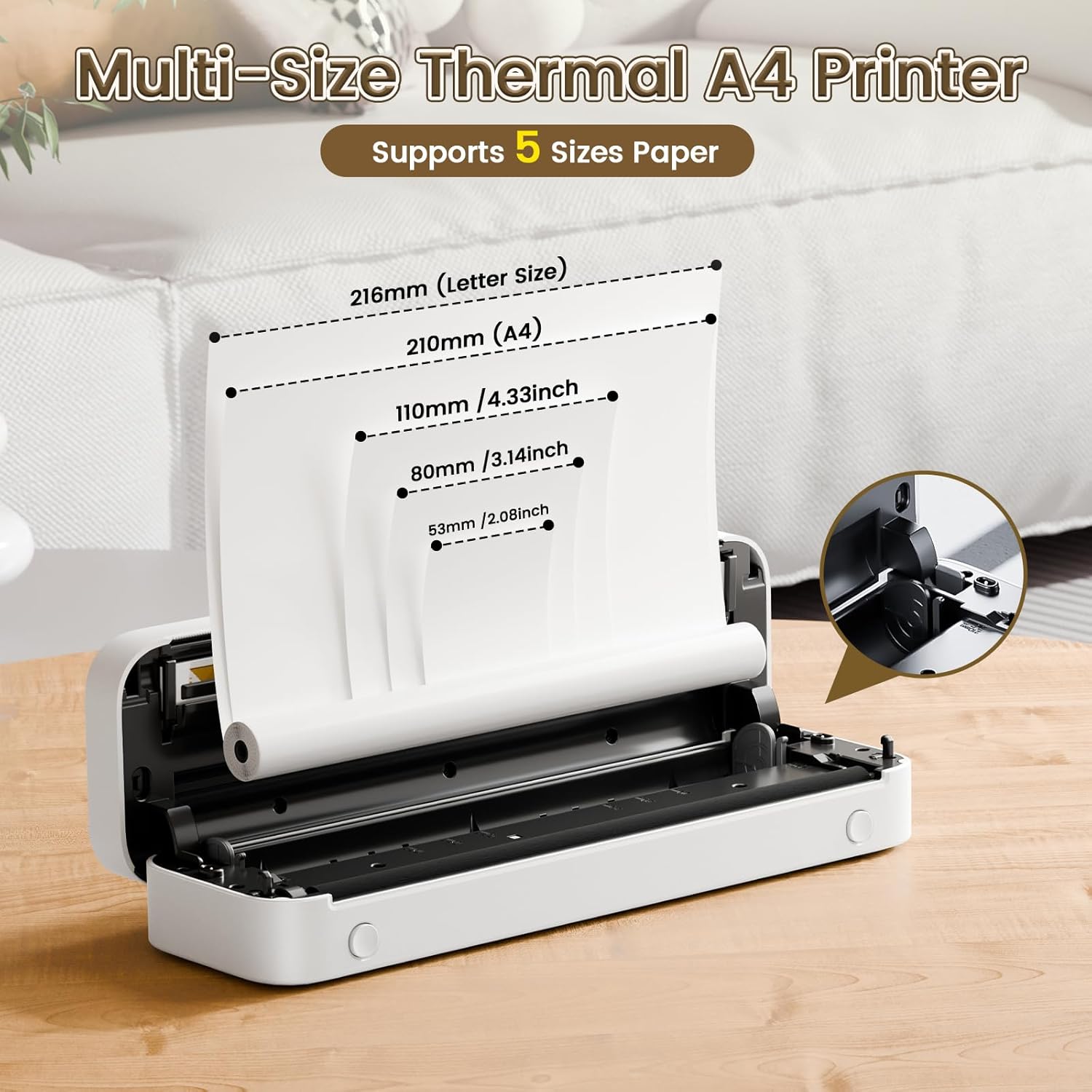
Image: The Phomemo M836-B printer demonstrating support for multiple paper sizes, including US Letter (216mm) and A4 (210mm).
3. Connessione ai dispositivi
La stampante supporta sia le connessioni Bluetooth che USB.
Bluetooth Connection (for iOS/Android)
- Scarica l'app ufficiale Phomemo dall'app store del tuo dispositivo.
- Accendere la stampante tenendo premuto il pulsante di accensione.
- Abilita il Bluetooth sul tuo dispositivo mobile.
- Open the Phomemo app, search for the printer (M836-B), and pair with it.
- Seguire le istruzioni visualizzate sullo schermo per completare il processo di associazione.
USB Connection (for Windows/macOS/ChromeOS/Linux)
- Assicurarsi che la stampante sia accesa.
- Collegare la stampante al computer utilizzando il cavo USB Type-C in dotazione.
- Visita il sito ufficiale di Phomemo webposto (www.phomemo.com) to download and install the appropriate drivers for your operating system.
- Una volta installati i driver, la stampante dovrebbe essere riconosciuta dal computer.

Image: Diagram illustrating the two types of connections supported by the Phomemo M836-B: Bluetooth for Android, iOS, and iPad, and USB for Windows, macOS, ChromeOS, and Linux.
Istruzioni per l'uso
Stampa da dispositivi mobili
- Ensure your printer is charged, loaded with paper, and connected via Bluetooth to your mobile device.
- Apri l'app Phomemo.
- Seleziona il documento o l'immagine che desideri stampare dall'app.
- Regolare le impostazioni di stampa (ad esempio, formato carta, densità) secondo necessità.
- Tocca il pulsante di stampa per avviare la stampa.
Printing from Computers
- Ensure your printer is charged, loaded with paper, and connected via USB to your computer with drivers installed.
- Apri il documento o file che desideri stampare sul tuo computer.
- Vai a "File" > "Stampa" (oppure usa la scorciatoia Ctrl+P/Cmd+P).
- Select the Phomemo M836-B from the list of available printers.
- Regolare le preferenze di stampa (ad esempio, formato carta, orientamento) secondo necessità.
- Fare clic su "Stampa".
Paper Handling Tips
- Always use high-quality thermal paper for best results.
- Assicurarsi che la carta sia caricata correttamente, con il lato stampabile rivolto verso la testina di stampa.
- Avoid exposing thermal paper to direct sunlight or high temperatures, as this can degrade print quality over time.
- Manually tear off printed documents carefully after printing, as the printer does not have an automatic cutter.
Manutenzione
Pulizia della stampante
- Spegnere la stampante e scollegarla dalla fonte di alimentazione.
- Utilizzare un panno morbido e privo di lanugine leggermente dampimbevuta di alcol isopropilico per pulire delicatamente la testina di stampa. Lasciarla asciugare completamente prima dell'uso.
- Pulire l'esterno della stampante con un panno morbido e asciutto. Non utilizzare detergenti abrasivi o solventi.
Magazzinaggio
- Conservare la stampante in un luogo fresco e asciutto, lontano dalla luce solare diretta e da temperature estreme.
- If storing for an extended period, ensure the printer is fully charged to maintain battery health.
- Keep thermal paper in its original packaging in a dark, cool place to prevent premature fading.
Risoluzione dei problemi
If you encounter issues with your Phomemo M836-B printer, refer to the following common problems and solutions:
La stampante non si accende
- Controllare la batteria: Ensure the printer is sufficiently charged. Connect it to a power source and try again.
- Pulsante di accensione: Tenere premuto il pulsante di accensione per alcuni secondi per assicurarsi che sia attivato correttamente.
Connectivity Issues (Bluetooth/USB)
- Bluetooth:
- Ensure Bluetooth is enabled on your device and the printer is within range.
- Disaccoppia e riassocia la stampante nelle impostazioni Bluetooth del tuo dispositivo.
- Riavviare sia la stampante che il dispositivo mobile.
- USB:
- Verificare che il cavo USB sia collegato saldamente sia alla stampante che al computer.
- Ensure the correct printer drivers are installed on your computer. Reinstall if necessary.
- Prova una porta USB o un cavo diverso.
Poor Print Quality (Blurry, Faded, Streaks)
- Pulisci la testina di stampa: Follow the cleaning instructions in the Maintenance section.
- Paper Quality/Type: Ensure you are using high-quality thermal paper and that it is loaded correctly.
- Densità di stampa: Adjust print density settings in the Phomemo app or printer driver.
- Conservazione della carta: Thermal paper exposed to heat or light can degrade. Try a fresh roll of paper.
Inceppamenti della carta
- Spegni stampante: Immediately turn off the printer.
- Rimuovere la carta: Gently pull out any jammed paper. Do not force it, as this can damage the printer.
- Ricaricare: Ensure paper is loaded correctly and not wrinkled or bent before restarting.
Specifiche tecniche
| Caratteristica | Specificazione |
|---|---|
| Marca | Fomeo |
| Nome del modello | M836-B |
| Tecnologia di connettività | Bluetooth, USB tipo C |
| Tecnologia di stampa | Termico |
| Uscita della stampante | Monocromo |
| Risoluzione di stampa massima | 300 DPI |
| Velocità di stampa massima (monocromatica) | 1.5 pagine al minuto |
| Dispositivi compatibili | Android Devices, Mac, Windows, iPhone, iPad |
| Dimensione massima del supporto | 8.5 x 11 inch (US Letter) |
| Supporto formato carta | US Letter, A4 |
| Tipo di supporto di stampa | Carta termica |
| Peso dell'articolo | 1.53 libbre (circa 694 g) |
| Dimensioni del prodotto (P x L x A) | 7.8D x 26.4W x 4.5H centimetri |
| Metodo di controllo | Applicazione |
| Paese di origine | Cina |
Garanzia e supporto
Specific warranty details for the Phomemo M836-B Portable Thermal Printer are not provided within this document. For information regarding warranty coverage, technical support, or service, please refer to the warranty card included with your product or contact Phomemo customer service directly through their official websito o le informazioni di contatto fornite nella confezione del prodotto.
Phomemo ufficiale Websito: www.phomemo.com


