
1. Introduzione
Grazie per l'acquistoasing the AODK L-Shaped Gaming Desk. This desk is designed for both gaming and work, offering a spacious and organized environment. It features integrated power outlets, RGB LED lighting, an adjustable monitor stand, and four storage drawers. This manual provides essential information for assembly, operation, and maintenance to ensure safe and efficient use of your new desk.
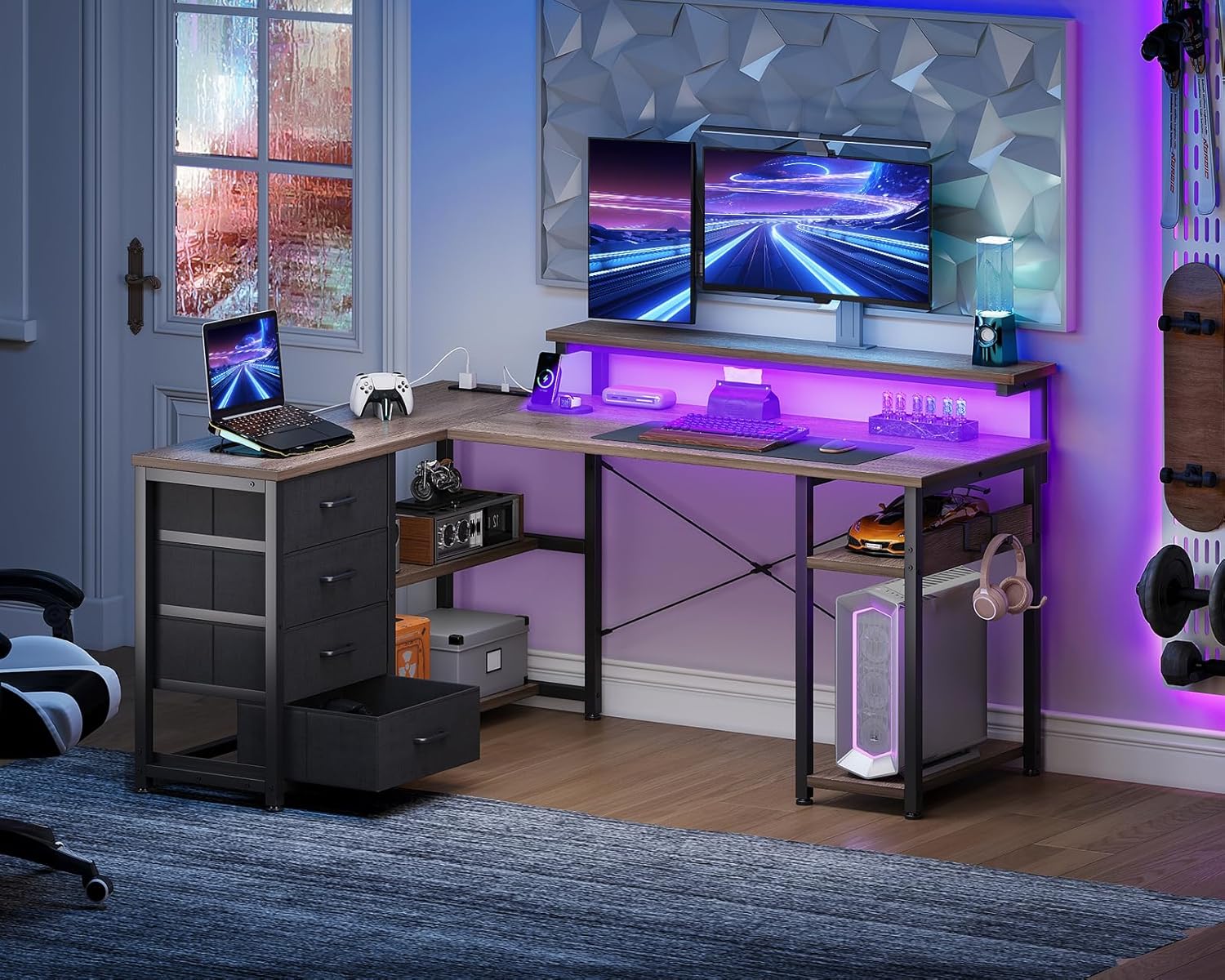
Image 1.1: The AODK L-Shaped Gaming Desk in a complete setup, showcasinil suo design e le sue caratteristiche.
2. Informazioni sulla sicurezza
- Segui sempre attentamente le istruzioni di montaggio.
- Do not exceed the maximum load capacity of the tabletop (50 kg).
- Assicurarsi che tutte le viti e gli elementi di fissaggio siano ben serrati prima dell'uso. Controllare periodicamente e serrare nuovamente se necessario.
- Keep liquids away from electrical outlets and electronic devices on the desk.
- Non stare in piedi o seduto sulla scrivania.
- Durante il montaggio, tenere le parti di piccole dimensioni lontano dalla portata dei bambini per evitare rischi di soffocamento.
- Se qualche parte risulta mancante o danneggiata, non procedere con il montaggio. Contattare immediatamente l'assistenza clienti.
3. Contenuto della confezione
Before beginning assembly, verify that all components are present and undamaged. A wrench is included for assembly.
- Desk panels (tabletop, shelves)
- Componenti del telaio in acciaio
- 4 cassetti in tessuto
- Power outlet unit (2 AC outlets, USB ports)
- Striscia luminosa a LED RGB
- Componenti del supporto per monitor
- Gancio per cuffie
- Assembly hardware (screws, bolts, adjustable feet)
- Chiave
- Manuale di istruzioni
4. Istruzioni per l'installazione e il montaggio
Assembly is required for this product. Please follow the detailed steps provided in the included instruction manual. It is recommended to assemble the desk with two people, though it can be done by one person. Ensure you have enough space for assembly.
4.1. Suggerimenti per l'assemblaggio generale
- Prima di iniziare, disporre tutti i componenti e l'hardware.
- Identify each part using the labels or diagrams in the manual.
- Do not overtighten screws during initial assembly; tighten fully once all parts are in place.
- The L-shaped design allows for flexible configuration. The drawer unit can be installed on either the left or right side to suit your preference and room layout.

Image 4.1: Dimensional diagram of the desk, illustrating the reversible configuration of the drawer unit.
4.2. Assemblaggio del cassetto
The four fabric drawers are designed for easy assembly and integration into the desk frame. Follow the steps below to assemble each drawer:
- Unfold the fabric drawer body.
- Insert the bottom panel into the drawer.
- Ensure the drawer is fully formed and stable.

Image 4.2: Step-by-step guide for assembling the fabric drawers.
5. Istruzioni per l'uso
5.1. Integrated Power Outlet
The desk is equipped with a power outlet unit featuring two AC outlets and two USB ports. This allows for convenient charging of your computer, smartphone, and other electronic devices directly from your workspace.
- Connect the desk's power cord (1.8m) to a wall outlet.
- Plug your devices into the available AC outlets (100-240V/15A) or USB ports (5V-2A).

Image 5.1: The integrated power outlet with AC and USB ports for charging devices.
5.2. Illuminazione LED RGB
Enhance your gaming or work environment with the built-in RGB LED lights. The lights offer 10 different illumination modes and color adjustment modes.
- Use the included controller to cycle through the 10 lighting modes and adjust colors.
- The memory function will retain your last selected mode when the lights are turned off and on again.

Image 5.2: The RGB LED lighting feature with various color modes.
5.3. Supporto per monitor regolabile
The monitor stand can be adjusted to three different heights (9cm, 12cm, 15cm) to optimize your viewing angle and improve posture, reducing strain on your neck and shoulders.
- Adjust the monitor stand height during assembly or by carefully repositioning the support brackets.
- Choose the height that best suits your eye level for comfortable use.

Image 5.3: The monitor stand with adjustable height settings for ergonomic comfort.
5.4. Conservazione e organizzazione
La scrivania fornisce ample storage with four fabric drawers and integrated shelves. A headphone hook is also included for convenient storage of your headset.
- Use the four drawers for storing documents, accessories, and other items.
- The open shelves are suitable for books, decorative items, or a PC tower.
- Attach the headphone hook to a convenient location on the desk frame to keep your headphones organized.

Immagine 5.4: Passoview of the desk's storage features, including drawers, shelves, and a headphone hook.
6. Manutenzione
To ensure the longevity and appearance of your AODK Gaming Desk, follow these maintenance guidelines:
- Pulizia: Pulisci le superfici della scrivania con un panno morbido eamp cloth. Avoid abrasive cleaners or harsh chemicals that may damage the melamine finish.
- Fuoriuscite: Immediately wipe up any spills to prevent water damage or staining. The melamine surface is resistant to moisture, but prolonged exposure can cause damage.
- Graffi: While the desk is scratch-resistant, use coasters for drinks and mouse pads for computer peripherals to minimize wear.
- Stabilità: Periodically check all screws and fasteners to ensure they remain tight. Re-tighten if any looseness is detected to maintain desk stability.
- Componenti elettrici: Ensure the power outlet unit and LED lights are kept dry and free from dust. Do not attempt to repair electrical components yourself.
7. Risoluzione Dei Problemi
If you encounter any issues with your AODK Gaming Desk, refer to the following common troubleshooting tips:
- La scrivania è traballante:
a. Check that all assembly screws are securely tightened.
b. Ensure the adjustable feet on the bottom of the desk legs are properly leveled on an even surface. Adjust them as needed to eliminate wobbling.
c. Verify that the cross-bracing hardware is correctly installed and tightened. - Power outlets or USB ports not working:
a. Confirm that the desk's main power cord is securely plugged into a functional wall outlet.
b. Check if the wall outlet itself is receiving power by testing it with another device.
c. Ensure the power unit is correctly connected within the desk structure. - LED lights not turning on or changing modes:
a. Check the connection of the LED strip to the power source and controller.
b. Ensure the power outlet unit is functional (see above).
c. Try pressing the buttons on the controller firmly. - I cassetti non scorrono fluidamente:
a. Ensure the fabric drawers are correctly assembled and not overloaded.
b. Check that the drawer unit frame is properly aligned and secured within the desk structure. - Parti mancanti o danneggiate all'arrivo:
a. Do not proceed with assembly.
b. Contact customer support immediately for assistance.
8. Specifiche
| Marca | AODK |
| Numero di modello | Dimensioni: 135*110*76 |
| Tipo | L-Shaped Gaming/Office Desk |
| Colore | Grigio |
| Dimensioni complessive (L x P x A) | Circa. 135 cm x 110 cm x 76 cm |
| Peso corporeo principale | Circa 25.3 kg |
| Capacità di carico del tavolo | 50 kg |
| Materiale | High-strength melamine laminated board, Steel frame |
| Cassetti | 4 fabric drawers, reversible installation |
| Unità di presa di corrente | 2 AC outlets (100-240V/15A), 2 USB ports (5V-2A), 1.8m extension cord |
| Illuminazione | RGB LED strip with 10 lighting modes and color adjustment, memory function |
| Supporto per monitor | 3-seconditage adjustable height (9cm, 12cm, 15cm) |
| Caratteristiche aggiuntive | Headphone hook, adjustable feet for stability, cross-bracing for anti-sway |
9. Garanzia e supporto
9.1. Informazioni sulla garanzia
Specific warranty details are not provided in this manual. Please refer to the product packaging or your purchase receipt for warranty terms and conditions. Typically, products come with a limited warranty covering manufacturing defects.
9.2. Assistenza clienti
If you have any questions, require assistance with assembly, or encounter any product defects, please do not hesitate to contact our customer support team. Contact information can usually be found on the product packaging, the seller's websito o sulla tua piattaforma di acquisto.
When contacting support, please have your product model number (135*110*76) and purchase details ready to facilitate a quicker resolution.

