
1. Introduzione
This manual provides essential information for the safe and effective use of the DMK ZBTK Fiber Laser Scan Galvo Head Set. This device is designed for high-precision laser processing applications, including laser cleaning and marking, utilizing a 1064nm wavelength.
The ZBTK Fiber Laser Scan Galvo Head Set offers advanced precision and versatility. It features an aperture range of 8.5-30mm, accommodating various beam sizes for compatibility with diverse laser systems. It is built from a robust high-precision aluminum alloy for durability and reliability in industrial environments.

Figure 1: ZBTK Fiber Laser Scan Galvo Head Set. This image displays the main unit with branding, indicating its use for 1064nm laser cleaning and marking.
2. Informazioni sulla sicurezza
AVVERTIMENTO: Laser systems can cause severe injury or death if not handled properly. Always follow all safety guidelines provided by your laser system manufacturer and local regulations.
- Always wear appropriate laser safety eyewear when operating or near the laser system.
- Ensure the work area is properly enclosed and marked with laser warning signs.
- Never look directly into the laser beam or its reflections.
- Scollegare l'alimentazione prima di effettuare qualsiasi intervento di manutenzione o regolazione.
- This device is intended for integration into a complete laser system. Refer to the overall system's safety manual for comprehensive instructions.
3. Configurazione e installazione
The ZBTK Fiber Laser Scan Galvo Head Set is designed for integration into existing fiber laser systems. Proper installation is crucial for optimal performance and safety.
3.1 Disimballaggio
Carefully remove the galvo head set from its packaging. Inspect for any signs of damage during transit. Report any damage to the supplier immediately.
3.2 Montaggio
Mount the galvo head securely to a stable surface or the designated mounting point within your laser system. Ensure proper alignment with the laser beam path. The unit features mounting holes for secure attachment.

Figura 2: lato view of the galvo head, illustrating the mounting points and general structure.
3.3 collegamenti elettrici
Connect the galvo head to the appropriate control unit and power supply of your laser system. Refer to your laser system's manual for specific wiring diagrams and voltage requirements. Ensure all connections are firm and correct before applying power.

Figura 3: Posteriore view of the galvo head, highlighting the electrical connection ports.
3.4 Beam Alignment
Precise alignment of the incoming laser beam with the galvo head's aperture is critical. Follow your laser system's beam alignment procedures to ensure the beam passes centrally through the galvo mirrors without clipping. Incorrect alignment can lead to poor performance and damage to the unit.
4. Funzionamento
Once installed and aligned, the galvo head operates under the control of your laser system's software and hardware. This section provides general operational guidelines.
4.1 Accensione/spegnimento
Power on the laser system and its control unit according to the manufacturer's instructions. The galvo head will initialize as part of the system startup. Power off the system in reverse order.
4.2 Controllo del software
Use your laser system's dedicated software to define scanning patterns, marking parameters (speed, power, frequency), and other operational settings. The galvo head translates these commands into precise mirror movements.
4.3 Aperture Adjustment (if applicable)
The galvo head supports an aperture range of 8.5-30mm. Ensure the aperture setting (if adjustable on your specific model or system) matches the laser beam diameter for optimal performance.
4.4 Monitoraggio delle prestazioni
Regularly monitor the quality of laser processing. Deviations in marking quality or scanning accuracy may indicate a need for recalibration or maintenance.
5. Manutenzione
Proper maintenance ensures the longevity and consistent performance of your ZBTK Fiber Laser Scan Galvo Head Set.
5.1 Pulizia degli specchi
The galvo mirrors are highly sensitive optical components. Only clean them if absolutely necessary and with extreme care. Use only optical-grade cleaning solutions and lint-free wipes specifically designed for laser optics. Never touch the mirror surfaces with bare hands.
- Ensure the laser system is powered off and locked out before cleaning.
- Use a blower bulb to remove loose dust particles.
- If further cleaning is required, gently wipe the mirror surface with an optical wipe moistened with isopropyl alcohol or a specialized optical cleaner. Wipe in one direction only.
5.2 Considerazioni ambientali
Operate the galvo head in a clean, dust-free environment. Avoid exposure to excessive humidity, temperature fluctuations, and corrosive substances.
5.3 Ispezione regolare
Periodically inspect the galvo head for any signs of wear, loose connections, or physical damage. Address any issues promptly.
6. Risoluzione Dei Problemi
This section addresses common issues you might encounter with the galvo head. For complex problems, contact your laser system supplier or DMK technical support.
| Problema | Possibile causa | Soluzione |
|---|---|---|
| Inaccurate Marking/Scanning |
|
|
| No Movement from Galvo Head |
|
|
| Surriscaldamento |
|
|
7. Specifiche
The following are the technical specifications for the ZBTK Fiber Laser Scan Galvo Head Set:
- Materiale: High-Precision Aluminum Alloy
- Lunghezza d'onda: 1064 nm
- Gamma di apertura: 8.5-30mm
- Velocità di scansione: Up to 100kpps
- Risoluzione: 10 µm
- Compatibilità: Suitable for Laser Cleaning and Marking Applications
- Dimensioni del prodotto: 3.94 x 3.94 x 3.94 pollici
- Numero modello articolo: Scan Galvo Head Set
- Produttore: DMK
For detailed performance parameters across different series (e.g., 8b series, 10c series, etc.), refer to the table below. Note that the specific model (8A) mentioned in the product title likely refers to a specific configuration within these series.
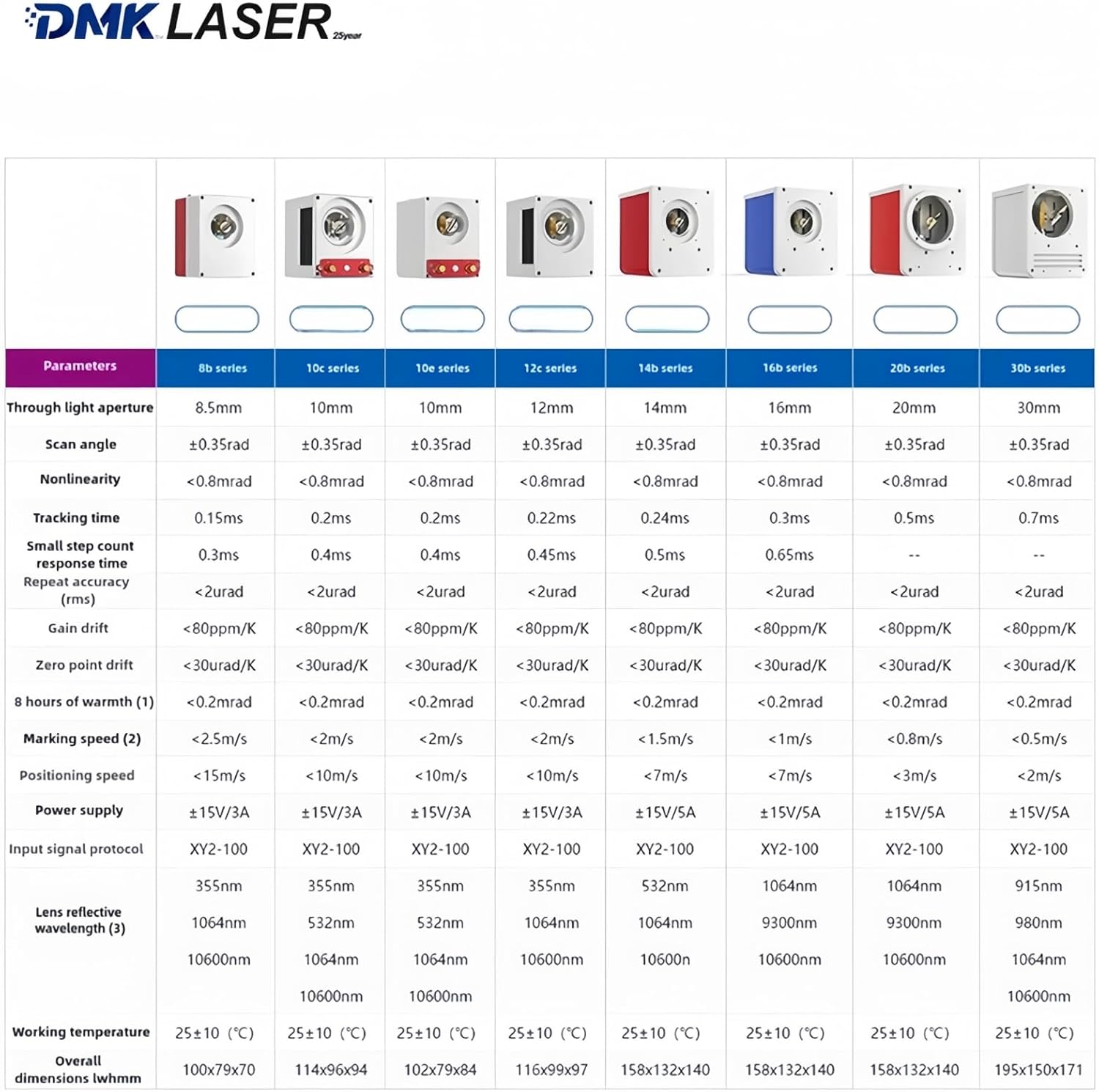
Figure 4: Detailed technical parameters for different ZBTK galvo head series, including scan angle, nonlinearity, tracking time, and power supply requirements.
8. Garanzia e supporto
For warranty information and technical support, please contact your point of purchase or the manufacturer, DMK Laser. You can visit the official DMK Laser store for more information: DMK Laser Store.