
Introduzione
This manual provides detailed instructions for the safe and effective operation of your TOOLTOP ET628 3-in-1 Network Scanner, Visual Fault Locator, and Multimeter. This versatile device combines cable length measurement, cable mapping, cable tracing, visual fault locating, and multimeter functions into a single unit, designed for professionals working with network cables, telephone lines, and other electrical systems.
Si prega di leggere attentamente il presente manuale prima di utilizzare il dispositivo e di conservarlo per riferimento futuro.
Informazioni sulla sicurezza
Per evitare lesioni e danni al dispositivo, osservare sempre le seguenti precauzioni di sicurezza:
- Non utilizzare il dispositivo se appare danneggiato o non funziona correttamente.
- Ensure proper connection of cables before performing any tests.
- Avoid direct exposure to the visual fault locator's laser beam, as it can cause eye damage.
- Non tentare di misurare il voltages exceeding the device's specified limits.
- Tenere il dispositivo lontano dall'acqua e dall'umidità elevata.
- Utilizzare solo accessori e pezzi di ricambio specificati dal produttore.
Contenuto della confezione
Verifica che tutti gli articoli siano presenti nel tuo pacco:
- 1 x trasmettitore (unità principale)
- 1 x Receiver (Wire Tracker)
- 1 x Cavo RJ45
- 1 x Test Leads
- 1 x K-type Temperature Probe
- 7 x Remote ID Units
- 1 x Borsa per il trasporto
- 1 x Manuale utente (questo documento)
- 1 x scatola regalo (imballaggio)
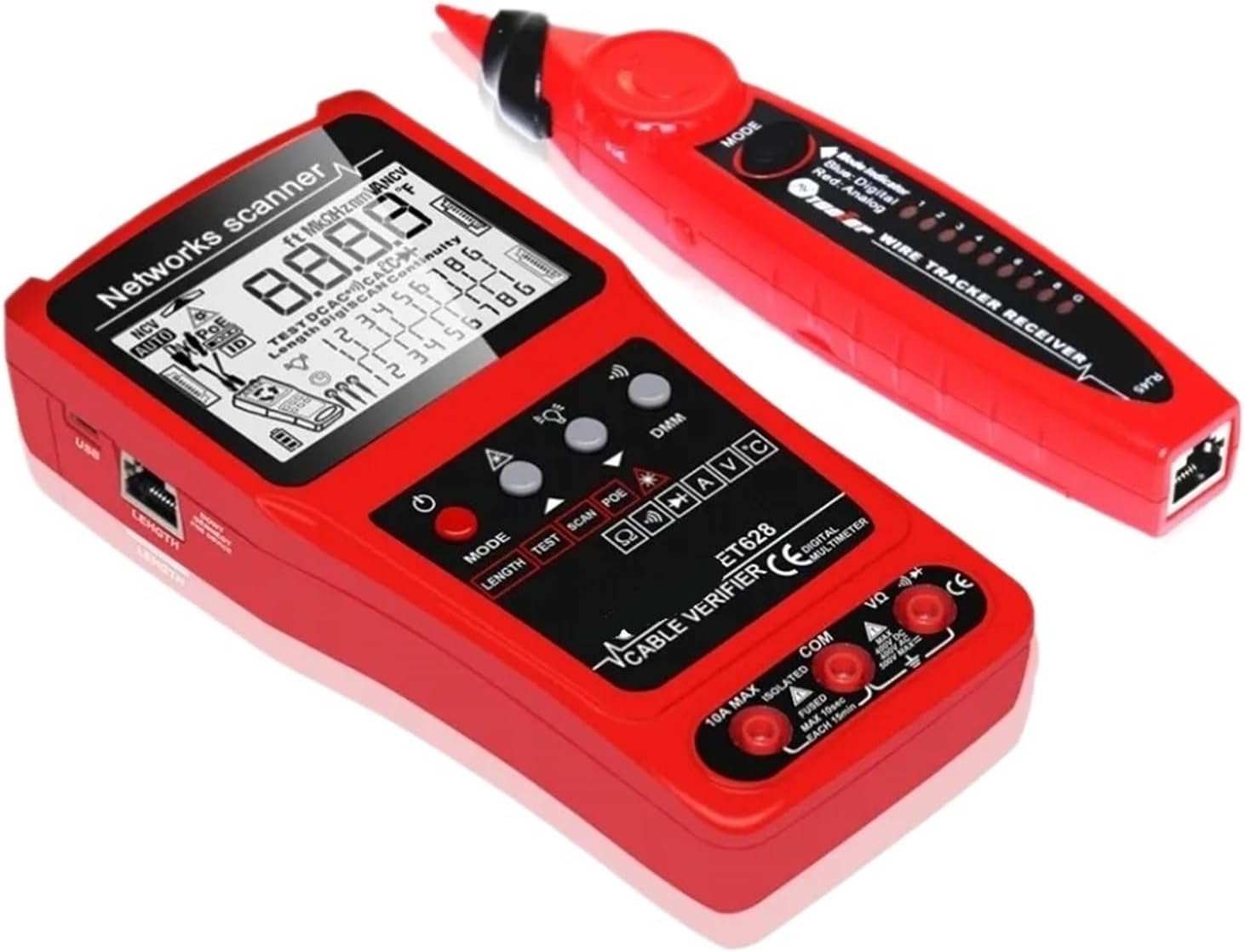
Immagine: The TOOLTOP ET628 main unit (transmitter), wire tracker (receiver), and various accessories including cables, test leads, remote IDs, and carrying bag.
Prodotto finitoview
The TOOLTOP ET628 is a multi-functional testing device designed for network and electrical professionals. It integrates several key functions to streamline cable installation, maintenance, and troubleshooting.

Immagine: Lato view of the ET628 transmitter (left) and the wire tracker receiver (right), showing their ergonomic design and ports.
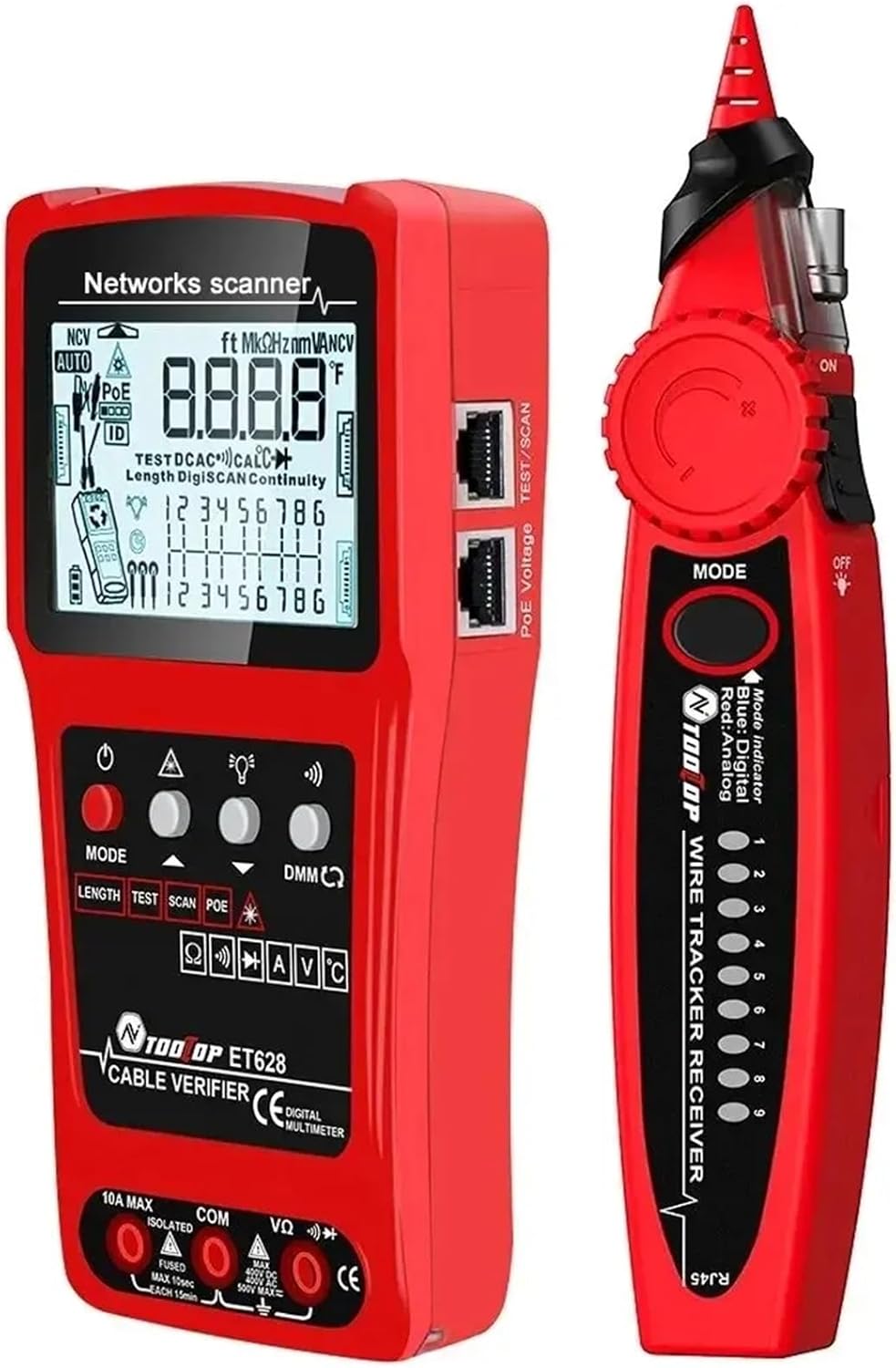
Immagine: Un dettagliato view of the ET628 transmitter's control panel, including buttons for MODE, LENGTH, TEST, SCAN, POE, and the digital multimeter (DMM) selector.
Caratteristiche principali:
- Misurazione della lunghezza del cavo: Measures and displays length and condition of network, telephone, coaxial, and other metal cables up to 600m (1968ft).
- Cable Mapping: Tests connection characteristics for open circuits, line sequence, short circuits, and crossovers.
- Cable Tracing (SCAN): Identifies target cables from bundles with noise-free digital technology.
- Localizzatore visivo di guasti (VFL): Locates problem areas in fiber optic cables using a red laser (10KM/10mW).
- Multimetro: Performs DC/AC current and voltage, resistance, continuity, diode, and temperature tests.
- Prova PoE: Verifies PoE switch power, network cable sequence, polarity, and voltage.
- Batteria al litio ricaricabile incorporata: Per un uso prolungato.
Impostare
Before first use, ensure the device is fully charged. Connect the included charging cable to the transmitter's charging port and a suitable USB power adapter.
Connessioni di base:
- Accensione: Press and hold the power button on both the transmitter and receiver to turn them on.
- Connessione via cavo: For most cable tests, connect one end of the cable to the appropriate port on the transmitter (e.g., RJ45 for network cables). For remote ID tests, connect the other end to one of the 7 remote ID units.
- Puntali di prova: For multimeter functions, connect the red and black test leads to the VΩmA and COM ports respectively on the transmitter.
Istruzioni per l'uso
The ET628 offers multiple testing modes. Use the MODALITÀ pulsante per scorrere le funzioni principali.

Immagine: A close-up of the ET628's LCD screen, displaying network scanner information, including cable mapping results and length measurements.
1. Misurazione della lunghezza del cavo
- Connect the cable to be measured to the appropriate port on the transmitter.
- Premere il tasto LUNGHEZZA button or select the length measurement mode using the MODALITÀ pulsante.
- The device will automatically measure and display the cable length in meters or feet.
- For accurate results, ensure the cable is disconnected from any active network devices.
2. Cable Mapping (Wiremap Test)
- Connect one end of the network cable to the RJ45 port on the transmitter.
- Connect the other end of the cable to one of the remote ID units (1-7).
- Selezionare il TEST mode (often labeled "TEST" or "WIREMAP").
- The display will show the wiring sequence, indicating any open circuits, short circuits, or crossed pairs.

Immagine: The ET628 transmitter with various cable types connected, illustrating its versatility for different testing scenarios.
3. Cable Tracing (SCAN)
- Connect the cable to be traced to the transmitter's RJ45 port.
- Selezionare il SCANSIONE mode on the transmitter.
- Use the receiver (wire tracker) to trace the cable. The receiver will emit an audible tone, which will be strongest when near the target cable.
- Adjust the sensitivity and sound level on the receiver as needed.
4. Localizzatore di guasti visivi (VFL)
- Remove the protective cap from the VFL port on the transmitter.
- Collegare il cavo in fibra ottica alla porta VFL.
- Activate the VFL function (refer to the display for VFL icon or specific button).
- Observe the fiber optic cable for red light leakage, which indicates breaks, bends, or faulty connectors.
- Caution: Avoid looking directly into the VFL output.
5. Multimeter Functions (DMM)
- Connect the red and black test leads to the VΩmA and COM ports respectively.
- Utilizzare il Multimetro digitale selector or MODALITÀ button to select the desired measurement (e.g., DC/AC voltage, resistance, continuity, diode, temperature).
- Touch the test probes to the circuit or component to be measured.
- Leggere la misura sul display.
- Il NCV (Vol senza contattotage) test function can be activated to detect AC voltage senza contatto diretto.
6. Test PoE
- Connect the network cable from the PoE switch to the RJ45 port on the transmitter.
- Selezionare il POE modalità.
- The device will display information about the PoE power, including the network cable sequence number, positive and negative poles, and voltage valore.
Manutenzione
- Pulizia: Pulire il dispositivo con un panno morbido e asciutto. Non utilizzare detergenti abrasivi o solventi.
- Batteria: The device features a built-in rechargeable lithium battery. Recharge when the battery indicator is low. Avoid fully discharging the battery for extended periods.
- Magazzinaggio: Quando non lo si utilizza, conservare il dispositivo nella sua custodia per il trasporto in un luogo fresco e asciutto.
- Calibrazione: The cable length measurement function may require occasional calibration for optimal accuracy. Refer to the on-screen prompts or specific instructions for calibration procedures.
Risoluzione dei problemi
| Problema | Possibile causa | Soluzione |
|---|---|---|
| Il dispositivo non si accende. | Batteria scarica. | Caricare il dispositivo utilizzando il cavo di ricarica in dotazione. |
| Misurazione imprecisa della lunghezza del cavo. | Cable connected to active network; improper calibration. | Ensure cable is disconnected from all active devices. Perform calibration as per instructions. |
| No signal during cable tracing. | Transmitter not in SCAN mode; receiver sensitivity too low; cable not connected. | Verify transmitter is in SCAN mode. Increase receiver sensitivity. Ensure cable is properly connected to transmitter. |
| VFL laser not visible. | Protective cap still on; VFL function not activated; fiber cable severely damaged. | Remove cap. Activate VFL mode. Check fiber cable for severe damage. |
Specifiche
- Modello: ET628
- Marca: MDWXDOFP (TOOLTOP)
- Misurazione della lunghezza del cavo: Fino a 600 m / 1968 piedi
- Visual Fault Locator Output: 10KM / 10mW (Red Laser)
- Funzioni del multimetro: DC/AC Current, DC/AC Voltage, Resistance, Continuity, Diode, Temperature, NCV
- Prova PoE: SÌ
- Remote ID Units: 7 inclusi
- Fonte di energia: Batteria al litio ricaricabile integrata
- Peso dell'articolo: Approximately 50 Grams (main unit, without accessories)
Garanzia e supporto
Specific warranty information for the TOOLTOP ET628 is not provided in this manual. Please refer to the product packaging or contact the retailer/manufacturer directly for warranty details and technical support.
Per ulteriore assistenza, puoi visitare il sito del produttore website or contact their customer service department using the information provided at the point of purchase.