
Wanneton M9-1
Wanneton M9-1 Rechargeable Wireless Walkie Talkies User Manual
Modello: M9-1
1. Introduzione
This manual provides detailed instructions for the proper use and maintenance of your Wanneton M9-1 Rechargeable Wireless Walkie Talkies. Please read this manual thoroughly before operating the device to ensure optimal performance and safety.
Cosa c'è nella scatola
- 1X Walkie Talkie
- 1X Battery
- 1X clip da cintura
- 1X Charging Head (Power Adapter)
- 1X Charging Cable (USB Type-C)
- 1X Manuale di istruzioni
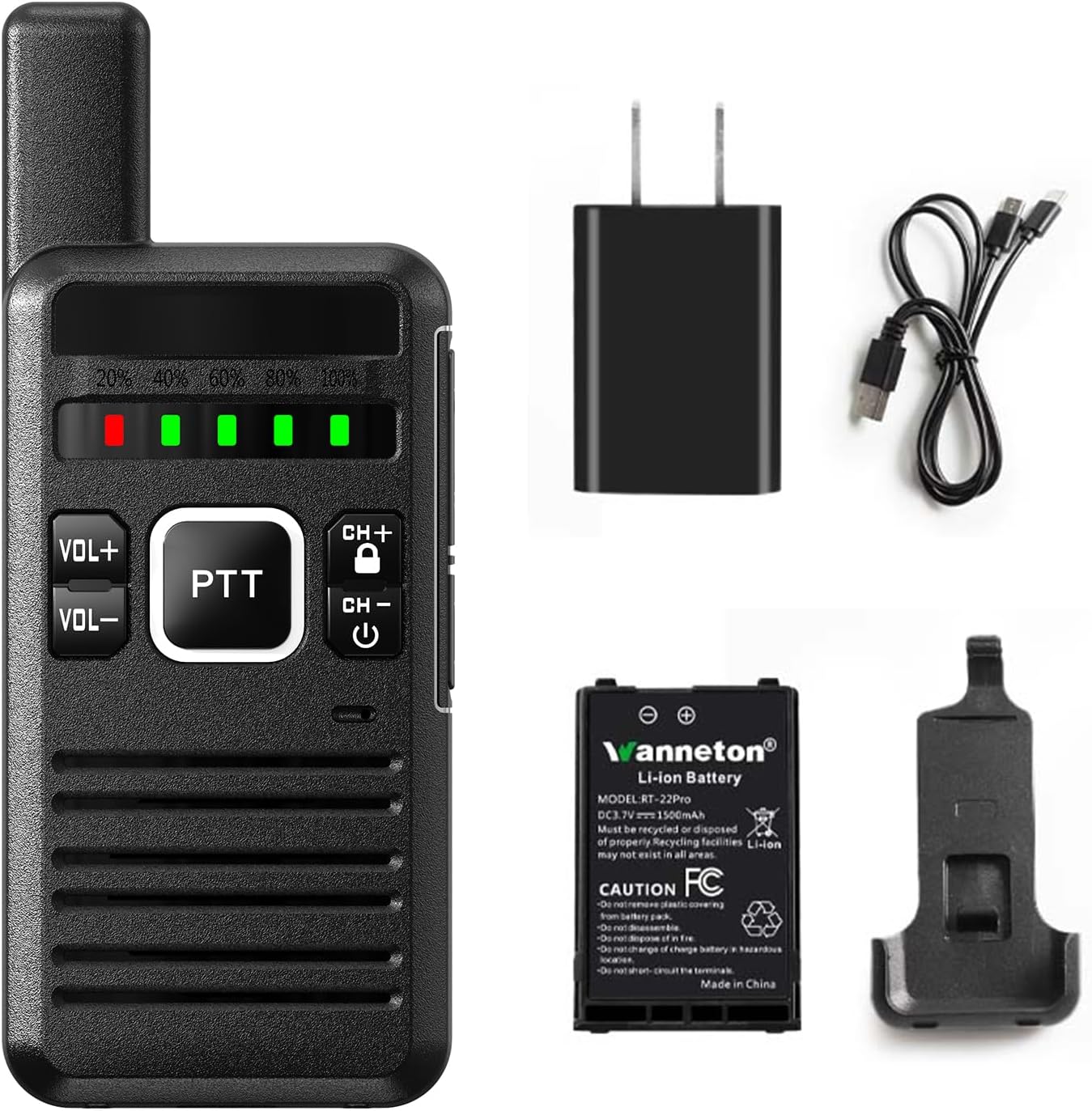
Figure 1: Package Contents of the Wanneton M9-1 Walkie Talkie.
2. Prodotto finitoview
Familiarize yourself with the components and controls of your Wanneton M9-1 walkie talkie.

Figure 2: Labeled Diagram of the Wanneton M9-1 Walkie Talkie.
Componenti chiave:
- Antenna: Per la trasmissione e la ricezione del segnale.
- Interruttore di accensione/volume: Ruota per accendere/spegnere il dispositivo e regolare il volume.
- Visualizzazione della barra della batteria: Indica il livello attuale della batteria.
- Jack per cuffie: Per collegare accessori audio esterni.
- Channel+/Channel Lock Button: Used to change channels and lock/unlock controls.
- USB Type-C Charging Socket: Per caricare il dispositivo.
- MICROFONO: Microfono per input vocale.
- Oratore: Per l'uscita audio.
- Pulsante PTT (premi per parlare): Tenere premuto per trasmettere, rilasciare per ricevere.
- Tasti Volume +/-: Regola il volume dell'altoparlante.
3. Impostazione
3.1 Installazione della batteria
- Assicurarsi che il walkie-talkie sia spento.
- Individuare il vano batteria sul retro del dispositivo.
- Insert the provided Lithium-Ion battery, ensuring the contacts align correctly.
- Chiudere saldamente il coperchio del vano batterie.
3.2 Caricamento della batteria
The walkie talkie uses a rechargeable 1500mAh Li-ion battery. Charge the device before first use and whenever the battery indicator shows low power.
- Connect the USB Type-C charging cable to the charging socket on the side of the walkie talkie.
- Connect the other end of the USB cable to the charging head (power adapter) and plug it into a standard wall outlet, or connect it to a computer or power bank.
- The battery indicator lights will show charging status. A full charge is indicated when all lights are green.
- Scollegare il caricabatterie una volta completata la ricarica.

Figure 3: Charging the Wanneton M9-1 Walkie Talkie.
3.3 Fissaggio della clip da cintura
The innovative clip design allows for easy attachment and detachment without tools.
- Allineare la clip da cintura con le apposite fessure sul retro del walkie-talkie.
- Slide the clip until it securely locks into place.
- Per rimuoverlo, premere la linguetta di rilascio (se presente) e far scorrere la clip verso l'esterno.

Figure 4: Attaching the Belt Clip for Hands-free Use.
4. Istruzioni per l'uso
4.1 Accensione/spegnimento e regolazione del volume
- To power on, rotate the Power/Volume switch clockwise until you hear a click and the device powers on.
- To power off, rotate the Power/Volume switch counter-clockwise until you hear a click and the device powers off.
- Adjust the volume by rotating the Power/Volume switch further clockwise (increase) or counter-clockwise (decrease). Alternatively, use the dedicated VOL+ and VOL- buttons.

Figure 5: Clear Sound Quality and Volume Control.
4.2 Trasmissione e ricezione (PTT)
- Per trasmettere, tenere premuto il pulsante PTT (Push-to-Talk). Parlare chiaramente nel microfono.
- Rilasciare il pulsante PTT per interrompere la trasmissione e tornare alla modalità di ricezione.
4.3 Selezione del canale
Use the CH+ and CH- buttons to cycle through the available channels. Ensure all parties are on the same channel for communication.
4.4 Funzione VOX (funzionamento a mani libere)
La funzione VOX (Voice Operated Exchange) consente di trasmettere senza premere il pulsante PTT. Quando la funzione VOX è abilitata, la radio trasmetterà automaticamente quando rileva la voce.
- Access the device menu to enable or disable VOX.
- Adjust VOX sensitivity levels as needed to prevent accidental transmissions or missed voice activation.
4.5 Scrambling Function
The scrambling function encrypts your voice transmission to enhance privacy. Only other radios with the scrambling function enabled and set to the same code can understand your communication.
- Enable or disable scrambling through the device menu.
4.6 Funzione di scansione
The scanning function allows the radio to automatically scan through channels to detect active transmissions.
- Activate scanning via the device menu. The radio will stop on an active channel and resume scanning after a short period of inactivity.
4.7 Copia della frequenza wireless
This feature allows you to easily clone frequencies from other walkie talkie brands without needing to know the exact frequency, ensuring compatibility.

Figure 6: Wireless Frequency Copy in Action.
4.8 Altre funzioni
The M9-1 walkie talkie includes additional features accessible through the device menu:
- Codici sulla privacy: Utilize 260 privacy codes to minimize interference from other users.
- Funzione di decodifica: For receiving scrambled transmissions.
- Promemoria batteria scarica: Ti avvisa quando la batteria è scarica.
- Modalità di risparmio energetico: Prolunga la durata della batteria durante i periodi di inattività.
- Wide/Narrowband: Adjusts channel bandwidth for specific communication needs.

Figura 7: Oltreview of Wanneton M9-1 Features.
5. Manutenzione
5.1 Pulizia
- Pulire il dispositivo con un panno morbido, damp stoffa. Non utilizzare prodotti chimici aggressivi o detergenti abrasivi.
- Assicurarsi che la porta di ricarica sia priva di polvere e detriti.
5.2 Cura della batteria
- Evitare di scaricare completamente la batteria frequentemente.
- Conservare il dispositivo e la batteria in un luogo fresco e asciutto quando non vengono utilizzati per periodi prolungati.
- Non esporre la batteria a temperature estreme.
6. Risoluzione Dei Problemi
| Problema | Possibile causa | Soluzione |
|---|---|---|
| Nessun potere | Battery discharged; Battery not installed correctly; Device faulty. | Charge the battery; Reinstall the battery; Contact customer support. |
| Impossibile trasmettere o ricevere | Wrong channel; Out of range; Battery low; Antenna damaged. | Verify channel settings; Move closer to other radios; Charge battery; Inspect antenna. |
| Scarsa qualità audio | Low volume; Interference; Out of range; Speaker/MIC obstructed. | Adjust volume; Move away from interference sources; Move closer; Clear obstructions. |
| La copia di frequenza non funziona | Source radio too far; Incorrect procedure. | Ensure radios are close; Follow frequency copy instructions carefully. |
7. Specifiche
| Caratteristica | Dettaglio |
|---|---|
| Marca | Wanneton |
| Numero di modello | M9-1 |
| Peso dell'articolo | 1 libbre |
| Dimensioni del prodotto | 0.8 x 2 x 6.2 pollici |
| Tipo di batteria | 1 batteria agli ioni di litio richiesta (1500 mAh) |
| Colore | Nero |
| Numero di canali | 16 |
| Caratteristiche speciali | One-key decoding copy frequency, Battery Saver Mode, Lightweight, Keypad Lock, Emergency Alarm |
| Gamma di frequenza | Frequenza ultra-alta |
| Portata massima di conversazione | 30 miglia (in condizioni ottimali) |
| Voltage | 3.7 Volt (CC) |
| Livello di resistenza all'acqua | Resistente all'acqua |
8. Garanzia e supporto
8.1 Informazioni sulla garanzia
Please note that the product specifications indicate 'NO' for warranty. For specific details regarding any implied warranties or consumer rights, please refer to your point of purchase or local consumer protection laws.
8.2 Assistenza clienti
Wanneton provides lifetime after-sales service for the quality of their walkie talkies. If you have any questions, concerns, or require assistance with your M9-1 device, please contact our dedicated customer support team. Refer to the contact information provided with your purchase or visit the official Wanneton websito per opzioni di supporto.
Ask a question about this manual
Ask about setup, troubleshooting, compatibility, parts, safety, or missing instructions. Manuals+ will review the question and use this page’s manual context to help answer it.