
1. Introduzione
This manual provides essential information for the safe and efficient operation of your Meizu mblu 21 smartphone. Please read it thoroughly before using the device.
The Meizu mblu 21 features a Prism Edge Design with a radiant gradient and a large immersive 6.79-inch HD display. It is equipped with a 13MP main camera and an 8MP front camera, powered by Android 14. The device includes a 4900mAh battery for extended use and supports 4G LTE connectivity, Dual-Band Wi-Fi, and Bluetooth 5.0.
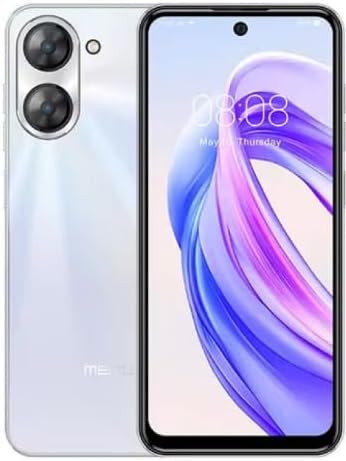
Figura 1.1: Fronte e retro view of the Meizu mblu 21 smartphone in White Diamond color.
2. Cosa c'è nella scatola
Verificare che tutti gli articoli siano presenti nel pacco:
- Meizu mblu 21 Smartphone
- Adattatore di alimentazione
- Cavo USB
- Strumento di espulsione della SIM
- Guida rapida

Figure 2.1: Meizu mblu 21 smartphone alongside its power adapter.
3. Impostazione
3.1. Inserimento delle schede SIM e della scheda MicroSD
The Meizu mblu 21 supports Dual Nano SIM cards and a MicroSD card for expandable storage. Locate the SIM tray on the side of the device.
- Power off the device before inserting or removing SIM/MicroSD cards.
- Utilizzare lo strumento di espulsione SIM in dotazione per aprire il vassoio della SIM.
- Carefully place the Nano SIM cards and/or MicroSD card into the designated slots on the tray, ensuring correct orientation.
- Spingere delicatamente il vassoio nel dispositivo finché non è a filo.
3.2. Accensione iniziale e procedura guidata di configurazione
- Press and hold the Power button until the Meizu logo appears.
- Segui le istruzioni sullo schermo per completare la configurazione iniziale, inclusa la selezione della lingua, la connessione a una rete Wi-Fi e la configurazione del tuo account Google.
4. Utilizzo del dispositivo
4.1. Display e navigazione
The 6.79-inch HD display features a 90Hz adaptive refresh rate for smooth visuals. Navigate the interface using touch gestures: tap, swipe, pinch-to-zoom.
4.2. Funzioni della fotocamera
The device is equipped with a 13MP main camera and an 8MP front camera. Open the Camera application to capture photos and videos.
- Fotocamera intelligente da 13 MP: Ideal for capturing everyday moments with sharpness and true-to-life colors.
- Fotocamera frontale da 8 MP: Designed for clear selfies and video calls.
4.3. Funzionalità di sicurezza
- Side Unlock: A fast and secure fingerprint sensor integrated into the side power button for instant access.
- Smart Face Unlock: Use the front camera to unlock your device quickly and conveniently.
4.4. Connettività
Your mblu 21 supports various connectivity options:
- 4G LTE: For mobile data connectivity. In the USA, this device is compatible with T-Mobile. Outside the USA, it works with any carrier worldwide.
- Wi-Fi dual-band: Supports both 2.4GHz and 5GHz bands for seamless internet access.
- Bluetooth 5.0: For connecting wireless accessories with improved energy efficiency.
- VoLTE HD Calls: Enjoy sharper, clearer voice calls over LTE networks.

Figure 4.1: Key technology features of the Meizu mblu 21, including Android 14, Dual-Band Wi-Fi, Bluetooth 5.0, and VoLTE.
5. Manutenzione
5.1. Cura della batteria
The mblu 21 is equipped with a 4900mAh battery. To maximize battery lifespan:
- Evitare temperature estreme.
- Use only the provided power adapter or certified compatible chargers.
- Evitare di scaricare completamente la batteria frequentemente.

Figura 5.1: Interno view of the Meizu mblu 21, showcasing the 4900mAh battery and internal components.
5.2. Pulizia del dispositivo
Utilizzare un panno morbido e privo di lanugine per pulire lo schermo e il corpo del telefono. Evitare l'uso di prodotti chimici aggressivi o materiali abrasivi.
5.3. Aggiornamenti software
Regularly check for and install software updates to ensure optimal performance and security. Updates can be found in the device's settings menu.
6. Risoluzione Dei Problemi
If you encounter issues with your Meizu mblu 21, try the following solutions:
- Il dispositivo non risponde: Per forzare il riavvio, tenere premuto il pulsante di accensione per circa 10-15 secondi.
- Problemi di connettività di rete:
- Assicurarsi che la scheda SIM sia inserita correttamente.
- Attiva e disattiva la modalità aereo.
- Controllare le impostazioni di rete (APN, tipo di rete preferito).
- La batteria si scarica rapidamente:
- Chiudi le app inutilizzate in esecuzione in background.
- Ridurre la luminosità dello schermo.
- Disable unnecessary features like GPS or Bluetooth when not in use.
- Problemi di prestazioni:
- Clear cache and data of problematic apps.
- Libera spazio di archiviazione.
- Consider a factory reset (Note: This will erase all data on your device. Back up important data first.).
7. Specifiche
| Caratteristica | Dettaglio |
|---|---|
| Nome del modello | mblu 21 |
| Numero di modello | M416L |
| Sistema operativo | Androide 14 |
| Dimensioni dello schermo | 6.79 pollici |
| Capacità di archiviazione della memoria | 64 GB |
| Dimensione della memoria RAM installata | 4 GB |
| Capacità della batteria | 4900 milioneamp Ore |
| Fotocamera principale | 13 MP |
| Fotocamera frontale | 8 MP |
| Operatore di telefonia mobile (USA) | T-Mobile |
| Tecnologia cellulare | 4G LTE |
| Tecnologie di connettività | 4G, Dual-Band Wi-Fi, Bluetooth 5.0 |
| Peso dell'articolo | 14 once |
| Dimensioni del pacco | 7 x 4 x 2 pollici |
| Colore | White Diamond |
8. Garanzia e supporto
Your Meizu mblu 21 smartphone comes with a manufacturer's warranty. Please refer to the warranty card included in your product packaging for specific terms and conditions.
For technical support, service, or further inquiries, please contact Meizu customer support through their official channels. Contact information can typically be found on the manufacturer's websito o nella documentazione del prodotto.