
1. Introduzione
This manual provides essential information for the proper setup, operation, maintenance, and troubleshooting of your Meizu mblu 21 4G LTE smartphone. Please read this manual thoroughly before using your device to ensure optimal performance and longevity.
The Meizu mblu 21 features a 6.79-inch HD display, a 13MP dual camera system, and runs on Android 14. It is designed for efficient performance and reliable connectivity.
2. Impostazione
2.1 Contenuto della confezione
Verifica che il pacco contenga i seguenti articoli:
- Meizu mblu 21 Smartphone
- Adattatore di alimentazione
- Guida rapida (se inclusa)
2.2 Installazione della scheda SIM e della scheda MicroSD
The Meizu mblu 21 supports Dual Nano SIM cards and a MicroSD card for expandable storage.
- Individua il vassoio SIM sul lato del dispositivo.
- Insert the SIM ejector tool (not included, use a thin pin if necessary) into the small hole on the SIM tray to eject it.
- Place your Nano SIM card(s) and/or MicroSD card into the designated slots on the tray, ensuring proper orientation.
- Reinserire con cautela il vassoio della SIM nel telefono finché non scatta in posizione.
2.3 Accensione iniziale e configurazione di rete
- Press and hold the power button until the Meizu logo appears.
- Seguire le istruzioni sullo schermo per completare la configurazione iniziale, inclusa la selezione della lingua, la connessione Wi-Fi e la configurazione dell'account Google.
- For cellular connectivity, ensure your SIM card is active. This device is an international version and in the USA market, it operates exclusively on T-Mobile's 4G LTE network. Outside the USA, it is compatible with various carriers worldwide.
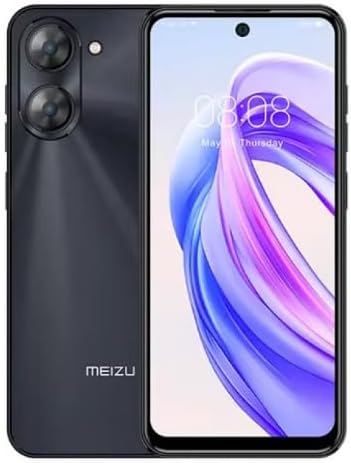
Immagine 2.3.1: Anteriore e posteriore view of the Meizu mblu 21 smartphone. The front displays the screen with a punch-hole camera, while the rear shows the dual camera module and the Meizu branding.
3. Istruzioni per l'uso
3.1 Navigazione di base (Android 14)
Your Meizu mblu 21 runs on Android 14, offering an intuitive user experience. Use gestures or on-screen navigation buttons to move between apps, access settings, and manage notifications.
3.2 Utilizzo della fotocamera
The device features a 13MP Smart Camera on the rear and an 8MP front camera. Open the Camera app to capture photos and videos. Utilize various modes and settings for optimal results.
3.3 Funzionalità di sicurezza
Unlock your device using the side-mounted fingerprint sensor for instant access or the 8MP front camera for Smart Face Unlock.
3.4 Connettività
- Wifi: Supports Dual-Band Wi-Fi (2.4GHz and 5GHz) for stable internet access.
- Bluetooth: Bluetooth 5.0 per la connessione ad accessori wireless.
- VoLTE: Enjoy clearer voice calls with VoLTE HD Calls.

Immagine 3.4.1: Visual representation of key connectivity and operating system features, including Android 14, Dual-Band Wi-Fi, Bluetooth 5.0, and VoLTE HD Calls.
4. Manutenzione
4.1 Cura generale
- Mantieni il tuo dispositivo asciutto e lontano da temperature estreme.
- Pulisci lo schermo e il corpo con un panno morbido e privo di lanugine. Evita prodotti chimici aggressivi.
- Protect the screen with a screen protector and the body with a protective case to prevent scratches and damage.
4.2 Gestione della batteria
The 4900mAh battery is designed for all-day performance. To prolong battery life:
- Evitare di scaricare completamente la batteria frequentemente.
- Per la ricarica utilizzare l'adattatore di alimentazione fornito.
- Optimize background app usage and screen brightness in settings.

Immagine 4.2.1: Un interno view of the Meizu mblu 21 smartphone highlighting the 4900mAh battery, emphasizing its capacity for extended use.
5. Risoluzione Dei Problemi
5.1 Problemi comuni e soluzioni
- Il dispositivo non si accende: Assicurati che la batteria sia carica. Collegala all'adattatore di alimentazione e riprova.
- Problemi di connettività di rete: Check if your SIM card is properly inserted and active. Verify network settings and ensure you are within T-Mobile's coverage area in the USA.
- Prestazioni lente: Chiudere le applicazioni in background non necessarie. Cancellare la cache e i file temporanei files. Riavviare il dispositivo.
- La batteria si scarica rapidamente: Reduce screen brightness, disable unused features like Bluetooth or GPS, and check for power-intensive apps.
Se i problemi persistono, valuta la possibilità di eseguire un ripristino delle impostazioni di fabbrica (esegui prima il backup dei dati) o di contattare l'assistenza clienti.
6. Specifiche
| Numero di modello | M416L |
| Sistema operativo | Androide 14 |
| Display | 6.79 Inches HD, 2340 x 1080 Resolution, 90Hz Adaptive Refresh Rate |
| Processore | Octa Core 1.6GHz ARM Mali-G57 |
| Memoria | 64 GB Internal Storage, 4 GB RAM |
| Batteria | 4900mAh (4.9E+3 Milliamp Hours) Lithium Polymer |
| Telecamera posteriore | 13MP Smart Camera, 5P Precision Lens |
| Fotocamera frontale | 8MP |
| Tecnologia cellulare | 4G LTE FDD: 2,3,4,5,7,8,12,17,26,28,66; 3G WCDMA: 2/4/5/8; 2G Quad Band |
| Tipo di SIM | Dual Nano SIM + MicroSD |
| Wifi | Doppia banda (2.4 GHz e 5 GHz) |
| Bluetooth | 5.0 |
| Presa audio | USB tipo C |
| Peso dell'articolo | 14 once |
| Identificazione FCC | 2ANQ6-M416L |

Immagine 6.1: The Meizu mblu 21 smartphone presented in its Titan Black color variant, showcasing il suo design.
7. Garanzia e supporto
For warranty information, please refer to the warranty card included with your product or consult the retailer where the device was purchased. Meizu provides support for its products. For further assistance, please visit the official Meizu websito o contattare il loro servizio clienti.