
1. Introduzione
Grazie per l'acquistoasing the WVCLTVJA 318C Digital Microscope Camera. This device is designed for detailed observation and analysis, featuring a 12MP camera, up to 1600X magnification, and a 7-inch IPS touch screen for intuitive control. This manual provides essential information for the safe and effective use of your microscope. Please read it thoroughly before operation and retain it for future reference.
2. Informazioni sulla sicurezza
Per garantire un funzionamento sicuro e prolungare la durata del dispositivo, osservare le seguenti precauzioni:
- Non esporre il microscopio a temperature estreme, umidità o sostanze corrosive.
- Evitare l'esposizione diretta dell'obiettivo a fonti di luce intensa, poiché ciò potrebbe danneggiare il sensore.
- Utilizzare solo l'adattatore di alimentazione fornito. L'utilizzo di un adattatore non corretto potrebbe danneggiare il dispositivo o comportare un rischio di incendio.
- Tenere il dispositivo lontano dalla portata dei bambini per evitare incidenti.
- Non tentare di smontare o modificare il microscopio. Per qualsiasi intervento di manutenzione, rivolgersi a personale qualificato.
- Clean the device with a soft, dry cloth. Avoid liquid cleaners directly on the screen or lens.
3. Contenuto della confezione
Please check the package contents upon receipt. If any items are missing or damaged, contact your retailer immediately.
- WVCLTVJA 318C Digital Microscope Camera
- Ordinary Lens
- Supporto regolabile
- Cavo di alimentazione USB
- Adattatore di alimentazione
- Righello di calibrazione
- Manuale dell'utente (questo documento)
4. Prodotto finitoview
Familiarize yourself with the main components and controls of your WVCLTVJA 318C Digital Microscope.
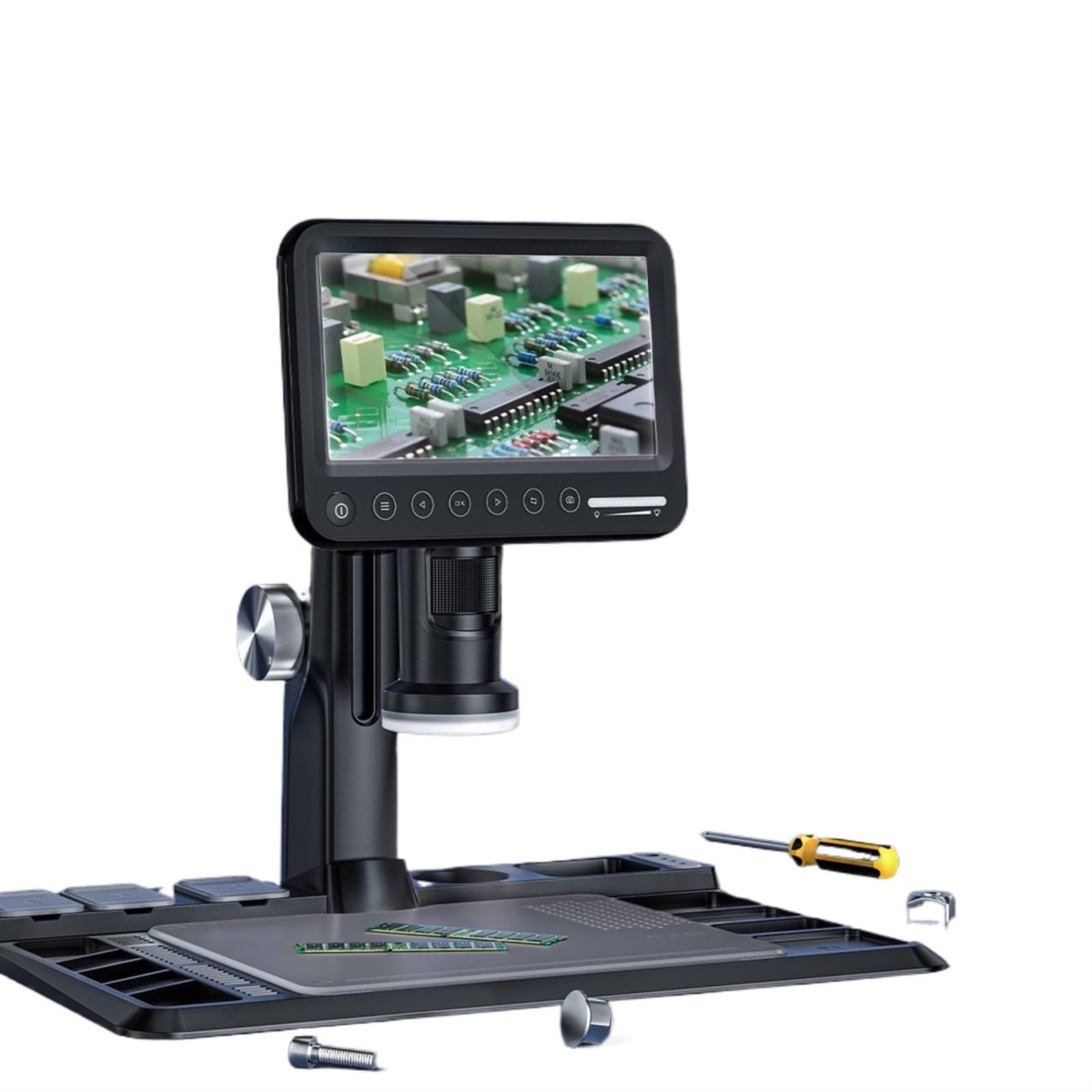
Figura 4.1: WVCLTVJA 318C Digital Microscope Camera. This image illustrates the main unit, including the 7-inch IPS touch screen, the adjustable stand, and the attached ordinary lens. Key components include the screen, focus wheel, magnification adjustment, and power input port.
Componenti chiave:
- Schermo touch IPS da 7 pollici: Per viewing live images, navigating menus, and adjusting settings.
- Ordinary Lens: The primary lens for standard magnification.
- Ruota di messa a fuoco: Regola la messa a fuoco per immagini nitide.
- Regolazione dell'ingrandimento: Controls the optical magnification level.
- Illuminazione a LED: Built-in lights to illuminate the specimen.
- Pulsante di accensione: Accende e spegne il dispositivo.
- Porta USB: Per l'alimentazione e il trasferimento dei dati.
- Slot per scheda MicroSD: Per memorizzare immagini e video acquisiti.
5. Impostazione
5.1 Disimballaggio e montaggio
- Rimuovere con attenzione tutti i componenti dalla confezione.
- Place the adjustable stand on a stable, flat surface.
- Attach the microscope main unit to the stand, ensuring it is securely fastened.
5.2 Installazione dell'obiettivo
- Gently screw the ordinary lens onto the microscope body until it is firm. Do not overtighten.
- Ensure the lens is clean and free of dust before use.
5.3 Collegamento di alimentazione
- Connect the USB power cable to the microscope's USB port.
- Collegare l'altra estremità del cavo USB all'adattatore di alimentazione fornito.
- Inserire l'adattatore di alimentazione in una presa elettrica standard.
5.4 Accensione iniziale
- Press and hold the Power button on the microscope for a few seconds until the screen illuminates.
- The device will boot up and display the live view dalla telecamera.
6. Istruzioni per l'uso
6.1 Accensione/spegnimento
- Per accendere: Tenere premuto il pulsante di accensione finché lo schermo non si accende.
- Per spegnere: Press and hold the Power button until a shutdown prompt appears on the screen. Confirm to power off.
6.2 Posizionamento di un campione
Place the object you wish to observe directly on the stage beneath the lens. Ensure it is stable and centered.
6.3 Regolazione della messa a fuoco
- Adjust the distance between the lens and the specimen using the stand's height adjustment mechanism.
- Rotate the Focus Wheel slowly until the image on the screen becomes clear and sharp.
6.4 Regolazione dell'ingrandimento
The 318C offers digital magnification up to 1600X. Optical magnification is adjusted by rotating the lens barrel or by changing the distance between the lens and the object. Digital zoom can be controlled via the touch screen interface.
6.5 Acquisizione di immagini e video
The 318C allows you to capture high-resolution images and videos directly to a MicroSD card (not included).
- Ensure a MicroSD card (Class 10 or higher, up to 32GB recommended) is inserted into the card slot.
- Dal vivo view, tap the camera icon on the touch screen to take a photo.
- Tap the video camera icon to start recording. Tap again to stop recording.
- Catturato files può essere riviewed in the gallery mode, accessible via the main menu.
6.6 Menu Navigation (Touch Control)
The 7-inch IPS screen supports touch control for navigating the microscope's settings and features.
- Rubinetto: Select an option or icon.
- Scorri: Scroll through lists or images in gallery mode.
- Pizzica per ingrandire: Adjust digital zoom in live view or gallery (if supported by software).
Le opzioni di menu più comuni includono:
- Risoluzione: Adjust image/video capture resolution.
- Esposizione: Control brightness.
- Bilanciamento del bianco: Regola la temperatura del colore.
- Data/Ora: Imposta la data e l'ora del sistema.
- Lingua: Seleziona la lingua di visualizzazione.
- Formatta scheda SD: Cancella tutti i dati sulla scheda MicroSD.
6.7 Trasferimento dati
Per trasferire files a un computer:
- Collegare il microscopio al computer tramite il cavo USB.
- The microscope should appear as a removable storage device.
- Alternatively, remove the MicroSD card from the microscope and insert it into a card reader connected to your computer.
7. Manutenzione
7.1 Pulizia
- Lente: Use a soft, lint-free lens cleaning cloth and specialized lens cleaning solution. Do not use abrasive materials.
- Schermo: Wipe the touch screen gently with a microfiber cloth. For stubborn smudges, slightly dampPulisci il panno con acqua o con un detergente per schermi.
- Corpo: Use a soft, dry cloth to wipe the microscope body. Avoid harsh chemicals.
7.2 Conservazione
When not in use, store the microscope in a clean, dry, and dust-free environment. Use the original packaging or a protective case to prevent damage.
7.3 Cura della batteria (se applicabile)
If your model includes a rechargeable battery, ensure it is charged periodically even when not in use to maintain battery health. Avoid fully discharging the battery for extended periods.
8. Risoluzione Dei Problemi
If you encounter issues with your WVCLTVJA 318C Digital Microscope, refer to the following table for common problems and solutions.
| Problema | Possibile causa | Soluzione |
|---|---|---|
| Il dispositivo non si accende. | Nessuna alimentazione, collegamento allentato o batteria scarica. | Check power adapter and cable connection. Ensure the power outlet is functional. Charge the device if it has an internal battery. |
| L'immagine è sfocata. | Out of focus, dirty lens, or incorrect working distance. | Adjust the focus wheel. Clean the lens. Adjust the height of the microscope relative to the specimen. |
| Impossibile acquisire immagini/video. | No MicroSD card, full card, or card error. | Insert a MicroSD card. Check if the card is full and delete unnecessary files or replace it. Format the MicroSD card (this will erase all data). |
| Lo schermo non risponde. | Problema software o blocco temporaneo. | Restart the device by holding the power button. If unresponsive, disconnect power and reconnect after a few seconds. |
| L'immagine è troppo scura/chiara. | Incorrect LED illumination or exposure settings. | Adjust the brightness of the LED lights. Modify exposure settings in the menu. |
Se il problema persiste dopo aver provato queste soluzioni, contattare l'assistenza clienti.
9. Specifiche
Technical specifications for the WVCLTVJA 318C Digital Microscope Camera:
| Caratteristica | Dettaglio |
|---|---|
| Modello | 318C |
| Risoluzione della fotocamera | 12 Megapixel |
| Ingrandimento | Up to 1600X (Digital) |
| Display | Schermo tattile IPS da 7 pollici |
| Magazzinaggio | MicroSD Card (up to 32GB, Class 10 recommended) |
| Connettività | USB |
| Illuminazione | Luci LED regolabili |
| Potenza in ingresso | 5V DC via USB |
| Peso | Approximately 50 Grams (main unit) |
10. Garanzia e supporto
The WVCLTVJA 318C Digital Microscope Camera comes with a standard manufacturer's warranty. Please refer to the warranty card included in your package for specific terms and conditions. For technical support, troubleshooting assistance, or warranty claims, please contact your retailer or the manufacturer directly using the contact information provided with your purchase.
Please have your model number (318C) and purchase date available when contacting support.