
1. Introduzione
The GMKtec EVO-X1 Mini PC is a high-performance, compact computing solution designed for a wide range of applications, from professional tasks to gaming and creative work. It features the next-generation AMD Ryzen AI 9 HX-370 processor, advanced AI NPU capabilities, and robust connectivity options, all within an ultra-small form factor.

Image: GMKtec EVO-X1 Mini PC highlighting its AMD Ryzen AI 9 HX-370 processor, 12 cores, 24 threads, 24MB L3 cache, and 65W TPD.
2. Prodotto finitoview
The EVO-X1 Mini PC integrates cutting-edge technology to deliver exceptional performance and versatility. Key features include:
- Processore: AMD Ryzen AI 9 HX-370 (Zen 5 architecture, up to 5.1GHz, 12 Cores/24 Threads)
- AI NPU: XDNA 2 architecture with up to 50 TOPS AI processing capability
- Grafica: Integrated AMD Radeon 890M iGPU (RDNA 3.5)
- Memoria: 32GB LPDDR5X 7500MHz (onboard)
- Magazzinaggio: 1TB PCIe 4.0 M.2 2280 SSD, expandable up to 8TB (2x M.2 2280 NVMe SSD slots)
- Sistema operativo: Windows 11 Pro
- Uscita di visualizzazione: Supports up to three 8K displays simultaneously (HDMI 2.1, DisplayPort 2.1, USB4)
- Rete: Dual Intel NIC 2.5Gbps LAN, WiFi 6, Bluetooth 5.2
- Connettività: USB4 (40Gbps, PD3.0/DP1.4/Data), Oculink port (PCIe x4, up to 64Gbps for eGPU), multiple USB 3.2 (Gen2) ports
- Raffreddamento: Dual cooling fans with optimized airflow design
- Dimensioni: Ultra-compact 110 x 107 x 68mm, weighing 591g
Porte e interfacce
The EVO-X1 offers a comprehensive set of ports for various connectivity needs:
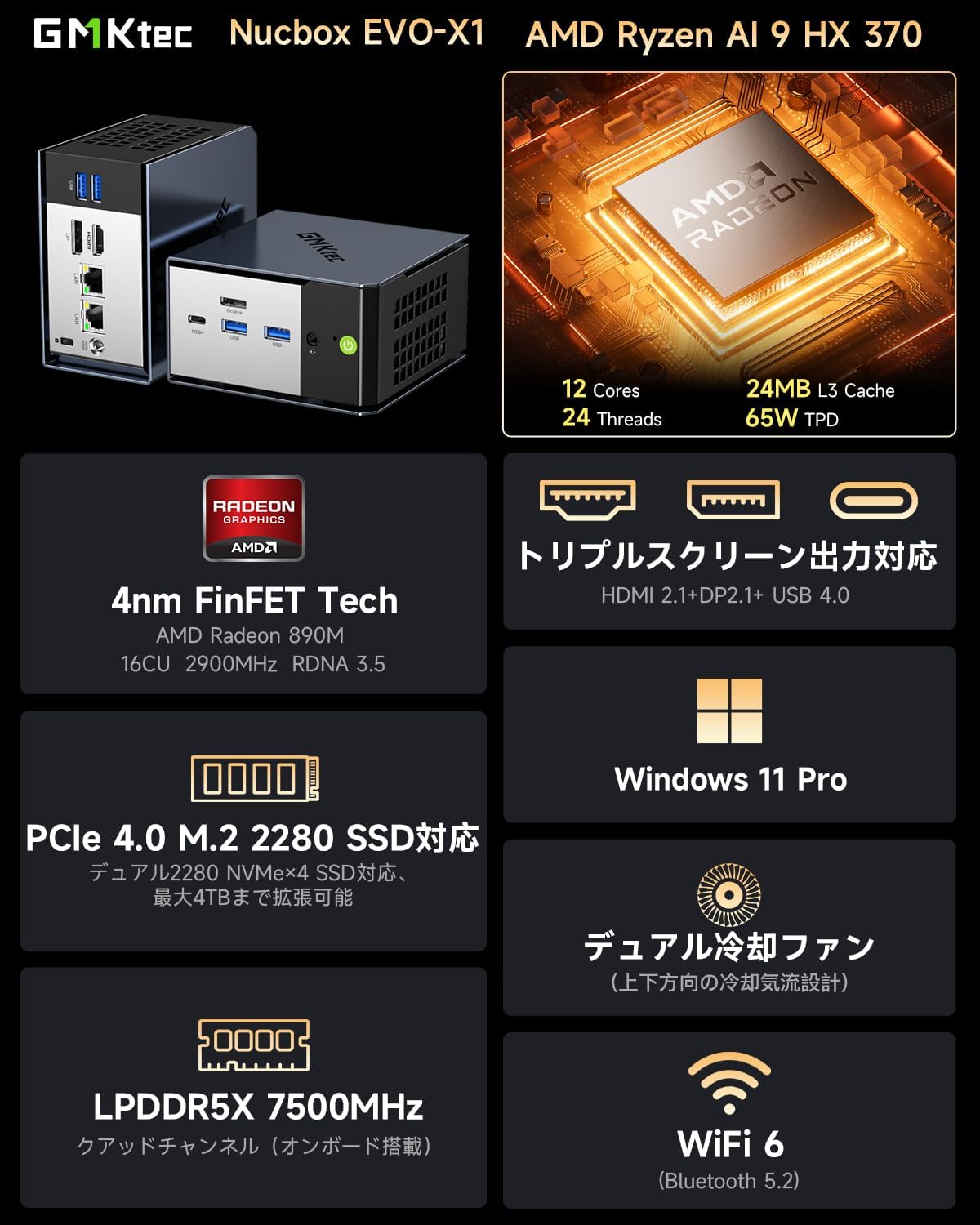
Immagine: anteriore e posteriore views of the EVO-X1 Mini PC, detailing the location of all ports.
- Porte anteriori: Power button, USB 3.2 (Gen2) x2, USB4 Type-C (PD/DP/Data), 3.5mm CTIA audio jack
- Porte posteriori: DC IN (19V 6.32A), Oculink (PCIe Gen4 x4), HDMI 2.1 (8K@60Hz), DisplayPort 2.1 (8K@60Hz), 2.5G LAN (RJ45) x2, USB 3.2 (Gen2) x2, Kensington Lock

Immagine: Un diagramma dettagliato mostraasing the rich interfaces of the EVO-X1, including USB 4, 2.5G LAN, HDMI 2.1, DP 2.1, USB 3.2, CTIA, and Oculink.
3. Impostazione
Follow these steps to set up your GMKtec EVO-X1 Mini PC:
- Contenuto della confezione: Carefully remove all items from the packaging. Verify that you have the EVO-X1 Mini PC, power adapter and cable, HDMI cable, vertical stand, and user manual.
- Connetti le periferiche: Connect your monitor(s) to the HDMI 2.1, DisplayPort 2.1, or USB4 Type-C ports. Connect your keyboard and mouse to the available USB ports.
- Connessione di rete: For a wired connection, connect an Ethernet cable to one of the 2.5G LAN ports. For wireless, ensure your WiFi network is available during initial setup.
- Collegamento elettrico: Connect the power adapter to the DC IN port on the Mini PC, then plug the power cable into an electrical outlet.
- Accensione: Premere il pulsante di accensione sulla parte anteriore del Mini PC. Il sistema si avvierà.
- Configurazione iniziale di Windows: Seguire le istruzioni visualizzate sullo schermo per completare la configurazione di Windows 11 Pro, inclusa la creazione di lingua, regione, rete e account utente.

Image: The package contents laid out, including the EVO-X1 Mini PC, power adapter, HDMI cable, vertical stand, and user manual.
4. Istruzioni per l'uso
Configurazione multi-display
The EVO-X1 supports up to three independent displays with 8K resolution. Connect your monitors to the HDMI 2.1, DisplayPort 2.1, and USB4 Type-C ports. Windows will automatically detect the displays. You can configure display settings (e.g., extend, duplicate) via the Display Settings in Windows.

Image: The EVO-X1 Mini PC demonstrating its capability for triple screen output, supporting up to 8K resolution.
Connettività di rete
Utilize the dual 2.5Gbps LAN ports for high-speed wired network connections, ideal for demanding applications like file servers or routing. For wireless connectivity, the integrated WiFi 6 module provides fast and stable internet access.

Image: The EVO-X1 Mini PC showcasing its dual 2.5G high-speed Ethernet ports, illustrating fast data transfer rates.
External GPU (eGPU) via Oculink
The Oculink port provides a high-speed PCIe x4 interface, allowing you to connect an external graphics card (eGPU) for enhanced gaming or professional graphics workloads. This significantly boosts graphical performance beyond the integrated GPU.

Image: The EVO-X1 Mini PC connected to an external GPU via its high-speed Oculink port, demonstrating external GPU support.
Espansione di archiviazione
The EVO-X1 supports up to two M.2 2280 NVMe SSDs (PCIe Gen4 x4), allowing for a total storage capacity of up to 8TB. To expand storage, open the chassis, locate the M.2 slots, and install compatible SSDs. Refer to the internal structure diagram for guidance.

Image: An illustration of the high-speed memory and large capacity SSD slots within the Mini PC, indicating support for PCIe 4.0 M.2 2280 NVMe SSDs up to 8TB.
5. Manutenzione
Una corretta manutenzione garantisce la longevità e le prestazioni ottimali del tuo Mini PC.
- Pulizia: Regularly clean the exterior of the Mini PC with a soft, dry cloth. Use compressed air to gently clear dust from the ventilation grilles to maintain proper airflow. Do not use liquid cleaners directly on the device.
- Aggiornamenti software: Keep your Windows operating system and drivers updated to ensure system stability, security, and performance. Check for updates regularly through Windows Update and the GMKtec support websito.
- Sistema di raffreddamento: The EVO-X1 features dual cooling fans. Ensure that the air vents are not obstructed to allow for efficient heat dissipation. If you notice increased fan noise or overheating, ensure the vents are clear.

Immagine: Un esploso view highlighting the upgraded twin cooling fans and their intelligent system design for efficient heat management of SSD/DDR.

Image: Internal structure display of the EVO-X1, showing components like the removable cover, top cooling fan, M.2 2280 PCIe 4.0 slots, and air cooling vents.
6. Risoluzione Dei Problemi
If you encounter issues with your EVO-X1 Mini PC, refer to the following common problems and solutions:
| Problema | Possibile causa | Soluzione |
|---|---|---|
| Nessuna visualizzazione sul monitor | Collegamento del cavo allentato, sorgente di ingresso errata, problema di alimentazione. | Ensure monitor cables (HDMI/DP/USB4) are securely connected. Check monitor's input source. Verify power adapter is connected and the PC is powered on. Try a different monitor or cable. |
| PC does not power on or boots to a black screen | Power supply issue, hardware malfunction, corrupted boot. | Ensure power adapter is working. Disconnect all peripherals and try booting. If the issue persists, contact customer support. (Note: Some users have reported intermittent boot issues where the screen remains black; a forced shutdown and restart may resolve this temporarily, but persistent issues require support.) |
| Nessuna connessione di rete | Loose Ethernet cable, incorrect WiFi password, driver issue. | Check Ethernet cable connection. Re-enter WiFi password. Ensure network drivers are installed and updated. Restart router/modem. |
| Prestazioni lente | Too many background applications, insufficient storage, overheating. | Close unnecessary applications. Check available storage space. Ensure proper ventilation and clean dust from vents. Update drivers. |
| Oculink eGPU not detected | Incorrect connection, driver issue, eGPU enclosure power. | Ensure Oculink cable is securely connected. Verify eGPU enclosure is powered on. Install the latest graphics drivers for the external GPU. |
If the problem persists after attempting these solutions, please contact GMKtec customer support for further assistance.
7. Specifiche
| Caratteristica | Dettaglio |
|---|---|
| Marca | GMKtec |
| Modello | EVO-X1 |
| Sistema operativo | Windows 11 Pro |
| Modello CPU | AMD Ryzen AI 9 HX-370 |
| Velocità della CPU | Fino a 5.1 GHz |
| Core processore | 12 Nuclei |
| Presa per processore | TSMC 4nm FinFET |
| Processore grafico | AMD Radeon 890M (integrata) |
| Memoria (RAM) | 32 GB LPDDR5X 7500 MHz |
| Storage (SSD) | 1 TB PCIe 4.0 M.2 2280 SSD |
| Espansione di archiviazione | 2x M.2 2280 NVMe SSD slots (PCIe Gen4 x4), up to 8TB total |
| Interfacce di uscita video | HDMI 2.1, DisplayPort 2.1, USB4 Type-C |
| Risoluzione massima dello schermo | 7680x4320 pixel (8K) |
| Porte USB | 1x USB4 Type-C, 4x USB 3.2 (Gen2) |
| Porta Oculink | 1x Oculink (PCIe Gen4 x4) |
| Porte LAN | 2x 2.5Gbps Intel NIC RJ45 |
| Connettività wireless | Wi-Fi 6, Bluetooth 5.2 |
| Uscita audio | Jack audio CTIA da 3.5 mm |
| Dimensioni | Dimensioni: 110 x 107 x 68 mm |
| Peso | 591g |
| Accessori inclusi | Mini PC unit, Power Adapter, HDMI Cable, Vertical Stand, User Manual |
8. Garanzia e supporto
The GMKtec EVO-X1 Mini PC comes with a Garanzia del produttore di 1 anni. For any technical issues, questions, or support needs, please contact GMKtec customer service. Our support team is available to assist you within 24 hours.
For the latest drivers, FAQs, and support resources, please visit the official GMKtec websito o fare riferimento alle informazioni di contatto fornite sulla confezione del prodotto.