
1. Introduzione
This manual provides instructions for the proper use and maintenance of your Yunir Real Time Language Translator. This compact device features a 2.45-inch touch screen and is designed to facilitate communication across various languages, supporting both online and offline translation capabilities.

Image 1.1: Yunir Real Time Language Translator device.
The translator is equipped with a noise-canceling microphone for clear audio input and a long-lasting battery, making it suitable for travel, business meetings, and language learning.
2. Impostazione
2.1 Contenuto della confezione
Prima di procedere, assicurati che tutti gli elementi siano presenti:
- 1 x Yunir Translation Device
- 1 cavo USB
- 1 x Manuale utente (questo documento)
2.2 Ricarica del dispositivo
The device comes with a built-in 1250mAh lithium-ion battery. For optimal performance, fully charge the device before first use.
- Connect the provided USB cable to the charging port on the translator device.
- Collegare l'altra estremità del cavo USB a un adattatore di alimentazione USB compatibile (non incluso) o alla porta USB di un computer.
- The charging indicator on the device will show its status. A full charge typically provides over 7 days of standby time or more than 8 hours of continuous operation.

Image 2.1: Translator device with USB charging cable.
2.3 Accensione/Spegnimento
- Per accendere: Tenere premuto il pulsante di accensione (solitamente situato sul lato) finché lo schermo non si illumina.
- Per spegnere: Press and hold the power button until a power-off option appears on the screen, then select to confirm.
2.4 Connessione Wi-Fi
For online translation features, a stable Wi-Fi connection is required.
- From the home screen, tap on the Impostazioni icona.
- Selezionare Wifi dal menù.
- Attiva/disattiva Wi-Fi On.
- Seleziona la rete desiderata dall'elenco e inserisci la password se richiesta.
- Una volta effettuata la connessione, l'icona Wi-Fi apparirà nella barra di stato.
2.5 Impostazioni iniziali della lingua
Set your preferred system language and default translation languages.
- Vai a Impostazioni.
- Selezionare Lingua di sistema to choose from options like English, Chinese, Japanese, Korean, etc.
- For translation, select the source and target languages within the translation application interface.
3. Istruzioni per l'uso
The device is designed for intuitive operation via its 2.45-inch touch screen.
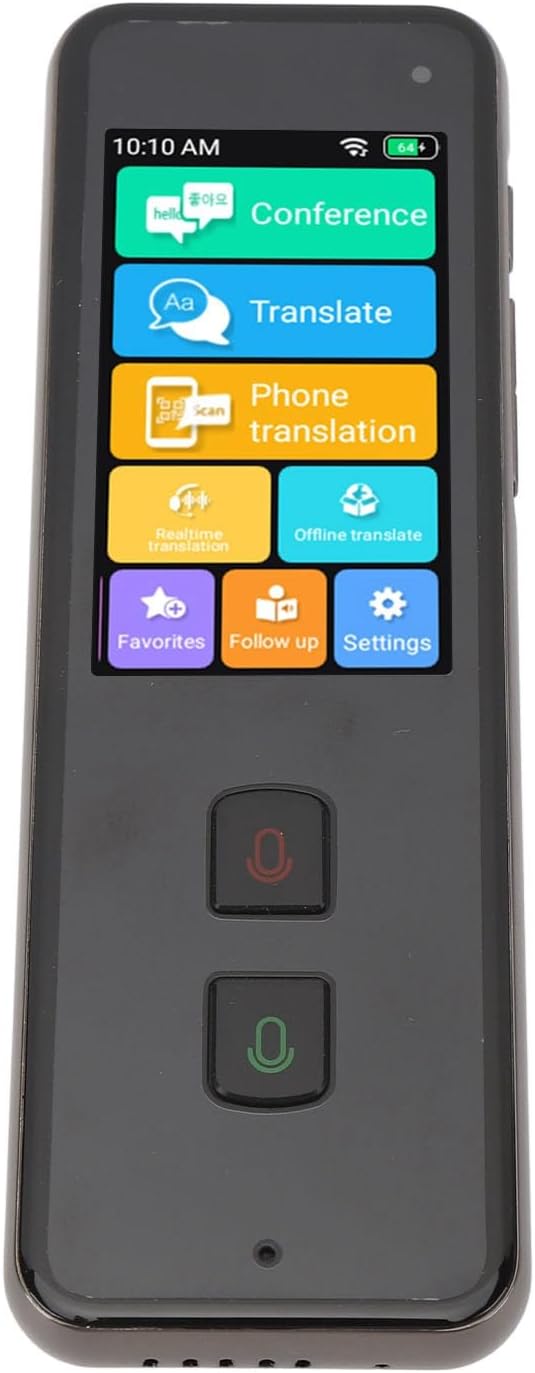
Image 3.1: Translator device screen interface.
3.1 Online Translation (138 Languages)
Ensure the device is connected to Wi-Fi for online translation.
- From the home screen, tap the Tradurre icona.
- Select your source language (the language you will speak) and target language (the language you want to translate to).
- Press and hold the designated microphone button (usually indicated by a color or icon) for your source language. Speak clearly into the device's microphone.
- Release the button. The device will process your speech and display/speak the translation in the target language.
3.2 Traduzione offline (15 lingue)
Offline translation allows use without an internet connection. Ensure necessary language packs are downloaded beforehand.
- Tocca il Traduzione offline icona sulla schermata principale.
- Select the desired offline language pairs.
- Proceed with speaking as described in the online translation section.
3.3 Photo Translation (40 Offline, 74 Online)
This feature translates text from images using the built-in 5MP rear camera.
- Tocca il Traduzione telefonica or Traduzione in tempo reale icon (depending on the specific interface for camera translation).
- Punta la fotocamera sul testo che desideri tradurre.
- Ensure the text is well-lit and clear within the camera's frame.
- The device will capture and translate the text.
3.4 Two-Way Translation
The device supports seamless two-way communication. After one person speaks and the translation is provided, the other person can speak in their language, and the device will translate it back.
3.5 Noise-Canceling Microphone
The integrated noise-canceling microphone helps ensure clear and precise language input, even in environments with background noise. Speak directly into the microphone for best results.
4. Manutenzione
4.1 Pulizia
- Per pulire lo schermo e il corpo del dispositivo, utilizzare un panno morbido, asciutto e privo di lanugine.
- Non utilizzare detergenti liquidi, spray o materiali abrasivi, poiché potrebbero danneggiare il dispositivo.
4.2 Cura della batteria
- Evitare di esporre il dispositivo a temperature estreme (calde o fredde) poiché ciò potrebbe compromettere la durata e le prestazioni della batteria.
- If storing the device for an extended period, ensure it has at least a 50% charge to preserve battery health.
- Utilizzare solo il cavo USB in dotazione per la ricarica.
4.3 Conservazione
Conservare il dispositivo in un luogo fresco e asciutto, lontano dalla luce solare diretta e dall'umidità quando non viene utilizzato.
5. Risoluzione Dei Problemi
| Problema | Possibile causa/soluzione |
|---|---|
| Il dispositivo non si accende. |
|
| La traduzione è imprecisa o non funziona. |
|
| Problemi di connessione Wi-Fi. |
|
| Qualità audio scadente. |
|
6. Specifiche
| Numero di modello | Yunirpgyt7v3nz8 |
| Materiale | Lega di alluminio |
| Sistema operativo | For Android 5.1 |
| Tipo di schermo | 2.45 inch 240 x 432 Touch Screen |
| Memoria | 1 GB di RAM + 8 GB di ROM |
| Telecamera posteriore | 5MP |
| Wifi | 2.4G (802.11a/b/g/n) |
| Bluetooth | 4.2 |
| Tipo di batteria | Batteria agli ioni di litio da 1250 mAh integrata |
| Durata della batteria | Over 7 days standby, 8+ hours continuous work |
| Traduzione online | 138 Lingue |
| Traduzione offline | 15 Lingue |
| Traduzione di foto | 40 Offline, 74 Online |
| Lingue di sistema | Danish, Japanese, German, Thai, Vietnamese, Greek, Filipino, Korean, Arabic, French, Spanish, Italian, Portuguese, Russian, English, Chinese, Bengali, Malay, Burmese |
| Dimensioni | 6.3 x 3.54 x 1.57 pollici (confezione) |
| Peso dell'articolo | 8.9 once |
7. Informazioni sulla garanzia
Specific warranty details for the Yunir Real Time Language Translator (Model: Yunirpgyt7v3nz8) are typically provided at the point of purchase or included with the product packaging. Please refer to the documentation provided by your retailer or contact the manufacturer directly for comprehensive warranty terms and conditions.
8. Assistenza clienti
For technical assistance, troubleshooting beyond this manual, or inquiries regarding your device, please contact the seller or the manufacturer, Yunir. Refer to your purchase receipt or the product packaging for contact information.