
1. Avvertenze importanti per la sicurezza
WARNING: THIS ESC IS NOT A TOY. It is a high-power electronic component for use by knowledgeable hobbyists. Misuse can cause property damage, personal injury, or fire. NEVER short-circuit the battery terminals (+ and -). This will cause extreme heat, fire, or explosion. DISCONNECT the battery immediately after use.
Always ensure proper ventilation around the ESC during operation. Do not operate the ESC in wet conditions. Read this manual completely before installation and operation.
2. Introduzione al prodotto
The ZTW Mantis Slim G2 15A Electronic Speed Controller (ESC) is designed for micro to small-sized RC airplanes and drones. It features a compact and lightweight design, providing reliable and efficient power delivery for various flight applications, including F3P, 3D, and 4D flying. This ESC incorporates advanced technology for smooth operation and multiple protection features to ensure safety and longevity.
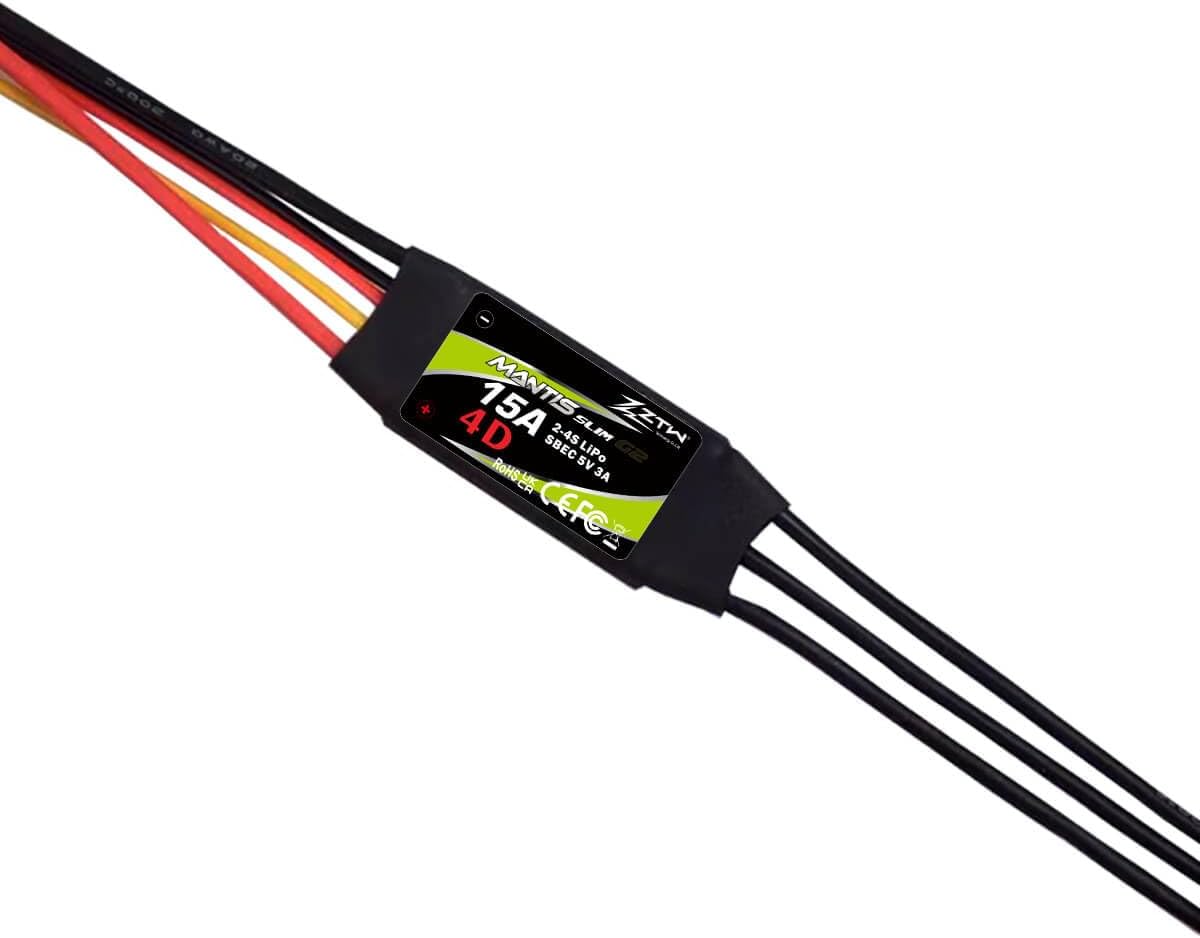
Image 1: ZTW Mantis Slim G2 15A ESC showing the product label and wire connections.
3. Caratteristiche principali
- High-Efficiency 15A Output: Delivers a continuous 15A current for stable performance.
- Integrated 5V/3A Switching BEC: Provides clean, stable power to the receiver and servos, preventing brown-outs.
- Design ultracompatto e leggero: Allows for easy installation in tight spaces, maintaining optimal model balance.
- Comprehensive Protection Suite: Include basso volumetage Cutoff (LVC) and Over-Heat protection to prevent damage.
- Smooth Operation & Wide Compatibility: Offers smooth throttle response and is compatible with 2-4S LiPo battery setups and various sensorless brushless motors.
- Programmabile: Supports programming via transmitter or ZTW LCD programming card (sold separately).
4. Specifiche
| Parametro | Valore |
|---|---|
| Modello | ZTW Mantis Slim G2 15A |
| Corrente continua | 15A |
| Corrente di picco | 30A |
| Ingresso volumetage | 2-4S LiPo / 5-12NC |
| Tipo BEC | Switching BEC |
| Uscita BEC | 5V / 3A |
| Peso | 10 g (0.32 once) |
| Dimensioni (L*W*H) | 25.5*15*5 mm (1 x 0.59 x 0.2 pollici) |
| Spina della batteria | JST Female |
| Tappo motore | 2.0mm Bullet |
| Modo di programmazione | Transmitter / ZTW LCD Program Card G2 |
5. Configurazione e installazione
Follow these steps for proper installation of your ZTW Mantis Slim G2 15A ESC:
- Collegamento al motore: Connect the three motor wires from the ESC to the three wires of your brushless motor using the 2.0mm bullet connectors. The order of connection may affect motor rotation direction; if the motor spins in the wrong direction, swap any two of the motor wires.
- Connetti al ricevitore: Plug the servo lead (signal cable) from the ESC into the throttle channel of your RC receiver. This is typically channel 3.
- Collegamento alla batteria: Connect your 2-4S LiPo battery (or 5-12NC battery) to the JST female connector on the ESC. Ensure correct polarity.
- Proteggere l'ESC: Mount the ESC securely in your aircraft, ensuring good airflow for cooling. Avoid placing it near sources of interference.

Immagine 2: Passoview of the ZTW Mantis Slim G2 15A ESC showing all connection points: battery (JST), receiver (servo lead), and motor (bullet connectors).
6. Istruzioni per l'uso
6.1 Calibrazione della gamma dell'acceleratore
For optimal performance, calibrate the ESC's throttle range with your transmitter:
- Turn on your transmitter and set the throttle stick to its maximum position (100% throttle).
- Collegare la batteria all'ESC. L'ESC emetterà una serie di segnali acustici.
- When you hear the confirmation beeps (usually a long beep or a specific tone sequence), move the throttle stick to its minimum position (0% throttle).
- The ESC will emit another series of beeps to confirm the minimum throttle position. The calibration is now complete.
6.2 Modalità di programmazione
The ZTW Mantis Slim G2 15A ESC supports two main operating modes:
- Forward Only: Modalità standard per velivoli ad ala fissa.
- Avanti e indietro: For specific 3D/4D flying applications where reverse thrust is required.
Programming can be done via your transmitter's stick commands or more conveniently with the ZTW LCD Program Card G2 (sold separately). Refer to the program card's manual for detailed instructions on adjusting parameters such as battery type, cutoff voltage, timing, and brake settings.
7. Manutenzione
- Mantenere l'ESC pulito e privo di polvere, sporcizia e umidità.
- Ispezionare regolarmente tutti i cavi e i connettori per verificare che non vi siano danni o collegamenti allentati.
- Ensure adequate airflow around the ESC to prevent overheating, especially during prolonged use.
- Quando non viene utilizzato, conservare l'ESC in un luogo fresco e asciutto.
8. Risoluzione Dei Problemi
If you encounter issues with your ESC, consider the following:
- Il motore non gira: Check all connections (battery, motor, receiver). Ensure the throttle is calibrated correctly. Verify the battery is charged.
- Erratic motor behavior/stuttering: This could indicate incorrect motor timing, a loose connection, or a damaged motor/ESC. Check connections and try adjusting motor timing if programmable.
- Surriscaldamento dell'ESC: Ensure sufficient airflow. Check for excessive current draw from the motor or an undersized propeller.
- No power to receiver/servos: Check the BEC output. Ensure the ESC is properly connected to the receiver.
- ESC beeps continuously: Questo spesso indica una bassa voltage cutoff or an error code. Refer to the programming card manual for specific beep codes if available.
If problems persist, contact ZTW customer support for further assistance.
9. Garanzia e supporto
For warranty information and technical support, please refer to the official ZTW websito o contattare il rivenditore. Conservare la prova d'acquisto per eventuali reclami in garanzia.