
Introduzione
This manual provides detailed instructions for the setup, operation, and maintenance of your OLEVS IN-3652 Men's Multifunction Chronograph Watch. This timepiece features multiple dials, a luminous display, chronograph functions, date display, and moon phase indicator, all housed in a durable stainless steel case with water resistance.

Figure 1: OLEVS IN-3652 Multifunction Chronograph Watch (Two-tone strap, white dial variant)
Prodotto finitoview
The OLEVS IN-3652 watch is designed with precision and functionality. Key features include:
- Multi-Dial Display: Includes minute timer, 24-hour lunar phase, second time zone, second timer, and calendar window.
- Lancette e indici luminosi: Ensures visibility in low-light conditions after absorbing sufficient light.
- Resistenza all'acqua: Rated for 30 meters, suitable for daily use and splashes, but not for swimming or hot water exposure.
- Costruzione durevole: Stainless steel band and case with a high-hardness coated mirror surface.
- Movimento al quarzo: Fornisce un cronometraggio accurato.

Figure 2: Key features of the OLEVS IN-3652 watch, including water resistance, crystal coating, movement type, and luminous display.
Impostare
1. Impostazione iniziale di data e ora
Prima di indossare l'orologio, imposta l'ora e la data corrette.
- Estrarre la corona: Tirare delicatamente la corona (la manopola sul lato dell'orologio) fino alla posizione 2 (la posizione più esterna).
- Imposta l'ora: Rotate the crown to adjust the hour and minute hands to the current time. Ensure you differentiate between AM and PM for the 24-hour indicator and moon phase.
- Imposta la data: Push the crown back to position 1 (middle position). Rotate the crown to adjust the date in the calendar window.
- Push the crown back: Once time and date are set, push the crown fully back into position 0 (normal position) to start the watch and ensure water resistance.
2. Regolazione della cinghia
The stainless steel strap can be adjusted for a comfortable fit. A watch adjustment tool is included with your purchase.
- To shorten the strap, use the provided tool to remove pins from the links.
- To lengthen the strap, additional links may be required (not included).
- It is recommended to have a professional jeweler adjust the strap to prevent damage.
Istruzioni per l'uso
Your OLEVS IN-3652 watch features several sub-dials and pushers for various functions.
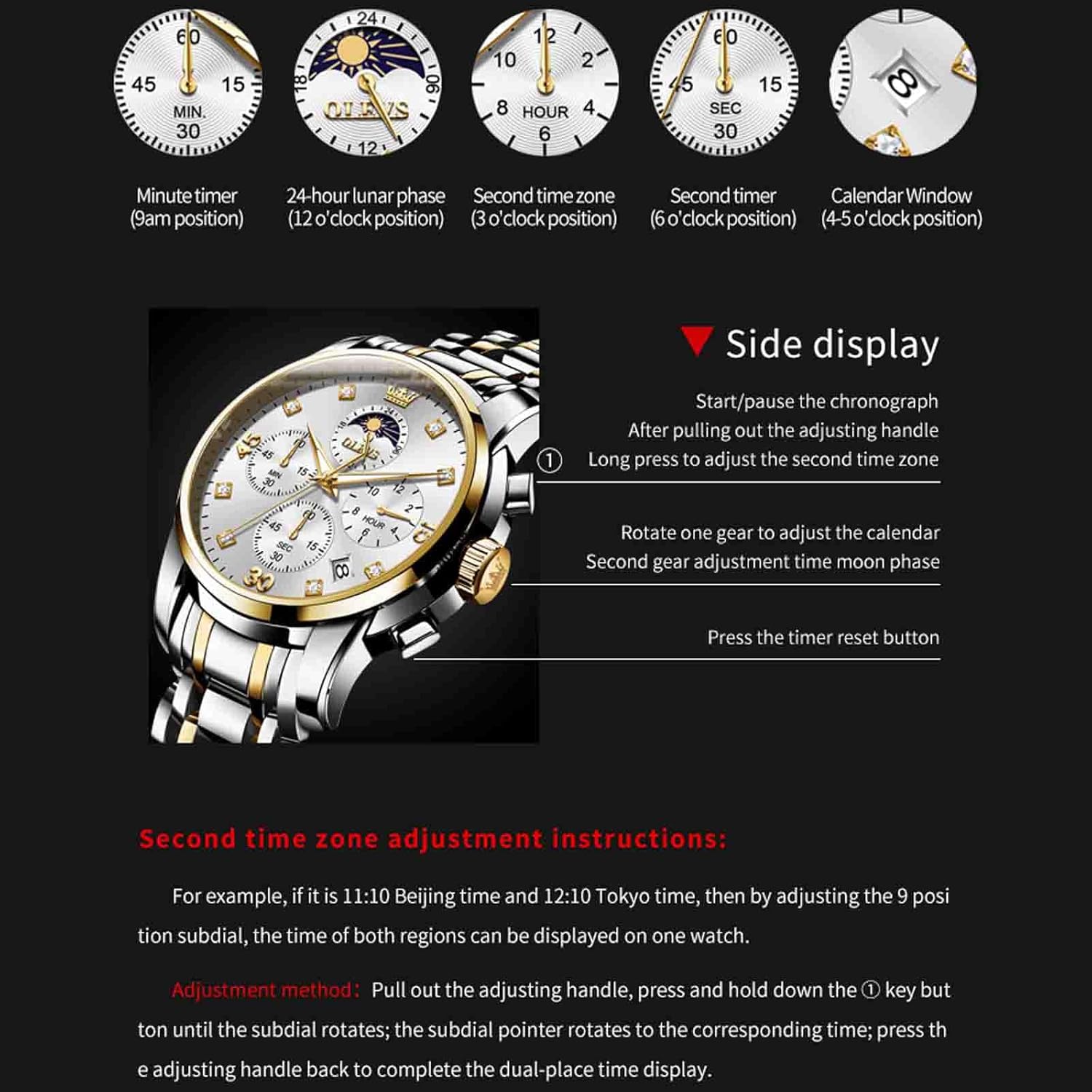
Figure 3: Watch dial functions and side control diagram.
1. Funzione cronografo (cronometro)
- The 9 o'clock sub-dial indicates the minute timer (up to 60 minutes).
- The 6 o'clock sub-dial indicates the second timer (up to 30 seconds).
- Avvio/Pausa: Press the top pusher (button above the crown) to start or pause the chronograph.
- Reset: Press the bottom pusher (button below the crown) to reset the chronograph to zero. This only works when the chronograph is stopped.
2. 24-Hour Lunar Phase (Moon Phase)
- The 12 o'clock sub-dial displays the 24-hour time and lunar phase.
- To adjust the moon phase, pull the crown to position 1 (middle position) and rotate it. The moon phase will advance as you rotate.
3. Second Time Zone Adjustment
- The 3 o'clock sub-dial displays the second time zone.
- Metodo di regolazione: Pull out the adjusting handle (crown) to position 2. Press and hold down the top pusher (button above the crown). While holding, rotate the crown. The sub-dial pointer will rotate to the corresponding time. Press the adjusting handle back to position 0 to complete the dual-place time display.
4. Calendar Window
- The calendar window is located between the 4 and 5 o'clock positions.
- To adjust the calendar, pull the crown to position 1 (middle position) and rotate it.
5. Display luminoso
The watch hands and markers contain luminous material. For optimal glow in the dark, expose the watch to a bright light source for a period of time to allow the phosphor to absorb sufficient light.
Manutenzione
1. Resistenza all'acqua
Your OLEVS IN-3652 watch is rated for 30 meters (3ATM) water resistance. This means it is suitable for:
- Daily use, such as hand washing or light rain.
- Schizzi accidentali.
Precauzioni importanti:
- Non fare wear the watch while swimming, diving, or showering.
- Evitare exposure to hot water, steam, or extreme temperature changes, as this can compromise the water-resistant seals.
- Per mantenere l'impermeabilità, assicurarsi che la corona sia sempre completamente inserita.

Figura 4: Posteriore view of the watch highlighting water resistance and buckle type.
2. Pulizia
- Pulire regolarmente la cassa e il cinturino dell'orologio con un panno morbido e asciutto per rimuovere sporco e sudore.
- Per i cinturini in acciaio inossidabile, una leggera damp è possibile utilizzare un panno e procedere immediatamente all'asciugatura.
- Evitare l'uso di detergenti chimici, solventi o materiali abrasivi, poiché potrebbero danneggiare la finitura dell'orologio.
3. Sostituzione della batteria
The watch is powered by a quartz movement, which requires a battery. When the watch stops or runs erratically, the battery may need replacement. It is recommended to have the battery replaced by a qualified watch technician to ensure proper sealing and functionality.
Risoluzione dei problemi
- Orologio non in funzione: Controllare che la corona sia completamente inserita. In tal caso, potrebbe essere necessario sostituire la batteria.
- Ora/data errate: Refer to the "Initial Time and Date Setting" section to re-adjust.
- Il cronografo non si azzera: Ensure the chronograph is stopped before pressing the reset pusher. If it still doesn't reset, a service may be required.
- Appannamento sotto il cristallo: Ciò indica una perdita di resistenza all'acqua. Evitare ulteriori contatti con l'acqua e rivolgersi immediatamente a un tecnico specializzato.
Specifiche
| Caratteristica | Specificazione |
|---|---|
| Numero di modello | ZC-3652-men (IN-3652) |
| Marca | OLEVS |
| Tipo di movimento | Quarzo |
| Tipo di visualizzazione | Analogico |
| Diametro della cassa | 41.5 millimetri |
| Spessore della cassa | 11 millimetri |
| Larghezza di banda | 20 millimetri |
| Materiale della fascia | Acciaio inossidabile |
| Tipo di chiusura | Butterfly double button hidden buckle |
| Profondità di resistenza all'acqua | 30 metri (3 ATM) |
| Caratteristiche speciali | Glow In The Dark, Multifunction, Waterproof, Chronograph, Date, Moon Phase, Second Time Zone |
| Peso dell'articolo | 130 g (0.13 chilogrammi) |
Garanzia e supporto
Informazioni sulla garanzia
Your OLEVS IN-3652 watch comes with a Garanzia limitata. Please refer to the warranty card included with your purchase for specific terms and conditions. This warranty typically covers manufacturing defects but does not cover damage resulting from improper use, accidents, or unauthorized repairs.
An optional 1-Year Extended Warranty Plan by Onsitego may be available for purchase separately.
Assistenza clienti
For any questions, service requests, or technical support regarding your OLEVS watch, please contact OLEVS customer service through the retailer where the product was purchased or visit the official OLEVS brand store online.
Produttore: OLEVS
Importatore: OLEVS
Imballatore: ECONETING E-COMMERCE PRIVATE LIMITED