
1. Prodotto finitoview
Experience wireless freedom and exceptional sound quality with the LX-09 Wireless Single Earphone. Designed with a sleek, ergonomic ear hook style, it offers a secure and comfortable fit for all-day wear. The rechargeable Type-C battery ensures uninterrupted audio enjoyment, while intelligent noise cancellation technology delivers crystal-clear audio, even in noisy environments. This HIFI headset is perfect for music, calls, or any audio activity on the go.
Caratteristiche principali:
- Design versatile: Sleek and ergonomic in-ear earhook style for a secure and comfortable fit during active use or daily wear.
- Cancellazione del rumore: Intelligent noise cancellation technology effectively blocks out ambient sounds for an immersive audio experience.
- Connettività wireless: Utilizes Bluetooth for a hassle-free wireless connection to your devices without tangled cords.
- Batteria a lunga durata: Built-in rechargeable battery provides up to 6 hours of continuous playback on a single charge.
- Compatto e portatile: Lightweight and compact design allows for easy carrying and storage when not in use.

Image: The LX-09 Wireless Single Earphone, showcasing its ergonomic ear hook design and compact form factor.

Immagine: multipla views of the LX-09 earphone, highlighting its sleek black finish and the integrated speaker components.

Image: A graphic illustrating key features of the LX-09 earphone, including Bluetooth 5.4, double horn speakers, comfort, suitability for driving, office use, running, riding, light weight, fast charge, hands-free, IP56 waterproof rating, and HiFi sound quality.
2. Cosa c'è nella scatola
Si prega di controllare il contenuto della confezione una volta disimballata per assicurarsi che siano presenti tutti gli articoli:
- LX-09 Wireless Single Earphone
- Cavo di ricarica di tipo C.
3. Guida all'installazione
3.1 Ricarica dell'auricolare
Before first use, fully charge the earphone. Use the provided Type-C charging cable.
- Connect the Type-C end of the charging cable to the charging port on the LX-09 earphone.
- Collegare l'estremità USB-A del cavo di ricarica a un adattatore di alimentazione USB compatibile (non incluso) o alla porta USB di un computer.
- The indicator light on the earphone will illuminate during charging and turn off or change color when fully charged. A full charge takes approximately 1.5 hours.

Image: The LX-09 earphone connected to a Type-C charging cable, illustrating the fast charging capability.
3.2 Associazione Bluetooth
To connect your LX-09 earphone to a device, follow these steps:
- Assicurarsi che gli auricolari siano carichi e spenti.
- Press and hold the multi-function button on the earphone until the indicator light flashes red and blue alternately, indicating it is in pairing mode.
- Sul tuo dispositivo (smartphone, tablet, ecc.), attiva il Bluetooth e cerca i dispositivi disponibili.
- Select "LX-09" from the list of found devices.
- Once connected, the indicator light on the earphone will stop flashing and may turn solid blue or off, depending on the model.
- The earphone will automatically attempt to reconnect to the last paired device when powered on.

Image: A visual representation of the LX-09 earphone's internal Bluetooth 5.4 chip, emphasizing stable and anti-jamming wireless connectivity.
4. Istruzioni per l'uso
4.1 Accensione/spegnimento
- Accensione: Tenere premuto il pulsante multifunzione per circa 3 secondi finché la spia luminosa non lampeggia in blu.
- Spegni: Tenere premuto il pulsante multifunzione per circa 5 secondi finché la spia luminosa non lampeggia in rosso e poi si spegne.
4.2 Music Playback (Touch Control)
The LX-09 earphone features touch controls for convenient music management.
- Riproduci/Pausa: Single tap the touch control area.
- Traccia successiva: Tocca due volte l'area di controllo touch.
- Traccia precedente: Triple tap the touch control area.
4.3 Call Management (Touch Control)
Manage your calls with simple touch gestures.
- Rispondi/Termina chiamata: Single tap the touch control area during an incoming call or active call.
- Rifiuta chiamata: Durante una chiamata in arrivo, tenere premuta l'area di controllo touch per 2 secondi.
4.4 Cancellazione del rumore
The LX-09 features intelligent noise cancellation for an enhanced audio experience.
- Activate/Deactivate Noise Cancellation: Refer to your device's Bluetooth settings or specific app controls, as this feature is often managed at the source device level for optimal performance.

Image: The LX-09 earphone shown worn on an ear, demonstrating its "ear-hanging" and "non-inductive wearing experience" design for comfort and secure fit.

Image: A close-up of the LX-09 earphone worn, highlighting its lightweight integrated liquid silicone and ergonomic design for comfortable wear and freedom of movement.
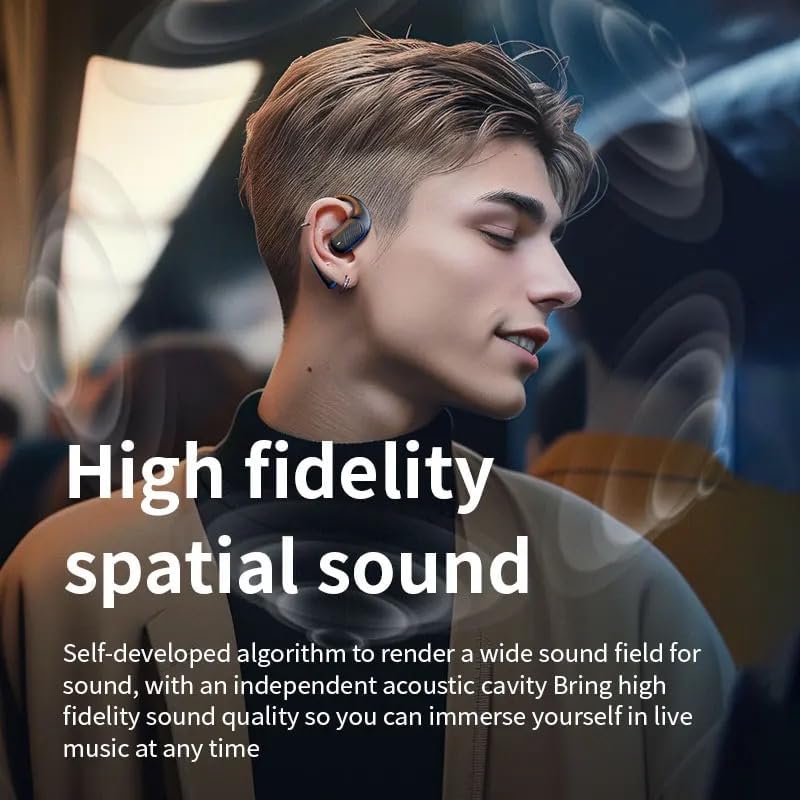
Image: A person wearing the LX-09 earphone, with visual effects indicating high fidelity spatial sound and an immersive audio experience.
5. Manutenzione
Proper maintenance ensures the longevity and optimal performance of your LX-09 earphone.
- Pulizia: Gently wipe the earphone with a soft, dry, lint-free cloth. Do not use abrasive cleaners, alcohol, or chemical solvents.
- Magazzinaggio: When not in use, store the earphone in a cool, dry place, away from direct sunlight and extreme temperatures.
- Cura della batteria: To preserve battery life, avoid fully discharging the earphone frequently. Charge it regularly, even if not in use for extended periods.
- Resistenza all'acqua: The earphone is rated Water Resistant (IP56). This means it can withstand splashes and light rain, but it is not designed for submersion in water. Avoid exposing it to heavy rain or direct water jets.
6. Risoluzione Dei Problemi
If you encounter issues with your LX-09 earphone, refer to the following common solutions:
- Nessun potere:
- Assicurarsi che gli auricolari siano completamente carichi.
- Verificare che il cavo di ricarica e la fonte di alimentazione funzionino correttamente.
- Impossibile associare il dispositivo:
- Make sure the earphone is in pairing mode (indicator light flashing red and blue).
- Assicurati che il Bluetooth sia abilitato sul tuo dispositivo e che si trovi nel raggio d'azione (in genere 10 metri).
- Forget "LX-09" from your device's Bluetooth list and attempt to pair again.
- Riavvia sia l'auricolare che il dispositivo.
- Nessun suono o volume basso:
- Controlla i livelli del volume sia sull'auricolare che sul dispositivo collegato.
- Assicurati che l'auricolare sia collegato correttamente al dispositivo.
- Prova a riprodurre l'audio da un'applicazione o una sorgente diversa.
- Connessione intermittente:
- Avvicinati al dispositivo connesso per ridurre le interferenze.
- Avoid obstacles between the earphone and your device.
- Assicurarsi che nessun altro segnale wireless forte stia causando interferenze.
7. Specifiche
| Caratteristica | Dettaglio |
|---|---|
| Nome del modello | LX-09 |
| Marca | Generico |
| Tecnologia di connettività | Wireless, Bluetooth, Type-C |
| Tecnologia di comunicazione wireless | Bluetooth 5.3 (as per image, product spec says Bluetooth) |
| Controllo del rumore | Cancellazione attiva del rumore |
| Presa per cuffie | Tipo C |
| Componenti inclusi | Earphone, Type-C Charging Cable |
| Materiale | Plastica |
| Usi consigliati | Musica, chiamata |
| Dispositivi compatibili | Smartphone, compresse |
| Tipo di controllo | Controllo touch |
| Livello di resistenza all'acqua | Resistente all'acqua (IP56) |
| Posizionamento dell'orecchio | Nell'orecchio |
| Fattore di forma | Single Earpiece |
| Peso dell'articolo | 1.6 once |
| Produttore | Pintotronics |
8. Garanzia e supporto
Per informazioni sulla garanzia e sull'assistenza clienti, fare riferimento al rivenditore o al rappresentante ufficiale del produttore. websito in cui è stato acquistato il prodotto. Conservare la prova d'acquisto per eventuali reclami in garanzia.
Manufacturer: Pintotronics