1. Introduzione
Thank you for choosing the DEVAISE ASJZ026 L-Shaped Electric Standing Desk. This manual provides essential information for the safe assembly, operation, and maintenance of your new adjustable height desk. This desk is designed to offer a versatile workspace, allowing seamless transitions between sitting and standing positions to promote a healthier work environment.
Si prega di leggere attentamente il presente manuale prima del montaggio e dell'uso e di conservarlo per riferimento futuro.
2. Istruzioni di sicurezza
- Assicurarsi che tutti i componenti siano presenti e integri prima del montaggio. Non utilizzare se qualche componente risulta mancante o danneggiato.
- Tenere bambini e animali domestici lontani dalla scrivania durante il funzionamento per evitare lesioni causate dalle parti in movimento.
- Do not place hands or other body parts near the lifting columns or crossbars during height adjustment to avoid pinching.
- Ensure the power cord is properly connected and not damaged. Do not operate the desk with a damaged cord or plug.
- The maximum weight capacity for this desk is 220 lbs (100 kg). Do not exceed this limit.
- Evitare di posizionare liquidi direttamente sul pannello di controllo o in prossimità di componenti elettrici.
- Scollegare l'alimentazione prima di effettuare operazioni di pulizia o manutenzione.
- Questa scrivania è destinata esclusivamente all'uso interno.
3. Contenuto della confezione
Verifica che tutti i seguenti componenti siano inclusi nella confezione. Se qualche componente risulta mancante o danneggiato, contatta l'assistenza clienti.
- Desktop Panels (L-shaped, typically 2-3 sections)
- Lifting Columns (Legs with motors)
- Foot Pads/Adjustable Feet
- Crossbars/Frame Components
- Scatola di controllo
- Pannello di controllo
- Adattatore di alimentazione e cavo
- Ganci per cuffie (x2)
- Fermacavi
- Ferramenta di montaggio (viti, chiavi a brugola, ecc.)
4. Installazione e assemblaggio
Assembly typically requires two people. Follow the included graphical instructions for detailed steps. Ensure you have adequate space for assembly.
4.1 Disimballaggio e preparazione
- Disimballare con cura tutti i componenti e disporli su una superficie morbida e pulita per evitare graffi.
- Identificare tutte le parti in base all'elenco del contenuto della confezione.
4.2 Assemblaggio del telaio
- Attach the lifting columns to the crossbars and frame components using the provided hardware. Ensure all connections are secure.
- Install the adjustable feet onto the bottom of the lifting columns. These can be adjusted later to level the desk.
4.3 Installazione desktop
- Carefully place the desktop panels onto the assembled frame. The L-shaped design allows for flexible left or right orientation during installation to suit your workspace.
- Secure the desktop panels to the frame using the designated screws.
4.4 collegamenti elettrici
- Connect the motor cables from the lifting columns to the control box.
- Collegare il cavo del pannello di controllo alla scatola di controllo.
- Collegare l'adattatore di alimentazione alla scatola di controllo, quindi collegare il cavo di alimentazione a una presa a muro.
4.5 Installazione degli accessori
- Attach the headphone hooks to the underside of the desk as desired.
- Use the provided cable clips to manage and organize power and peripheral cables, ensuring a tidy and safe workspace.
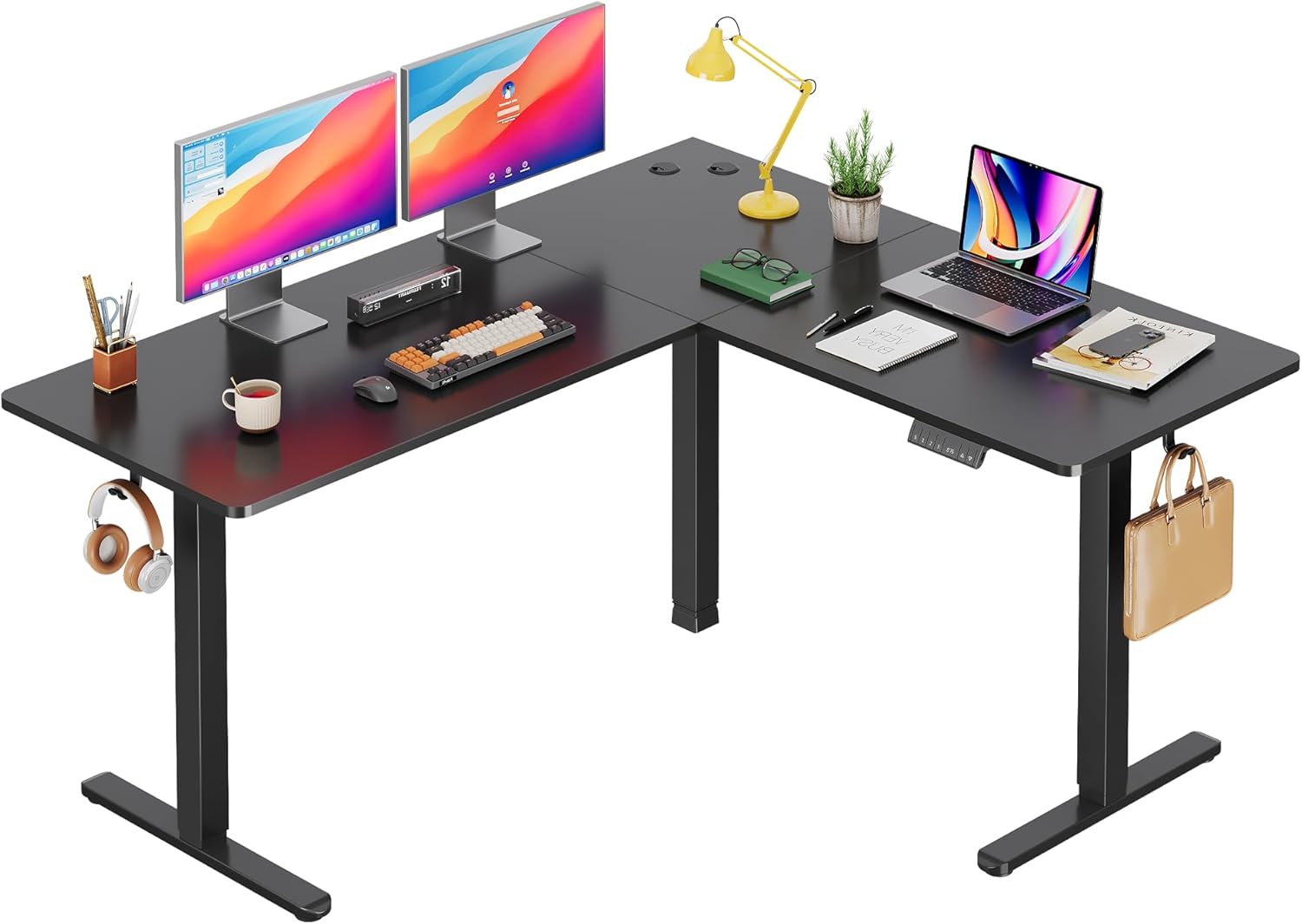
Image: The DEVAISE ASJZ026 L-Shaped Electric Standing Desk fully assembled in a modern home office environment, showcasing its spacious design and functionality.

Image: A detailed diagram illustrating the desk dimensions (63x55 inches) and its load capacity of up to 180 lbs, highlighting the robust construction.

Image: Visual representation of the desk's adjustable height feature, showing the range from a minimum of 28.35 inches to a maximum of 46.45 inches, suitable for various user preferences.
5. Istruzioni per l'uso
5.1 Pannello di controllo Sopraview
The desk is operated via a multi-function control panel, typically located on the front edge of the desk. It features an LED display, up/down buttons, and memory preset buttons.

Immagine: Un dettaglio view of the desk's control panel, highlighting the 'S' button for saving presets, three memory height buttons (1, 2, 3), the LED display showing current height, and the up/down adjustment buttons.
5.2 Regolazione dell'altezza
- Pulsanti su/giù: Premere e tenere premuto il tasto Su (▲) or Giù (▼) button to raise or lower the desk to your desired height. Release the button to stop movement. The LED display will show the current height.
5.3 Preimpostazioni di memoria
La scrivania consente di salvare fino a tre impostazioni di altezza preferite per regolazioni rapide.
- Per salvare un preset: Regolare la scrivania all'altezza desiderata utilizzando i pulsanti Su/Giù. Premere il pulsante S pulsante, quindi premere immediatamente uno dei pulsanti di memoria (1, 2, O 3). The LED display will confirm the setting is saved.
- Per utilizzare un preset: Premere il pulsante di memoria corrispondente (1, 2, O 3). La scrivania si sposterà automaticamente all'altezza salvata.
5.4 Funzione anticollisione
The desk is equipped with an anti-collision system. If the desk encounters an obstruction during height adjustment, it will automatically stop and reverse slightly to prevent damage or injury.
5.5 porta di ricarica USB
Some models may include a USB charging port on the control panel for convenient charging of small electronic devices.

Immagine: Un interno view diagram highlighting the dual motor system, which provides stable and efficient power for the desk's height adjustment mechanism.
Immagine: dettagliata views of additional features: two desk hooks for headphones or bags, adjustable feet for leveling on uneven surfaces, and cable clips for organized cable management.
6. Manutenzione
- Pulizia: Pulisci la superficie e la struttura della scrivania con un panno morbido e asciutto.amp cloth. Avoid harsh chemicals or abrasive cleaners. Ensure the desk is unplugged before cleaning.
- Ispezioni: Controllare periodicamente tutte le viti e i collegamenti per assicurarsi che siano ben serrati. Serrare nuovamente se necessario.
- Gestione dei cavi: Regularly check power and motor cables for any signs of wear or damage. Ensure cables are not pinched or tangled.
7. Risoluzione Dei Problemi
If you encounter issues with your DEVAISE ASJZ026 desk, refer to the following common problems and solutions:
| Problema | Possibile causa | Soluzione |
|---|---|---|
| La scrivania non si muove. | Power cable disconnected; motor cables loose; control box malfunction. | Controllare tutti i collegamenti di alimentazione e del motore. Assicurarsi che la presa di corrente sia funzionante. Ripristinare la scrivania scollegandola per 30 secondi e ricollegandola. |
| La scrivania si muove in modo irregolare o produce rumori insoliti. | Carico non uniforme; collegamenti allentati; ostruzione. | Ensure weight is evenly distributed. Check all frame connections for tightness. Clear any obstructions. Perform a reset. |
| LED display shows an error code (e.g., E01, E02). | Overload; motor fault; sensor issue. | Refer to the specific error code in the detailed manual (if provided) or perform a reset. Reduce desk load if an overload is suspected. |
| Anti-collision feature is too sensitive or not working. | Sensor calibration issue; obstruction. | Ensure no constant pressure is applied to the desk. Perform a reset. If adjustable, refer to the full manual for sensitivity settings. |
If these solutions do not resolve the issue, please contact DEVAISE customer support.
8. Specifiche
- Marca: DEVASTARE
- Numero modello: ASJZ026
- Dimensioni del prodotto: 23.62"P x 62.99"L x 25.84"A
- Intervallo di altezza regolabile: 28.5" to 47.2" (Minimum Height: 28.5 Inches, Maximum Height: 47 Inches)
- Tipo di materiale superiore: Legno ingegnerizzato
- Materiale di base: Ferro
- Capacità di peso: 220 lbs (Maximum Weight Recommendation: 2.2E+2 Pounds)
- Tipo di motore: Dual Motor Electric
- Caratteristiche speciali: Adjustable Height, Electric, L-shaped, Anti-collision Technology, Cable Management, Headphone Hook
- Peso dell'articolo: 80.74 libbre
- Colore: Nero
- Assemblaggio richiesto: SÌ
9. Garanzia e supporto
The DEVAISE ASJZ026 L-Shaped Electric Standing Desk comes with a Lifetime Warranty, as specified by the manufacturer. This warranty covers defects in materials and workmanship under normal use.
For warranty claims, technical assistance, or any questions regarding your product, please contact DEVAISE customer support through their official channels. Please have your model number (ASJZ026) and proof of purchase available when contacting support.