
BYTECH BC-AU-BE-146-WT
User Manual: BYTECH TWS Earbuds
Model: BC-AU-BE-146-WT
Introduzione
Thank you for choosing the BYTECH TWS Earbuds. This manual provides essential information for setting up, operating, and maintaining your new wireless earbuds. Please read this manual carefully before use to ensure optimal performance and longevity of your device.
These earbuds feature advanced Bluetooth 5.3 technology and True Wireless Stereo (TWS) connectivity, offering a seamless audio experience.
Cosa c'è nella scatola?
- BYTECH TWS Earbuds (Left and Right)
- Custodia di ricarica wireless
- Manuale dell'utente (questo documento)
- (Note: Charging cable may be included but not explicitly listed in product specifications. Please check packaging.)
Prodotto finitoview

Figura 1: The BYTECH TWS Earbuds in their open wireless charging case. The case features a digital display indicating the battery level, and the earbuds are white with a sleek design. The case also shows subtle color gradients, possibly from an LED indicator.
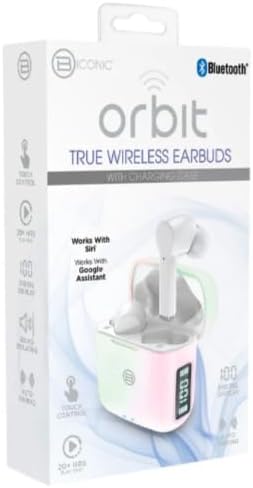
Figura 2: Retail packaging for the BYTECH Orbit True Wireless Earbuds. The box highlights key features such as Bluetooth connectivity, touch control, 20+ hours of play, auto pairing, and compatibility with Siri and Google Assistant.
Impostare
1. Ricarica degli auricolari e della custodia
Before first use, fully charge the earbuds and the charging case. Place the earbuds into the charging case. The case is equipped with wireless charging capability. Connect the charging case to a power source using a compatible charging cable (not explicitly listed as included, please check your package) or place it on a wireless charging pad.
- Il display digitale sulla custodia di ricarica indicherà il livello della batteria.
- Ensure the earbuds are properly seated in their slots for charging.
2. Associazione con il dispositivo (Bluetooth)
- Assicurati che gli auricolari siano carichi.
- Open the charging case. The earbuds will automatically enter pairing mode (indicated by flashing lights on the earbuds, if applicable).
- Sul tuo smartphone o dispositivo abilitato Bluetooth, vai alle impostazioni Bluetooth.
- Attiva il Bluetooth.
- Cercare new devices. You should see "BYTECH BC-AU-BE-146-WT" or a similar name appear in the list of available devices.
- Select the device name to connect. Once connected, a voice prompt will confirm the successful pairing, and the indicator lights on the earbuds will stop flashing.
- For subsequent uses, the earbuds will automatically connect to the last paired device when taken out of the case, provided Bluetooth is enabled on your device.
These earbuds support True Wireless Stereo (TWS) connectivity, meaning both earbuds connect to each other wirelessly to provide a stereo sound experience.
Utilizzo degli auricolari
The BYTECH TWS Earbuds feature intuitive touch controls for various functions. While specific touch gestures are not detailed in the product description, common functions typically include:
- Riproduci/Pausa: Un solo tocco su uno degli auricolari.
- Traccia successiva: Tocca due volte l'auricolare destro.
- Traccia precedente: Tocca due volte l'auricolare sinistro.
- Rispondi/Termina chiamata: Un singolo tocco su uno degli auricolari durante una chiamata in arrivo.
- Rifiuta chiamata: Durante una chiamata in arrivo, tenere premuto uno dei due auricolari per 2 secondi.
- Attiva l'assistente vocale: Triple tap or press and hold (check specific model behavior) to activate Siri (for iOS devices) or Google Assistant (for Android devices).
- Controllo del volume: Some models allow volume adjustment via touch (e.g., tap and hold left for volume down, right for volume up). If not, adjust volume directly on your connected device.
Please refer to the quick start guide included in your packaging for precise touch control instructions specific to your BC-AU-BE-146-WT model.
Manutenzione
Una corretta manutenzione garantisce la longevità e le prestazioni ottimali dei tuoi auricolari.
- Pulizia: Pulisci regolarmente gli auricolari e la custodia di ricarica con un panno morbido, asciutto e privo di lanugine. Non utilizzare detergenti abrasivi, alcol o solventi chimici. Rimuovi delicatamente cerume o detriti dai puntali degli auricolari e dalla rete dell'altoparlante utilizzando una piccola spazzola morbida o un cotton fioc.
- Magazzinaggio: Quando non li usi, conserva sempre nella loro custodia di ricarica per proteggerli da polvere, sporco e danni fisici. Conserva la custodia in un luogo fresco e asciutto, lontano dalla luce solare diretta e da temperature estreme.
- Cura della batteria: Per preservare la durata della batteria, evitare di scaricare completamente gli auricolari e la custodia frequentemente. Caricarli regolarmente, anche se non utilizzati per periodi prolungati.
- Resistenza all'acqua: These earbuds are not specified as water-resistant. Avoid exposure to water, sweat, and high humidity to prevent damage.
Risoluzione dei problemi
If you encounter issues with your BYTECH TWS Earbuds, try the following solutions:
- Gli auricolari non si associano al dispositivo:
- Assicurarsi che gli auricolari siano carichi e fuori dalla custodia.
- Disattiva e attiva il Bluetooth sul tuo dispositivo.
- Forget the device ("BYTECH BC-AU-BE-146-WT") from your device's Bluetooth settings and try pairing again.
- Assicurarsi che nessun altro dispositivo sia collegato agli auricolari.
- Funziona solo un auricolare:
- Riposizionare entrambi gli auricolari nella custodia di ricarica, chiudere il coperchio, attendere qualche secondo, quindi estrarli nuovamente.
- Assicurati che entrambi gli auricolari siano carichi.
- Prova a reimpostare gli auricolari (consulta la guida rapida per la procedura di reimpostazione specifica).
- Nessun suono o volume basso:
- Controlla il livello del volume sia sul dispositivo connesso sia sugli auricolari.
- Assicurati che gli auricolari siano posizionati correttamente nelle orecchie.
- Pulisci eventuali detriti dalla rete dell'altoparlante dell'auricolare.
- Problemi di ricarica:
- Ensure the charging cable (if used) is securely connected and functional.
- Se si utilizza la ricarica wireless, assicurarsi che la custodia sia posizionata correttamente sul pad di ricarica.
- Controllare che non vi siano detriti nella porta di ricarica della custodia.
Se i problemi persistono, contattare l'assistenza clienti.
Specifiche
| Caratteristica | Specificazione |
|---|---|
| Marca | BYTECH |
| Nome del modello | BC-AU-BE-146-WT |
| Numero di modello | BC-AU-BE-146-WT |
| Tecnologia di connettività | Bluetooth 5.3 |
| Fattore di forma | Intraurali (intrauricolari) |
| Colore | Bianco |
| Componenti inclusi | Custodia di ricarica wireless |
| Produttore | Biconico |
| ASIN | B0DPRCBT76 |
| Prima data disponibile | 6 dicembre 2024 |
Garanzia e supporto
For warranty information and customer support, please refer to the documentation included with your product packaging or visit the official BYTECH websito. I termini e le condizioni della garanzia possono variare in base alla regione e al rivenditore.
Conservare la prova d'acquisto per eventuali reclami in garanzia.
Ask a question about this manual
Ask about setup, troubleshooting, compatibility, parts, safety, or missing instructions. Manuals+ will review the question and use this page’s manual context to help answer it.