
Introduzione
Grazie per l'acquistoasing the JYX D58 Portable Karaoke Machine. This manual provides essential information for the safe and efficient operation of your device. Please read it thoroughly before use and retain it for future reference.
Informazioni sulla sicurezza
- Non esporre il dispositivo all'acqua o a umidità eccessiva.
- Evitare temperature estreme.
- Non tentare di smontare o riparare l'unità da soli. Contattare personale di assistenza qualificato.
- Tenere fuori dalla portata dei bambini.
- Use only the provided charging cable and power adapter (if applicable).
Contenuto della confezione
Si prega di verificare che tutti gli articoli siano presenti nel pacco:
- JYX D58 Karaoke Machine (Speaker Unit)
- Microfoni wireless (x2)
- Cavo di ricarica (USB tipo C)
- Cavo ausiliario
- Manuale di istruzioni (questo documento)

Prodotto finitoview
Unità altoparlante
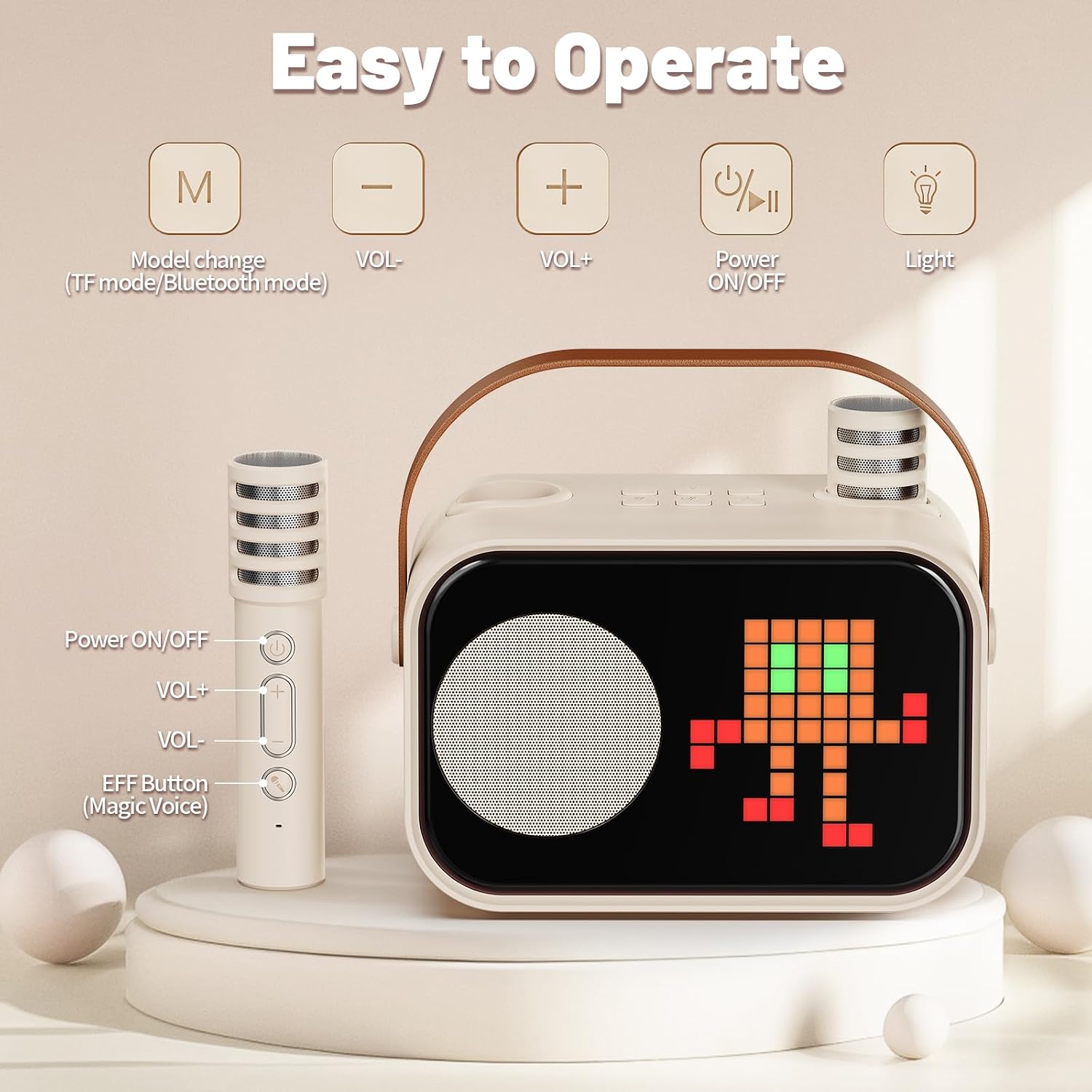
The main speaker unit features a compact design with a durable leather handle for portability. It includes a display screen, speaker grille, and control buttons on the top panel.

Control Panel and Microphones
The speaker's top panel includes buttons for mode change, volume adjustment, power, and light control. The wireless microphones have their own power, volume, and voice effect buttons.
Impostare
1. Carica del dispositivo
Prima del primo utilizzo, caricare completamente l'apparecchio per karaoke ed entrambi i microfoni.
- Connect the provided USB Type-C charging cable to the charging port on the speaker unit and a compatible USB power adapter (not included).
- Connect the charging cable to the charging port on each microphone.
- The charging indicator will show the charging status. A full charge typically takes 2-3 hours for the speaker.
2. Accensione/Spegnimento
- Oratore: Press and hold the Power ON/OFF button on the speaker's top panel until the display illuminates.
- Microfoni: Press and hold the Power ON/OFF button on each microphone.
- To power off, repeat the process for both the speaker and microphones.
3. Abbinamento del microfono
The wireless microphones are designed for direct connection to the speaker. They should automatically pair when both the speaker and microphones are powered on and in close proximity. If pairing issues occur, ensure both devices are charged and try restarting them.
Istruzioni per l'uso
1. Connessione Bluetooth
- Power on the JYX D58 karaoke machine. It will automatically enter Bluetooth pairing mode.
- Sul tuo smartphone, tablet o altro dispositivo abilitato Bluetooth, vai alle impostazioni Bluetooth.
- Cercare available devices and select "JYX D58" from the list.
- Once connected, you will hear a confirmation sound, and the speaker's display may indicate a successful connection.
2. Versatile Playback Options
The JYX D58 supports multiple audio input methods:
- Bluetooth: Connect wirelessly to your smart devices.
- INGRESSO AUX: Use the provided auxiliary cable to connect to devices with a 3.5mm audio output.
- Ingresso scheda TF: Inserire una scheda TF (microSD) caricata con audio MP3 files nello slot designato.
- USB: Inserisci una chiavetta USB con audio MP3 files nella porta USB.
Press the 'M' (Mode change) button on the speaker to switch between input modes (Bluetooth, AUX, TF Card, USB).

3. Funzioni del microfono
- Regolazione del volume: Use the VOL+ and VOL- buttons on the microphone to adjust your vocal volume.
- Effetti di modifica della voce: Press the 'EFF Button' (Magic Voice) on the microphone to cycle through four different voice effects.
- Direct Connect Design: The microphones can be inserted directly into the speaker for storage and a streamlined setup.
4. Accompaniment Mode
The accompaniment mode allows you to remove the original vocals from a song, enabling you to sing along. To activate this mode, refer to the specific instructions on the speaker's display or consult the quick start guide included with the product for button combinations.
5. Effetti di illuminazione dinamici
The JYX D58 features dynamic lighting with 10 modes and 50 pattern designs that synchronize with your music.
- Press the 'Light' button on the speaker's top panel to cycle through different lighting modes and patterns.
- Hold the 'Light' button to turn the lighting effects off or on.
Manutenzione
- Pulizia: Pulire il dispositivo con un panno morbido e asciutto. Non utilizzare detergenti abrasivi o solventi.
- Magazzinaggio: Conservare l'apparecchio per karaoke in un luogo fresco e asciutto, lontano dalla luce solare diretta e da temperature estreme.
- Cura della batteria: To prolong battery life, fully charge the device before long periods of storage and recharge it at least once every three months.
Risoluzione dei problemi
| Problema | Possibile causa | Soluzione |
|---|---|---|
| Nessun potere | La batteria è scarica. | Caricare completamente l'altoparlante e i microfoni. |
| Nessun suono dall'altoparlante | Volume troppo basso; modalità di input errata; dispositivo non connesso. | Increase speaker volume. Ensure correct input mode (Bluetooth, AUX, TF, USB). Reconnect Bluetooth device. |
| Il microfono non funziona | Microphone battery depleted; microphone not powered on; microphone not paired. | Charge microphone. Power on microphone. Restart speaker and microphone to re-establish pairing. |
| Connessione Bluetooth instabile | Dispositivo troppo lontano dall'altoparlante; interferenza. | Avvicinare il dispositivo connesso all'altoparlante. Evitare ostacoli tra i dispositivi. |
Specifiche
| Marca | Il mio nome è JYX. |
| Nome del modello | D58 |
| Numero di modello | D58-T |
| Dimensioni del prodotto (LxWxH) | Dimensioni: 15 x 8.5 x 12.5 cm |
| Peso dell'articolo | 840 grammi |
| Fonte di alimentazione | Alimentato a batteria |
| Voltage | 5 Volt |
| Tempo di gioco | 8+ ore (circa) |
| Tempo di ricarica | 2-3 ore (circa) |
| Tecnologia di connettività | Bluetooth 5.3, ausiliario, USB |
| Ingresso audio compatibile con | Microphone, AUX IN, TF Card, USB, Bluetooth |
| Dispositivi compatibili | Guitar, Smartphone, Tablet, Television |
| Componenti inclusi | Karaoke Machine (Speaker), 2 Wireless Microphones, Charging Cable, Auxiliary Cable, Instruction Manual |

Garanzia e supporto
For warranty information or technical support, please refer to the warranty card included in your package or contact JYX customer service through their official website or the retailer where the product was purchased. Please have your model number (D58-T) and purchase details ready.