
1. Introduzione
Thank you for choosing the SUPVAN KATASYMBOL T50M Pro Label Maker. This compact and versatile thermal label printer is designed to simplify your labeling tasks at home, school, or office. It offers inkless printing, smart app connectivity, and supports a wide range of label types and sizes.

The SUPVAN KATASYMBOL T50M Pro label maker, shown here with various label roll sizes, is a compact and efficient thermal printer designed for a wide range of labeling needs.
Contenuto della confezione:
- SUPVAN KATASYMBOL T50M Pro Label Maker
- 3 Rolls of White Waterproof Labels (included with this package)
- Cavo di ricarica USB
- Manuale dell'utente (questo documento)
2. Impostazione
2.1 Ricarica del dispositivo
Before first use, ensure the label maker is fully charged. Connect the provided USB charging cable to the device's charging port and a suitable USB power adapter (not included). The device has a 1200 mAh lithium battery and requires approximately 1 A for charging.
2.2 Installing the KATASYMBOL App
The T50M Pro operates via the 'KATASYMBOL' smart application, compatible with both Android and iOS smartphones. Cercare 'KATASYMBOL' in your device's app store (Google Play Store for Android or Apple App Store for iOS) and install it.

The T50M Pro label maker offers versatile connectivity, allowing users to design and print labels directly from their smartphone via Bluetooth or from a PC using a USB connection.
2.3 Caricamento dei rotoli di etichette
The T50M Pro uses thermal paper, eliminating the need for ink or toner. To load a label roll:
- Aprire il coperchio dello scomparto delle etichette.
- Insert the label roll with the printing surface facing upwards, ensuring it feeds smoothly into the printer mechanism.
- Close the cover securely. The printer will automatically detect the label size.
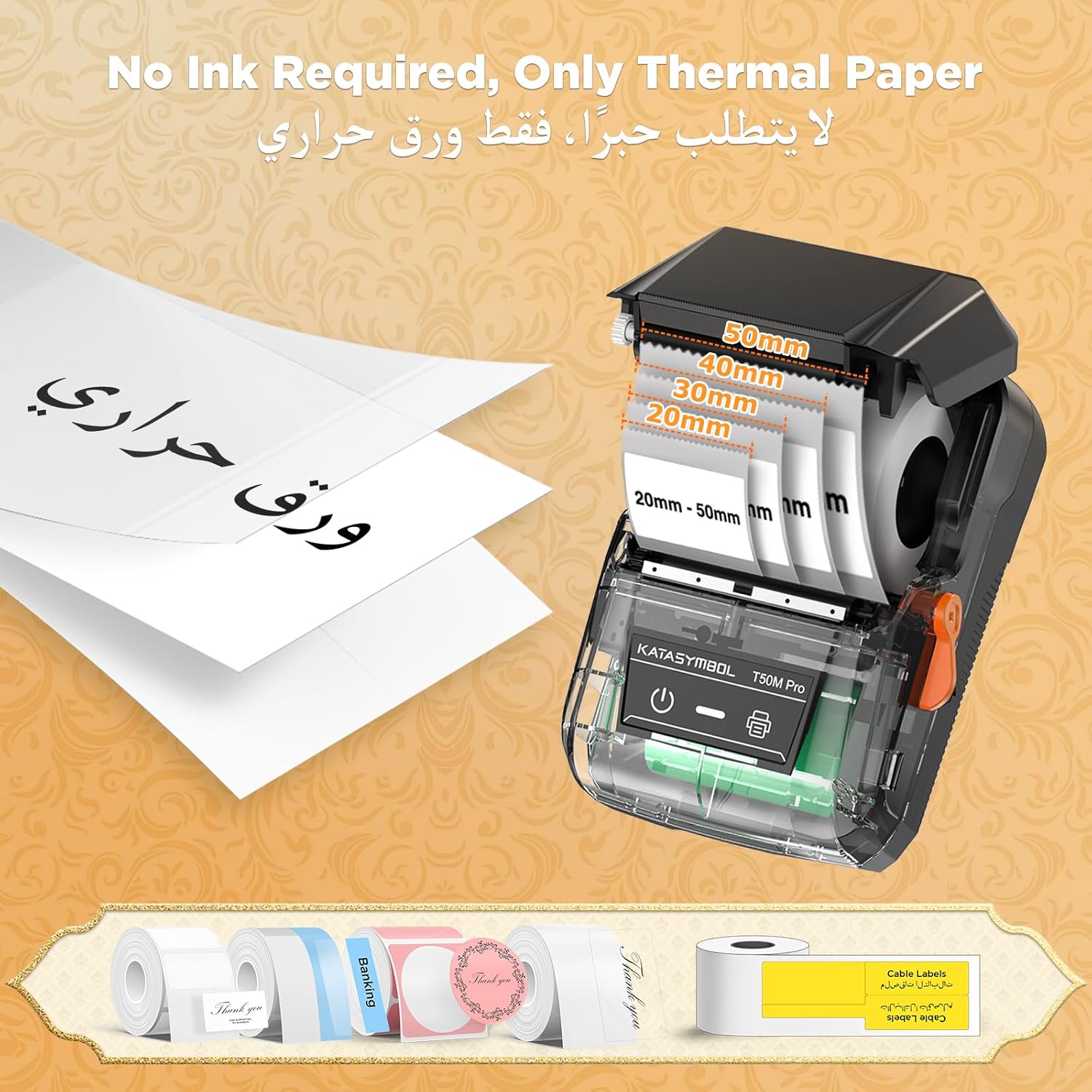
This image illustrates the simple process of loading thermal paper into the T50M Pro, highlighting its inkless operation and support for various label widths ranging from 20mm to 50mm.
3. Istruzioni per l'uso
3.1 Connessione all'App
Turn on the T50M Pro by pressing the power button. Open the KATASYMBOL app on your smartphone. The app will guide you through connecting to the printer via Bluetooth. For PC connection, use the USB cable.
3.2 Designing Your Labels
The KATASYMBOL app offers extensive features for label customization:
- Caratteri: Choose from over 40 fonts to personalize your text.
- Modelli: Utilize over 150 pre-designed templates for various purposes (e.g., price labels, address labels, date labels).
- Icone e simboli: Accedi a una libreria di oltre 600 icone e simboli per migliorare le tue etichette.
- Stampa delle immagini: The app is optimized for image resolution, supporting the printing of clear HD photos. Note that the printer supports only black and white printing.
- Codice a barre/codice QR: Easily generate and print barcodes (e.g., 4579634581372613) and QR codes.

The intuitive KATASYMBOL application provides extensive customization options, including a wide selection of fonts, pre-designed templates, and a vast library of symbols to create personalized labels.

The T50M Pro delivers crisp, high-definition prints at 203 DPI, ensuring clear and legible labels, especially for black and white images and text. Note that this printer supports only black and white printing.
3.3 Stampa delle etichette
Once your label design is complete, simply tap the print button within the app. The T50M Pro prints rapidly at up to 60 mm/s, providing quick results.

Experience fast and efficient printing with the T50M Pro, capable of printing at speeds up to 60 mm/s, making it ideal for quick labeling tasks in any setting.
3.4 Versatile Label Applications
The T50M Pro supports a wide range of label types and applications, including:
- Price labels, address labels, 2D code labels, barcode labels, form labels, date labels, numeric labels, text labels, symbol labels.
- Over 50 industrial label types, including white, clear, round, dotted, flag, and color labels.
- Ideal for retail, small business (product labels), office (file organization), home (organization or storage), and school (school supplies and calendars).

The T50M Pro supports a wide variety of label types and designs, allowing for creative and functional labeling across different scenarios. An example barcode 4579634581372613 is shown on a label. For more information, visit the official SUPVAN websito: https://us.supvan.com/
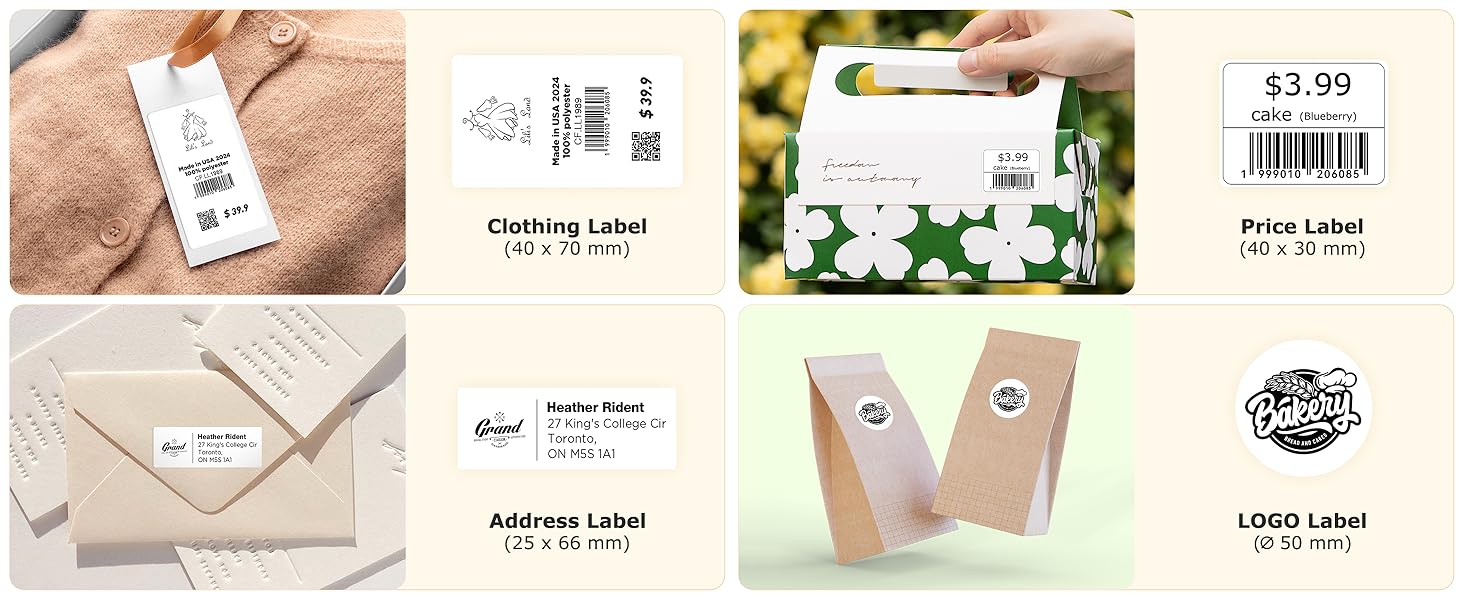
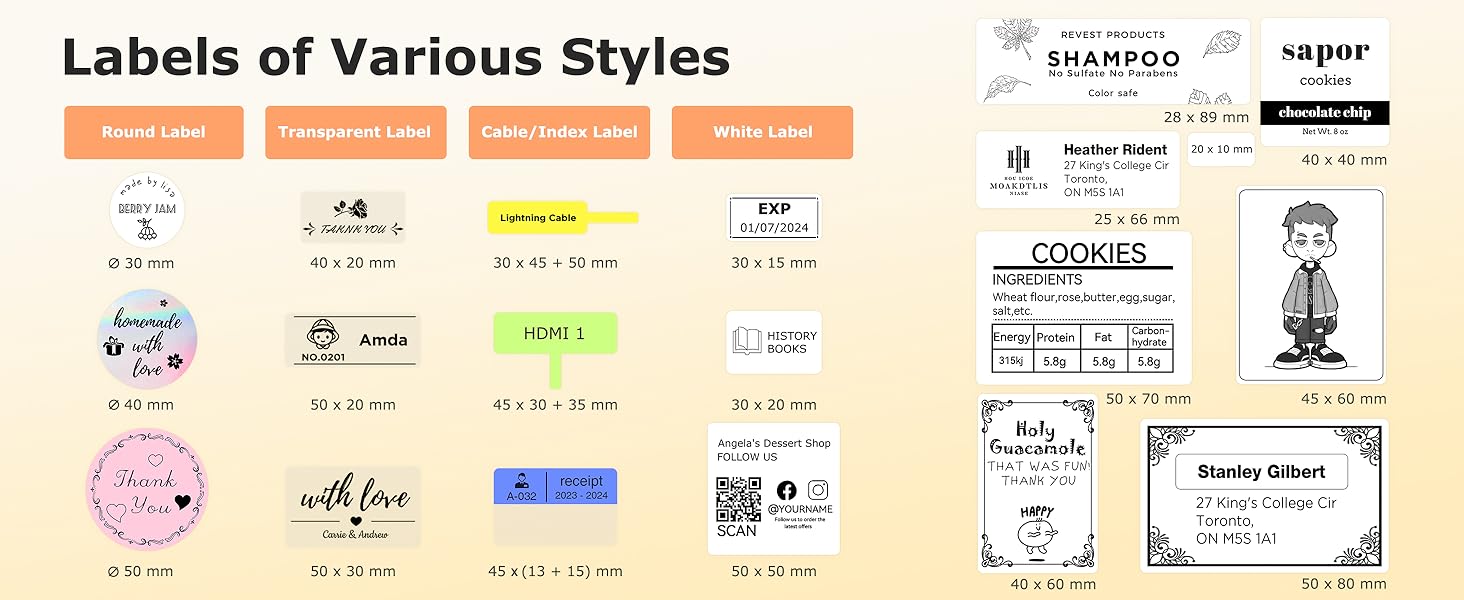
The T50M Pro supports a diverse range of label styles, including round, transparent, cable/index, and standard white labels, available in various sizes and suitable for different applications.

The T50M Pro is versatile for specific business needs, capable of printing clothing labels, price labels, address labels, and custom logo labels with various dimensions. An example barcode 1999010206085 is shown on a label.

The versatility of the T50M Pro extends to numerous applications, from organizing items in your home and labeling products for business to personalizing DIY projects and categorizing stationery.
4. Manutenzione
4.1 Pulizia della stampante
To ensure optimal printing quality and prolong the life of your label maker, regularly clean the print head and paper path. Use a soft, lint-free cloth slightly dampened with isopropyl alcohol. Do not use abrasive cleaners or solvents.
4.2 Durata dell'etichetta
SUPVAN labels are designed for durability and resistance to various conditions:
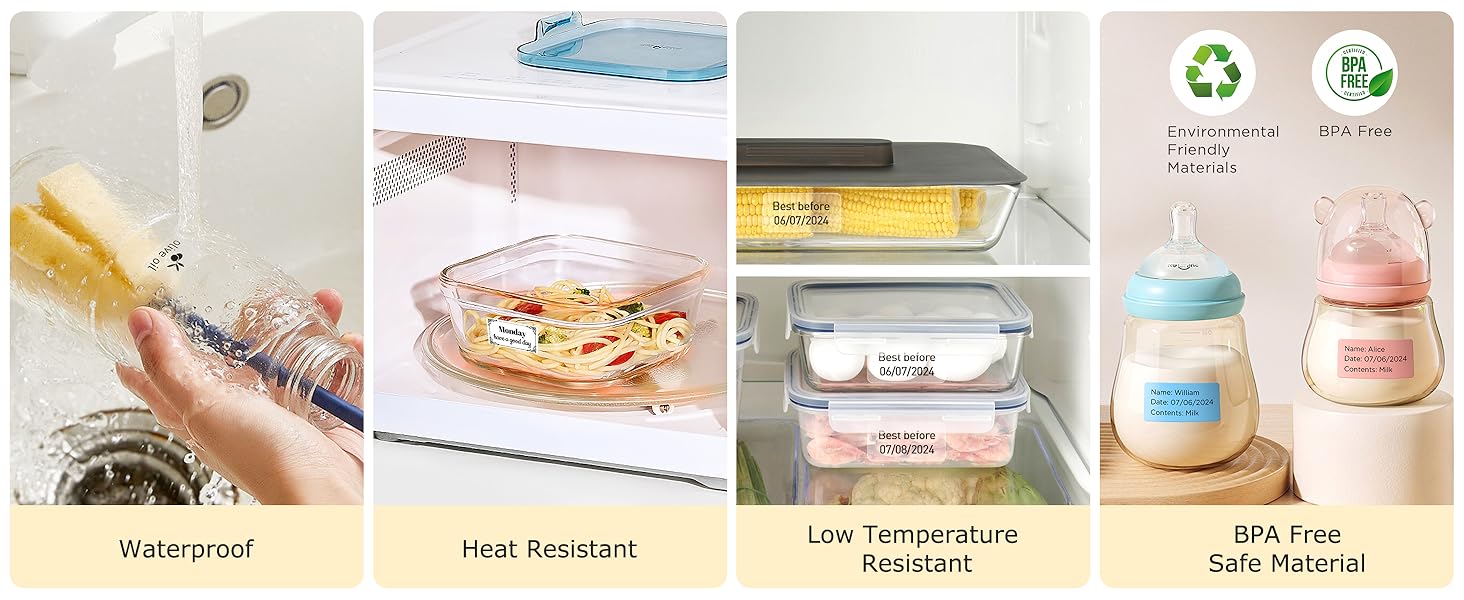
- Impermeabile: Labels are resistant to water and can be cleaned.
- Resistente al calore: Can withstand moderate heat exposure.
- Oil Resistant: Resistant to oil smudges.
- Senza BPA: Made from safe, environmentally friendly materials.
SUPVAN labels are designed for durability, featuring waterproof, heat-resistant, and low-temperature resistant properties, ensuring they remain intact in various environments. They are also made from BPA-free, environmentally friendly materials.
5. Risoluzione Dei Problemi
Problemi comuni e soluzioni:
- La stampante non si connette tramite Bluetooth:
Ensure the printer is turned on and within range. Check your phone's Bluetooth settings and ensure it's enabled. Restart both the printer and your phone. Re-pair the device in the KATASYMBOL app. - Scarsa qualità di stampa:
Ensure the label roll is loaded correctly and is not damaged. Clean the print head as described in the Maintenance section. Check if the label type is suitable for thermal printing. Ensure the image resolution in the app is sufficient (T50M Pro supports 203 DPI). - Le etichette non vengono alimentate correttamente:
Verify that the label roll is inserted properly and not jammed. Ensure the label compartment cover is fully closed. - La stampante non si accende:
Check the battery level. Connect the printer to a power source using the USB cable and try again. - App not recognizing label size:
Ensure the label roll is properly seated. Restart the app and the printer.
6. Specifiche
| Caratteristica | Dettaglio |
|---|---|
| Dimensioni del prodotto | 6.5D x 11W x 15H centimetri |
| Numero di modello | SUPT50MPROV2DE |
| Tipo di controllore | Android / iOS (via KATASYMBOL App) |
| Dimensione massima del supporto | 2 pollici (50mm) |
| Stampa Media | Etichette (carta termica) |
| Tecnologia di connettività | Bluetooth, USB |
| Tecnologia di stampa | Termico |
| Caratteristiche speciali | Enhanced Image Quality, High Clarity, Inkless, Lightweight, Waterproof |
| Uscita della stampante | Monocromo |
| Velocità massima di stampa monocromatica | 60 ppm (mm/s) |
| Batteria | Batteria al litio da 1200 mAh (inclusa) |
| Peso dell'articolo | 270 grammi |
| Produttore | Beijing Supvan Information Technology Co., Ltd. |
Key features of the T50M Pro include inkless thermal printing technology, a wide printing range supporting 3/4 to 2-inch label tape, a rechargeable battery with up to one month of standby time, and automatic label size recognition for precise printing.
7. Garanzia e supporto
7.1 Informazioni sulla garanzia
This product comes with a standard manufacturer's warranty. For detailed information regarding warranty terms and conditions, please refer to the documentation provided with your purchase or contact SUPVAN customer support. Extended warranty and accidental damage protection plans may be available for purchase separately.
7.2 Assistenza clienti
For technical assistance, troubleshooting, or any inquiries regarding your SUPVAN KATASYMBOL T50M Pro Label Maker, please contact SUPVAN customer support. You can also visit the official SUPVAN store on Amazon for product information and additional resources: SUPVAN Amazon Store.

SUPVAN boasts over 20 years of experience in label making, with more than 2 million products sold globally across over 100 countries, backed by 127 patented inventions.