
1. Introduzione
This manual provides detailed instructions for the installation, configuration, and operation of the GIGABYTE B860 Gaming X WIFI6E Motherboard. Designed to support Intel Core Ultra Processors (Series 2) with an LGA 1851 socket, this ATX motherboard features DDR5 memory support, multiple M.2 slots, PCIe 5.0 connectivity, USB-C, WIFI6E, and 2.5GbE LAN. Adherence to these instructions will ensure proper setup and optimal performance of your system.
2. Informazioni sulla sicurezza
- Always disconnect the power cord from the electrical outlet before installing or removing any components.
- Indossare un braccialetto antistatico o toccare frequentemente un oggetto metallico collegato a terra per scaricare l'elettricità statica prima di maneggiare i componenti.
- Maneggiare i componenti tenendoli per i bordi per evitare di toccare parti sensibili.
- Assicurare una corretta ventilazione all'interno del case del PC per evitare il surriscaldamento.
- Tenere la scheda madre lontana dall'umidità e dalle temperature estreme.
3. Contenuto della confezione
Verify that all items are present in the package. If any item is missing or damaged, contact your retailer.
- GIGABYTE B860 Gaming X WIFI6E Motherboard
- Manuale utente / Guida di installazione rapida
- Cavi dati SATA
- Antenna Wi-Fi
- Viti e distanziatori M.2
- CD/USB del driver (o istruzioni per il download)
4. Layout della scheda madre
Prima dell'installazione, familiarizzare con i vari componenti e connettori della scheda madre.
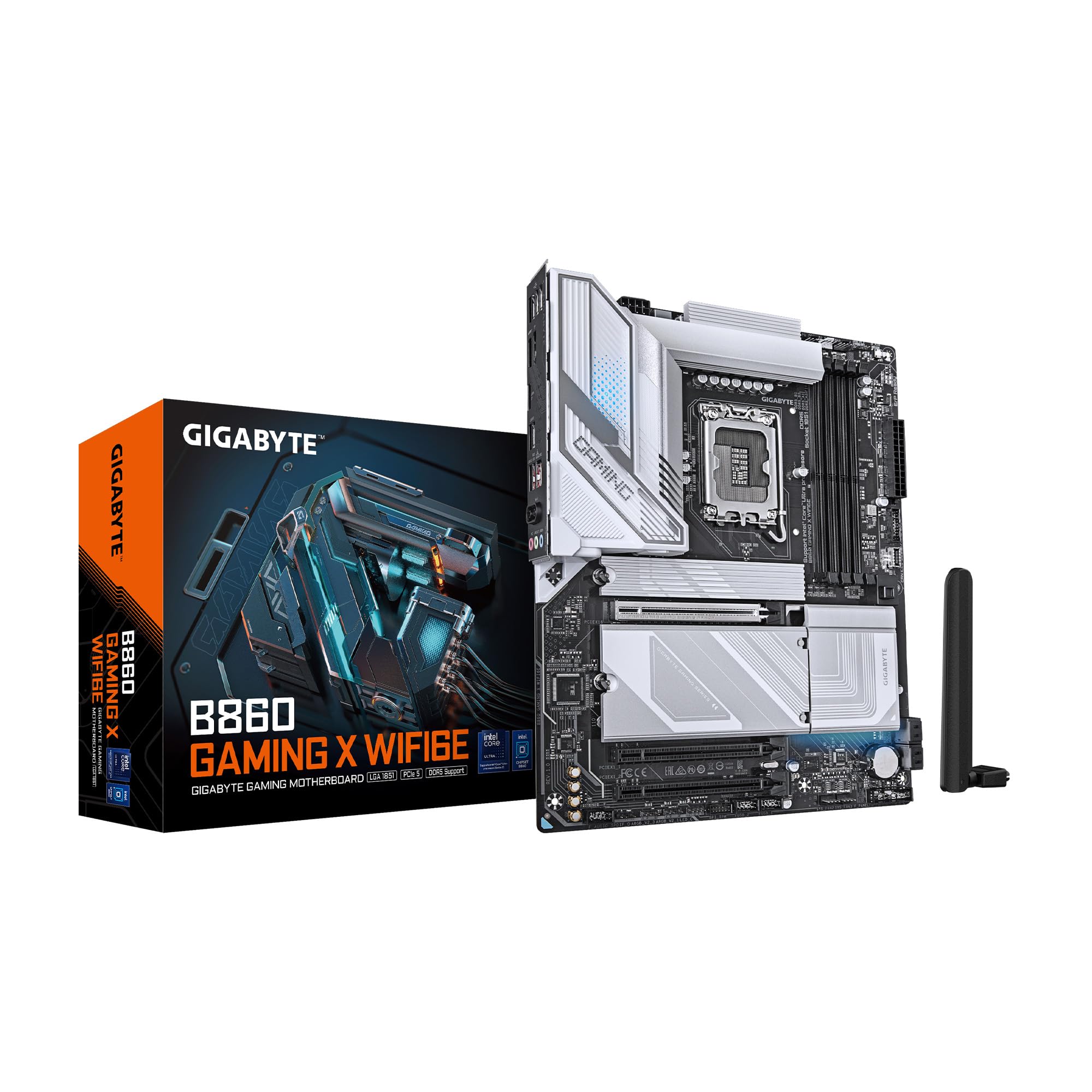
Figura 4.1: Dall'alto verso il basso view of the GIGABYTE B860 Gaming X WIFI6E Motherboard, showing the CPU socket, DDR5 DIMM slots, PCIe slots, and M.2 slots with heatsinks.

Figura 4.2: Angolato view of the GIGABYTE B860 Gaming X WIFI6E Motherboard, highlighting the VRM heatsinks, I/O shroud, and overall board design.
4.1 Pannello I/O posterioreview
Il pannello I/O posteriore è dotato di varie porte per il collegamento di dispositivi esterni.

Figure 4.3: Rear I/O panel featuring USB ports, HDMI, DisplayPort, 2.5GbE LAN, Wi-Fi antenna connectors, and audio jacks.
- Porte USB: Various USB 2.0, USB 3.2 Gen1, USB 3.2 Gen2, and USB4 Type-C ports for peripheral connectivity.
- Uscite video: HDMI and DisplayPort for integrated graphics output.
- Porta LAN: 2.5 Gigabit Ethernet for high-speed wired network connections.
- Connettori antenna Wi-Fi: For attaching the included Wi-Fi antenna.
- Jack audio: Per collegare altoparlanti, cuffie e microfoni.
- BIOS Flash Button: Per aggiornare il BIOS senza CPU o RAM installate.
5. Guida all'installazione
5.1 Installazione della CPU
- Aprire la leva del socket della CPU e rimuovere il coperchio protettivo.
- Allineare con attenzione la CPU con il socket, assicurandosi che il segno triangolare sulla CPU corrisponda al segno sul socket.
- Inserire delicatamente la CPU nel socket senza forzarla.
- Chiudere la leva del socket per fissare la CPU.
5.2 Installazione della memoria (RAM)
- Aprire le clip su entrambe le estremità degli slot DIMM DDR5.
- Align the notch on the DDR5 memory module with the key on the DIMM slot.
- Inserire saldamente il modulo di memoria nello slot finché le clip non scattano in posizione.
- For dual-channel operation, install modules in matching color slots (e.g., A2 and B2).
5.3 Storage (M.2 SSDs, SATA Drives) Installation
- SSD M.2: Remove the M.2 Thermal Guard. Insert the M.2 SSD into the slot at an angle, then push it down and secure it with the EZ-Latch mechanism or screw. Reattach the Thermal Guard.
- Unità SATA: Connect one end of the SATA data cable to a SATA port on the motherboard and the other end to your SATA storage device. Connect a SATA power cable from your power supply to the device.
5.4 Installazione della scheda di espansione (PCIe)
- Allinea la scheda di espansione PCIe (ad esempio la scheda grafica) con lo slot PCIe desiderato.
- Premere con decisione finché la scheda non è posizionata correttamente e la clip di fissaggio non si blocca.
- Fissare la scheda allo chassis con una vite.
5.5 Collegamenti dell'alimentazione
- Collegare il connettore di alimentazione principale ATX a 24 pin dall'alimentatore alla scheda madre.
- Collegare il connettore di alimentazione della CPU ATX 12V a 8 pin (o 4+4 pin) alla scheda madre.
5.6 Collegamenti del pannello frontale
Connect the cables from your PC case's front panel (power button, reset button, USB ports, audio jacks, LED indicators) to the corresponding headers on the motherboard. Refer to the motherboard diagram for exact header locations.
6. Primo avvio e configurazione del BIOS
6.1 Accensione iniziale
After assembling all components, connect your monitor, keyboard, and mouse. Power on your system. The system should display the GIGABYTE splash screen.
6.2 Accesso al BIOS/UEFI
Durante il processo di avvio, premere ripetutamente il tasto DEL key to enter the BIOS/UEFI setup utility. Here you can configure system settings, boot order, and monitor hardware status.
6.3 Basic BIOS Settings
- Ordine di avvio: Set the primary boot device (e.g., M.2 SSD with OS).
- Data e ora: Adjust system date and time.
- Controllo della ventola: Configurare la velocità della ventola per ottenere livelli ottimali di raffreddamento e rumore.
- XMPProfile: Enable XMP for your DDR5 memory to run at its rated speed.
7. Installazione di driver e software
For optimal system performance and stability, install the latest drivers and utilities for your motherboard.
- Driver del chipset: Essenziale per la corretta comunicazione tra la CPU e gli altri componenti.
- Driver LAN: For the 2.5GbE wired network connection.
- Wi-Fi/Bluetooth Drivers: Per la connettività wireless.
- Driver audio: Per una buona funzionalità.
- Software di utilità: GIGABYTE provides various utilities for system monitoring, RGB control, and BIOS updates.
Drivers can be found on the included CD/USB or downloaded from the official GIGABYTE websito.
8. Manutenzione
8.1 Aggiornamenti del BIOS
Controllare regolarmente il GIGABYTE website for the latest BIOS versions. BIOS updates can improve system stability, compatibility, and performance. Follow the instructions provided by GIGABYTE for safe BIOS flashing.
8.2 Aggiornamenti dei driver
Mantieni aggiornati i driver per garantire la compatibilità con nuovi software e hardware e per beneficiare di miglioramenti delle prestazioni e correzioni di bug.
8.3 Pulizia
Periodically clean your PC to prevent dust buildup, which can lead to overheating. Use compressed air to clear dust from heatsinks, fans, and other components. Ensure the system is powered off and unplugged before cleaning.
9. Risoluzione Dei Problemi
- Nessun potere: Controllare tutti i collegamenti di alimentazione (ATX a 24 pin, CPU a 8 pin, alimentazione GPU). Assicurarsi che l'alimentatore sia acceso.
- Nessuna visualizzazione: Verificare la connessione del monitor e la sorgente di input. Reinstallare la scheda grafica e i moduli RAM. Provare ad avviare il sistema con un solo modulo RAM.
- Il sistema non riesce ad avviarsi: Check for POST (Power-On Self-Test) error codes or beeps. Reseat all components. Clear CMOS by removing the battery or using the clear CMOS jumper.
- Componente non rilevato: Ensure the component is properly seated and connected. Check BIOS settings to confirm it is enabled. Update drivers.
- Surriscaldamento: Ensure CPU cooler is properly installed. Check fan connections and fan speeds in BIOS. Clean dust from heatsinks and fans.
10. Specifiche
| Caratteristica | Specificazione |
|---|---|
| Marca | GIGABYTE |
| Serie | Scheda madre B860 GAMING X WIFI6E |
| Numero modello articolo | Scheda madre B860 GAMING X WIFI6E |
| Presa CPU | IntelLGA 1851 |
| Processori compatibili | Intel Ultra Core Series 2 |
| Tecnologia della memoria RAM | DDR5 |
| Slot RAM | 4 DIMM |
| Velocità di memoria | 5600 MHz |
| Tipo di chipset | Intel B860 |
| Slot PCIe | PCIe 5.0 (for graphics card) |
| Slot M.2 | 3 slot M.2 |
| Connettività USB | USB-C and other USB ports |
| Rete locale | LAN da 2.5 GbE |
| Connettività wireless | WIFI6E |
| Progettazione di potenza | 12+1+2+1, 50A PPAK VRM |
| Termiche | MOSFET Heatsink, M.2 Thermal Guard |
| Fattore di forma | ATX |
| Dimensioni del prodotto | 12 x 9.6 x 1 pollici |
| Peso dell'articolo | 4.2 libbre |
| Piattaforma | Finestre 11 |
11. Informazioni sulla garanzia
GIGABYTE motherboards typically come with a limited manufacturer's warranty. The specific terms and duration of the warranty may vary by region and retailer. Please retain your proof of purchase for warranty claims. For detailed warranty information, refer to the official GIGABYTE websito o contatta il tuo punto vendita.
12. Supporto tecnico
If you encounter issues that cannot be resolved using this manual or the troubleshooting section, please contact GIGABYTE technical support.
- GIGABYTE Ufficiale Websito: www.gigabyte.com
- Fare riferimento alla sezione di supporto su website for FAQs, driver downloads, and contact information for your region.