
Symcode Desktop QR Omnidirectional Barcode Scanner
Manuale utente dello scanner di codici a barre omnidirezionale QR Desktop Symcode
Model: Desktop QR Omnidirectional Barcode Scanner
1. Prodotto finitoview
The Symcode Desktop QR Omnidirectional Barcode Scanner is designed for efficient and hands-free scanning of various barcode types. This device is suitable for environments requiring quick and accurate data capture, such as retail stores, libraries, and inventory management systems. It supports both 1D and 2D barcodes, including QR codes, and features automatic sensing for ease of use.

Immagine: lato frontale view of the Symcode Desktop QR Omnidirectional Barcode Scanner, showing its compact design and scan window.
Componenti chiave:
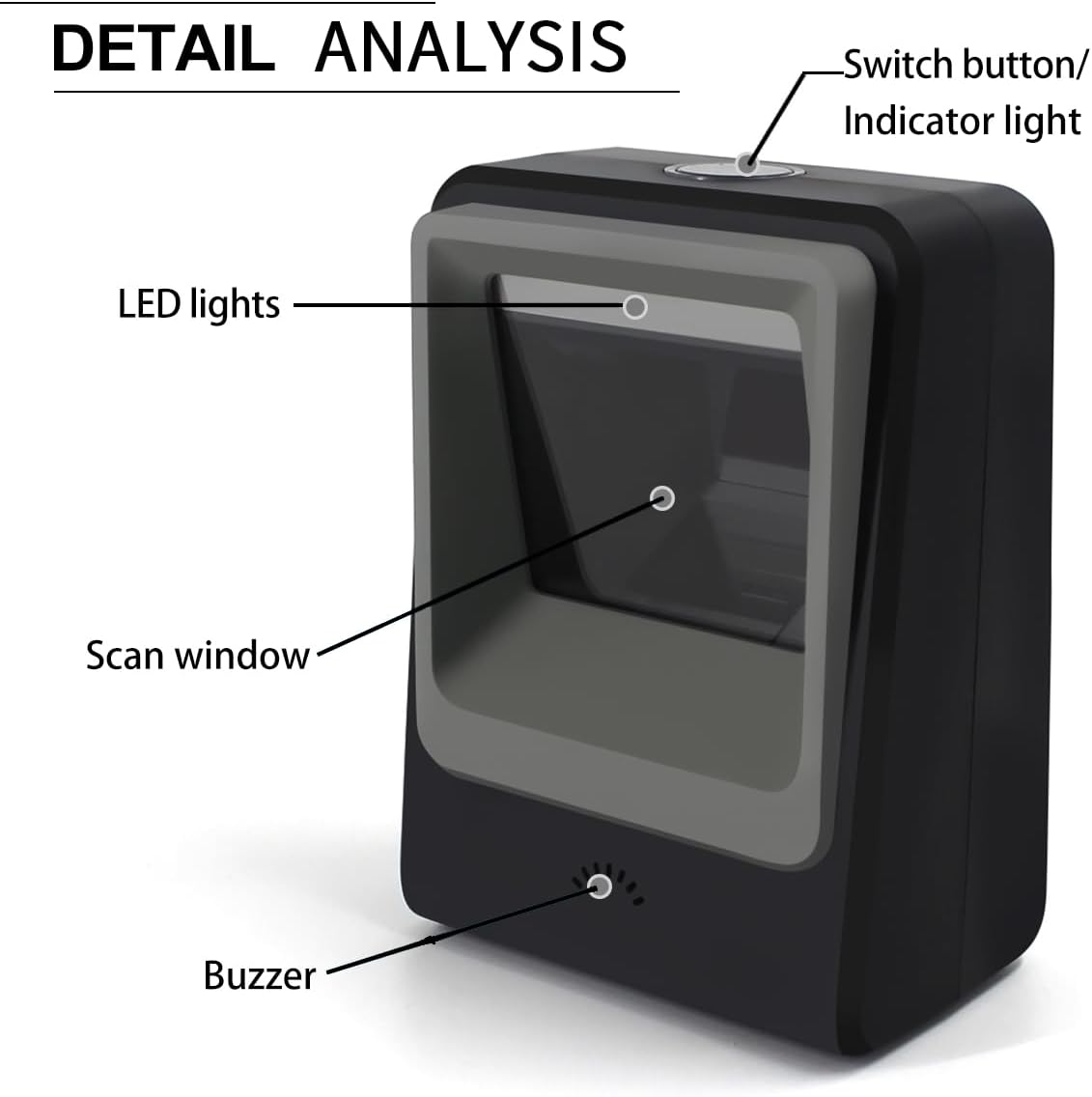
Image: Detailed diagram highlighting the scanner's components: Switch button/Indicator light, LED lights, Scan window, and Buzzer.
- Switch Button/Indicator Light: Controlla l'alimentazione e indica lo stato operativo.
- Luci LED: Illuminates the scanning area.
- Finestra di scansione: L'area attraverso la quale vengono letti i codici a barre.
- Cicalino: Provides audible feedback for successful scans or errors.
2 Caratteristiche
- Scansione versatile: Capable of reading 1D, 2D, and QR barcodes, including damaged or distorted codes.

Image: The scanner demonstrating its ability to read both 1D and 2D barcodes, including QR codes, from digital displays and printed labels.
- Funzionamento a mani libere: Features an infrared auto-sensing sensor that automatically activates the scanner when a barcode is presented, and enters sleep mode when inactive.

Image: Illustration of the scanner's automatic sleep and wake-up function, activating when an item is placed in front of it.
- Configurazione Plug and Play: Requires no software installation; simply connect via USB to a compatible device.
- Ampia compatibilità: Works with Windows XP/7/8/10, Mac OS, and Linux operating systems.

Image: The scanner connected to a laptop, illustrating its plug-and-play functionality and compatibility with multiple operating systems and devices.
- Costruzione durevole: Designed with an anti-slip base for stability and constructed from ABS engineering plastics for enhanced durability, capable of withstanding drops from up to 1.5 meters (approximately 5 feet).

Image: Visual representation of the scanner's anti-shock design, demonstrating its resilience to drops from a height of 1.5 meters.
- Molteplici opzioni di connettività: Supports USB, Serial, and TTL transmission for flexible integration into various systems.

Image: Diagram illustrating the scanner's support for USB, Serial, and TTL transmission methods, connecting to a computer display.
3. Istruzioni per l'installazione
- Disimballare lo scanner: Estrarre con cautela lo scanner dalla confezione.
- Connect to Power/Data: Insert the USB cable into the scanner's port and connect the other end to an available USB port on your computer or host device.
- Riconoscimento del sistema: The operating system (Windows, Mac OS, Linux) should automatically detect and configure the scanner as a standard HID keyboard device. No additional drivers or software are typically required.
- Funzionalità di prova: Open a text editor (e.g., Notepad, Word) or a compatible application. Place a known barcode in front of the scanner's window. The scanner should emit a light, scan the barcode, and the data should appear in your open application. A successful scan is usually indicated by a beep from the buzzer.
If the scanner does not function immediately, ensure the USB cable is securely connected and try a different USB port. For specific configuration settings, refer to the programming guide (if provided separately) or contact support.
4. Istruzioni per l'uso
The Symcode Desktop QR Omnidirectional Barcode Scanner is designed for hands-free, automatic operation.
- Scansione automatica: The scanner utilizes an infrared auto-sensing sensor. When an object with a barcode is placed within its scanning field, the scanner will automatically activate its light and attempt to read the barcode.
- Positioning Barcodes: For optimal performance, present the barcode to the scanner's window. The omnidirectional design allows for scanning from various angles without precise alignment.
- Conferma della scansione: Upon a successful scan, the scanner will typically emit a short beep and the indicator light may flash. The scanned data will be transmitted to your connected device as if typed from a keyboard.
- Modalità risparmio: When no barcode is detected for a period, the scanner will automatically enter a low-power sleep mode, turning off its scanning light. It will reactivate instantly when a barcode is presented again.
5. Manutenzione
Una corretta manutenzione garantisce la longevità e le prestazioni ottimali del tuo scanner per codici a barre.
- Pulizia della finestra di scansione: Regularly clean the scan window with a soft, lint-free cloth. If necessary, dampInumidire leggermente il panno con acqua o con un detergente delicato e non abrasivo. Evitare prodotti chimici aggressivi o materiali abrasivi che potrebbero graffiare la finestra.
- Pulizia generale: Wipe the exterior of the scanner with a soft, dry cloth. Do not immerse the scanner in water or any cleaning solutions.
- Cura del cavo: Ensure the USB cable is not kinked, twisted, or subjected to excessive strain. Damaged cables can affect connectivity.
- Magazzinaggio: Store the scanner in a clean, dry environment away from extreme temperatures and direct sunlight when not in use.
6. Risoluzione Dei Problemi
| Problema | Possibile causa | Soluzione |
|---|---|---|
| Lo scanner non si accende o non risponde. | USB cable not connected properly or faulty USB port. | Ensure the USB cable is securely plugged into both the scanner and the host device. Try a different USB port on your computer. |
| Lo scanner si accende ma non esegue la scansione. | Barcode is damaged, poorly printed, or not within the scanning range/angle. Scanner is in sleep mode. | Ensure the barcode is clear and flat. Adjust the distance and angle. The scanner should wake up automatically when a barcode is presented. If not, check for obstructions on the sensor. |
| I dati scansionati sono errati o incompleti. | Partial scan, incorrect barcode symbology settings (unlikely for default setup), or interference. | Rescan the barcode, ensuring it is fully within the scan window. If issues persist, consult the product's advanced configuration guide (if available) for symbology settings. |
| Dopo la scansione non vengono visualizzati dati nell'applicazione. | Application not in focus, or scanner not recognized as a keyboard input device. | Ensure the target application (e.g., text editor, POS software) is active and ready to receive input. Verify the scanner is recognized by your operating system (check Device Manager on Windows). |
7. Specifiche
| Caratteristica | Dettaglio |
|---|---|
| Dimensioni del prodotto | 4.25"P x 2.75"L x 6"A (10.8 cm P x 7 cm L x 15.2 cm A) Image: Dimensional drawing of the scanner, indicating its depth, width, and height measurements. |
| Peso dell'articolo | 7.1 once (circa 201 grammi) |
| Tecnologia di connettività | USB Cable (also supports Serial, TTL) |
| Fonte di alimentazione | USB Barcode Reader (Bus-powered) |
| Dispositivi compatibili | Laptop, PC, iPad, Phone (with appropriate adapters/OTG support) |
| Sistemi operativi | Windows XP/7/8/10, Mac OS, Linux, Android |
| Tipi di codici a barre supportati | 1D: UPC/EAN, UPC-A, UPC-E, Code39, ISBN, Interleaved 2 of 5, Code93, Code 128, Codabar, EAN-8, EAN-13, GS1 Databar, Industrial 2 of 5, MSI. 2D: PDF417, Data Matrix, QR Code, Aztec, Maxicode, Hanxin. |
| Produttore | codice simbolico |
8. Garanzia e supporto
For information regarding the product warranty, please refer to the documentation included with your purchase or contact Symcode customer support directly. Support contact details are typically available on the manufacturer's official websito o confezione del prodotto.
Produttore: codice simbolico
Documenti correlati - Desktop QR Omnidirectional Barcode Scanner
 |
Manuale utente dello scanner per codici a barre desktop 2D - Symcode Manuale utente completo per lo scanner per codici a barre desktop 2D Symcode (modello MJ-9120), che descrive in dettaglio funzionalità, parametri, interfacce, impostazioni e risoluzione dei problemi per una scansione efficiente dei codici a barre. |
 |
Manuale utente dello scanner di codici a barre wireless Bluetooth/2.4G Manuale utente completo per lo scanner di codici a barre wireless Bluetooth/2.4G, che illustra le caratteristiche, le procedure di configurazione, le modalità operative, la risoluzione dei problemi e le spiegazioni degli indicatori. |
 |
Guida per l'utente dello scanner di codici a barre wireless 2.4G | Symcode Manuale utente completo per lo scanner di codici a barre wireless Symcode 2.4G, che descrive in dettaglio le caratteristiche, i parametri delle prestazioni, le modalità operative, le opzioni di configurazione e le specifiche. |
 |
Manuale utente dello scanner per codici a barre 2D Symcode MJ-340 Manuale utente completo per lo scanner di codici a barre 2D Symcode MJ-340, che illustra l'installazione, le specifiche delle prestazioni, le modalità di comunicazione e le opzioni di configurazione. |
 |
Symcode 2D Barcode Scanner User Manual Comprehensive user manual for the Symcode 2D Barcode Scanner (Model MJ-4209-W), covering installation, interface configuration, barcode type settings, and troubleshooting. |
 |
Configurazione dello scanner di codici a barre Symcode: modalità continua e trigger Istruzioni per la configurazione degli scanner di codici a barre Symcode utilizzando le modalità Continua e Trigger mediante la stampa e la scansione dei codici di impostazione. Include esempi visiviampdi codici a barre per ogni modalità. |
Ask a question about this manual
Ask about setup, troubleshooting, compatibility, parts, safety, or missing instructions. Manuals+ will review the question and use this page’s manual context to help answer it.