
1. Introduzione
This manual provides detailed instructions for the ATTACK SHARK X68 HE 60% Gaming Keyboard. Designed for high-performance gaming, this keyboard features magnetic switches, rapid trigger technology, and extensive customization options. Please read this manual thoroughly to ensure proper use and to maximize your gaming experience.

Immagine 1.1: Passoview of the ATTACK SHARK X68 HE keyboard showcasing its magnetic switches, 0.01mm RT accuracy, adjustable actuation point, 0.125ms latency, Snap Tap, RGB lighting, and PC/Mac compatibility.
2. Caratteristiche del prodotto
- Magnetic Switches (Hall Effect Technology): Provides precise and consistent key presses with high durability.
- Frequenza di polling 8000Hz: Delivers an ultra-fast 0.125ms response time for competitive gaming.
- 0.01mm Rapid Trigger (RT) Accuracy: Allows for instant key reset and re-press, enhancing responsiveness.
- Punto di attivazione regolabile: Customize the key press distance from 0.1mm to 3.4mm to suit your playstyle.
- Snap Tap and Dynamic Keystroke: Advanced features for precise control and rapid input.
- Illuminazione RGB completa: Over 20 preset light effects with customizable colors and patterns.
- Web Software del driver: Comprehensive customization available via a web-based driver, compatible with Windows and Mac.
- Costruzione durevole: Features PBT keycaps, an aluminum alloy plate, and PORON foam for enhanced sound and feel.
- Layout compatto al 60%: Space-saving design without compromising essential gaming functions.

Image 2.1: Detail showing the 8000Hz polling rate, providing a 0.125ms response time for faster performance.
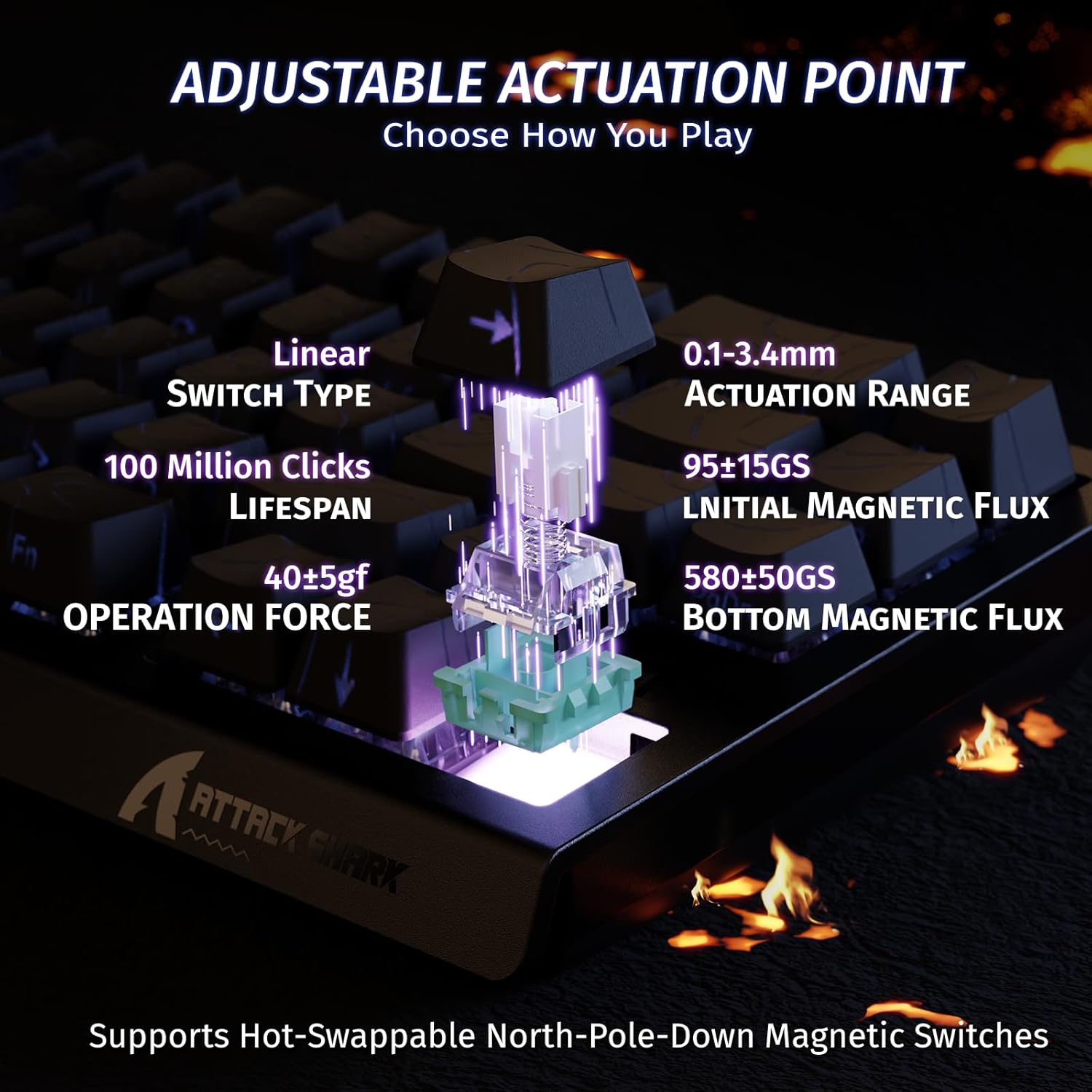
Image 2.2: Visual representation of the adjustable actuation point, allowing users to set the key press distance between 0.1mm and 3.4mm.

Image 2.3: The keyboard illuminated with full RGB light effects, demonstrating the variety of 20+ preset lighting options.

Image 2.4: An exploded diagram of the X68 HE keyboard, showing its internal layers including PBT keycaps, top case, aluminum alloy plate, PCB, PORON foam, ATTACK SHARK magnetic switches, and bottom case.
3. Impostazione
3.1 Collegamento della tastiera
- Individuare la porta USB-C sul retro della tastiera.
- Collegare il cavo USB-C in dotazione alla tastiera.
- Plug the other end of the USB-C cable into an available USB port on your computer (PC or Mac).
- La tastiera verrà riconosciuta automaticamente dal sistema operativo.
3.2 Compatibilità del sistema
The ATTACK SHARK X68 HE keyboard is compatible with Windows and Mac operating systems. No additional drivers are required for basic functionality, but the web driver is recommended for full customization.
4. Istruzioni per l'uso
4.1 Funzioni base dei tasti
The keyboard features a standard QWERTY layout with 61 keys. All keys function as labeled. For secondary functions (e.g., F-keys, media controls), use the Fn key in combination with the corresponding key.
4.2 Controllo dell'illuminazione RGB
The keyboard offers various RGB lighting effects. Use the following key combinations to adjust:
- Fn+↑: Aumenta la luminosità della retroilluminazione
- Fn + ↓: Riduci la luminosità della retroilluminazione
- Fn+←: Riduci la velocità della retroilluminazione
- F + →: Aumenta la velocità della retroilluminazione
- Fn + Alt: Cambia modalità luce
- Fn + Invio: Cambia colore della luce
- Fn + Backspace: Accendi/Spegni la luce

Image 4.1: Detail of the pattern shine-through keycaps with side-printed characters, aiding in visibility of secondary functions.
4.3 Web Personalizzazione del driver
For advanced customization, including adjusting actuation points, setting Rapid Trigger sensitivity, configuring Snap Tap, and creating macros, use the ATTACK SHARK web driver. Access the web driver through your internet browser. The web driver allows for:
- Key remapping and combination settings.
- Macro creation and management.
- Dynamic Keystroke (DKS) settings.
- Adjusting Trigger Sensitivity Level (TGL).
- Snap Tap configuration.
- Zero Deadzone settings.
- Aggiornamenti del firmware.

Immagine 4.2: Screenshot del web driver interface, demonstrating options for key settings, stroke settings, shaft settings, and advanced settings for comprehensive customization.

Image 4.3: Illustration of 0.01mm RT accuracy and 128kHz scan rate, showing the advantage of Rapid Trigger over regular switches in games like Valorant, CSGO, APEX, and osu!.
5. Manutenzione
5.1 Pulizia della tastiera
- Scollegare la tastiera dal computer prima di pulirla.
- Utilizzare un panno morbido e asciutto per pulire i tasti e il telaio.
- Per lo sporco ostinato, una leggera damp È possibile utilizzare un panno imbevuto di sapone neutro, assicurandosi che non penetri liquido nella tastiera.
- Utilizzare aria compressa per rimuovere polvere e detriti dagli spazi tra i tasti.
5.2 Cura generale
- Evitare di esporre la tastiera a temperature estreme, alla luce solare diretta o a elevata umidità.
- Do not spill liquids on the keyboard. In case of a spill, immediately disconnect it and allow it to dry completely before reconnecting.
- Evitare di far cadere la tastiera o di sottoporla a forti urti.
6. Risoluzione Dei Problemi
If you encounter any issues with your ATTACK SHARK X68 HE keyboard, please refer to the following common solutions:
- La tastiera non risponde: Assicurati che il cavo USB-C sia collegato saldamente sia alla tastiera che al computer. Prova una porta USB o un cavo diverso.
- L'illuminazione RGB non funziona: Check the lighting control key combinations (Fn + Backspace to toggle, Fn + Alt to change mode). Ensure the web driver settings haven't disabled lighting.
- Le chiavi non vengono registrate correttamente: Ensure the keyboard is clean and free of debris. If using the web driver, check actuation point settings and perform calibration if available.
- Software/Web Problemi con il driver: Assicurati che la tua connessione Internet sia stabile quando accedi a web driver. Try clearing your browser cache or using a different browser. Check the ATTACK SHARK official website for any announcements or updated web driver links.
- Comportamento inaspettato: Disconnect and reconnect the keyboard. If the issue persists, a factory reset (if available via web driver) might be necessary.
7. Specifiche
| Caratteristica | Dettaglio |
|---|---|
| Marca | ATTACCO SQUALO |
| Numero di modello | X68 Lui |
| Tecnologia di connettività | USB-C (cablato) |
| Descrizione della tastiera | Gioco d'azzardo |
| Usi consigliati | Daily Use, Gaming, Programming, Business |
| Tipo di interruttore a chiave | Linear Magnetic Switches |
| Punto di attuazione | Regolabile (0.1 mm - 3.4 mm) |
| Precisione del grilletto rapido | 0.01mm |
| Frequenza di scansione | 128 kHz |
| Tasso di sondaggio | Frequenza 8000 Hz |
| Retroilluminazione RGB | Yes (20+ preset effects) |
| Lingua | English (QWERTY Layout) |
| Numero di chiavi | 61 |
| Sistema operativo compatibile | Finestre, Mac |
| Materiale | Tasti in polibutilene tereftalato (PBT) |
| Codice UPC | 752010391158 |
8. Garanzia e supporto
8.1 Informazioni sulla garanzia
This product comes with an Importer Guaranteed warranty. Please retain your proof of purchase for any warranty claims. For specific warranty terms and conditions, refer to the documentation provided at the time of purchase or contact your retailer.
8.2 Supporto tecnico
For technical assistance, software updates, or advanced customization, please visit the official ATTACK SHARK website and access their web driver or support resources. The web driver includes integrated memory for saving your settings.