
1. Introduzione
Thank you for choosing the MageGee MK-Box 60% Mechanical Gaming Keyboard. This compact 68-key keyboard is designed for both gaming and office use, offering a space-saving layout without compromising essential functionality. Featuring responsive red mechanical switches and customizable LED backlighting, the MK-Box provides a comfortable and efficient typing experience. This manual will guide you through the setup, operation, and maintenance of your new keyboard.
2. Prodotto finitoview
Caratteristiche principali:
- Mini Portable 60% Compact Layout: The MK-Box features 68 keys, including separate arrow keys and Fn function keys, optimizing desk space while retaining necessary functions.
- Interruttori meccanici rossi: Characterized by a linear and smoother feel with minimal resistance, these switches offer fast action without a tactile bump, making typing and gaming effortless.
- Classic Charming Blue LED Backlit: Customize your experience with approximately 16 illuminated LED light effects. Adjust backlight modes, speed, and brightness using simple key combinations.
- Anti-ghosting completo: All 68 keys are conflict-free, ensuring every keystroke is registered accurately during intense gaming sessions.
- Design ergonomico: Features ergonomic suspension double-color injection keycaps, double kickstand feet for adjustable typing angles, and a detachable USB cable for convenience and durability.
- Ampia compatibilità: Compatible with Windows (2000, XP, ME, Vista, 7, 8), Linux, and Mac operating systems. Plug and play, no drivers or software required.
Cosa c'è nella scatola:
- MageGee MK-Box Mechanical Keyboard x 1
- Detachable USB-C to USB-A Cable x 1
- Extra Keycaps (e.g., 16 purple keycaps, red WASD keys) x 1 set
- Estrattore per copritasti x 1
- Manuale utente x 1
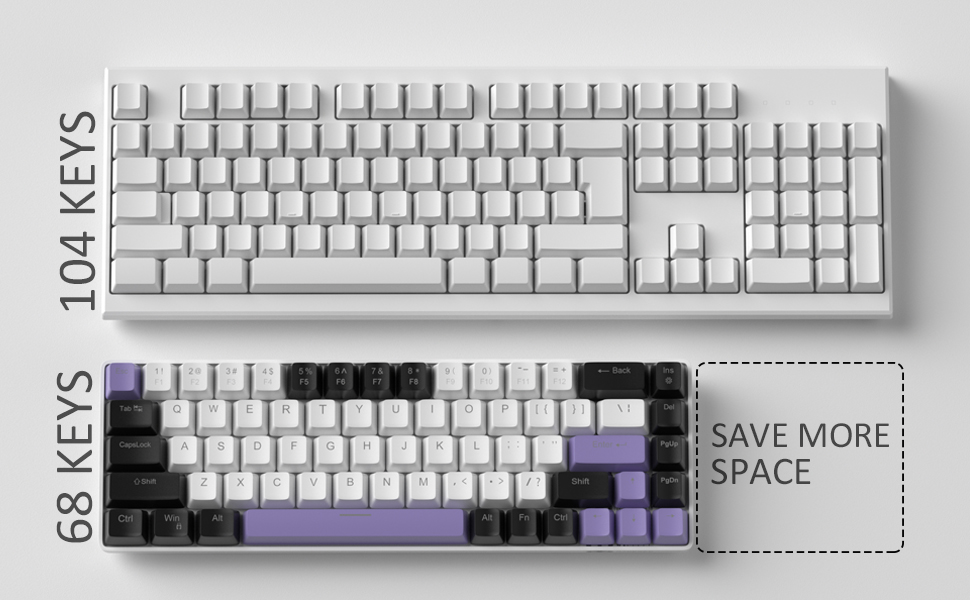
Image: Contents of the MageGee MK-Box packaging, including the keyboard, detachable USB-C cable, extra keycaps, keycap puller, and user manual.
3. Impostazione
- Collegare la tastiera: Locate the detachable USB-C cable. Plug the USB-C end into the port on the left side of the keyboard and the USB-A end into an available USB port on your computer (Laptop, PC, Mac).
Image: Close-up of the detachable USB-C port on the side of the MageGee MK-Box keyboard, with the cable being inserted.
- Regola l'angolo di digitazione: Flip the keyboard over to reveal the double kickstand feet. Gently pull out the feet to adjust the keyboard to your preferred typing angle for ergonomic comfort. There are two levels of adjustment.
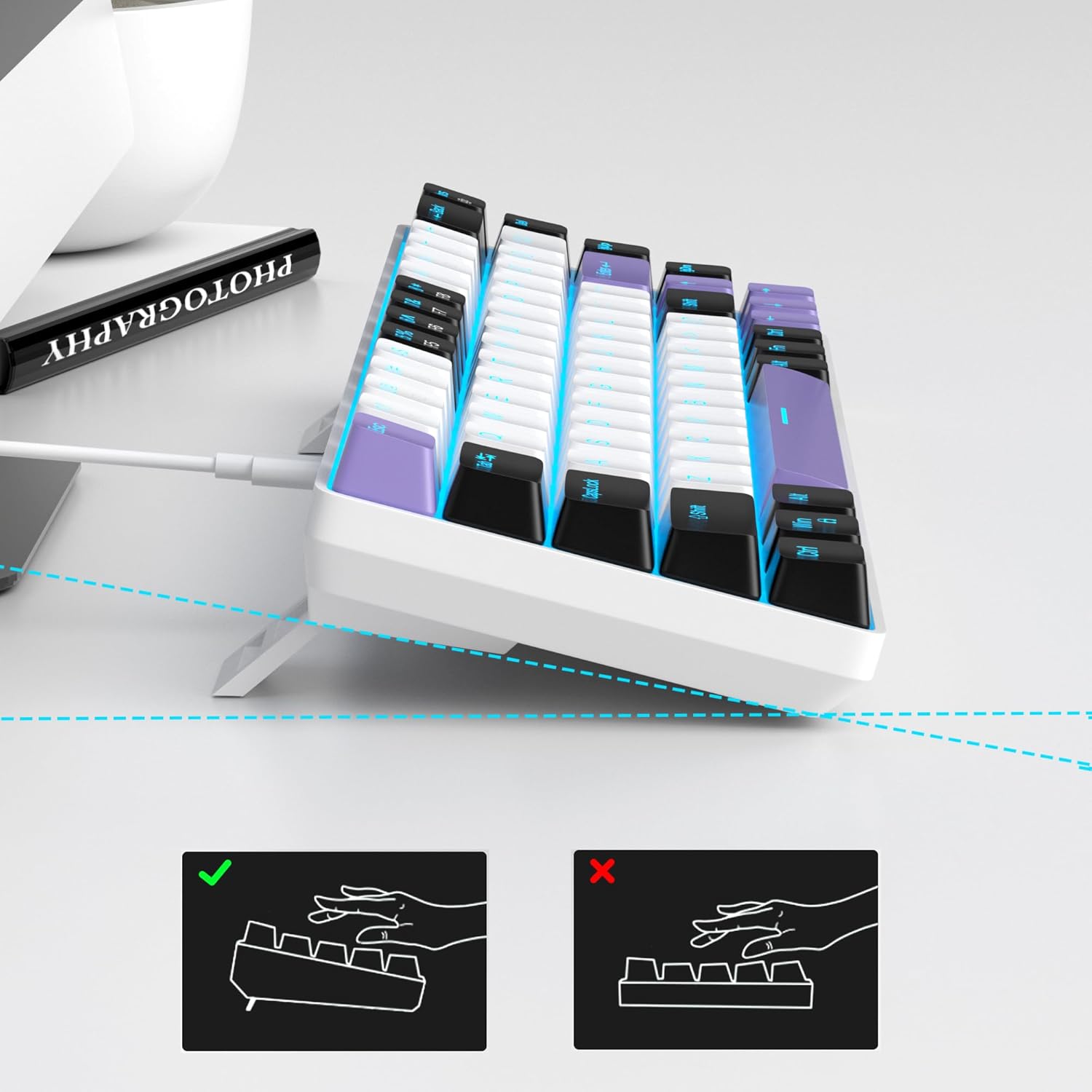
Image: The MageGee MK-Box keyboard shown from a side angle with its adjustable feet extended, illustrating the ergonomic tilt for comfortable typing.
- Riconoscimento del sistema: Your computer should automatically recognize the keyboard. No additional drivers or software installation is required.
4. Istruzioni per l'uso
Funzioni chiave di base:
- The keyboard features a standard QWERTY layout with 68 keys.
- Dedicated arrow keys are located on the bottom right.
- Function keys (F1-F12) are accessed via the Fn key in combination with the number row keys.
Controllo della retroilluminazione:
The MageGee MK-Box features a classic blue LED backlight with multiple modes and adjustable settings.
- Cambia modalità di retroilluminazione: Premere Fn + Ins to cycle through approximately 16 different backlight effects.
- Regola la velocità della retroilluminazione: Premere Fn + ← (freccia sinistra) to decrease speed or Fn + → (freccia destra) per aumentare la velocità.
- Regola la luminosità della retroilluminazione: Premere Fn + ↓ (freccia giù) to decrease brightness or Fn + ↑ (freccia su) per aumentare la luminosità.

Image: A diagram illustrating the key combinations for controlling the backlight effects, speed, and brightness on the MageGee MK-Box keyboard.
5. Manutenzione
- Pulizia: Utilizzare un panno morbido e asciutto per pulire la superficie della tastiera. Per una pulizia più approfondita, è possibile utilizzare una bomboletta di aria compressa per rimuovere polvere e detriti dagli spazi tra i tasti.
- Rimozione dei tasti: To clean under the keycaps or replace them with the provided extra keycaps, use the included keycap puller. Gently attach the puller to a keycap and pull straight up. When reattaching, align the keycap with the switch stem and press down firmly until it clicks into place.
- Cura del cavo: The detachable USB-C cable should be handled with care. Avoid sharp bends or excessive pulling to prevent damage.

Image: A close-up of the keycap puller tool, used for safely removing and replacing keycaps on the mechanical keyboard.
6. Risoluzione Dei Problemi
- La tastiera non risponde:
- Assicurarsi che il cavo USB sia collegato saldamente sia alla tastiera che al computer.
- Prova a collegare la tastiera a una porta USB diversa del computer.
- Prova la tastiera su un altro computer per escludere un problema specifico del computer.
- Retroilluminazione non funzionante/errata:
- Assicurarsi che la tastiera sia collegata correttamente e che riceva alimentazione.
- Premere Fn + Ins to cycle through backlight modes, as it might be set to an 'off' mode.
- Regola la luminosità utilizzando Fn + ↑/↓.
- Chiavi non registrate (fantasma):
- The MK-Box features full anti-ghosting. If you experience issues, ensure no debris is lodged under the keycaps.
- Try reconnecting the keyboard or restarting your computer.
7. Specifiche
| Caratteristica | Dettaglio |
|---|---|
| Marca | MageGee |
| Nome del modello | MK-Box |
| Descrizione della tastiera | Meccanico |
| Numero di chiavi | 68 |
| Tipo di interruttore | Linear (Red Switch) |
| Tecnologia di connettività | USB (cablato) |
| Dispositivi compatibili | Computer portatile, PC |
| Famiglia di sistemi operativi compatibili | Windows, Linux, Mac |
| Caratteristica speciale | 60% Mechanical Design, LED Backlit, Anti-Ghosting |
| Disposizione della tastiera | Tastiera QWERTY |
| Materiale | Plastica |
| Livello di resistenza all'acqua | Non resistente all'acqua |
8. Garanzia e supporto
MageGee products are designed for durability and performance. For any product-related inquiries, technical support, or warranty claims, please refer to the contact information provided on the product packaging or visit the official MageGee websito. Conservare la prova d'acquisto per l'assistenza in garanzia.