
1. Introduzione
This manual provides detailed instructions for the installation, operation, and maintenance of your Fuers 8-Channel 5MP H.265+ Hybrid Security DVR Recorder. This DVR system is designed to support various camera types, including TVI, AHD, CVBS, CVI, XVI, and IP cameras, offering a versatile surveillance solution. It features advanced H.265+ video compression, AI human detection, and remote access capabilities.
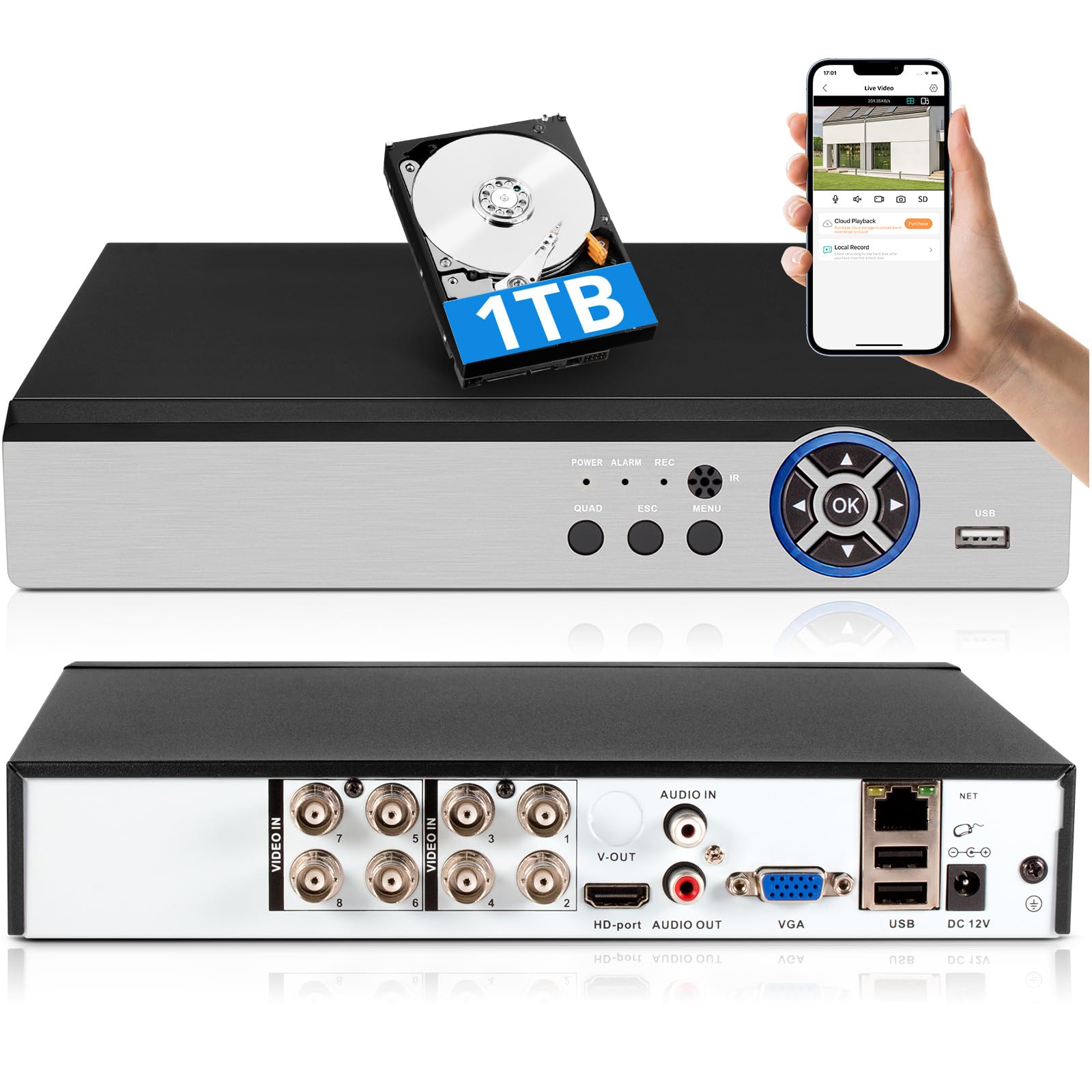
Image: The Fuers 8-Channel 5MP H.265+ Hybrid Security DVR Recorder unit.
2. Cosa c'è nella scatola
Si prega di verificare che tutti gli articoli elencati di seguito siano inclusi nel pacchetto:
- 1x 5MP 8CH DVR
- 1x 1TB Hard Drive (Pre-installed on DVR)
- 1x DVR Power Supply
- 1x mouse USB
- 1x Manuale utente

Image: The DVR unit and its included accessories: 1TB HDD, power supply, USB mouse, and user manual.
3. Caratteristiche del prodotto
- 5MP 6-in-1 Hybrid DVR: Supports up to 8 TVI, AHD, CVBS, CVI, XVI, Analog cameras and IP cameras.
- Formato video H.265+ avanzato: Offers longer recording times and up to 50% storage space savings compared to H.264 systems.
- Rilevamento umano AI: Advanced algorithms detect human presence, reducing false alarms.
- Accesso remoto: Controllo e view pippotage remotely via the iCSee App on smartphones, tablets, and PCs (Google Chrome, Microsoft Edge, Internet Explorer).
- Operazione offline: The DVR can function without an internet connection for local recording and viewing. Internet is only required for remote access features.
- Disco rigido preinstallato da 1 TB: Ready for immediate recording, expandable up to 14TB via SATA.
- Simultaneous VGA/HDMI Output: Connects to PC monitors and TVs concurrently.

Immagine: Oltreview of the DVR's key features including AI Human Detection and remote access.
4. Guida all'installazione
4.1 Connessioni fisiche
- Connetti il monitor: Plug the HDMI or VGA cable from your monitor into the corresponding port on the DVR.
- Collegare il mouse USB: Inserire il mouse USB in una delle porte USB del DVR.
- Collega le telecamere: Connect your analog cameras (TVI, AHD, CVBS, CVI, XVI) to the BNC 'VIDEO IN' ports. For IP cameras, connect them to your network and ensure the DVR is also connected to the same network.
- Connect Network (Optional for Remote Access): Connect an Ethernet cable from the DVR's 'NET' port to your router for remote viewcapacità di acquisizione.
- Connetti alimentazione: Plug the DVR power supply into the DC 12V input port on the DVR, then plug the adapter into a power outlet.

Immagine: dettagliata view of the DVR's rear panel showing video input, audio input/output, VGA, HDMI, USB, and network ports.
4.2 Mobile App Setup (iCSee)
To access your DVR remotely, download and configure the iCSee mobile application:
- Scarica l'app: Scan the QR code displayed on your monitor or search for "iCSee" in your device's app store.
- Androide: Negozio Google Play
- iOS: Negozio di applicazioni Apple
- Registrati/Accedi: Open the iCSee app and create a new account or log in if you already have one.
- Aggiungi dispositivo: In the app, select the option to add a new device. You can typically scan the QR code found in the DVR's menu (Main Menu > Info > Version) to bind the device.
- View Alimentazione dal vivo: Una volta aggiunto il dispositivo, puoi view your camera feeds live from anywhere with an internet connection.

Image: Visual guide for connecting the DVR to a network and setting up the iCSee mobile application for remote viewing.
5. Istruzioni per l'uso
5.1 Riproduzione video
per riview registrato footage:
- Fare clic con il tasto destro del mouse sulla diretta view screen to open the main menu.
- Select "Record" then "Playback".
- Choose the desired channel(s) and date from the calendar.
- Click "Start Playback" to view le registrazioni.
Video: Demonstration of DVR video playback settings and navigation.
5.2 Monitoraggio remoto
After completing the mobile app setup (Section 4.2), you can monitor your surveillance system from any location with internet access. The iCSee app allows for live viewing, riproduzione di foo registratitage, and receiving alerts.
Video: Oltreview of the H.265+ 5MP 8 Channel CCTV DVR Recorder with 1TB HDD, demonstrating its features and remote access capabilities.
5.3 Rilevamento del movimento e avvisi
The DVR supports customizable motion detection zones and AI human detection to minimize false alarms. When motion is detected, the system can send real-time app notifications and email alerts with snapshots.

Image: Illustration of AI human detection and the alert notification system.
6. Manutenzione
- Pulizia regolare: Mantenere l'unità DVR libera da polvere e detriti per garantire una corretta ventilazione. Utilizzare un panno morbido e asciutto per la pulizia.
- Aggiornamenti del firmware: Controllare periodicamente le istruzioni del produttore websito per gli aggiornamenti del firmware per garantire prestazioni e sicurezza ottimali.
- Gestione del disco rigido: The DVR features automatic overwrite functionality, ensuring continuous recording by replacing older footage with new. Regularly back up important footage to external storage if needed.
- Sicurezza della password: Use strong, unique passwords for your DVR and mobile app accounts. Change passwords regularly.
7. Risoluzione Dei Problemi
| Problema | Possibile causa | Soluzione |
|---|---|---|
| Nessuna visualizzazione video sul monitor | Collegamento del cavo allentato, sorgente di ingresso errata sul monitor, DVR non acceso. | Controllare i collegamenti dei cavi HDMI/VGA. Assicurarsi che la sorgente di ingresso del monitor corrisponda. Verificare l'alimentazione del DVR. |
| Impossibile accedere al DVR da remoto | Nessuna connessione Internet, impostazioni dell'app errate, problemi con il firewall. | Ensure DVR is connected to the internet. Verify app login details and device binding. Check router/firewall settings. |
| Nessuna registrazione | Hard drive full, recording schedule not set, hard drive malfunction. | Check hard drive status and capacity. Configure recording schedule. If HDD is faulty, replace it. |
| Frequenti falsi avvisi di movimento | Sensitive motion detection settings, environmental factors (e.g., moving branches). | Adjust motion detection sensitivity. Configure AI human detection. Define specific detection zones to exclude irrelevant areas. |
If you encounter issues not covered here, please refer to the comprehensive user manual included in your package or contact Fuers customer support.
8. Specifiche
- Numero modello: A6908-1TB
- Dimensioni del prodotto: 9.84 x 8.26 x 1.57 pollici
- Peso dell'articolo: 3.72 libbre
- Tecnologia di connettività: HDMI, USB, VGA, Ethernet
- Dispositivi compatibili: Analog Cameras (TVI, AHD, CVBS, CVI, XVI), IP Cameras, Smartphone, Tablet, Computer
- Capacità di memoria: 1 TB (preinstallato), espandibile fino a 14 TB
- Compressione video: H.265 +
- Canali: 8-Channel Analog, expandable with IP channels
- Produttore: Fuers
9. Garanzia e supporto
For warranty information and technical support, please refer to the warranty card included in your product packaging or visit the official Fuers website. You may also contact the seller, MBANGDE-COM, for assistance with your purchase.